disk check errors...EXPERT HELP NEEDED

Gilly

New member
Power User
Local time
2:04 PM
Messages
412
Location
manchester ,England
im having problems with every time i boot up 7 i get the 7 boot screen but then the n it says windows needs to check the disk for concistency but it cancels itself somehow . So every time i boot im met with this message

ive scanned my hdd with a couple of application on one it passed and said it had no errors but when i used harddisk test pilot i get error message as follows,,,

theres a error in your LPT port or LPT not found.
HDTP v2.6 could not fix this problem.
contact your local repair shop

ive not been expriencing any speed changes with hardisk but is this a serious problem

and is this linked to why the inbuild windows disk checker keep cancelling itself,,
:mad:
 

My Computer

OS
7 RTM 64bit
CPU
AMD Phenom 965 B3
Motherboard
ASUS M3A79-T DELUXE
Memory
Corsair 4GB (2x2GB) DDR2 800MHz/PC2-6400 XMS2 Memory Kit CL5
Graphics Card(s)
PowerColour HD 5770 CF 16x-16x
Monitor(s) Displays
32"
Screen Resolution
1920-1080
Hard Drives
Hitachi

1tb 7200rpm
PSU
Be Quiet Straight Power 650wat
Case
Asus TA-M series
Cooling
CoolIT Eco ALC Water Cooling System
Keyboard
Microsoft wireless Keyboard
Mouse
Microsoft wireless mouse
seems like your HDD is about to go bad. First of all, i would recommend to back up your stuffs. Then boot to windows 7 DVD and Click on Repair Your Computer.
Now click on the Command Prompt, and type c: and press Enter.
Then type chkdsk c:\r and press Enter. Let it run and once its done, restart your computer and that message should go. :D
 

My Computer

Computer Manufacturer/Model Number
Samsung NP530U4B-S02IN
OS
Windows® 8 Pro (64-bit)
CPU
Intel® Core™ i5 Processor 2467M (1.60GHz, 3MB L3 Cache)
Motherboard
Samsung Electronics
Memory
6GB DDR3 System Memory at 1,333MHz (on BD 4GB + 2GB x 1)
Graphics Card(s)
AMD Radeon™ HD7550M 1GB DDR3 (Ext. Graphic)
Sound Card
Realtek High Definition Audio
Monitor(s) Displays
35.56cm (14.0) SuperBright 300nit HD LED Display
Screen Resolution
1366x768
Hard Drives
1TB S-ATA II Hard Drive (5400RPM) with ExpressCache 16GB SSD
Internet Speed
sucks
Antivirus
Microsoft Security Essentials
Browser
Google Chrome (Sync enabled)
seems like your HDD is about to go bad. First of all, i would recommend to back up your stuffs. Then boot to windows 7 DVD and Click on Repair Your Computer.
Now click on the Command Prompt, and type c: and press Enter.
Then type chkdsk c:\r and press Enter. Let it run and once its done, restart your computer and that message should go. :D
Ive already tried repair computer but says it cant be done on this operating system

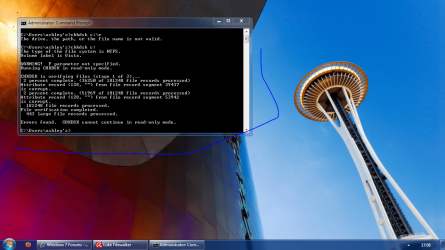
this is what i got when i ran command prompt

Capture.PNG
 

My Computer

OS
7 RTM 64bit
CPU
AMD Phenom 965 B3
Motherboard
ASUS M3A79-T DELUXE
Memory
Corsair 4GB (2x2GB) DDR2 800MHz/PC2-6400 XMS2 Memory Kit CL5
Graphics Card(s)
PowerColour HD 5770 CF 16x-16x
Monitor(s) Displays
32"
Screen Resolution
1920-1080
Hard Drives
Hitachi

1tb 7200rpm
PSU
Be Quiet Straight Power 650wat
Case
Asus TA-M series
Cooling
CoolIT Eco ALC Water Cooling System
Keyboard
Microsoft wireless Keyboard
Mouse
Microsoft wireless mouse
did u format the partition where you wanted to install windows 7 from within windows 7 setup??
i had the same problem on previous RC builds when i was dual booting with vista...i had first formatted the win 7 partition from within vista and then directly installed win 7 on it without formatting from within the setup..
 

My Computer

OS
Windows 7 Ultimate x64 SP1
did u format the partition where you wanted to install windows 7 from within windows 7 setup??
i had the same problem on previous RC builds when i was dual booting with vista...i had first formatted the win 7 partition from within vista and then directly installed win 7 on it without formatting from within the setup..
i partitioned for windows xp but got rid of xp and now when i boot its gives me boot option for 7 and older version of windows

p.s hardrive only 4 months old
 

My Computer

OS
7 RTM 64bit
CPU
AMD Phenom 965 B3
Motherboard
ASUS M3A79-T DELUXE
Memory
Corsair 4GB (2x2GB) DDR2 800MHz/PC2-6400 XMS2 Memory Kit CL5
Graphics Card(s)
PowerColour HD 5770 CF 16x-16x
Monitor(s) Displays
32"
Screen Resolution
1920-1080
Hard Drives
Hitachi

1tb 7200rpm
PSU
Be Quiet Straight Power 650wat
Case
Asus TA-M series
Cooling
CoolIT Eco ALC Water Cooling System
Keyboard
Microsoft wireless Keyboard
Mouse
Microsoft wireless mouse
theres a error in your LPT port or LPT not found.
HDTP v2.6 could not fix this problem.
contact your local repair shop

Hi Gilly,

LPT is the printer port found at the back of your machine :sarc:

It has nothing todo with chkdsk canceling its scan of your hard-drive, first lets open an elevated cmd prompt by typing cmd into the start-menu searchbox then right-clicking and selecting "Run As Administrator"

From there enter: fsutil dirty set C: then enter chkdsk C: /F /V

Once you have entered the chkdsk command you should see the following:
Chkdsk cannot run because the volume is in use by another
process. Would you like to schedule this volume to be
checked the next time the system restarts? (Y/N)


Press Y then Enter, from there you will see:

This volume will be checked the next time the system restarts.

That should force chkdsk into running a complete scan of your drive once you reboot, let us know the results ;)

Steven
 
so you created an empty partition for 7 from within xp and then u installed 7 on that partition by simply selecting that partition while installing 7?...you did not format from within 7 setup?
 

My Computer

OS
Windows 7 Ultimate x64 SP1
so you created an empty partition for 7 from within xp and then u installed 7 on that partition by simply selecting that partition while installing 7?...you did not format from within 7 setup?
i had 7 as my sole operating system and created partition for xp in 7 but as you know when you do this it boots into xp so i had to use easy bcd to boot back into 7 . but since then ive reinstalled 7 on my main c drive and the partiton what used to have xp is now just used for media

but still says in boot option older version of windows
windows 7 <


also i should add this problem happened when i was trying to install dameon tools and i ran it in compatable mode but it wouldnt boot my computer after it told me to restart it ...so i kept my finger on power button rebooted then did system restore thinking that would fix it but its still failing to check my disk and just cancel on its own
 

My Computer

OS
7 RTM 64bit
CPU
AMD Phenom 965 B3
Motherboard
ASUS M3A79-T DELUXE
Memory
Corsair 4GB (2x2GB) DDR2 800MHz/PC2-6400 XMS2 Memory Kit CL5
Graphics Card(s)
PowerColour HD 5770 CF 16x-16x
Monitor(s) Displays
32"
Screen Resolution
1920-1080
Hard Drives
Hitachi

1tb 7200rpm
PSU
Be Quiet Straight Power 650wat
Case
Asus TA-M series
Cooling
CoolIT Eco ALC Water Cooling System
Keyboard
Microsoft wireless Keyboard
Mouse
Microsoft wireless mouse
i had 7 as my sole operating system and created partition for xp in 7 but as you know when you do this it boots into xp so i had to use easy bcd to boot back into 7 . but since then ive reinstalled 7 on my main c drive and the partiton what used to have xp is now just used for media

but still says in boot option older version of windows
windows 7 <

Gilly,

Please read my reply above ;)

Steven
 
Gilly,

Your expert help has arrived. Follow the instructions set forth by dmex. He is not guessing.

You are on the short path to recovery.
 

My Computer

OS
7 RTM 64bit
CPU
AMD Phenom 965 B3
Motherboard
ASUS M3A79-T DELUXE
Memory
Corsair 4GB (2x2GB) DDR2 800MHz/PC2-6400 XMS2 Memory Kit CL5
Graphics Card(s)
PowerColour HD 5770 CF 16x-16x
Monitor(s) Displays
32"
Screen Resolution
1920-1080
Hard Drives
Hitachi

1tb 7200rpm
PSU
Be Quiet Straight Power 650wat
Case
Asus TA-M series
Cooling
CoolIT Eco ALC Water Cooling System
Keyboard
Microsoft wireless Keyboard
Mouse
Microsoft wireless mouse

My Computer

OS
7 RTM 64bit
CPU
AMD Phenom 965 B3
Motherboard
ASUS M3A79-T DELUXE
Memory
Corsair 4GB (2x2GB) DDR2 800MHz/PC2-6400 XMS2 Memory Kit CL5
Graphics Card(s)
PowerColour HD 5770 CF 16x-16x
Monitor(s) Displays
32"
Screen Resolution
1920-1080
Hard Drives
Hitachi

1tb 7200rpm
PSU
Be Quiet Straight Power 650wat
Case
Asus TA-M series
Cooling
CoolIT Eco ALC Water Cooling System
Keyboard
Microsoft wireless Keyboard
Mouse
Microsoft wireless mouse
ok..i am not an expert on windows 7 but this was what i was trying to say..

i also faced the same problem after trying to install daemon tools and then it asked me to restart...then the problem started...after searching a bit found i had partitioned and formatted the win 7 partition from within xp and simply installed 7 on that partition...then i got this endless chksk at startup each time and corrupt volume messages....also when u do windows update u will get a specific error code...i dont remember it now....but you can google that error code..

xp uses NTFS v5.1 and win 7 uses NTFS v6.0(not sure)..maybe win 7 is not compatible with system partitons formatted with older NTFS versions...so i did a clean install again and this time i formatted the partition from within the win 7 install....and then the problem was solved...
 

My Computer

OS
Windows 7 Ultimate x64 SP1
Ive already tried repair computer but says it cant be done on this operating system

this is what i got when i ran command prompt

View attachment 20103
you are running it from desktop, I wrote in my previous post to run it thru recovery environment(Because when you are on the desktop, your C drive cannot be locked to perform the repair). ;)
 

My Computer

Computer Manufacturer/Model Number
Samsung NP530U4B-S02IN
OS
Windows® 8 Pro (64-bit)
CPU
Intel® Core™ i5 Processor 2467M (1.60GHz, 3MB L3 Cache)
Motherboard
Samsung Electronics
Memory
6GB DDR3 System Memory at 1,333MHz (on BD 4GB + 2GB x 1)
Graphics Card(s)
AMD Radeon™ HD7550M 1GB DDR3 (Ext. Graphic)
Sound Card
Realtek High Definition Audio
Monitor(s) Displays
35.56cm (14.0) SuperBright 300nit HD LED Display
Screen Resolution
1366x768
Hard Drives
1TB S-ATA II Hard Drive (5400RPM) with ExpressCache 16GB SSD
Internet Speed
sucks
Antivirus
Microsoft Security Essentials
Browser
Google Chrome (Sync enabled)
you are running it from desktop, I wrote in my previous post to run it thru recovery environment(Because when you are on the desktop, your C drive cannot be locked to perform the repair). ;)
oh my bad .. should i go repair computer then command prompt?
 

My Computer

OS
7 RTM 64bit
CPU
AMD Phenom 965 B3
Motherboard
ASUS M3A79-T DELUXE
Memory
Corsair 4GB (2x2GB) DDR2 800MHz/PC2-6400 XMS2 Memory Kit CL5
Graphics Card(s)
PowerColour HD 5770 CF 16x-16x
Monitor(s) Displays
32"
Screen Resolution
1920-1080
Hard Drives
Hitachi

1tb 7200rpm
PSU
Be Quiet Straight Power 650wat
Case
Asus TA-M series
Cooling
CoolIT Eco ALC Water Cooling System
Keyboard
Microsoft wireless Keyboard
Mouse
Microsoft wireless mouse
dinesh, I doubt Gilly will be able to find the recovery environment ;)

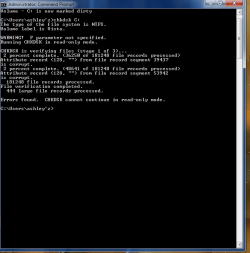
ive just tried the first couple of steps but getting this again

View attachment 20106

am i doing something wrong?

Yes, Your not entering the full command like I showed you :sarc:

Enter the command exactly as its shown below in bold type...

fsutil dirty set C: then press enter.

chkdsk C: /F /V then press enter.

Once you have entered the chkdsk command you should see the following:

Chkdsk cannot run because the volume is in use by another
process. Would you like to schedule this volume to be
checked the next time the system restarts? (Y/N)


Press Y then Enter, from there you will see:

This volume will be checked the next time the system restarts.


That should force chkdsk into running a complete scan of your drive once you reboot, let us know the results ;)

Steven
 
thanks alott to everyone for there input to try and fix the problem

but biggest thanks to dmex

my computer booted up then i thought it was gonna stay the same because the check disk came up and said cancelling again i thought NOOOOOOO
but underneath that it started the check disk and it only took a couple of minutes to complete and my computer booting much faster now to ,about 20 seconds:D


heres some rep for all you Mo'Fo's

also dmex when you put chkdsk C: /F /V
i thought you just meant put chkdsk then add on the end the hdd label letter ,rather than what you meant put all of it in the command prompt
 

My Computer

OS
7 RTM 64bit
CPU
AMD Phenom 965 B3
Motherboard
ASUS M3A79-T DELUXE
Memory
Corsair 4GB (2x2GB) DDR2 800MHz/PC2-6400 XMS2 Memory Kit CL5
Graphics Card(s)
PowerColour HD 5770 CF 16x-16x
Monitor(s) Displays
32"
Screen Resolution
1920-1080
Hard Drives
Hitachi

1tb 7200rpm
PSU
Be Quiet Straight Power 650wat
Case
Asus TA-M series
Cooling
CoolIT Eco ALC Water Cooling System
Keyboard
Microsoft wireless Keyboard
Mouse
Microsoft wireless mouse
hey gilly glad to hear that it worked. Cheers dmex.:D
 

My Computer

Computer Manufacturer/Model Number
Samsung NP530U4B-S02IN
OS
Windows® 8 Pro (64-bit)
CPU
Intel® Core™ i5 Processor 2467M (1.60GHz, 3MB L3 Cache)
Motherboard
Samsung Electronics
Memory
6GB DDR3 System Memory at 1,333MHz (on BD 4GB + 2GB x 1)
Graphics Card(s)
AMD Radeon™ HD7550M 1GB DDR3 (Ext. Graphic)
Sound Card
Realtek High Definition Audio
Monitor(s) Displays
35.56cm (14.0) SuperBright 300nit HD LED Display
Screen Resolution
1366x768
Hard Drives
1TB S-ATA II Hard Drive (5400RPM) with ExpressCache 16GB SSD
Internet Speed
sucks
Antivirus
Microsoft Security Essentials
Browser
Google Chrome (Sync enabled)
Back
Top