Disk Checking Error on Windows Startup

ktpanks2

New member
Local time
5:58 PM
Messages
5
Hello Everyone,

I recently had an external USB hard drive go faulty on me. It would no longer spin up correctly and my Dell PC would no longer recognise the device. It would attempt to install drivers for it, but fail. I've written off the hard drive (fortunately I had the data backed up).

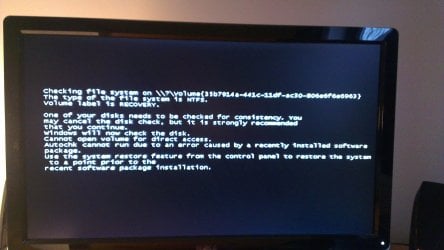
However, since this event every time I start up my PC I get a disk checking message pop-up for an obscure disk volume. This test subsequently fails (see attached image).

I can skip the test and start up my PC fine, but it's getting very annoying. I've also done a disk check on my C drive which went through ok.

Is there anyway to disable this disk check?

Thanks in advance.
 

Attachments
  • IMAG0056.jpg
    IMAG0056.jpg
    586.1 KB · Views: 9

My Computer

Computer type
PC/Desktop
Computer Manufacturer/Model Number
Dell
OS
ATI Mobility RADEON HD 4330
CPU
ATI Mobility RADEON HD 4330
Motherboard
ATI Mobility RADEON HD 4330
Memory
8 GB
Graphics Card(s)
ATI Mobility RADEON HD 4330
Sound Card
ATI High Def Audio
Monitor(s) Displays
DELL ST2310
Screen Resolution
1920 x 1080
Hard Drives
ATI Mobility RADEON HD 4330
Antivirus
Avira
Browser
IE8
Hello ktpanks2 and welcome ot Seven Forums.

This may be nothing more than resetting the check disk to not run at startup.

http://www.sevenforums.com/tutorials/56685-check-disk-reset.html

But sometimes when a drive is not safely disconnected (and a catastrophic drive failure could be in this category) other files including files on the C: drive can become unreliable or suffer from "dirty bits". This previous Forum thread explains more:

http://www.sevenforums.com/hardware...rror-volume-dirty-0x80071ac3.html#post2123913

And it wouldn't hurt to also check for damaged or corrupt system files by running a system file checker scan from an elevated command prompt (option two.) If problems are found, run the scan 3 times and immediately reboot the computer after each scan.

http://www.sevenforums.com/tutorials/1538-sfc-scannow-command-system-file-checker.html
 

My Computer

Computer type
Laptop
Computer Manufacturer/Model Number
Sony Vaio VPCEB47GM Laptop
OS
Win 7 Pro 64-bit
CPU
Intel i5 2.4 Ghz
Memory
8GB DDR3
Graphics Card(s)
Intel HD 3000
Sound Card
IDT High Definition
Monitor(s) Displays
15.6 WGXA Anti-Glare LED
Screen Resolution
1280x800
Hard Drives
640Gb 7200rpm
Antivirus
MSE
Browser
Opera (primary) with IE9 backup
Many thanks for your reply. I'll try these suggestions when I get home tonight.

Just off the top of my head though I'm a little confused how I can force Windows to skip the test given it's not being reffered to by a specific drive letter, e.g. C: - rather I see \\?\volume.....

But I'll have a little play around later and let you know how I get on.

Katie
 

My Computer

Computer type
PC/Desktop
Computer Manufacturer/Model Number
Dell
OS
ATI Mobility RADEON HD 4330
CPU
ATI Mobility RADEON HD 4330
Motherboard
ATI Mobility RADEON HD 4330
Memory
8 GB
Graphics Card(s)
ATI Mobility RADEON HD 4330
Sound Card
ATI High Def Audio
Monitor(s) Displays
DELL ST2310
Screen Resolution
1920 x 1080
Hard Drives
ATI Mobility RADEON HD 4330
Antivirus
Avira
Browser
IE8
Katie, my apologies for missing that bit of information in your screen capture. Upon taking a closer look I noticed that it refers to "Volume Label is RECOVERY." RECOVERY is usually a hidden partition on the C: drive and is put there by the computer manufacturer. It usually doesn't have a drive letter assigned so that's probably why you're getting the ?\Volume designation. Hopefully you can just choose C: as the drive to check.

Again, my apologies for missing this. :o
 

My Computer

Computer type
Laptop
Computer Manufacturer/Model Number
Sony Vaio VPCEB47GM Laptop
OS
Win 7 Pro 64-bit
CPU
Intel i5 2.4 Ghz
Memory
8GB DDR3
Graphics Card(s)
Intel HD 3000
Sound Card
IDT High Definition
Monitor(s) Displays
15.6 WGXA Anti-Glare LED
Screen Resolution
1280x800
Hard Drives
640Gb 7200rpm
Antivirus
MSE
Browser
Opera (primary) with IE9 backup
Assign a drive letter to partition recovery. Post screenshot of disk management. Don't reset chkdsk becuase there's something wrong with partition RECOVERY. Assume you assign drive letter W to it. Do from elevated command prompt:

Code:
fsutil  dirty  query  W:

Can you explore W using windows explorer?

Post results.
 

My Computer

Computer type
Laptop
Computer Manufacturer/Model Number
ACER ASPIRE 5742G
OS
Microsoft Windows 7 Home Premium 64-bits 7601 Multiprocessor Free Service Pack 1
CPU
Intel(R) Core(TM) i3 CPU M 370 @ 2.40GHz
Motherboard
Acer Aspire 5742G
Memory
4,00 GB
Graphics Card(s)
ATI Mobility Radeon HD 5400 Series
Sound Card
(1) AMD High Definition Audio Device (2) Realtek High Defi
Screen Resolution
1366 x 768 x 32 bits (4294967296 colors) @ 60 Hz
Hard Drives
WDC WD5000BEVT-22ZAT0
Hi,

I was able to assign a drive letter to the RECOVERY partion (I was also able to explore via windows explorer). I then ran the query as above ...

Microsoft Windows [Version 6.1.7601]
Copyright (c) 2009 Microsoft Corporation. All rights reserved.
C:\Windows\system32>fsutil dirty query w:
Volume - w: is Dirty
C:\Windows\system32>

So the volume is dirty.

I'll try some of the other suggestions above now.
 

My Computer

Computer type
PC/Desktop
Computer Manufacturer/Model Number
Dell
OS
ATI Mobility RADEON HD 4330
CPU
ATI Mobility RADEON HD 4330
Motherboard
ATI Mobility RADEON HD 4330
Memory
8 GB
Graphics Card(s)
ATI Mobility RADEON HD 4330
Sound Card
ATI High Def Audio
Monitor(s) Displays
DELL ST2310
Screen Resolution
1920 x 1080
Hard Drives
ATI Mobility RADEON HD 4330
Antivirus
Avira
Browser
IE8
Ok cool. Having assigned a drive letter to the partition I was able to run a chkdsk on it. Upon completion I was able to re-run the above query and the volume was no longer dirty.

Upon reboot I didn't get the error I was seeing previously.

Looks like I'm sorted.

Any recommendation on what should I do with this w: partition now?
 

My Computer

Computer type
PC/Desktop
Computer Manufacturer/Model Number
Dell
OS
ATI Mobility RADEON HD 4330
CPU
ATI Mobility RADEON HD 4330
Motherboard
ATI Mobility RADEON HD 4330
Memory
8 GB
Graphics Card(s)
ATI Mobility RADEON HD 4330
Sound Card
ATI High Def Audio
Monitor(s) Displays
DELL ST2310
Screen Resolution
1920 x 1080
Hard Drives
ATI Mobility RADEON HD 4330
Antivirus
Avira
Browser
IE8
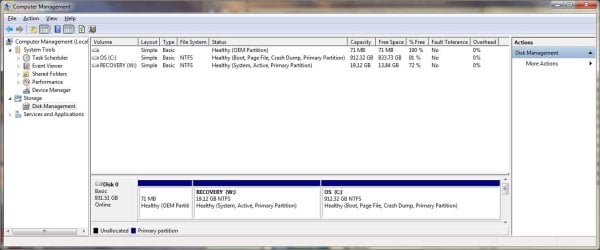
Disk management screenshot ...
 

Attachments

  • diskman.jpg
    diskman.jpg
    163.8 KB · Views: 8

My Computer

Computer type
PC/Desktop
Computer Manufacturer/Model Number
Dell
OS
ATI Mobility RADEON HD 4330
CPU
ATI Mobility RADEON HD 4330
Motherboard
ATI Mobility RADEON HD 4330
Memory
8 GB
Graphics Card(s)
ATI Mobility RADEON HD 4330
Sound Card
ATI High Def Audio
Monitor(s) Displays
DELL ST2310
Screen Resolution
1920 x 1080
Hard Drives
ATI Mobility RADEON HD 4330
Antivirus
Avira
Browser
IE8
The recovery partition is provided by the computer manufacturer as a way to restore the computer to factory specs. You could just leave it as is for now since there's no immediate need to use it. If you've made a set of recovery disks (usually recommended by the manufacturer) you could format that partition and make it 19+GB of unallocated space . You could then assign that unallocated space to the C: partition and increase it by the 19+ GB. But since youve got a 1TB hard drive the extra 19GB isn't going to add all that much.

So I think I'd leave everything as is, at least for a while to make sure the computer really is working properly.
 

My Computer

Computer type
Laptop
Computer Manufacturer/Model Number
Sony Vaio VPCEB47GM Laptop
OS
Win 7 Pro 64-bit
CPU
Intel i5 2.4 Ghz
Memory
8GB DDR3
Graphics Card(s)
Intel HD 3000
Sound Card
IDT High Definition
Monitor(s) Displays
15.6 WGXA Anti-Glare LED
Screen Resolution
1280x800
Hard Drives
640Gb 7200rpm
Antivirus
MSE
Browser
Opera (primary) with IE9 backup
chkdsk ran on startup because RECOVERY was dirty. Volume was a little bit corrupt. But why??? You never use it. And chkdsk can also repair volumes without a drive letter. Remove drive letter W using disk manager, so everything is as it was before
 

My Computer

Computer type
Laptop
Computer Manufacturer/Model Number
ACER ASPIRE 5742G
OS
Microsoft Windows 7 Home Premium 64-bits 7601 Multiprocessor Free Service Pack 1
CPU
Intel(R) Core(TM) i3 CPU M 370 @ 2.40GHz
Motherboard
Acer Aspire 5742G
Memory
4,00 GB
Graphics Card(s)
ATI Mobility Radeon HD 5400 Series
Sound Card
(1) AMD High Definition Audio Device (2) Realtek High Defi
Screen Resolution
1366 x 768 x 32 bits (4294967296 colors) @ 60 Hz
Hard Drives
WDC WD5000BEVT-22ZAT0
Back
Top