Disk - Clean and Clean All with Diskpart Command

How to "Clean" or "Clean All" a Disk with the Diskpart Command


   Information
This will show you how to use the clean or clean all command on a selected disk to delete all of it's MBR or GPT partitions, volumes, and any hidden sector information on MBR disks is overwritten.

The data on the HDD is not written over using the clean command like it does with the clean all command below. With the clean command, the data on the HDD is only marked as being deleted instead and is only written over when new data is written/saved to the same location on the HDD next.

OR

You could use the clean all command (secure erase) to do the above and also have each and every disk sector on the HDD written over and zeroed out completely to securely delete all data on the disk to help prevent the data from being able to be recovered. "Clean All" takes about an hour per 320 GB to finish running.

   Note

  • You cannot use the clean or clean all diskpart commands on a boot disk (ex: disk Windows is installed on) unless you do it from a command prompt at boot.
  • Be sure to backup anything that you do not want to lose on the disk that you use clean or clean all on first. It will be to late afterwards. All data will be permanently lost on the disk.
   Warning
You do not want to use clean all on a SSD disk often. Having every sector written over to 0 on a SSD can reduce it's life span faster.


Here's How:

1. In Windows 7, open an elevated command prompt, or a command prompt at boot.

OR

2. In Windows 8 and 8.1, open an elevated command prompt, or a command prompt at boot.

   Note
Be sure that you have the correct Disk #. You would not want to wipe clean the wrong disk.

A) Press the Windows + R keys to open the Run dialog, type compmgmt.msc, and press Enter.

B) If prompted by UAC, click/tap on Yes.

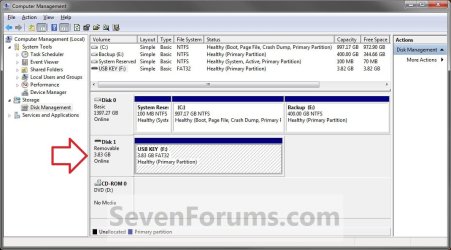
C) Click/tap on Disk Management in the left pane, and make note of the disk # in the middle pane of the disk that you want to clean or clean all. (see screenshot below)
NOTE: For example, I would use Disk 1 if I wanted to use clean or clean all on my USB key drive.
Computer_Management-1.jpg


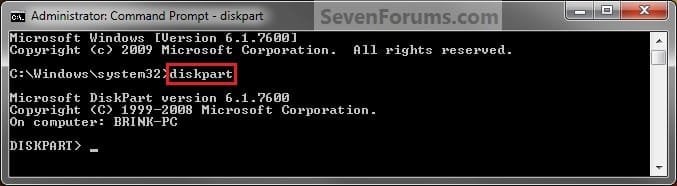
3. In the elevated command prompt, type diskpart and press Enter. (see screenshot below)
Step1.jpg
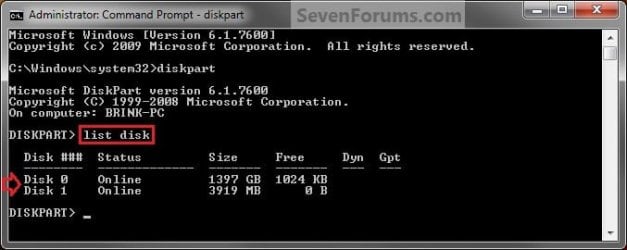
4. In the elevated command prompt, type list disk and press Enter. (see screenshot below)
NOTE: This will give you a list of disk numbers to select from.
Step2.jpg
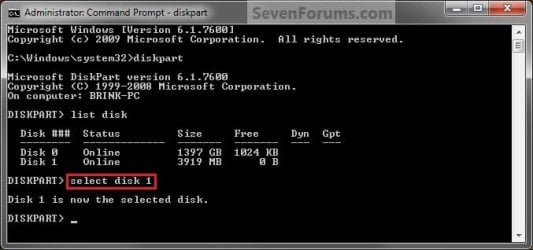
5. In the elevated command prompt, type select disk # and press Enter. (see screenshot below)
NOTE: You would substitute # for the disk number listed that you want to use clean or clean all on. For example, I want to use one of them on Disk 1 (from step 1) for my USB key drive, so I would type select disk 1 and press Enter.
Step3.jpg
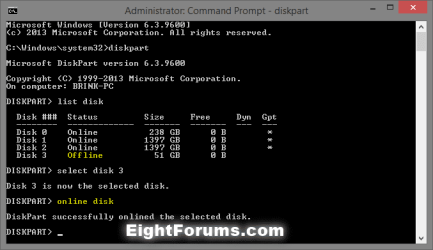
6. If the status of the selected disk # (ex: Disk 3) shows as Offline, type online disk, and press Enter to make it online. (see screenshot below)
diskpart_online_disk.png
7. Do either step 8 or 9 below for which command you would like to use.


8. To Use the Clean Diskpart Command
NOTE: (Recommended) See the green INFO box at the top of the tutorial for more information about this command. This command will wipe the HDD quickly.
A) In the elevated command prompt, type clean, press Enter, and go to step 10 below. (see screenshot below)
NOTE: This will not take long to finish. Think of it as being like a quick format.
Step4_Clean.jpg
9. To Use the Clean All Diskpart Command
NOTE: See the green INFO box at the top of the tutorial for more information about this command. This command will wipe the HDD, and perform a secure erase. "Clean All" takes about an hour per 320 GB to finish running. It's best to only use this command if you wanted to help make sure that the data on the HDD cannot be recovered say when giving or selling the HDD to another person.
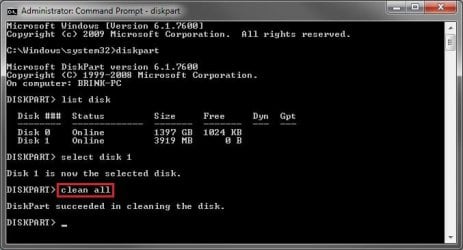
A) In the elevated command prompt, type clean all, and press Enter, and go to step 10 below. You will see the command prompt below as is until the "clean all" command is finished. (see screenshot below)

NOTE: This will take quite some time (several hours or more) to finish depending on how large the disk is since it is writing over each and every sector on it to zero. Think of it as being like a full or low level format.
Step4_Clean_All.jpg
10. When finished, in the elevated command prompt, type exit and press Enter. Close the elevated command prompt.

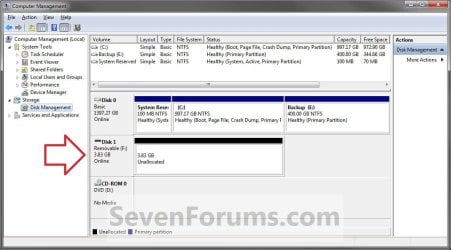
11. The disk will be left as unallocated space. (see screenshot below)
Computer_Management-2.jpg
12. You will now need to create a new partition or volume on the disk to be able to use it again.


That's it,
Shawn


Last edited:
The answer is in your picture. You can't perform clean to the disk which hosts windows. It's like shooting your own leg.
Brink wrote it himself in the head of this post:
Brink said:
You cannot use the clean or clean all diskpart commands on a boot disk (ex: disk Windows 7 is installed on) unless you do it from a command prompt at boot.
So if you really wish to clean it then do it via the boot command prompt.
 

My Computer

OS
Windows 7 Ultimate 32bit
CPU
AMD Phenom II x4 965 3.4GHz
Motherboard
Gigabyte GA-890FXA-UD5 rev2.0
Memory
G.SKILL F3-16000CL8D-4GBPIS (2GBx2)
Graphics Card(s)
Inno3d GTX480 1.5GB GDDR5
Monitor(s) Displays
LG FLATRON W2486L
Screen Resolution
1920x1080@60Hz
Hard Drives
Western Digital Caviar Black WD1002FAEX 1TB 64MB 7200RPM Sata III x3
PSU
Enermax MODU82+ 625W
Case
Thermaltake Element G Middle Tower
I'm sorry but I followed every step carefully and it just won't work... Here's a picture of the commands... Thanks for any help. I want to convert back to a basic disk, that's all. But nothing is working...


Hello mate.


You are aware that both the clean or the clean all command will over-write data on the entire Hard Disk Drive and render Windows unusable, it will not boot at all after those commands are run?
 

My Computer

Computer Manufacturer/Model Number
* BFK Customs *
OS
W 7 64-bit Ultimate
CPU
Intel Q9550 Yorkfield
Motherboard
ASUS P5Q Pro
Memory
8GB Dominator 8500C5D
Graphics Card(s)
ATI : XFX 5870
Sound Card
Realtek HD Audio 7-1
Monitor(s) Displays
1x 47" LCD HDMI & 3x 26" LCD HDMI
Screen Resolution
1920x1080P & 1920x1200
Hard Drives
1x 80GB Intel X25-M G2 SSD : 1x 500GB & 1x 640GB WD Caviar Black(s)
PSU
Corsair 620HX
Case
Cooler Master RC-690
Cooling
Tuniq Tower 120, 2x 140mm and 3x 120mm case fans
Keyboard
Microsoft 500
Mouse
Razer Diamondback 3G
Internet Speed
14 Mb/s
Other Info
1x Koutech 3Gb/s SATA HDD Hot Swap Rack
I'm sorry but I followed every step carefully and it just won't work... Here's a picture of the commands... Thanks for any help. I want to convert back to a basic disk, that's all. But nothing is working...

Hello mate.

You are aware that both the clean or the clean all command will over-write data on the entire Hard Disk Drive and render Windows unusable, it will not boot at all after those commands are run?

Thanks for the warning, I'm aware that it will over-write data on the entire HD but as far as wendering Windows unusable, won't I be able to do a clean re-install of Windows 7? So I wonder what my options are at this point. Any advice?
 

My Computer

OS
Windows 7 Home Premium 64bit
Thanks for the warning, I'm aware that it will over-write data on the entire HD but as far as wendering Windows unusable, won't I be able to do a clean re-install of Windows 7? So I wonder what my options are at this point. Any advice?


Yes you will be able to do a clean install but you would be better off doing a clean all instead of just a clean as that (the clean) only over-writes the format configuration data and the clean all over-writes all the data on the entire Hard Disk Drive, much better IMO.
 

My Computer

Computer Manufacturer/Model Number
* BFK Customs *
OS
W 7 64-bit Ultimate
CPU
Intel Q9550 Yorkfield
Motherboard
ASUS P5Q Pro
Memory
8GB Dominator 8500C5D
Graphics Card(s)
ATI : XFX 5870
Sound Card
Realtek HD Audio 7-1
Monitor(s) Displays
1x 47" LCD HDMI & 3x 26" LCD HDMI
Screen Resolution
1920x1080P & 1920x1200
Hard Drives
1x 80GB Intel X25-M G2 SSD : 1x 500GB & 1x 640GB WD Caviar Black(s)
PSU
Corsair 620HX
Case
Cooler Master RC-690
Cooling
Tuniq Tower 120, 2x 140mm and 3x 120mm case fans
Keyboard
Microsoft 500
Mouse
Razer Diamondback 3G
Internet Speed
14 Mb/s
Other Info
1x Koutech 3Gb/s SATA HDD Hot Swap Rack
Yes you will be able to do a clean install but you would be better off doing a clean all instead of just a clean as that (the clean) only over-writes the format configuration data and the clean all over-writes all the data on the entire Hard Disk Drive, much better IMO.

Ok, just so I'm following you here, I want to do a clean re-install. I've tried different options to convert back to a basic disk and since I'm only left with a dynamic drive with Windows 7 installed on it, it seems like my only options id to do a Clean or Clean All with Diskpart Command.

So, from what your saying, I would only do a clean all from the Command Prompt at boot? Since I cannot use the clean or clean all diskpart commands on a boot disk, I would have to do it from a command prompt at boot?

But since it won't boot after, I assume I'll be able to use the Bootable DVD and re-install, which should convert it to a basic disk, it that correct?
 

My Computer

OS
Windows 7 Home Premium 64bit

My Computer

Computer Manufacturer/Model Number
* BFK Customs *
OS
W 7 64-bit Ultimate
CPU
Intel Q9550 Yorkfield
Motherboard
ASUS P5Q Pro
Memory
8GB Dominator 8500C5D
Graphics Card(s)
ATI : XFX 5870
Sound Card
Realtek HD Audio 7-1
Monitor(s) Displays
1x 47" LCD HDMI & 3x 26" LCD HDMI
Screen Resolution
1920x1080P & 1920x1200
Hard Drives
1x 80GB Intel X25-M G2 SSD : 1x 500GB & 1x 640GB WD Caviar Black(s)
PSU
Corsair 620HX
Case
Cooler Master RC-690
Cooling
Tuniq Tower 120, 2x 140mm and 3x 120mm case fans
Keyboard
Microsoft 500
Mouse
Razer Diamondback 3G
Internet Speed
14 Mb/s
Other Info
1x Koutech 3Gb/s SATA HDD Hot Swap Rack

My Computer

OS
Windows 7 Home Premium 64bit
Boot to a command window as outlined in the link, doing either a clean or a clean all will leave the entire HDD as unallocated space, that removes all the Dynamic info and automatically converts back to a Basic disk; then just follow the appropriate tutorial for the version you have to do a clean install of Windows.

How to Do a Clean Installation with Windows 7

Do a Clean Install with a Upgrade Windows 7 Version

Thanks! I appreciate the info!


Glad I could help.
 

My Computer

Computer Manufacturer/Model Number
* BFK Customs *
OS
W 7 64-bit Ultimate
CPU
Intel Q9550 Yorkfield
Motherboard
ASUS P5Q Pro
Memory
8GB Dominator 8500C5D
Graphics Card(s)
ATI : XFX 5870
Sound Card
Realtek HD Audio 7-1
Monitor(s) Displays
1x 47" LCD HDMI & 3x 26" LCD HDMI
Screen Resolution
1920x1080P & 1920x1200
Hard Drives
1x 80GB Intel X25-M G2 SSD : 1x 500GB & 1x 640GB WD Caviar Black(s)
PSU
Corsair 620HX
Case
Cooler Master RC-690
Cooling
Tuniq Tower 120, 2x 140mm and 3x 120mm case fans
Keyboard
Microsoft 500
Mouse
Razer Diamondback 3G
Internet Speed
14 Mb/s
Other Info
1x Koutech 3Gb/s SATA HDD Hot Swap Rack
Hello, I started a "clean all" of my 1TB WD My Book External HDD that's connected via USB with a command prompt at boot.

The HDD's activity LED at the front is going up and down, but the strange thing is I can't hear any clicking or typical hard-drive writing noise at all.

I can't do anything else at the command prompt (it's stuck since I typed clean all).

Does this mean it's not doing anything or is it supposed to be silent like this? I really don't want to leave my PC on for days thinking it's writing zeros when it's doing nothing... But on the other hand I'm afraid this is normal behavior and it would damage the drive if I tried to reboot.

But it really is too silent. I know the noise it makes when I'm making backups, moving or deleting files. Unless there's a long period of waiting before it starts writing zeros or writing zeros makes no noise at all...? Wish it showed a progress status % or something...

Thanks
 
Last edited:

My Computer

OS
Windows 7 Professional 64bit
CPU
Intel i7 920
Motherboard
EVGA X58 SLI
Memory
3x2GB GSKill
Graphics Card(s)
EVGA GTX 295
Sound Card
Auzentech X-Fi Forte
Monitor(s) Displays
Samsung T220
Screen Resolution
1680x1050
Hard Drives
2x640GB internal WD Caviar
1 TB WD My Book external
PSU
Corsair HX1000
Case
Antec 1200
Hello Kusuri.


You will get a blinking cursor while the clean all is working, about an hour per 300GBs.

click to enlarge


... and this when it's finished.


My Computer

Computer Manufacturer/Model Number
* BFK Customs *
OS
W 7 64-bit Ultimate
CPU
Intel Q9550 Yorkfield
Motherboard
ASUS P5Q Pro
Memory
8GB Dominator 8500C5D
Graphics Card(s)
ATI : XFX 5870
Sound Card
Realtek HD Audio 7-1
Monitor(s) Displays
1x 47" LCD HDMI & 3x 26" LCD HDMI
Screen Resolution
1920x1080P & 1920x1200
Hard Drives
1x 80GB Intel X25-M G2 SSD : 1x 500GB & 1x 640GB WD Caviar Black(s)
PSU
Corsair 620HX
Case
Cooler Master RC-690
Cooling
Tuniq Tower 120, 2x 140mm and 3x 120mm case fans
Keyboard
Microsoft 500
Mouse
Razer Diamondback 3G
Internet Speed
14 Mb/s
Other Info
1x Koutech 3Gb/s SATA HDD Hot Swap Rack
Hello Kusuri.


You will get a blinking cursor while the clean all is working, about an hour per 300GBs.
click to enlarge


... and this when it's finished.

Thanks, then it's not working for me for some reason... Should I use Western Digital's Write-Zeros instead?


Yes, give that a go and keep me informed mate.
 

My Computer

Computer Manufacturer/Model Number
* BFK Customs *
OS
W 7 64-bit Ultimate
CPU
Intel Q9550 Yorkfield
Motherboard
ASUS P5Q Pro
Memory
8GB Dominator 8500C5D
Graphics Card(s)
ATI : XFX 5870
Sound Card
Realtek HD Audio 7-1
Monitor(s) Displays
1x 47" LCD HDMI & 3x 26" LCD HDMI
Screen Resolution
1920x1080P & 1920x1200
Hard Drives
1x 80GB Intel X25-M G2 SSD : 1x 500GB & 1x 640GB WD Caviar Black(s)
PSU
Corsair 620HX
Case
Cooler Master RC-690
Cooling
Tuniq Tower 120, 2x 140mm and 3x 120mm case fans
Keyboard
Microsoft 500
Mouse
Razer Diamondback 3G
Internet Speed
14 Mb/s
Other Info
1x Koutech 3Gb/s SATA HDD Hot Swap Rack
Hello Kusuri.


You will get a blinking cursor while the clean all is working, about an hour per 300GBs.click to enlarge


... and this when it's finished.

Thanks, then it's not working for me for some reason... Should I use Western Digital's Write-Zeros instead?


Yes, give that a go and keep me informed mate.

Hmm I had the drive as unallocated space, so it seems it was working after all somehow. Hope I didn't screw anything up?

Well, at least I get a progress bar with a timer now though, 11 hours.
 

My Computer

OS
Windows 7 Professional 64bit
CPU
Intel i7 920
Motherboard
EVGA X58 SLI
Memory
3x2GB GSKill
Graphics Card(s)
EVGA GTX 295
Sound Card
Auzentech X-Fi Forte
Monitor(s) Displays
Samsung T220
Screen Resolution
1680x1050
Hard Drives
2x640GB internal WD Caviar
1 TB WD My Book external
PSU
Corsair HX1000
Case
Antec 1200
If it shows as unallocated space, that's what it shows as after the clean all finishes.
 

My Computer

Computer Manufacturer/Model Number
* BFK Customs *
OS
W 7 64-bit Ultimate
CPU
Intel Q9550 Yorkfield
Motherboard
ASUS P5Q Pro
Memory
8GB Dominator 8500C5D
Graphics Card(s)
ATI : XFX 5870
Sound Card
Realtek HD Audio 7-1
Monitor(s) Displays
1x 47" LCD HDMI & 3x 26" LCD HDMI
Screen Resolution
1920x1080P & 1920x1200
Hard Drives
1x 80GB Intel X25-M G2 SSD : 1x 500GB & 1x 640GB WD Caviar Black(s)
PSU
Corsair 620HX
Case
Cooler Master RC-690
Cooling
Tuniq Tower 120, 2x 140mm and 3x 120mm case fans
Keyboard
Microsoft 500
Mouse
Razer Diamondback 3G
Internet Speed
14 Mb/s
Other Info
1x Koutech 3Gb/s SATA HDD Hot Swap Rack
If it shows as unallocated space, that's what it shows as after the clean all finishes.

Yeah, but I don't think it had finished all the way though, since 11 hours hadn't passed.
 

My Computer

OS
Windows 7 Professional 64bit
CPU
Intel i7 920
Motherboard
EVGA X58 SLI
Memory
3x2GB GSKill
Graphics Card(s)
EVGA GTX 295
Sound Card
Auzentech X-Fi Forte
Monitor(s) Displays
Samsung T220
Screen Resolution
1680x1050
Hard Drives
2x640GB internal WD Caviar
1 TB WD My Book external
PSU
Corsair HX1000
Case
Antec 1200
Hello Kusuri,

If you got a "succeeded....." message in the command prompt like in step 7, and you show the drive as "unallocated space" as in step 9, then it has finished. All you would need to do now is step 10 to format the "unallocated space" to be able to use it. :)
 

My Computer

Computer type
PC/Desktop
Computer Manufacturer/Model Number
Self built custom
OS
64-bit Windows 11 Pro for Workstations
CPU
Intel i7-8700K OC'd to 5 GHz
Motherboard
ASUS ROG Maximus XI Formula Z390
Memory
64 GB (4x16GB) G.SKILL TridentZ RGB DDR4 3600 MHz
Graphics Card(s)
ASUS ROG-STRIX-GTX1080TI-O11G-GAMING
Sound Card
Integrated
Monitor(s) Displays
2 x Samsung Odyssey G7 27"
Screen Resolution
2560x1440
Hard Drives
1TB Samsung 990 PRO M.2,
4TB Samsung 990 PRO PRO M.2,
TerraMaster F8 SSD Plus NAS
PSU
Seasonic Prime Titanium 850W
Case
Thermaltake Core P3
Cooling
Corsair Hydro H115i
Keyboard
Logitech wireless K800
Mouse
Logitech MX Master 4
Internet Speed
2 Gb/s Download and 100 Mb/s Upload
Antivirus
Malwarebyte Anti-Malware Premium
Browser
Google Chrome
Other Info
Logitech Z625 speaker system,
Logitech BRIO 4K Pro webcam,
HP Color LaserJet Pro MFP M477fdn,
APC SMART-UPS RT 1000 XL - SURT1000XLI,
Galaxy S23 Plus phone
Yeah but there was no message. I think it was still cleaning, 11h hadn't passed like WD Diag says it'll take now. Still, it really is silent. When I reformatted it showed 118 mb already in use but it was empty. Is that normal?
 

My Computer

OS
Windows 7 Professional 64bit
CPU
Intel i7 920
Motherboard
EVGA X58 SLI
Memory
3x2GB GSKill
Graphics Card(s)
EVGA GTX 295
Sound Card
Auzentech X-Fi Forte
Monitor(s) Displays
Samsung T220
Screen Resolution
1680x1050
Hard Drives
2x640GB internal WD Caviar
1 TB WD My Book external
PSU
Corsair HX1000
Case
Antec 1200
11 hours is a long time for this. What are the rest of your system specs? If you have a lowered powered system, then it could take longer than usual.

If you open Disk Management (diskmgmt.msc), does it show the HDD as unallocated space? Could you post a screenshot of this and of the progress bar prompt with more details (if available) expanded?
 

My Computer

Computer type
PC/Desktop
Computer Manufacturer/Model Number
Self built custom
OS
64-bit Windows 11 Pro for Workstations
CPU
Intel i7-8700K OC'd to 5 GHz
Motherboard
ASUS ROG Maximus XI Formula Z390
Memory
64 GB (4x16GB) G.SKILL TridentZ RGB DDR4 3600 MHz
Graphics Card(s)
ASUS ROG-STRIX-GTX1080TI-O11G-GAMING
Sound Card
Integrated
Monitor(s) Displays
2 x Samsung Odyssey G7 27"
Screen Resolution
2560x1440
Hard Drives
1TB Samsung 990 PRO M.2,
4TB Samsung 990 PRO PRO M.2,
TerraMaster F8 SSD Plus NAS
PSU
Seasonic Prime Titanium 850W
Case
Thermaltake Core P3
Cooling
Corsair Hydro H115i
Keyboard
Logitech wireless K800
Mouse
Logitech MX Master 4
Internet Speed
2 Gb/s Download and 100 Mb/s Upload
Antivirus
Malwarebyte Anti-Malware Premium
Browser
Google Chrome
Other Info
Logitech Z625 speaker system,
Logitech BRIO 4K Pro webcam,
HP Color LaserJet Pro MFP M477fdn,
APC SMART-UPS RT 1000 XL - SURT1000XLI,
Galaxy S23 Plus phone
11 hours is a long time for this. What are the rest of your system specs? If you have a lowered powered system, then it could take longer than usual.

If you open Disk Management (diskmgmt.msc), does it show the HDD as unallocated space? Could you post a screenshot of this and of the progress bar prompt with more details (if available) expanded?

EVGA X58 SLI
Intel i7 920
Corsair HX1000 PSU

The ext HDD is connected to its own power though. It's also connected via USB and write-cache in it is off.

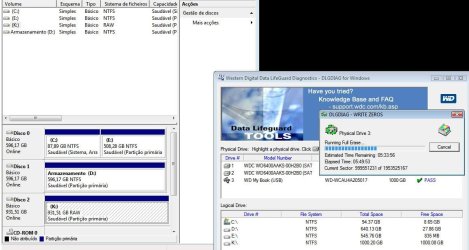
It shows as RAW. I had done a quick reformat and restarted the Write-Zeros, but with Western Digital Data LifeGuard Diagnostics. Still is it common for these ext HDDs to have 118 MB already used after format? I can't remember how it was the first time I got it.

IgLSe.jpg
 
Last edited by a moderator:

My Computer

OS
Windows 7 Professional 64bit
CPU
Intel i7 920
Motherboard
EVGA X58 SLI
Memory
3x2GB GSKill
Graphics Card(s)
EVGA GTX 295
Sound Card
Auzentech X-Fi Forte
Monitor(s) Displays
Samsung T220
Screen Resolution
1680x1050
Hard Drives
2x640GB internal WD Caviar
1 TB WD My Book external
PSU
Corsair HX1000
Case
Antec 1200
RAW indicates that it's not finished yet since it should say "Unallocated Space" instead.

Since you are doing this from a program, then it could take longer since it may do more write passes. Plus, it will take longer via a USB connection since it is slower than a internal SATA or external eSATA connection.

Is the drive's activity light still on or blinking?

If you look at the "Current Sector" area in the progress dialog box, is the sector count increasing on the left side to indicate that it is actually still running?
 

My Computer

Computer type
PC/Desktop
Computer Manufacturer/Model Number
Self built custom
OS
64-bit Windows 11 Pro for Workstations
CPU
Intel i7-8700K OC'd to 5 GHz
Motherboard
ASUS ROG Maximus XI Formula Z390
Memory
64 GB (4x16GB) G.SKILL TridentZ RGB DDR4 3600 MHz
Graphics Card(s)
ASUS ROG-STRIX-GTX1080TI-O11G-GAMING
Sound Card
Integrated
Monitor(s) Displays
2 x Samsung Odyssey G7 27"
Screen Resolution
2560x1440
Hard Drives
1TB Samsung 990 PRO M.2,
4TB Samsung 990 PRO PRO M.2,
TerraMaster F8 SSD Plus NAS
PSU
Seasonic Prime Titanium 850W
Case
Thermaltake Core P3
Cooling
Corsair Hydro H115i
Keyboard
Logitech wireless K800
Mouse
Logitech MX Master 4
Internet Speed
2 Gb/s Download and 100 Mb/s Upload
Antivirus
Malwarebyte Anti-Malware Premium
Browser
Google Chrome
Other Info
Logitech Z625 speaker system,
Logitech BRIO 4K Pro webcam,
HP Color LaserJet Pro MFP M477fdn,
APC SMART-UPS RT 1000 XL - SURT1000XLI,
Galaxy S23 Plus phone
Back
Top