
Disk Cleaner making system unbootable

rgg

New member
Local time
8:17 PM
Messages
3
Location
Glasgow, UK
Hi all,

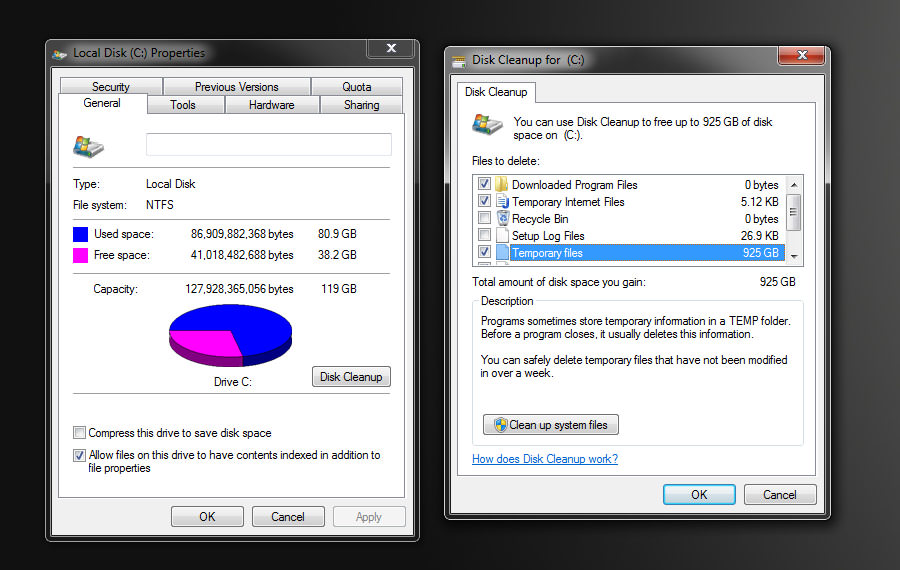
Last night, I ran Disk Cleanup (cleanmgr.exe) on a reasonably fresh install of Windows 7 Pro x64 SP1, which resides on the only drive on the system - a 128GB SSD. I noticed it was reporting that over 800GB could be freed up from Temporary Files, but put this down to a minor glitch and went ahead with the cleanup.

After it was done, Chrome failed to open and gave an error about a missing .dll file. Various .dll files were reported as missing while trying to run other programs, and Windows system apps like Regedit and Task Manager were reported as being missing. The exe files were still in the system folder, but from research I think they actually link to files in the winsxs folder, which seemed to have been gutted.

After a failed reboot, I managed to use a restore point from a couple of hours earlier and I'm all back up and running now with Disk Cleanup still reporting an insane amount of GBs.
uU4nsLK.jpg


I found a post elsewhere with the same issue on a Windows 7 machine with an SSD, but nothing about the cause of the problem or how to fix it.

Windows is genuine and up to date, virus scan reports nothing, SSD firmware is up to date.

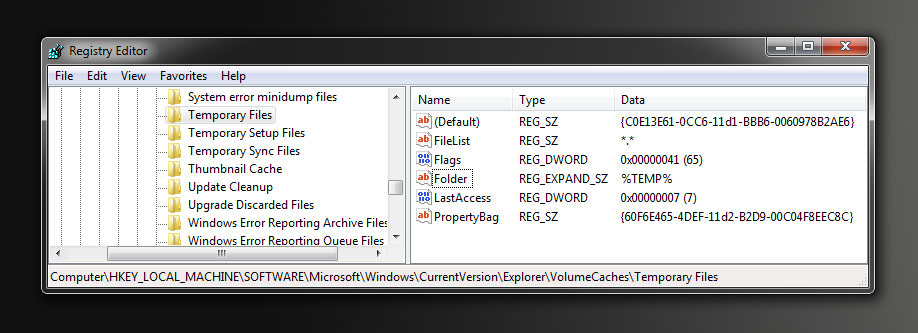
So far, I've found out that Disk Cleanup goes through the registry entries under HKLM\SOFTWARE\Microsoft\Windows\CurrentVersion\Explorer\VolumeCaches as part of the process:
0lavjfg.jpg


and Temporary Files links to %TEMP%, which maps to C:\Users\[username]\AppData\Local\Temp, which is a lot less than the 925GB it reports.

Has anyone encountered this before or know of how to find out what's going wrong? I could just reinstall and hope it goes away, but these bugs bug me :)
 

My Computer

Computer type
PC/Desktop
Computer Manufacturer/Model Number
Dell Optiplex 9020 SFF
OS
Windows 7 Professional x64 SP1
CPU
Intel Core i5 4570 @ 3.20GHz
Motherboard
Dell Inc. 0XCR8D (SOCKET 0)
Memory
16GB (4x Hynix 4GB DDR3 HMT451U6AFR8C)
Graphics Card(s)
NVIDIA NVS 310
Monitor(s) Displays
LCD2690WUXi
Screen Resolution
1920x1200
Hard Drives
LITEON LCS-128M6S (128GB)
PSU
Stock
Case
Stock
Antivirus
MSE
Browser
Chrome
Last night, I ran Disk Cleanup (cleanmgr.exe) on a reasonably fresh install of Windows 7 Pro x64 SP1, which resides on the only drive on the system - a 128GB SSD. I noticed it was reporting that over 800GB could be freed up from Temporary Files, but put this down to a minor glitch and went ahead with the cleanup.
I never run the disk cleanup utility because it doesn't tell you specifically what files it will delete also M$crosoft won't take any responsibility if there is any damage to the system.
If I were you, I would definitely reinstall Windows.

1) For cleaning the system use CCleaner, check the settings and never delete anything you don't know what is about.
2) Install Rollback RX Home (free) which will make a shot of the "whole" system unlike Microsoft's system restore. Disable any defragmenting tasks in task scheduler and never rut it because Rollback uses its own defrag utility.
 

My Computer

Computer type
PC/Desktop
Computer Manufacturer/Model Number
Custom build
OS
Windows 7 Ultimate x64
CPU
Intel i5-6600K 3.50GHz
Motherboard
Asus Pro Z170 Gaming
Memory
Corsair DDR4 2x8GB
Graphics Card(s)
MSI GeForce GTX1070 Gaming X
Sound Card
On board Realtek
Monitor(s) Displays
Dell SP2309W
Screen Resolution
1920x1080
Hard Drives
OS Samsung 850 EVO 500GB SATA III SSD
2x Hitachi Deskstar 1GB SATA data drives
1x Western Digital Caviar Black 1TB SATA data drive
PSU
Corsair HX650W
Case
CoolerMaster CM 690 III
Cooling
Coolermaster Hyper 212 EVO 1x200mm 1x140mm 2x120mm case fan
Keyboard
Logitech usb keyboard
Mouse
Logitech G500 $27 bargain :)
Internet Speed
ADSL2
Antivirus
Microsoft Security Essential, MalwareBytes
Browser
SRWare Iron, Internet Explorer
Other Info
Very happy with this buid.
I struggled a lot to find all compatible parts since I wanted an Intel 1151 based motherboard so to be able to install Windows 7.
I chose this case because it has amazing air flow, it's sturdy and looks good.
The case included 1x 200mm front and 1x 120mm back fans, I added 1x 200mm on the top and 1x120 bottom fans and modded the panels with black stockings for women s
You may have a disk problem.
Boot from the installation disk, go to Repair and launch a CMD window. Type:
chkdsk c: /f

Then do a system file check. Type:
sfc /scannow
 

My Computers

System One System Two

  • Computer type
    PC/Desktop
    Computer Manufacturer/Model Number
    custom build
    OS
    Windows 7 HP 64
    CPU
    i5 6600K - 800MHz to 4200MHz
    Motherboard
    GA-Z170-HD3P
    Memory
    4+4G GSkill DDR4 3000
    Graphics Card(s)
    IG - Intel 530
    Monitor(s) Displays
    Samsung 226BW
    Screen Resolution
    1680x1050
    Hard Drives
    (1) -1 SM951 – 128GB M.2 AHCI PCIe SSD drive for Windows 7 and Lubuntu
    (2) -1 WD SATA 3 - 1T for Data
    (3) -1 WD SATA 3 - 1T for backup
    PSU
    Thermaltake 450W TR2 gold
    Keyboard
    Old and good Chicony mechanical keyboard
    Mouse
    Logitech mX performance - 9 buttons (had to disable some)
    Internet Speed
    500Mb/s
    Browser
    Firefox 64
    Other Info
    TinyWall firewall
  • Computer type
    Laptop
    System Manufacturer/Model Number
    Asus Q550LF
    OS
    Windows 7 Pro
    CPU
    i7-4500U 800MHz to 3.0GHz
    Motherboard
    Asus Q550LF
    Memory
    (4+4)G DDR3 1600
    Graphics Card(s)
    IG intel 4400 + NVIDIA GeForce GT 745M
    Sound Card
    Realtek
    Monitor(s) Displays
    LG Display LP156WF4-SPH1
    Screen Resolution
    1920 x 1080
    Hard Drives
    BX500 120G SSD for Windows and programs +
    1T HDD for data
    Internet Speed
    500 Mb/s
    Browser
    Firefox
    Other Info
    TinyWall firewall
From post #2

I never run the disk cleanup utility because it doesn't tell you specifically what files it will delete also M$crosoft won't take any responsibility if there is any damage to the system.
If I were you, I would definitely reinstall Windows.

The owners of Ccleaner will also not take any responsibility if you use their program.

I use Windows 7 Disk Cleanup Tool just about every day for years without problems.

In my opinion using Windows 7 built into tools is the safest tools to use because in most cases Windows 7 tries to protect itself.

Jack
 

My Computer

Computer type
PC/Desktop
Computer Manufacturer/Model Number
Home made Desktop
OS
Windows 10 Pro. 64/ version 1709 Windows 7 Pro/64
CPU
Intel i7-6800K @ 4.3
Motherboard
ASUS X-99 Deluxe II
Memory
Corsair Platinum 16 gig @2400
Graphics Card(s)
EVGA GTX 1070 OC
Monitor(s) Displays
Asus 27" LED LCD/VE278Q
Screen Resolution
1920-1080 or 1280-720 HDMI
Hard Drives
INTEL SSD 730-240 Gb Sata 3.0/
PSU
EVGA Platium 1200W
Case
Phanteks Luxe Tempered Glass 8 fans/ one radiator
Cooling
XSPC/ Water Cooled CPU
Keyboard
Das 4 Professional
Mouse
Logitech M705/MX Anywhere 2-S
Internet Speed
100 mbits
Antivirus
Microsoft Security Essentials/ Malwarebytes Premium 3.0/ SAS
Browser
I.E. 11 default/Firefox/ ISP Time Warner Cable/Spectrum
Other Info
LG BluRay Burner/
Sound system-KLipsch-THX/
Icy Dock ssd Hot Swap bays.
Hi

DiskCleaner has been known to incorrectly state the size of files/folders that have Hardlinks associated with them. I've seen reports of 3.99TB on 100GB drive on our W10 forum.
The user did not report any problems after letting the program complete.


Roy
 

My Computer

Computer type
PC/Desktop
Computer Manufacturer/Model Number
medionl/Aspire 6930G/acer x55a
OS
W7 home premium 32bit/W7HP 64bit/w10 tp insider ring
CPU
E5300 dual core
Motherboard
medion MS7366
Memory
3gb
Graphics Card(s)
Nvidia Geforce 7100 Nforce 630i
Monitor(s) Displays
avixc
Internet Speed
n (isp resticted to 72)
Antivirus
mse/pands
Browser
palemoon
Other Info
Belkin Fd7050 n USB using Railink RT2870 drivers, more upto date
I personally don't worry about that size of files/folders that shows when using Disk Cleanup.
I read what it's cleaning and if I like it I check it.

Just like I don't worry about the reported size of WinSXS.

Jack
 

My Computer

Computer type
PC/Desktop
Computer Manufacturer/Model Number
Home made Desktop
OS
Windows 10 Pro. 64/ version 1709 Windows 7 Pro/64
CPU
Intel i7-6800K @ 4.3
Motherboard
ASUS X-99 Deluxe II
Memory
Corsair Platinum 16 gig @2400
Graphics Card(s)
EVGA GTX 1070 OC
Monitor(s) Displays
Asus 27" LED LCD/VE278Q
Screen Resolution
1920-1080 or 1280-720 HDMI
Hard Drives
INTEL SSD 730-240 Gb Sata 3.0/
PSU
EVGA Platium 1200W
Case
Phanteks Luxe Tempered Glass 8 fans/ one radiator
Cooling
XSPC/ Water Cooled CPU
Keyboard
Das 4 Professional
Mouse
Logitech M705/MX Anywhere 2-S
Internet Speed
100 mbits
Antivirus
Microsoft Security Essentials/ Malwarebytes Premium 3.0/ SAS
Browser
I.E. 11 default/Firefox/ ISP Time Warner Cable/Spectrum
Other Info
LG BluRay Burner/
Sound system-KLipsch-THX/
Icy Dock ssd Hot Swap bays.
I also never had any problems using Disk Cleanup.
Can it be crossed links on the allocation table?
That's why I asked to do the check disk and a system file check. It's the basic start.
 

My Computers

System One System Two

  • Computer type
    PC/Desktop
    Computer Manufacturer/Model Number
    custom build
    OS
    Windows 7 HP 64
    CPU
    i5 6600K - 800MHz to 4200MHz
    Motherboard
    GA-Z170-HD3P
    Memory
    4+4G GSkill DDR4 3000
    Graphics Card(s)
    IG - Intel 530
    Monitor(s) Displays
    Samsung 226BW
    Screen Resolution
    1680x1050
    Hard Drives
    (1) -1 SM951 – 128GB M.2 AHCI PCIe SSD drive for Windows 7 and Lubuntu
    (2) -1 WD SATA 3 - 1T for Data
    (3) -1 WD SATA 3 - 1T for backup
    PSU
    Thermaltake 450W TR2 gold
    Keyboard
    Old and good Chicony mechanical keyboard
    Mouse
    Logitech mX performance - 9 buttons (had to disable some)
    Internet Speed
    500Mb/s
    Browser
    Firefox 64
    Other Info
    TinyWall firewall
  • Computer type
    Laptop
    System Manufacturer/Model Number
    Asus Q550LF
    OS
    Windows 7 Pro
    CPU
    i7-4500U 800MHz to 3.0GHz
    Motherboard
    Asus Q550LF
    Memory
    (4+4)G DDR3 1600
    Graphics Card(s)
    IG intel 4400 + NVIDIA GeForce GT 745M
    Sound Card
    Realtek
    Monitor(s) Displays
    LG Display LP156WF4-SPH1
    Screen Resolution
    1920 x 1080
    Hard Drives
    BX500 120G SSD for Windows and programs +
    1T HDD for data
    Internet Speed
    500 Mb/s
    Browser
    Firefox
    Other Info
    TinyWall firewall
You may have a disk problem.
Boot from the installation disk, go to Repair and launch a CMD window. Type:
chkdsk c: /f

Then do a system file check. Type:
sfc /scannow

chkdsk run from the installation disk seems to scan just the System Reserved partition and reports no errors other than "Failed to transfer logged messages to the event log with status 50"

I scheduled chkdsk to run on reboot - no errors found

sfc /scannow - Windows Resource Protection did not find any integrity violations

I found the Windows Server 2008 version of cleanmgr and ran it out of interest - it reports Temp Files as 32.8MB which sounds more accurate that the Windows 7 version which is now reporting 1.08TB

I'm wondering if the issue is an obscure bug in the Win7 version of cleanmgr rather than a system problem.

I'd rather not reinstall from scratch without knowing what the cause is - the issue could still be there afterwards.
 

My Computer

Computer type
PC/Desktop
Computer Manufacturer/Model Number
Dell Optiplex 9020 SFF
OS
Windows 7 Professional x64 SP1
CPU
Intel Core i5 4570 @ 3.20GHz
Motherboard
Dell Inc. 0XCR8D (SOCKET 0)
Memory
16GB (4x Hynix 4GB DDR3 HMT451U6AFR8C)
Graphics Card(s)
NVIDIA NVS 310
Monitor(s) Displays
LCD2690WUXi
Screen Resolution
1920x1200
Hard Drives
LITEON LCS-128M6S (128GB)
PSU
Stock
Case
Stock
Antivirus
MSE
Browser
Chrome
Did you install Win 7 as Legacy - MBR or UEFI - GPT?
 

My Computers

System One System Two

  • Computer type
    PC/Desktop
    Computer Manufacturer/Model Number
    custom build
    OS
    Windows 7 HP 64
    CPU
    i5 6600K - 800MHz to 4200MHz
    Motherboard
    GA-Z170-HD3P
    Memory
    4+4G GSkill DDR4 3000
    Graphics Card(s)
    IG - Intel 530
    Monitor(s) Displays
    Samsung 226BW
    Screen Resolution
    1680x1050
    Hard Drives
    (1) -1 SM951 – 128GB M.2 AHCI PCIe SSD drive for Windows 7 and Lubuntu
    (2) -1 WD SATA 3 - 1T for Data
    (3) -1 WD SATA 3 - 1T for backup
    PSU
    Thermaltake 450W TR2 gold
    Keyboard
    Old and good Chicony mechanical keyboard
    Mouse
    Logitech mX performance - 9 buttons (had to disable some)
    Internet Speed
    500Mb/s
    Browser
    Firefox 64
    Other Info
    TinyWall firewall
  • Computer type
    Laptop
    System Manufacturer/Model Number
    Asus Q550LF
    OS
    Windows 7 Pro
    CPU
    i7-4500U 800MHz to 3.0GHz
    Motherboard
    Asus Q550LF
    Memory
    (4+4)G DDR3 1600
    Graphics Card(s)
    IG intel 4400 + NVIDIA GeForce GT 745M
    Sound Card
    Realtek
    Monitor(s) Displays
    LG Display LP156WF4-SPH1
    Screen Resolution
    1920 x 1080
    Hard Drives
    BX500 120G SSD for Windows and programs +
    1T HDD for data
    Internet Speed
    500 Mb/s
    Browser
    Firefox
    Other Info
    TinyWall firewall

My Computer

Computer type
PC/Desktop
Computer Manufacturer/Model Number
Dell Optiplex 9020 SFF
OS
Windows 7 Professional x64 SP1
CPU
Intel Core i5 4570 @ 3.20GHz
Motherboard
Dell Inc. 0XCR8D (SOCKET 0)
Memory
16GB (4x Hynix 4GB DDR3 HMT451U6AFR8C)
Graphics Card(s)
NVIDIA NVS 310
Monitor(s) Displays
LCD2690WUXi
Screen Resolution
1920x1200
Hard Drives
LITEON LCS-128M6S (128GB)
PSU
Stock
Case
Stock
Antivirus
MSE
Browser
Chrome
Back
Top