Disk Defragmenter - Open and Use

How to Use Windows 7 Disk Defragmenter

   Information
Fragmentation makes your hard disk do extra work that can slow down your computer. Removable storage devices such as USB flash drives can also become fragmented. Disk Defragmenter rearranges fragmented data so your disks and drives can work more efficiently. While Disk Defragmenter can run on a schedule, this will show you how to open and use Disk Defragmenter to manually analyze and defragment your disks and drives in Windows 7.
   Note

  • If the disk is already in exclusive use by another program, or if the disk is formatted using a file system other than NTFS file system, FAT, or FAT32, then it cannot be defragmented.
  • Network locations cannot be defragmented.
  • If a disk that you're expecting to see under Current status is not showing up there, it might be because it contains an error. You should try to repair the disk first with Disk Check, then return to Disk Defragmenter to try again.
   Warning
Solid State Drives (SSD) and USB flash key drives do not need to be defragmented. Doing so may shorten the lifespan of them.


OPTION ONE

Using "Disk Deframenter" in Windows 7
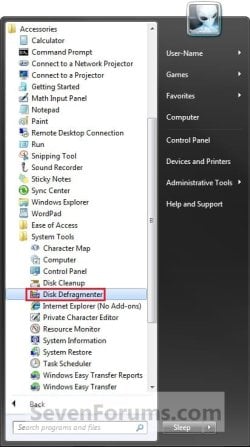
1. Open the Start Menu, and double click on to expand All Programs, Accessories, System Tools, and click on Disk Defragmenter. (See screenshot below) Step1.jpg
A) Go to step 3.
OR

2. Open the Start Menu, then type dfrgui into the search line and press Enter.

3. To Anaylze a Disk
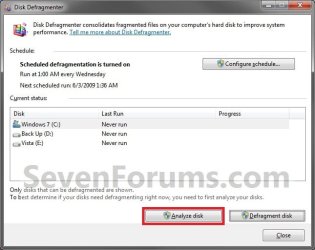
NOTE: This will anaylze the selected disk to see what percentage fragmented it is. If the number is above 10%, you should defragment the disk. A) Select a disk, and click on the Anaylze disk button. (See screenshot below) Step2.jpg
4. To Defragment a Disk
NOTE: Disk Defragmenter might take from several minutes to a few hours to finish, depending on the size and degree of fragmentation of your hard disk. You can still use your computer during the defragmentation process. A) Select a disk, and click on the Defragment disk button. (See screenshot below) Step3.jpg
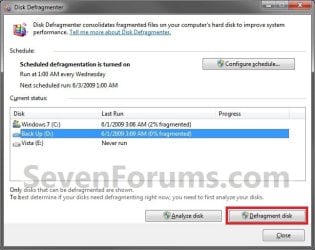
B) You will now see the disk being defragmented. (See screenshot below)
NOTE: You can abort the defragmentation of the selected disk at anytime by clicking on the Stop operation button. Step4.jpg
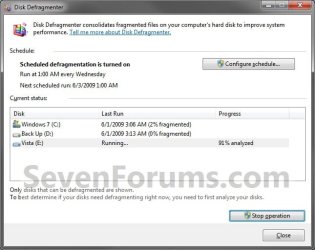
5. When finished, click on Close. (See screenshot below) Step5.jpg


OPTION TWO

Run Defragmenter from Drive's Properties Page

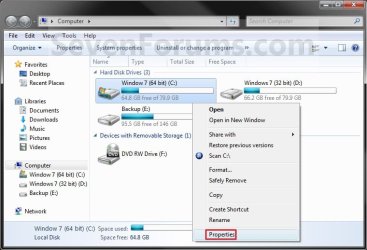
1. Open the Start Menu and click on the Computer button on the right dark side.

2. Right click the hard disk drive that you want to check, and click on Properties. (see screenshot below) Computer.jpg
3. Click on the Tools tab, and click on the Defragment now button. (see screenshot below) Computer-2.jpg
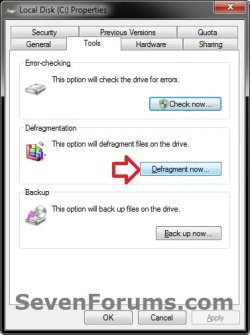
4. You can now do either step 3 or 4 in OPTION ONE above.


OPTION THREE

Run Defragmenter in a Command Prompt

1. Do step 2 or 3 below for how you would like to run the defrag command.

2. To Use an Elevated Command Prompt in Windows 7 A) Open an elevated command prompt.

B) Go to step 4.
3. To Use a Command Prompt at Boot A) Open a command prompt at startup.

B) In the command prompt, type diskpart and press Enter.

C) In the command prompt, type list volume and press Enter.
NOTE: Make note of the drive letter that you want to run defrag on. The drive letter for the drive will not always be the same at boot as it is in Windows 7.

D) In the command prompt, type exit and press Enter.

E) Continue on to step 4.
4. In the command prompt, type in the following command below followed by one or more switches (flags) that you would like to use below with a space between each switch and press Enter.
NOTE: For example, the most common command to run defrag on your C: drive is:

defrag C: /F defrag [drive letter]: [switches]

   Tip
If you would like to defrag more than one drive letter at once, then you can just include as many separate drive letters in the command like below for the ones you want to defrag. For example, with drive letters C, E, and H.

defrag C: E: H: /F


Switches:
NOTE: The ones in red below are new to Windows 7.

  • /A - Perform analysis on the specified volumes.
  • /B - Boot optimization to defrags the boot sector of the boot volume (ex: Windows drive). This will not work on a SSD.
  • /C - Perform the operation on all volumes.
  • /E - Perform the operation on all volumes except those specified.
  • /F - Forces defragmentation of the volume when free space is low.
  • /H - Run the operation at normal priority (default is low).
  • /M - Run the operation on each volume in parallel in the background.
  • /R - Performs partial defragmentation (default). Attempts to consolidate only fragments smaller than 64 megabytes (MB).
  • /T - Track an operation already in progress on the specified volume.
  • /U - Print the progress of the operation on the screen.
  • /V - Print verbose output containing the fragmentation statistics.
  • /X - Perform free space consolidation on the specified volumes.
CMD-1.jpg


That's it,
Shawn


Last edited:
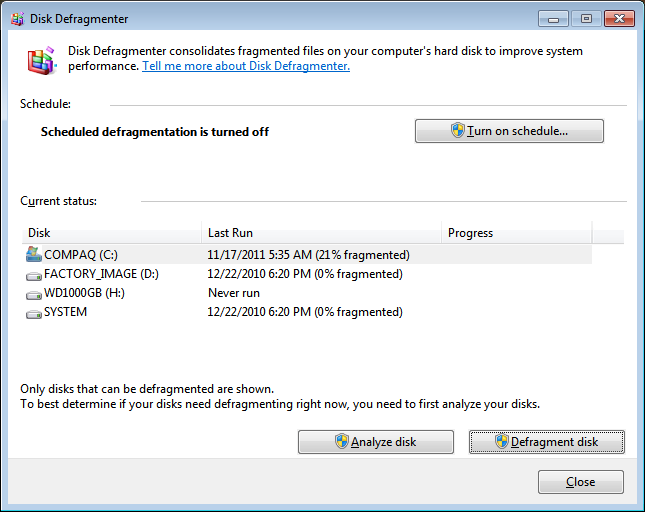
QUICK question. Yes, I am about to defrag the primary C:\. Amazing how I turned up 21% fragmented tonight. All the time I would only see a measly 2% not close to 10%. But 11% or over, defrag, I heard this

But..what's this SYSTEM that's listed in the GUI ?

7enaA.png
 

My Computer My Computer

Computer Manufacturer/Model Number
Compaq Presario
OS
Windows 7 Home Edition 64-bit
Memory
4 gigger
Graphics Card(s)
NVIDIA GeForce GT 440
Screen Resolution
1920x1080
PSU
AMD 2.30GHz
Keyboard
USB Logitech wired..with the volume knob not buttons :)
Mouse
USB wired
Internet Speed
AT&T (384kilos down 40 kilos up) wired
Hello Alex,

SYSTEM appears that is may be another one of the factory recovery partitions. You could look in Disk Management (diskmgmt.msc) to help see more details about the partition though.
 

My Computer My Computer

Computer type
PC/Desktop
Computer Manufacturer/Model Number
Self built custom
OS
64-bit Windows 11 Pro for Workstations
CPU
Intel i7-8700K OC'd to 5 GHz
Motherboard
ASUS ROG Maximus XI Formula Z390
Memory
64 GB (4x16GB) G.SKILL TridentZ RGB DDR4 3600 MHz
Graphics Card(s)
ASUS ROG-STRIX-GTX1080TI-O11G-GAMING
Sound Card
Integrated
Monitor(s) Displays
2 x Samsung Odyssey G7 27"
Screen Resolution
2560x1440
Hard Drives
1TB Samsung 990 PRO M.2,
4TB Samsung 990 PRO PRO M.2,
TerraMaster F8 SSD Plus NAS
PSU
Seasonic Prime Titanium 850W
Case
Thermaltake Core P3
Cooling
Corsair Hydro H115i
Keyboard
Logitech wireless K800
Mouse
Logitech MX Master 4
Internet Speed
2 Gb/s Download and 100 Mb/s Upload
Antivirus
Malwarebyte Anti-Malware Premium
Browser
Google Chrome
Other Info
Logitech Z625 speaker system,
Logitech BRIO 4K Pro webcam,
HP Color LaserJet Pro MFP M477fdn,
APC SMART-UPS RT 1000 XL - SURT1000XLI,
Galaxy S23 Plus phone
Sorry to sneak in here Shawn, but I've been trying to help Alex, and was thinking it might be a proprietary OEM recovery console partition? Is that a possibility, as it is a mere 100MB

http://i.imgur.com/FTnQo.png

Also His C: boot drive is at like 95% full so obviously can't shuffle the defrag, so I advised he cleans house, with lots of suggestions, but I know you have a good tut somewhere about win 7 cleanup I referenced a day or two ago.

Thanks,
Mike:)

[EDIT] make that 98%+ full!
 

My Computer My Computer

Computer Manufacturer/Model Number
Custom self build - Desktop
OS
MS Windows 7 Home Premium SP1 64-bit (Family Pack Lic.) Upgrade
CPU
AMD Phenom II X6: Black Ed 1090T - AM3 / 3.2GHz / 8MB
Motherboard
Biostar TA790XE3
Memory
2 dual ch sets OCZ DDR3 PC3-10666 Platinum 1333MHz 8GB total
Graphics Card(s)
Onboard
Sound Card
Onboard 5.1 channel HD
Monitor(s) Displays
SyncMaster "Legal-sized" LCD (rotatable)
Screen Resolution
unknown (8.5"x15")? pixels are not known
Hard Drives
HDD1: WD RE3 Enterprize [p/n: WD500ABYS-NDW]
________SATA-II (3Gb/s) 500GB/7200rpm/16MB

HDD2: Deskstar 7K1000.C [p/n: HDS721010CLA332]
________SATA-II (3Gb/s) 1TB/7200rpm/32MB
PSU
Antec 900W mATX 20+4 w/6-8SATA;2MLX;4x6(+2)PCIe[p/n HCG-900]
Case
Mid 10-bay tower - free space design interior & well vented
Cooling
CPU HS cooler, 14.5" Case-sysfan1, dual sysfan2, exhaust
Keyboard
Blue Star Ergonomic - ps/2
Mouse
LED coorded w/v. roller wheel - ps/2
Internet Speed
GbLAN 10/100/1000 & WLAN - on T1 (Peer Network)
Other Info
Harmon-Karden speakers (L,R @ sub)

APC (Lead/Acid Batt backup UPC+Surge protector+etc)

Sony DVD SATA(300) - RW DVD/CD SATA-II(300)
when i analyze , is 3% Fragmented, 3% need disk defrag?
 

My Computer My Computer

OS
Windows 7 Home Premium 64bit
Hello sle3pingz,

With only 3% it's not really required or needed, but you still could defrag if you wanted to. Usually around 10% or more is a good amount to defrag with. :)

Hope this helps,
Shawn
 

My Computer My Computer

Computer type
PC/Desktop
Computer Manufacturer/Model Number
Self built custom
OS
64-bit Windows 11 Pro for Workstations
CPU
Intel i7-8700K OC'd to 5 GHz
Motherboard
ASUS ROG Maximus XI Formula Z390
Memory
64 GB (4x16GB) G.SKILL TridentZ RGB DDR4 3600 MHz
Graphics Card(s)
ASUS ROG-STRIX-GTX1080TI-O11G-GAMING
Sound Card
Integrated
Monitor(s) Displays
2 x Samsung Odyssey G7 27"
Screen Resolution
2560x1440
Hard Drives
1TB Samsung 990 PRO M.2,
4TB Samsung 990 PRO PRO M.2,
TerraMaster F8 SSD Plus NAS
PSU
Seasonic Prime Titanium 850W
Case
Thermaltake Core P3
Cooling
Corsair Hydro H115i
Keyboard
Logitech wireless K800
Mouse
Logitech MX Master 4
Internet Speed
2 Gb/s Download and 100 Mb/s Upload
Antivirus
Malwarebyte Anti-Malware Premium
Browser
Google Chrome
Other Info
Logitech Z625 speaker system,
Logitech BRIO 4K Pro webcam,
HP Color LaserJet Pro MFP M477fdn,
APC SMART-UPS RT 1000 XL - SURT1000XLI,
Galaxy S23 Plus phone
How EXACTLY do I type that command? I type it like I see it and all I get is "Microsoft Disk Defragmenter Copyright (c) 2007 Microsoft Corp."
 

My Computer My Computer

OS
Windows 7 home premium
Hello Isisflamedancer, and welcome to Seven Forums.

If you wanted to do this for you C: drive, then you would type this below in a elevated command prompt and press Enter. OPTION THREE in the tutorial can give you more details.

defrag C: /F

defrag[space]C:[space]/F

You could also use OPTION ONE or OPTION TWO to do the same thing if you didn't want to use the command prompt.

Hope this helps, :)
Shawn
 

My Computer My Computer

Computer type
PC/Desktop
Computer Manufacturer/Model Number
Self built custom
OS
64-bit Windows 11 Pro for Workstations
CPU
Intel i7-8700K OC'd to 5 GHz
Motherboard
ASUS ROG Maximus XI Formula Z390
Memory
64 GB (4x16GB) G.SKILL TridentZ RGB DDR4 3600 MHz
Graphics Card(s)
ASUS ROG-STRIX-GTX1080TI-O11G-GAMING
Sound Card
Integrated
Monitor(s) Displays
2 x Samsung Odyssey G7 27"
Screen Resolution
2560x1440
Hard Drives
1TB Samsung 990 PRO M.2,
4TB Samsung 990 PRO PRO M.2,
TerraMaster F8 SSD Plus NAS
PSU
Seasonic Prime Titanium 850W
Case
Thermaltake Core P3
Cooling
Corsair Hydro H115i
Keyboard
Logitech wireless K800
Mouse
Logitech MX Master 4
Internet Speed
2 Gb/s Download and 100 Mb/s Upload
Antivirus
Malwarebyte Anti-Malware Premium
Browser
Google Chrome
Other Info
Logitech Z625 speaker system,
Logitech BRIO 4K Pro webcam,
HP Color LaserJet Pro MFP M477fdn,
APC SMART-UPS RT 1000 XL - SURT1000XLI,
Galaxy S23 Plus phone
I tried to do that an it still isn't working. I can't run it normally because my computer is freezing unless I am in safe mode and I am trying everything to get it to work
 

My Computer My Computer

OS
Windows 7 home premium
You might see if you may be able to do step 3 in OPTION THREE to run it in a command prompt at boot.

In addition, you might also create a new thread about your computer freezing issue to see if we may be able to help with that. For now, you might see if the tutorial below may be able to help troubleshoot to see what may be a cause for the freezing since it runs fine otherwise in Safe Mode. :)

http://www.sevenforums.com/tutorial...ation-conflicts-performing-clean-startup.html
 

My Computer My Computer

Computer type
PC/Desktop
Computer Manufacturer/Model Number
Self built custom
OS
64-bit Windows 11 Pro for Workstations
CPU
Intel i7-8700K OC'd to 5 GHz
Motherboard
ASUS ROG Maximus XI Formula Z390
Memory
64 GB (4x16GB) G.SKILL TridentZ RGB DDR4 3600 MHz
Graphics Card(s)
ASUS ROG-STRIX-GTX1080TI-O11G-GAMING
Sound Card
Integrated
Monitor(s) Displays
2 x Samsung Odyssey G7 27"
Screen Resolution
2560x1440
Hard Drives
1TB Samsung 990 PRO M.2,
4TB Samsung 990 PRO PRO M.2,
TerraMaster F8 SSD Plus NAS
PSU
Seasonic Prime Titanium 850W
Case
Thermaltake Core P3
Cooling
Corsair Hydro H115i
Keyboard
Logitech wireless K800
Mouse
Logitech MX Master 4
Internet Speed
2 Gb/s Download and 100 Mb/s Upload
Antivirus
Malwarebyte Anti-Malware Premium
Browser
Google Chrome
Other Info
Logitech Z625 speaker system,
Logitech BRIO 4K Pro webcam,
HP Color LaserJet Pro MFP M477fdn,
APC SMART-UPS RT 1000 XL - SURT1000XLI,
Galaxy S23 Plus phone
Hi everyone!

Im about to defrag OS HDD and have 2 doubts about what to put in the Command Prompt.

I already did the "defrag c: /b /h" (dont really know if you need the "/h"...)

Now i wanted to know if could use "defrag /c /x /h /w /v" or if I had to use:

1st- "defrag /c /h /w /v"
2nd- "defrag /c /x /h /v"

Thanks in advance.
 

My Computer My Computer

Computer Manufacturer/Model Number
Asus
OS
Windows 7 Home Premium 64bit
CPU
Intel Core i7-2630QM @ 2.00/2.90GHz
Motherboard
ASUSTeK G74Sx
Memory
12GB DDR3 @ 1333MHz
Graphics Card(s)
GeForce GTX 560M - 3 GB GDDR5
Sound Card
Steelseries 7.1 Surround (external)
Screen Resolution
1920x1080 @ 60Hz
Hard Drives
500 GB 7200rpm + 500 GB 7200rpm + 1 TB MemUp 5400rpm (external)
Cooling
Asus + Coolermaster Notepal U3
Mouse
ASUS ROG GX800 3200 DPI Laser Gaming Mouse
Internet Speed
54Mbs wifi / 100Mbs cable
Hello Joaodiogo,

You could use those with the switches you like, but I would also add /f as well. You might consider doing this at boot so the HDD will not be in use and prevent some areas from being defragmented. If you do it at boot, then you will not need the /h switch.

Hope this helps,
Shawn
 

My Computer My Computer

Computer type
PC/Desktop
Computer Manufacturer/Model Number
Self built custom
OS
64-bit Windows 11 Pro for Workstations
CPU
Intel i7-8700K OC'd to 5 GHz
Motherboard
ASUS ROG Maximus XI Formula Z390
Memory
64 GB (4x16GB) G.SKILL TridentZ RGB DDR4 3600 MHz
Graphics Card(s)
ASUS ROG-STRIX-GTX1080TI-O11G-GAMING
Sound Card
Integrated
Monitor(s) Displays
2 x Samsung Odyssey G7 27"
Screen Resolution
2560x1440
Hard Drives
1TB Samsung 990 PRO M.2,
4TB Samsung 990 PRO PRO M.2,
TerraMaster F8 SSD Plus NAS
PSU
Seasonic Prime Titanium 850W
Case
Thermaltake Core P3
Cooling
Corsair Hydro H115i
Keyboard
Logitech wireless K800
Mouse
Logitech MX Master 4
Internet Speed
2 Gb/s Download and 100 Mb/s Upload
Antivirus
Malwarebyte Anti-Malware Premium
Browser
Google Chrome
Other Info
Logitech Z625 speaker system,
Logitech BRIO 4K Pro webcam,
HP Color LaserJet Pro MFP M477fdn,
APC SMART-UPS RT 1000 XL - SURT1000XLI,
Galaxy S23 Plus phone
Hello Joaodiogo,

You could use those with the switches you like, but I would also add /f as well. You might consider doing this at boot so the HDD will not be in use and prevent some areas from being defragmented. If you do it at boot, then you will not need the /h switch.

Hope this helps,
Shawn

Thanks for the information.

What I really wanted to know in my second question was if I could use the /w and the /x at the same time and if it would perform both switches. For example, defrag /c /x /w /f /v

Does the /w include the /x?
 

My Computer My Computer

Computer Manufacturer/Model Number
Asus
OS
Windows 7 Home Premium 64bit
CPU
Intel Core i7-2630QM @ 2.00/2.90GHz
Motherboard
ASUSTeK G74Sx
Memory
12GB DDR3 @ 1333MHz
Graphics Card(s)
GeForce GTX 560M - 3 GB GDDR5
Sound Card
Steelseries 7.1 Surround (external)
Screen Resolution
1920x1080 @ 60Hz
Hard Drives
500 GB 7200rpm + 500 GB 7200rpm + 1 TB MemUp 5400rpm (external)
Cooling
Asus + Coolermaster Notepal U3
Mouse
ASUS ROG GX800 3200 DPI Laser Gaming Mouse
Internet Speed
54Mbs wifi / 100Mbs cable
Joaodiogo,

There's really no point in using the /w switch in Windows 7 though. The /w switch is described as "Performs full defragmentation. Attempts to consolidate all file fragments, regardless of their size." This implies that file fragments larger than 64 MB will also be optimized, but this is simply not the case in Windows 7 which ignores the larger chunks. You can read all about the benefits of this change in design in the Microsoft MSDN blog link below.

I would just use /x since /w will basically just be the same now in Windows 7.

Disk Defragmentation
 

My Computer My Computer

Computer type
PC/Desktop
Computer Manufacturer/Model Number
Self built custom
OS
64-bit Windows 11 Pro for Workstations
CPU
Intel i7-8700K OC'd to 5 GHz
Motherboard
ASUS ROG Maximus XI Formula Z390
Memory
64 GB (4x16GB) G.SKILL TridentZ RGB DDR4 3600 MHz
Graphics Card(s)
ASUS ROG-STRIX-GTX1080TI-O11G-GAMING
Sound Card
Integrated
Monitor(s) Displays
2 x Samsung Odyssey G7 27"
Screen Resolution
2560x1440
Hard Drives
1TB Samsung 990 PRO M.2,
4TB Samsung 990 PRO PRO M.2,
TerraMaster F8 SSD Plus NAS
PSU
Seasonic Prime Titanium 850W
Case
Thermaltake Core P3
Cooling
Corsair Hydro H115i
Keyboard
Logitech wireless K800
Mouse
Logitech MX Master 4
Internet Speed
2 Gb/s Download and 100 Mb/s Upload
Antivirus
Malwarebyte Anti-Malware Premium
Browser
Google Chrome
Other Info
Logitech Z625 speaker system,
Logitech BRIO 4K Pro webcam,
HP Color LaserJet Pro MFP M477fdn,
APC SMART-UPS RT 1000 XL - SURT1000XLI,
Galaxy S23 Plus phone
Ok.

Thanks for your help. Very appreciated! :D
 

My Computer My Computer

Computer Manufacturer/Model Number
Asus
OS
Windows 7 Home Premium 64bit
CPU
Intel Core i7-2630QM @ 2.00/2.90GHz
Motherboard
ASUSTeK G74Sx
Memory
12GB DDR3 @ 1333MHz
Graphics Card(s)
GeForce GTX 560M - 3 GB GDDR5
Sound Card
Steelseries 7.1 Surround (external)
Screen Resolution
1920x1080 @ 60Hz
Hard Drives
500 GB 7200rpm + 500 GB 7200rpm + 1 TB MemUp 5400rpm (external)
Cooling
Asus + Coolermaster Notepal U3
Mouse
ASUS ROG GX800 3200 DPI Laser Gaming Mouse
Internet Speed
54Mbs wifi / 100Mbs cable
You're most welcome. :)
 

My Computer My Computer

Computer type
PC/Desktop
Computer Manufacturer/Model Number
Self built custom
OS
64-bit Windows 11 Pro for Workstations
CPU
Intel i7-8700K OC'd to 5 GHz
Motherboard
ASUS ROG Maximus XI Formula Z390
Memory
64 GB (4x16GB) G.SKILL TridentZ RGB DDR4 3600 MHz
Graphics Card(s)
ASUS ROG-STRIX-GTX1080TI-O11G-GAMING
Sound Card
Integrated
Monitor(s) Displays
2 x Samsung Odyssey G7 27"
Screen Resolution
2560x1440
Hard Drives
1TB Samsung 990 PRO M.2,
4TB Samsung 990 PRO PRO M.2,
TerraMaster F8 SSD Plus NAS
PSU
Seasonic Prime Titanium 850W
Case
Thermaltake Core P3
Cooling
Corsair Hydro H115i
Keyboard
Logitech wireless K800
Mouse
Logitech MX Master 4
Internet Speed
2 Gb/s Download and 100 Mb/s Upload
Antivirus
Malwarebyte Anti-Malware Premium
Browser
Google Chrome
Other Info
Logitech Z625 speaker system,
Logitech BRIO 4K Pro webcam,
HP Color LaserJet Pro MFP M477fdn,
APC SMART-UPS RT 1000 XL - SURT1000XLI,
Galaxy S23 Plus phone
Brink, i want ask a few question , maybe it's weird ...
1. you say this before, do the defrag maybe at 10% +++ , if i do at 1 ~ 9% there's will be a problem ?
2. when i on defragmented process, can i plugged in charger? because my notebook is Low Bat / 7%, it will damaged our hardware or system if we plugged in when do a process like this (maybe defrag it's a hard process , i mean heavy process)

Thanks :geek:
 

My Computer My Computer

OS
Windows 7 Home Premium 64bit
Hello sle3pingz,

Q1) It will not cause a problem to defrag at 1 ~ 9%. You can if you like, but it's just more of a waste of your time since it's really not defragmented enough to spend time defragmenting it.

Q2) It makes no difference wether you are on battery or plugged in when you defrag. It would be preferred to be plugged in if it will take a long time to defrag though. You don't want the battery dying in the middle of defragging the HDD since that could cause issues.

Hope this helps. :)
 

My Computer My Computer

Computer type
PC/Desktop
Computer Manufacturer/Model Number
Self built custom
OS
64-bit Windows 11 Pro for Workstations
CPU
Intel i7-8700K OC'd to 5 GHz
Motherboard
ASUS ROG Maximus XI Formula Z390
Memory
64 GB (4x16GB) G.SKILL TridentZ RGB DDR4 3600 MHz
Graphics Card(s)
ASUS ROG-STRIX-GTX1080TI-O11G-GAMING
Sound Card
Integrated
Monitor(s) Displays
2 x Samsung Odyssey G7 27"
Screen Resolution
2560x1440
Hard Drives
1TB Samsung 990 PRO M.2,
4TB Samsung 990 PRO PRO M.2,
TerraMaster F8 SSD Plus NAS
PSU
Seasonic Prime Titanium 850W
Case
Thermaltake Core P3
Cooling
Corsair Hydro H115i
Keyboard
Logitech wireless K800
Mouse
Logitech MX Master 4
Internet Speed
2 Gb/s Download and 100 Mb/s Upload
Antivirus
Malwarebyte Anti-Malware Premium
Browser
Google Chrome
Other Info
Logitech Z625 speaker system,
Logitech BRIO 4K Pro webcam,
HP Color LaserJet Pro MFP M477fdn,
APC SMART-UPS RT 1000 XL - SURT1000XLI,
Galaxy S23 Plus phone
about Q2 , i don't see the battery, and i do the defrag, when the defrag almost done, i see the bat already appear warning at Low bat at 7% , that will damaged my HDD , Hardware or System if i plugged in the charger when the middle of defragging process? i mean by plugged in the charger is when middle of defragging process, not before the defragging, sorry for my poor english :D
 

My Computer My Computer

OS
Windows 7 Home Premium 64bit
Nope. It will not hurt anything at all. :)
 

My Computer My Computer

Computer type
PC/Desktop
Computer Manufacturer/Model Number
Self built custom
OS
64-bit Windows 11 Pro for Workstations
CPU
Intel i7-8700K OC'd to 5 GHz
Motherboard
ASUS ROG Maximus XI Formula Z390
Memory
64 GB (4x16GB) G.SKILL TridentZ RGB DDR4 3600 MHz
Graphics Card(s)
ASUS ROG-STRIX-GTX1080TI-O11G-GAMING
Sound Card
Integrated
Monitor(s) Displays
2 x Samsung Odyssey G7 27"
Screen Resolution
2560x1440
Hard Drives
1TB Samsung 990 PRO M.2,
4TB Samsung 990 PRO PRO M.2,
TerraMaster F8 SSD Plus NAS
PSU
Seasonic Prime Titanium 850W
Case
Thermaltake Core P3
Cooling
Corsair Hydro H115i
Keyboard
Logitech wireless K800
Mouse
Logitech MX Master 4
Internet Speed
2 Gb/s Download and 100 Mb/s Upload
Antivirus
Malwarebyte Anti-Malware Premium
Browser
Google Chrome
Other Info
Logitech Z625 speaker system,
Logitech BRIO 4K Pro webcam,
HP Color LaserJet Pro MFP M477fdn,
APC SMART-UPS RT 1000 XL - SURT1000XLI,
Galaxy S23 Plus phone
Nope. It will not hurt anything at all. :)

ok thanks, you understand about my Question right? i don't know how to simple explain, you know right? about my Q2 ?
 

My Computer My Computer

OS
Windows 7 Home Premium 64bit
Back
Top