Disk Management Placement not holding

SomeUserName

Banned
Local time
3:45 PM
Messages
129
Location
Niagara Falls, ON
I Low Level Write 0's formatted my computer on Monday via Wester Digital Data Lifeguard for a fresh reinstall as my computer was slowing to a crawl.

I have:
1 x 500GB Sata Windows main drive
1 x 1TB Sata for games, music, pictures ect
1 x 320GB IDE drive for documents
2 x DVD-RW (Twins: Same LG name, model #, color, speed ect)
1 x 4 in 1 Card reader (Similar but not exact -> http://products.ncix.com/detail/ngear-usb-3-0-multi-card-aa-78988.htm)

I pulled all drives except the 4in1 card reader which hooks to on-motherboard USB plugs before formatting and reinstalling Windows7 64 Ultimate and some programs. Some of my setup files are on the 1TB so I plugged that back in when it was needed.

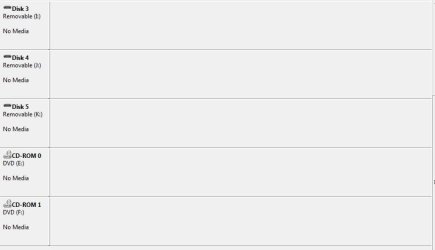
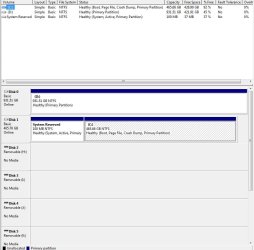
Disk 0 (which is SUPPOSED to be the 500GB Windows Drive) and the 1TB media drive is SUPPOSED to be Disk 1 sometimes switch places between Disk 0 and Disk 1 then becoming like it was before the format but will eventually go back.

The 2 DVD drives I have are brand new as I bought them especially for the reinstall as the lasers in my old ones were on they way out anyways.

Now that the DVD drives are installed I cannot get it to even randomly switch back. 1TB Drive D seems stuck on Disk 0 and the 500GB Windows drive seems stuck on Disk 1

One thing I seemed to notice last night though I cannot replicate the problem today is when I restarted the computer if I immediately went to disk management after logging into Windows it would be switched up but if I restart, log into windows and let it sit for a minute or two before checking Disk management and if I let it sit THEN things will show up in the right order in regards to C: and D:. Restart again and immediately go to disk management without waiting and things are switched up again. <-- That test was done wile the DVD drives were NOT hooked up.

IT SHOULD BE IN THIS ORDER:
C: -> Disk 0 = 500GB SATA Windows
D: -> Disk 1 = 1TB SATA Media Drive
E: -> Disk 2 = 320 GB IDE Document drive (This drive is still disconnected and not been rehooked back in yet)
F: -> DVD Drive
G: -> DVD Drive
Disk 3 = Removeable Disk
Disk 4 = Removeable Disk
Disk 5 = Removeable Disk
Disk 6 = Removeable Disk (6 is not showing because the 320GB IDE is not hooked back up yet)

I tried changing the drive letters in hopping Disk Management could put the lowest drive letter at the lowest disk number and that did not work.

I have been messing with this for over 2 days now and am honestly starting to get a little pi$$ed off now and don't know how much more start-shut down----power up my computer can handle while I switch plugs around. I must have shutdown & restarted it at least 40-50 times last night and I want to stop with the power cycles now.

Time to ask...What do I need to do to get my drives in the right order in disk management and KEEP/HOLD/FREEZE/FORCE them in position so they do now change places. All I can think of now is there is some switch in windows or BIOS or some key in the registry that needs to be adjusted. Can someone tell me what to change or adjust because this issue is starting to get REAL old now.

My motherboard is a ASUS P5Q pro Turbo w/ 4gb RAM.

(Edit: One thing I just realized is that I have a "System Reserved" partition that is still sitting there. I remember from my last format I got rid of that reserved bit with Partition Magic or some program like that it was over 2 years ago) This time I did not remove that System Reserved and let it sit. I wonder if that might have anything to do with it?)
 

Attachments
  • DM1.JPG
    DM1.JPG
    70.6 KB · Views: 1
  • dm2.JPG
    dm2.JPG
    22.5 KB · Views: 1

My Computer

Computer type
PC/Desktop
Computer Manufacturer/Model Number
Custom built by myself
OS
Windows 7 Ultimate 64Bit (SP1)
CPU
Intel® Core™ i3-6100 Processor (3M Cache, 3.70 GHz)
Motherboard
Asus B150M-C D3
Memory
Kingston 16GB Hyper X Fury Blue DDR3 1600Mhz (2x 8GB sticks)
Graphics Card(s)
On board (Asus B150M-C D3) VGA and DVI on Extended Desktop
Sound Card
On Board (Asus B150M-C D3)
Monitor(s) Displays
Left DVI: Samsung 920WM - Right VGA: Samsung 941BW
Hard Drives
WD WD5000AADS 500GB SATA Green--WD 1TB WD1001FALS SATA Black--WD 320GB WD3200JB
PSU
Cooler Master 700W Silent Pro
Case
See through Side panel--right hinge door--5x 5" & 2x 3" bays
Cooling
Side, Front, Rear fan & Power supply fan
Keyboard
Logitech MX5000 BT
Mouse
Logitech MX500
Internet Speed
40Mb down--10Mb Up
Antivirus
AVG Internet Security
Browser
Chrome-Firefox-Opera-IE-TOR
Other Info
2x LG DVD-RW--NZXT Fan contoller--4in1 Card reader
The best you can do is put C on sata port 1 (or 0 if the MB uses 0)

If you had pre partitioned the hard drive before installing windows you would not get a system reserved partition, but it`s no big deal.

I use the Partition Wizard Boot cd.

Partition Wizard Bootable CD allows user to manage partition directly with partition manager bootable CD.

Having a SR partition should have nothing to do with the order of the drives in disk management.

I went through the same problem with my Intel SSD, it was showing as disk 4, even though I had it on sata port 1.

After I installed the Intel Chipset drivers (sata controller driver) it went to Disk 0 and has stayed there, but I don`t think this would matter in your case.
 

My Computer

Computer type
PC/Desktop
Computer Manufacturer/Model Number
Skylake Special #666
OS
Windows 10 Pro x64
CPU
Intel Core i7 6700K
Motherboard
Asus Sabertooth Z170 Mark 1
Memory
GSkill TridentZ RGB 16GB 3600 16-16-16-36
Graphics Card(s)
EVGA GTX 980 Ti SC x2
Sound Card
Realtek High Definition
Monitor(s) Displays
AOC G2460PG
Screen Resolution
1920 x 1080 144Hz
Hard Drives
Samsung 860 Pro 256GB, Seagate Barracuda 4TB x2
PSU
EVGA 1000 P2, EVGA White Custom Braided Cables
Case
Corsair Vengeance C70 Gunmetal Black
Cooling
Corsair H100i v2, Corsair ML120 x2, Thermal Grizzly Kryonaut
Keyboard
Logitech G910 Orion Spectrum
Mouse
Logitech G700s
Internet Speed
Verizon Fios Quantum Gateway 75/75
Antivirus
Windows Defender, Malwarebytes Free 3.8.3
Browser
Chrome
Other Info
Corsair SP120 x4, LG Blu-ray Drive, Durabrand HT-395 100 Watt Dolby Digital Amp, Corsair H2100 Wireless 7.1 Headset
OK I plugged in the IDE and it placed itself as Disk 2 where it should be and where I want it but the 2 SATAs are still being funny. Out of 5 restarts the 1GB has landed as Disk 0 4 times ---- Disk 0 become C: 500GB only once. But the IDE is holding Disk 2

I downloaded Partition Wizard and tried to delete and merge the the 2 but it said the computer may become unbootable.

I downloaded the SATA drivers from the ASUS website Motherboards - P5Q PRO Turbo and will try that.

If the driver does not work I will try merging the C: and the reserved as it said the system "MAY" become unbootable. Not WILL but "MAY".

Im pretty much ready to reformat again anyway I think and REMEMBER to make the single partition at the beginning of setup. I do remember I did not do that and is something I normally do.
 

My Computer

Computer type
PC/Desktop
Computer Manufacturer/Model Number
Custom built by myself
OS
Windows 7 Ultimate 64Bit (SP1)
CPU
Intel® Core™ i3-6100 Processor (3M Cache, 3.70 GHz)
Motherboard
Asus B150M-C D3
Memory
Kingston 16GB Hyper X Fury Blue DDR3 1600Mhz (2x 8GB sticks)
Graphics Card(s)
On board (Asus B150M-C D3) VGA and DVI on Extended Desktop
Sound Card
On Board (Asus B150M-C D3)
Monitor(s) Displays
Left DVI: Samsung 920WM - Right VGA: Samsung 941BW
Hard Drives
WD WD5000AADS 500GB SATA Green--WD 1TB WD1001FALS SATA Black--WD 320GB WD3200JB
PSU
Cooler Master 700W Silent Pro
Case
See through Side panel--right hinge door--5x 5" & 2x 3" bays
Cooling
Side, Front, Rear fan & Power supply fan
Keyboard
Logitech MX5000 BT
Mouse
Logitech MX500
Internet Speed
40Mb down--10Mb Up
Antivirus
AVG Internet Security
Browser
Chrome-Firefox-Opera-IE-TOR
Other Info
2x LG DVD-RW--NZXT Fan contoller--4in1 Card reader

My Computer

Computer type
PC/Desktop
Computer Manufacturer/Model Number
Skylake Special #666
OS
Windows 10 Pro x64
CPU
Intel Core i7 6700K
Motherboard
Asus Sabertooth Z170 Mark 1
Memory
GSkill TridentZ RGB 16GB 3600 16-16-16-36
Graphics Card(s)
EVGA GTX 980 Ti SC x2
Sound Card
Realtek High Definition
Monitor(s) Displays
AOC G2460PG
Screen Resolution
1920 x 1080 144Hz
Hard Drives
Samsung 860 Pro 256GB, Seagate Barracuda 4TB x2
PSU
EVGA 1000 P2, EVGA White Custom Braided Cables
Case
Corsair Vengeance C70 Gunmetal Black
Cooling
Corsair H100i v2, Corsair ML120 x2, Thermal Grizzly Kryonaut
Keyboard
Logitech G910 Orion Spectrum
Mouse
Logitech G700s
Internet Speed
Verizon Fios Quantum Gateway 75/75
Antivirus
Windows Defender, Malwarebytes Free 3.8.3
Browser
Chrome
Other Info
Corsair SP120 x4, LG Blu-ray Drive, Durabrand HT-395 100 Watt Dolby Digital Amp, Corsair H2100 Wireless 7.1 Headset
Can't even install the driver. It wants to install to a removable disk and my HDD does not even show in destination options
 

Attachments

  • 20140306_113931.jpg
    20140306_113931.jpg
    213.2 KB · Views: 6

My Computer

Computer type
PC/Desktop
Computer Manufacturer/Model Number
Custom built by myself
OS
Windows 7 Ultimate 64Bit (SP1)
CPU
Intel® Core™ i3-6100 Processor (3M Cache, 3.70 GHz)
Motherboard
Asus B150M-C D3
Memory
Kingston 16GB Hyper X Fury Blue DDR3 1600Mhz (2x 8GB sticks)
Graphics Card(s)
On board (Asus B150M-C D3) VGA and DVI on Extended Desktop
Sound Card
On Board (Asus B150M-C D3)
Monitor(s) Displays
Left DVI: Samsung 920WM - Right VGA: Samsung 941BW
Hard Drives
WD WD5000AADS 500GB SATA Green--WD 1TB WD1001FALS SATA Black--WD 320GB WD3200JB
PSU
Cooler Master 700W Silent Pro
Case
See through Side panel--right hinge door--5x 5" & 2x 3" bays
Cooling
Side, Front, Rear fan & Power supply fan
Keyboard
Logitech MX5000 BT
Mouse
Logitech MX500
Internet Speed
40Mb down--10Mb Up
Antivirus
AVG Internet Security
Browser
Chrome-Firefox-Opera-IE-TOR
Other Info
2x LG DVD-RW--NZXT Fan contoller--4in1 Card reader
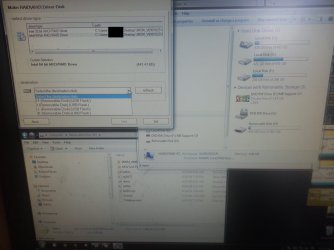
I got the drivers right from Intel.

List your MB so others can help, I have to step out. :)
 

My Computer

Computer type
PC/Desktop
Computer Manufacturer/Model Number
Skylake Special #666
OS
Windows 10 Pro x64
CPU
Intel Core i7 6700K
Motherboard
Asus Sabertooth Z170 Mark 1
Memory
GSkill TridentZ RGB 16GB 3600 16-16-16-36
Graphics Card(s)
EVGA GTX 980 Ti SC x2
Sound Card
Realtek High Definition
Monitor(s) Displays
AOC G2460PG
Screen Resolution
1920 x 1080 144Hz
Hard Drives
Samsung 860 Pro 256GB, Seagate Barracuda 4TB x2
PSU
EVGA 1000 P2, EVGA White Custom Braided Cables
Case
Corsair Vengeance C70 Gunmetal Black
Cooling
Corsair H100i v2, Corsair ML120 x2, Thermal Grizzly Kryonaut
Keyboard
Logitech G910 Orion Spectrum
Mouse
Logitech G700s
Internet Speed
Verizon Fios Quantum Gateway 75/75
Antivirus
Windows Defender, Malwarebytes Free 3.8.3
Browser
Chrome
Other Info
Corsair SP120 x4, LG Blu-ray Drive, Durabrand HT-395 100 Watt Dolby Digital Amp, Corsair H2100 Wireless 7.1 Headset
MB is ASUS P5Q pro turbo. 2nd last part of 1st post.

Made rescue disk, marked System reserved as inactive and the part with Windows as Active, re-booted and it said cannot find boot manager as expected. Rebooted again with CD, loaded as windows (EMS). It does some bottom scrollbar installation/loading graphics for a while and then I get:

"Windows has encountered a problem communicating with a device connected to your computer.

This error can be caused by unplugging a removable storage device such as an external USB drive while the device is in use, or by faulty hardware such as a hard drive or CD-ROM drive that is failing. Make sure any removable storage is properly connected and then restart your computer.

If you continue to receive this error message, contact the hardware manufacturer.

Status: 0xc000009

Info: An unexpected I/O error has occurred"

I have no external storage devices plugged in into my computer and I also removed the 4in1 USB card reader that connects directly to the motherboard. Same error repeats itself.
 

My Computer

Computer type
PC/Desktop
Computer Manufacturer/Model Number
Custom built by myself
OS
Windows 7 Ultimate 64Bit (SP1)
CPU
Intel® Core™ i3-6100 Processor (3M Cache, 3.70 GHz)
Motherboard
Asus B150M-C D3
Memory
Kingston 16GB Hyper X Fury Blue DDR3 1600Mhz (2x 8GB sticks)
Graphics Card(s)
On board (Asus B150M-C D3) VGA and DVI on Extended Desktop
Sound Card
On Board (Asus B150M-C D3)
Monitor(s) Displays
Left DVI: Samsung 920WM - Right VGA: Samsung 941BW
Hard Drives
WD WD5000AADS 500GB SATA Green--WD 1TB WD1001FALS SATA Black--WD 320GB WD3200JB
PSU
Cooler Master 700W Silent Pro
Case
See through Side panel--right hinge door--5x 5" & 2x 3" bays
Cooling
Side, Front, Rear fan & Power supply fan
Keyboard
Logitech MX5000 BT
Mouse
Logitech MX500
Internet Speed
40Mb down--10Mb Up
Antivirus
AVG Internet Security
Browser
Chrome-Firefox-Opera-IE-TOR
Other Info
2x LG DVD-RW--NZXT Fan contoller--4in1 Card reader
I got back into windows. The rescue disk didnt work but the Windows install disk did. Pick Language and then you can install windows or repair. It did its thing and Windows is back.

As for the SATA disk I didnt want a disk. I downloaded the drivers hoping the file would install them to C but it only lets it go to a removable disk.

C: Drive is ACTIVE now and I tried to delete it. Now I have 2 unallocated spots I cant merge or delete. 101MB and 1MB.

Disk MAnagement only shows 1 unallocated spot though
 

Attachments

  • 20140306_145133.jpg
    20140306_145133.jpg
    149.2 KB · Views: 3
  • 20140306_150830.jpg
    20140306_150830.jpg
    124.2 KB · Views: 3

My Computer

Computer type
PC/Desktop
Computer Manufacturer/Model Number
Custom built by myself
OS
Windows 7 Ultimate 64Bit (SP1)
CPU
Intel® Core™ i3-6100 Processor (3M Cache, 3.70 GHz)
Motherboard
Asus B150M-C D3
Memory
Kingston 16GB Hyper X Fury Blue DDR3 1600Mhz (2x 8GB sticks)
Graphics Card(s)
On board (Asus B150M-C D3) VGA and DVI on Extended Desktop
Sound Card
On Board (Asus B150M-C D3)
Monitor(s) Displays
Left DVI: Samsung 920WM - Right VGA: Samsung 941BW
Hard Drives
WD WD5000AADS 500GB SATA Green--WD 1TB WD1001FALS SATA Black--WD 320GB WD3200JB
PSU
Cooler Master 700W Silent Pro
Case
See through Side panel--right hinge door--5x 5" & 2x 3" bays
Cooling
Side, Front, Rear fan & Power supply fan
Keyboard
Logitech MX5000 BT
Mouse
Logitech MX500
Internet Speed
40Mb down--10Mb Up
Antivirus
AVG Internet Security
Browser
Chrome-Firefox-Opera-IE-TOR
Other Info
2x LG DVD-RW--NZXT Fan contoller--4in1 Card reader
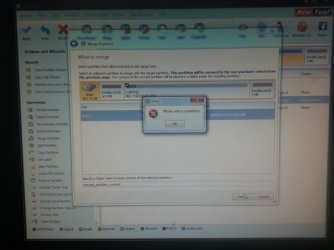
Create a partition out of the 101 MB, then PW should let you merge them together.
 

My Computer

Computer type
PC/Desktop
Computer Manufacturer/Model Number
Skylake Special #666
OS
Windows 10 Pro x64
CPU
Intel Core i7 6700K
Motherboard
Asus Sabertooth Z170 Mark 1
Memory
GSkill TridentZ RGB 16GB 3600 16-16-16-36
Graphics Card(s)
EVGA GTX 980 Ti SC x2
Sound Card
Realtek High Definition
Monitor(s) Displays
AOC G2460PG
Screen Resolution
1920 x 1080 144Hz
Hard Drives
Samsung 860 Pro 256GB, Seagate Barracuda 4TB x2
PSU
EVGA 1000 P2, EVGA White Custom Braided Cables
Case
Corsair Vengeance C70 Gunmetal Black
Cooling
Corsair H100i v2, Corsair ML120 x2, Thermal Grizzly Kryonaut
Keyboard
Logitech G910 Orion Spectrum
Mouse
Logitech G700s
Internet Speed
Verizon Fios Quantum Gateway 75/75
Antivirus
Windows Defender, Malwarebytes Free 3.8.3
Browser
Chrome
Other Info
Corsair SP120 x4, LG Blu-ray Drive, Durabrand HT-395 100 Watt Dolby Digital Amp, Corsair H2100 Wireless 7.1 Headset
Did that and they merged together. Now I have 2 unallocated partitions. One is 1.00MB and the other is 1.02MB. I tried creating another out of each of those but they both "failed to crate partition".
 

My Computer

Computer type
PC/Desktop
Computer Manufacturer/Model Number
Custom built by myself
OS
Windows 7 Ultimate 64Bit (SP1)
CPU
Intel® Core™ i3-6100 Processor (3M Cache, 3.70 GHz)
Motherboard
Asus B150M-C D3
Memory
Kingston 16GB Hyper X Fury Blue DDR3 1600Mhz (2x 8GB sticks)
Graphics Card(s)
On board (Asus B150M-C D3) VGA and DVI on Extended Desktop
Sound Card
On Board (Asus B150M-C D3)
Monitor(s) Displays
Left DVI: Samsung 920WM - Right VGA: Samsung 941BW
Hard Drives
WD WD5000AADS 500GB SATA Green--WD 1TB WD1001FALS SATA Black--WD 320GB WD3200JB
PSU
Cooler Master 700W Silent Pro
Case
See through Side panel--right hinge door--5x 5" & 2x 3" bays
Cooling
Side, Front, Rear fan & Power supply fan
Keyboard
Logitech MX5000 BT
Mouse
Logitech MX500
Internet Speed
40Mb down--10Mb Up
Antivirus
AVG Internet Security
Browser
Chrome-Firefox-Opera-IE-TOR
Other Info
2x LG DVD-RW--NZXT Fan contoller--4in1 Card reader
I really dont know why Im doing anything anymore. Im too lost on this. I counldt figure out why things were not working. Just noticed the big green APPLY button on partition wizard. Its doing its thing now. Ive been working on this for way too long now
 

My Computer

Computer type
PC/Desktop
Computer Manufacturer/Model Number
Custom built by myself
OS
Windows 7 Ultimate 64Bit (SP1)
CPU
Intel® Core™ i3-6100 Processor (3M Cache, 3.70 GHz)
Motherboard
Asus B150M-C D3
Memory
Kingston 16GB Hyper X Fury Blue DDR3 1600Mhz (2x 8GB sticks)
Graphics Card(s)
On board (Asus B150M-C D3) VGA and DVI on Extended Desktop
Sound Card
On Board (Asus B150M-C D3)
Monitor(s) Displays
Left DVI: Samsung 920WM - Right VGA: Samsung 941BW
Hard Drives
WD WD5000AADS 500GB SATA Green--WD 1TB WD1001FALS SATA Black--WD 320GB WD3200JB
PSU
Cooler Master 700W Silent Pro
Case
See through Side panel--right hinge door--5x 5" & 2x 3" bays
Cooling
Side, Front, Rear fan & Power supply fan
Keyboard
Logitech MX5000 BT
Mouse
Logitech MX500
Internet Speed
40Mb down--10Mb Up
Antivirus
AVG Internet Security
Browser
Chrome-Firefox-Opera-IE-TOR
Other Info
2x LG DVD-RW--NZXT Fan contoller--4in1 Card reader
Just noticed the big green APPLY button on partition wizard.

Why are you using Partition Wizard?

Will not change Disk 1 to Disk 0.
 

My Computer

OS
ME/XP/Vista/Win7
I have three of the same motherboards.(not your motherboard)

On Vista.
SATA 0 = Disk 0 OS
SATA 1 = Disk 1 Back up

On Windows 7.
SATA 0 = Disk 1 OS
SATA 1 = Disk 0 Back up

On Windows 8/8.1.
SATA 0 = Disk 0 OS
SATA 1 = Disk 1 Back up

http://support.microsoft.com/kb/937251
 

My Computer

OS
ME/XP/Vista/Win7
I was trying to get rid of the System reserved and it because unallocated and I tired to merge unallocated with windows. Partition wizard failed and rescue/repair says "Startup repair cannot repair this computer auotmatically. Sending more information can help Microsoft create solutions." So thats it its done. Format c:....again.
 

My Computer

Computer type
PC/Desktop
Computer Manufacturer/Model Number
Custom built by myself
OS
Windows 7 Ultimate 64Bit (SP1)
CPU
Intel® Core™ i3-6100 Processor (3M Cache, 3.70 GHz)
Motherboard
Asus B150M-C D3
Memory
Kingston 16GB Hyper X Fury Blue DDR3 1600Mhz (2x 8GB sticks)
Graphics Card(s)
On board (Asus B150M-C D3) VGA and DVI on Extended Desktop
Sound Card
On Board (Asus B150M-C D3)
Monitor(s) Displays
Left DVI: Samsung 920WM - Right VGA: Samsung 941BW
Hard Drives
WD WD5000AADS 500GB SATA Green--WD 1TB WD1001FALS SATA Black--WD 320GB WD3200JB
PSU
Cooler Master 700W Silent Pro
Case
See through Side panel--right hinge door--5x 5" & 2x 3" bays
Cooling
Side, Front, Rear fan & Power supply fan
Keyboard
Logitech MX5000 BT
Mouse
Logitech MX500
Internet Speed
40Mb down--10Mb Up
Antivirus
AVG Internet Security
Browser
Chrome-Firefox-Opera-IE-TOR
Other Info
2x LG DVD-RW--NZXT Fan contoller--4in1 Card reader
Ray, aren`t you reading the thread ?
 

My Computer

Computer type
PC/Desktop
Computer Manufacturer/Model Number
Skylake Special #666
OS
Windows 10 Pro x64
CPU
Intel Core i7 6700K
Motherboard
Asus Sabertooth Z170 Mark 1
Memory
GSkill TridentZ RGB 16GB 3600 16-16-16-36
Graphics Card(s)
EVGA GTX 980 Ti SC x2
Sound Card
Realtek High Definition
Monitor(s) Displays
AOC G2460PG
Screen Resolution
1920 x 1080 144Hz
Hard Drives
Samsung 860 Pro 256GB, Seagate Barracuda 4TB x2
PSU
EVGA 1000 P2, EVGA White Custom Braided Cables
Case
Corsair Vengeance C70 Gunmetal Black
Cooling
Corsair H100i v2, Corsair ML120 x2, Thermal Grizzly Kryonaut
Keyboard
Logitech G910 Orion Spectrum
Mouse
Logitech G700s
Internet Speed
Verizon Fios Quantum Gateway 75/75
Antivirus
Windows Defender, Malwarebytes Free 3.8.3
Browser
Chrome
Other Info
Corsair SP120 x4, LG Blu-ray Drive, Durabrand HT-395 100 Watt Dolby Digital Amp, Corsair H2100 Wireless 7.1 Headset

My Computer

OS
ME/XP/Vista/Win7
If you don`t want a system reserved partition, then.....

When you get to step 7, make sure you delete all partitions down to un allocated space. Then create a partition out of the un allocated space. You could divide the hard drive in half, or you could just use the entire drive for windows. That choice is yours.

http://www.sevenforums.com/tutorials/1649-clean-install-windows-7-a.html

And only have the hard drive you want to install windows on plugged in, disconnect any others.
 

My Computer

Computer type
PC/Desktop
Computer Manufacturer/Model Number
Skylake Special #666
OS
Windows 10 Pro x64
CPU
Intel Core i7 6700K
Motherboard
Asus Sabertooth Z170 Mark 1
Memory
GSkill TridentZ RGB 16GB 3600 16-16-16-36
Graphics Card(s)
EVGA GTX 980 Ti SC x2
Sound Card
Realtek High Definition
Monitor(s) Displays
AOC G2460PG
Screen Resolution
1920 x 1080 144Hz
Hard Drives
Samsung 860 Pro 256GB, Seagate Barracuda 4TB x2
PSU
EVGA 1000 P2, EVGA White Custom Braided Cables
Case
Corsair Vengeance C70 Gunmetal Black
Cooling
Corsair H100i v2, Corsair ML120 x2, Thermal Grizzly Kryonaut
Keyboard
Logitech G910 Orion Spectrum
Mouse
Logitech G700s
Internet Speed
Verizon Fios Quantum Gateway 75/75
Antivirus
Windows Defender, Malwarebytes Free 3.8.3
Browser
Chrome
Other Info
Corsair SP120 x4, LG Blu-ray Drive, Durabrand HT-395 100 Watt Dolby Digital Amp, Corsair H2100 Wireless 7.1 Headset
Back
Top