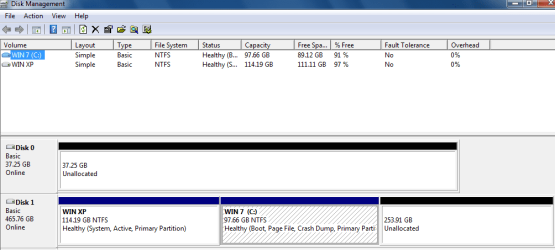
Disk Management Placement not holding

This can also be caused by adding a PCI Raid Card.

Before adding a PCI Raid Card.
BFK001.PNG

After adding a PCI Raid Card.

BFK003.PNG
 

My Computer My Computer

OS
ME/XP/Vista/Win7
Last post on previous page - That is the plan - Just have 1 big partition for the c drive or Windows drive

I have no PCI RAID card.Only slot being used is the blue video card slot

I am at the part where I can select the HDD driver. Someone mentioned before they got the driver from intel rather than the MB manufacturer site. I am trying to get intel as well from https://downloadcenter.intel.com/SearchResult.aspx?lang=eng&keyword="AHCI+SATA+Driver" but when I click desktop boards I need a series #. How do I know if my MB is 5, 6 or 7 series chipset?
 

My Computer My Computer

Computer type
PC/Desktop
Computer Manufacturer/Model Number
Custom built by myself
OS
Windows 7 Ultimate 64Bit (SP1)
CPU
Intel® Core™ i3-6100 Processor (3M Cache, 3.70 GHz)
Motherboard
Asus B150M-C D3
Memory
Kingston 16GB Hyper X Fury Blue DDR3 1600Mhz (2x 8GB sticks)
Graphics Card(s)
On board (Asus B150M-C D3) VGA and DVI on Extended Desktop
Sound Card
On Board (Asus B150M-C D3)
Monitor(s) Displays
Left DVI: Samsung 920WM - Right VGA: Samsung 941BW
Hard Drives
WD WD5000AADS 500GB SATA Green--WD 1TB WD1001FALS SATA Black--WD 320GB WD3200JB
PSU
Cooler Master 700W Silent Pro
Case
See through Side panel--right hinge door--5x 5" & 2x 3" bays
Cooling
Side, Front, Rear fan & Power supply fan
Keyboard
Logitech MX5000 BT
Mouse
Logitech MX500
Internet Speed
40Mb down--10Mb Up
Antivirus
AVG Internet Security
Browser
Chrome-Firefox-Opera-IE-TOR
Other Info
2x LG DVD-RW--NZXT Fan contoller--4in1 Card reader
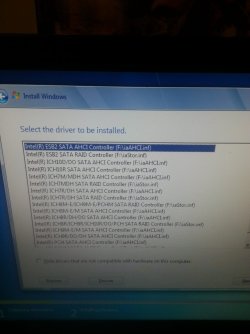
The SATA drivers from the ASUS site all disappear in the setup when "Hide drivers that are not compatible with hardware on this computer" is checked. Strange since I got them from the page of my specific motherboard ASUSTeK Computer Inc. -Support- Drivers and Download P5Q PRO TURBO SATA drivers 3rd from the bottom and I download the 23MB package for Windows 7 64bit and none are compatible
 

Attachments

  • 20140306_193733.jpg
    20140306_193733.jpg
    261.7 KB · Views: 0

My Computer My Computer

Computer type
PC/Desktop
Computer Manufacturer/Model Number
Custom built by myself
OS
Windows 7 Ultimate 64Bit (SP1)
CPU
Intel® Core™ i3-6100 Processor (3M Cache, 3.70 GHz)
Motherboard
Asus B150M-C D3
Memory
Kingston 16GB Hyper X Fury Blue DDR3 1600Mhz (2x 8GB sticks)
Graphics Card(s)
On board (Asus B150M-C D3) VGA and DVI on Extended Desktop
Sound Card
On Board (Asus B150M-C D3)
Monitor(s) Displays
Left DVI: Samsung 920WM - Right VGA: Samsung 941BW
Hard Drives
WD WD5000AADS 500GB SATA Green--WD 1TB WD1001FALS SATA Black--WD 320GB WD3200JB
PSU
Cooler Master 700W Silent Pro
Case
See through Side panel--right hinge door--5x 5" & 2x 3" bays
Cooling
Side, Front, Rear fan & Power supply fan
Keyboard
Logitech MX5000 BT
Mouse
Logitech MX500
Internet Speed
40Mb down--10Mb Up
Antivirus
AVG Internet Security
Browser
Chrome-Firefox-Opera-IE-TOR
Other Info
2x LG DVD-RW--NZXT Fan contoller--4in1 Card reader
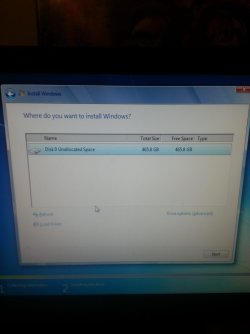
I skipped the drivers since none were compatible. I did not see any place to create and format partion. On the Drive options screen format was greyed out but I did just finish formatting so that might be why. I clicked next hoping that might bring a partition screen but it began the installation. Hopefully it works but for some reason I have a feeling I am going to end up with another System reserved partition is the screen right before the install started and that is the ONLY drive hooked into the computer. I even pulled the 4in1 USB reader out.
 

Attachments

  • 20140306_194631.jpg
    20140306_194631.jpg
    116.9 KB · Views: 1

My Computer My Computer

Computer type
PC/Desktop
Computer Manufacturer/Model Number
Custom built by myself
OS
Windows 7 Ultimate 64Bit (SP1)
CPU
Intel® Core™ i3-6100 Processor (3M Cache, 3.70 GHz)
Motherboard
Asus B150M-C D3
Memory
Kingston 16GB Hyper X Fury Blue DDR3 1600Mhz (2x 8GB sticks)
Graphics Card(s)
On board (Asus B150M-C D3) VGA and DVI on Extended Desktop
Sound Card
On Board (Asus B150M-C D3)
Monitor(s) Displays
Left DVI: Samsung 920WM - Right VGA: Samsung 941BW
Hard Drives
WD WD5000AADS 500GB SATA Green--WD 1TB WD1001FALS SATA Black--WD 320GB WD3200JB
PSU
Cooler Master 700W Silent Pro
Case
See through Side panel--right hinge door--5x 5" & 2x 3" bays
Cooling
Side, Front, Rear fan & Power supply fan
Keyboard
Logitech MX5000 BT
Mouse
Logitech MX500
Internet Speed
40Mb down--10Mb Up
Antivirus
AVG Internet Security
Browser
Chrome-Firefox-Opera-IE-TOR
Other Info
2x LG DVD-RW--NZXT Fan contoller--4in1 Card reader
Reinstall done...System reserved is back and the 2 1MB and 1.02MB unallocated partitions are still there as well so there are now 4 partitions on this one drive....WHAT THE F**K
 

My Computer My Computer

Computer type
PC/Desktop
Computer Manufacturer/Model Number
Custom built by myself
OS
Windows 7 Ultimate 64Bit (SP1)
CPU
Intel® Core™ i3-6100 Processor (3M Cache, 3.70 GHz)
Motherboard
Asus B150M-C D3
Memory
Kingston 16GB Hyper X Fury Blue DDR3 1600Mhz (2x 8GB sticks)
Graphics Card(s)
On board (Asus B150M-C D3) VGA and DVI on Extended Desktop
Sound Card
On Board (Asus B150M-C D3)
Monitor(s) Displays
Left DVI: Samsung 920WM - Right VGA: Samsung 941BW
Hard Drives
WD WD5000AADS 500GB SATA Green--WD 1TB WD1001FALS SATA Black--WD 320GB WD3200JB
PSU
Cooler Master 700W Silent Pro
Case
See through Side panel--right hinge door--5x 5" & 2x 3" bays
Cooling
Side, Front, Rear fan & Power supply fan
Keyboard
Logitech MX5000 BT
Mouse
Logitech MX500
Internet Speed
40Mb down--10Mb Up
Antivirus
AVG Internet Security
Browser
Chrome-Firefox-Opera-IE-TOR
Other Info
2x LG DVD-RW--NZXT Fan contoller--4in1 Card reader
System Reserved partition has absolutely nothing to do with which disk number your SATA drives will show up as. You were provided with a link that explains the mysteries of this directly from MS: Disk drive numbers may not correspond to the SATA channel numbers when you install Windows on a computer that has multiple SATA or RAID disks.

Further there is no reason to be concerned about this at all. The only problem that can come from the OS disk not being in DISK0 is if you run Startup Repair or reinstall without unplugging the other drive. Then it might derail your System boot files to the first Primary partition in order if that is not the System Reserved or C drive. But there are ways to avoid this such as simply converting your data drive's partitions to Logical which cannot receive boot files. http://www.partitionwizard.com/vide...l-partition/primary-or-logical-partition.htmlHow to set partition as Primary or Logical with Partition Wizard

This thread spun out of control so quickly my head is spinning just from trying to keep up. But if you'll post back another screenshot and restate what it is you want to do, I will give you the steps that have worked for tens of thousands of others since Win7 was in beta.
 
Last edited:
gregrocker said:
This thread spun out of control so quickly my head is spinning just from trying to keep up.
:ditto:

@ SomeUserName
theog said:
This can also be caused by adding a PCI Raid Card.

SomeUserName said:
I have no PCI RAID card.Only slot being used is the blue video card slot

Just show another cause.
 

My Computer My Computer

OS
ME/XP/Vista/Win7
I don't understand the O.P. problem, if he's always booting from C:
Why worry about it.
In BIOS , I have it set USB, Optical and then the Adata.
Which it always does, I may have switched data cables during maintenance but the system performs
as expected. So why worry?
 
Last edited:

My Computer My Computer

Computer type
PC/Desktop
Computer Manufacturer/Model Number
Custom Build
OS
W7 Ultimate 32-bit
Motherboard
ASUS M4N68T-M V2
PSU
Seasonic G-series 650W, can't afford the X,still Top/Line.
Case
Cooler Master Storm Scout 2, Ghost White version.
Cooling
5 fans....no liquid needed, everything under 100F
Keyboard
veteran PS2
Mouse
veteran PS2
Internet Speed
50Mps
Antivirus
AVG 2016 + TinyWall-to enhance Windows 7 firewall.
Browser
several
I skipped the drivers since none were compatible. I did not see any place to create and format partion. On the Drive options screen format was greyed out but I did just finish formatting so that might be why. I clicked next hoping that might bring a partition screen but it began the installation. Hopefully it works but for some reason I have a feeling I am going to end up with another System reserved partition is the screen right before the install started and that is the ONLY drive hooked into the computer. I even pulled the 4in1 USB reader out.

Format was grayed out because you didn`t make the partition yet, you would simply make a partition out of the 465 GB un allocated space that it shows you right there in the picture.

@Blueguy, the OP wants C to show as Disk 0 and he does not want a system reserved partition.
 

My Computer My Computer

Computer type
PC/Desktop
Computer Manufacturer/Model Number
Skylake Special #666
OS
Windows 10 Pro x64
CPU
Intel Core i7 6700K
Motherboard
Asus Sabertooth Z170 Mark 1
Memory
GSkill TridentZ RGB 16GB 3600 16-16-16-36
Graphics Card(s)
EVGA GTX 980 Ti SC x2
Sound Card
Realtek High Definition
Monitor(s) Displays
AOC G2460PG
Screen Resolution
1920 x 1080 144Hz
Hard Drives
Samsung 860 Pro 256GB, Seagate Barracuda 4TB x2
PSU
EVGA 1000 P2, EVGA White Custom Braided Cables
Case
Corsair Vengeance C70 Gunmetal Black
Cooling
Corsair H100i v2, Corsair ML120 x2, Thermal Grizzly Kryonaut
Keyboard
Logitech G910 Orion Spectrum
Mouse
Logitech G700s
Internet Speed
Verizon Fios Quantum Gateway 75/75
Antivirus
Windows Defender, Malwarebytes Free 3.8.3
Browser
Chrome
Other Info
Corsair SP120 x4, LG Blu-ray Drive, Durabrand HT-395 100 Watt Dolby Digital Amp, Corsair H2100 Wireless 7.1 Headset
Reinstall done...System reserved is back and the 2 1MB and 1.02MB unallocated partitions are still there as well so there are now 4 partitions on this one drive....WHAT THE F**K

Unallocated space is not a partition.
 

My Computer My Computer

Computer type
PC/Desktop
Computer Manufacturer/Model Number
Skylake Special #666
OS
Windows 10 Pro x64
CPU
Intel Core i7 6700K
Motherboard
Asus Sabertooth Z170 Mark 1
Memory
GSkill TridentZ RGB 16GB 3600 16-16-16-36
Graphics Card(s)
EVGA GTX 980 Ti SC x2
Sound Card
Realtek High Definition
Monitor(s) Displays
AOC G2460PG
Screen Resolution
1920 x 1080 144Hz
Hard Drives
Samsung 860 Pro 256GB, Seagate Barracuda 4TB x2
PSU
EVGA 1000 P2, EVGA White Custom Braided Cables
Case
Corsair Vengeance C70 Gunmetal Black
Cooling
Corsair H100i v2, Corsair ML120 x2, Thermal Grizzly Kryonaut
Keyboard
Logitech G910 Orion Spectrum
Mouse
Logitech G700s
Internet Speed
Verizon Fios Quantum Gateway 75/75
Antivirus
Windows Defender, Malwarebytes Free 3.8.3
Browser
Chrome
Other Info
Corsair SP120 x4, LG Blu-ray Drive, Durabrand HT-395 100 Watt Dolby Digital Amp, Corsair H2100 Wireless 7.1 Headset
I skipped the drivers since none were compatible. I did not see any place to create and format partion. On the Drive options screen format was greyed out but I did just finish formatting so that might be why. I clicked next hoping that might bring a partition screen but it began the installation. Hopefully it works but for some reason I have a feeling I am going to end up with another System reserved partition is the screen right before the install started and that is the ONLY drive hooked into the computer. I even pulled the 4in1 USB reader out.

Format was grayed out because you didn`t make the partition yet, you would simply make a partition out of the 465 GB un allocated space that it shows you right there in the picture.

@Blueguy, the OP wants C to show as Disk 0 and he does not want a system reserved partition.

But OP can not have C: as SATA 0 & Disk 0, as the BIOS & Windows are talking to each other in that way.

With or Without System Reserved Partition, reinstalling or repair install.
 

My Computer My Computer

OS
ME/XP/Vista/Win7
Ah! I'm wondering if he's using one of those crazy vendor 'recovery disk'.
I had to work on a Gateway once that only had one of those, not a proper install disk.
Retail or OEM it too kept shrinking the free space on the drive, so I did the next step below.
I'd suggest he try to get an OEM DVD or download an .iso, burn, use the key from the label,
which should be on the case somewhere.
He should re-virgin his drive, set active in disk management, which means, at least in my past,
using another machine to kill that reserved partition.
 

My Computer My Computer

Computer type
PC/Desktop
Computer Manufacturer/Model Number
Custom Build
OS
W7 Ultimate 32-bit
Motherboard
ASUS M4N68T-M V2
PSU
Seasonic G-series 650W, can't afford the X,still Top/Line.
Case
Cooler Master Storm Scout 2, Ghost White version.
Cooling
5 fans....no liquid needed, everything under 100F
Keyboard
veteran PS2
Mouse
veteran PS2
Internet Speed
50Mps
Antivirus
AVG 2016 + TinyWall-to enhance Windows 7 firewall.
Browser
several
Ah! I'm wondering if he's using one of those crazy vendor 'recovery disk'.
I had to work on a Gateway once that only had one of those, not a proper install disk.
Retail or OEM it too kept shrinking the free space on the drive, so I did the next step below.
I'd suggest he try to get an OEM DVD or download an .iso, burn, use the key from the label,
which should be on the case somewhere.
He should re-virgin his drive, set active in disk management, which means, at least in my past,
using another machine to kill that reserved partition.


Post 16

theog said:
I have three of the same motherboards.(not your motherboard)


On Vista.

SATA 0 = Disk 0 OS

SATA 1 = Disk 1 Back up


On Windows 7.

SATA 0 = Disk 1 OS

SATA 1 = Disk 0 Back up


On Windows 8/8.1.

SATA 0 = Disk 0 OS

SATA 1 = Disk 1 Back up


Disk drive numbers may not correspond to the SATA channel numbers when you install Windows on a computer that has multiple SATA or RAID disks
 

My Computer My Computer

OS
ME/XP/Vista/Win7
theog;2713053 Post 16 [/QUOTE said:
Ok, I see, you're pointing to the original M$ knowledge base article.
So my solution won't work, as I usually revert to steps for a new build.
Win7 does things its' own way. :shock:
 

My Computer My Computer

Computer type
PC/Desktop
Computer Manufacturer/Model Number
Custom Build
OS
W7 Ultimate 32-bit
Motherboard
ASUS M4N68T-M V2
PSU
Seasonic G-series 650W, can't afford the X,still Top/Line.
Case
Cooler Master Storm Scout 2, Ghost White version.
Cooling
5 fans....no liquid needed, everything under 100F
Keyboard
veteran PS2
Mouse
veteran PS2
Internet Speed
50Mps
Antivirus
AVG 2016 + TinyWall-to enhance Windows 7 firewall.
Browser
several
Blue Guy, mark all of your Active partitions except C Inactive: Partition - Mark as Inactive - Windows 7 Forums. Only the OS partition or it's intended boot partition should be Active - ever.

There is no good reason to avoid the System Reserved partition I know of. I would not waste the time to even contemplate it, but just accept whatever it gives you. If you don't have the drive pre-partitioned or if you delete partitions during install, it will issue SysReservd.
 
Sorry, I'm not the O.P.

I think this is what the O.P. is trying to achieve;

"If you do not want to have the 100 MB System Reserved partition and only the Windows 7 C: partition on a HDD or SSD after installation, then select a formatted partition or drive to install Windows 7 on. If there are any partitions on the disk, you won't get the 100 MB System Reserved."
http://www.sevenforums.com/tutorials/1649-clean-install-windows-7-a.html

He wants to get rid of the reserved space and we've already tried to tell him that BIOS and
Windows7 enumerates the drives differently, he'll probably never get C: to be Disk 0, as theog
explained in his dialogue box.

There is no good reason to avoid the System Reserved partition I know of. I would not waste the time to even contemplate it, but just accept whatever it gives you. If you don't have the drive pre-partitioned or if you delete partitions during install, it will issue SysReservd.

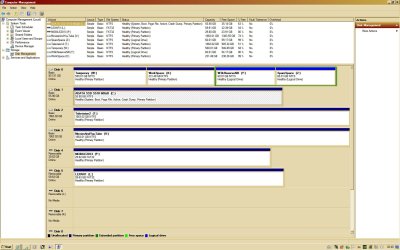
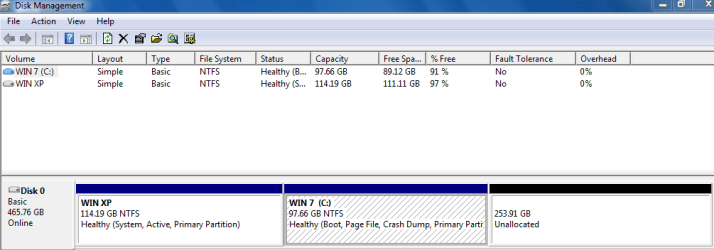
I've never encountered this System Reserved, so my installation habits must be different or my habit of formatting new boot drives on the previous machine, prior to installing it on a new build. See my screen cap.
 
Last edited:

My Computer My Computer

Computer type
PC/Desktop
Computer Manufacturer/Model Number
Custom Build
OS
W7 Ultimate 32-bit
Motherboard
ASUS M4N68T-M V2
PSU
Seasonic G-series 650W, can't afford the X,still Top/Line.
Case
Cooler Master Storm Scout 2, Ghost White version.
Cooling
5 fans....no liquid needed, everything under 100F
Keyboard
veteran PS2
Mouse
veteran PS2
Internet Speed
50Mps
Antivirus
AVG 2016 + TinyWall-to enhance Windows 7 firewall.
Browser
several
I realize that you are not the OP, but you also have stray partitions marked Active which should not be. ;)

The OP did not say he wanted to get rid of System Reserved, only asked if that might resolve his issue. It will not.
 
I realize that you are not the OP, but you also have stray partitions marked Active which should not be. ;)

Yikes!, it was a hot summer in August, can't believe I missed that! :o
I must have been sleepy, moving drives from one box to another.
Thanks for catching that, although it hasn't affected operations.;)
 

Attachments

  • disk2.jpg
    disk2.jpg
    181.4 KB · Views: 3

My Computer My Computer

Computer type
PC/Desktop
Computer Manufacturer/Model Number
Custom Build
OS
W7 Ultimate 32-bit
Motherboard
ASUS M4N68T-M V2
PSU
Seasonic G-series 650W, can't afford the X,still Top/Line.
Case
Cooler Master Storm Scout 2, Ghost White version.
Cooling
5 fans....no liquid needed, everything under 100F
Keyboard
veteran PS2
Mouse
veteran PS2
Internet Speed
50Mps
Antivirus
AVG 2016 + TinyWall-to enhance Windows 7 firewall.
Browser
several
Re Read posts #17 and #22

The OP states he was trying to get rid of the system reserved partition. ;)

In #22 he states he wants to have 1 large partition.

I IM him with my cell number, hopefully he can give me a ring.
 

My Computer My Computer

Computer type
PC/Desktop
Computer Manufacturer/Model Number
Skylake Special #666
OS
Windows 10 Pro x64
CPU
Intel Core i7 6700K
Motherboard
Asus Sabertooth Z170 Mark 1
Memory
GSkill TridentZ RGB 16GB 3600 16-16-16-36
Graphics Card(s)
EVGA GTX 980 Ti SC x2
Sound Card
Realtek High Definition
Monitor(s) Displays
AOC G2460PG
Screen Resolution
1920 x 1080 144Hz
Hard Drives
Samsung 860 Pro 256GB, Seagate Barracuda 4TB x2
PSU
EVGA 1000 P2, EVGA White Custom Braided Cables
Case
Corsair Vengeance C70 Gunmetal Black
Cooling
Corsair H100i v2, Corsair ML120 x2, Thermal Grizzly Kryonaut
Keyboard
Logitech G910 Orion Spectrum
Mouse
Logitech G700s
Internet Speed
Verizon Fios Quantum Gateway 75/75
Antivirus
Windows Defender, Malwarebytes Free 3.8.3
Browser
Chrome
Other Info
Corsair SP120 x4, LG Blu-ray Drive, Durabrand HT-395 100 Watt Dolby Digital Amp, Corsair H2100 Wireless 7.1 Headset
Back
Top