bkcouturier
New member
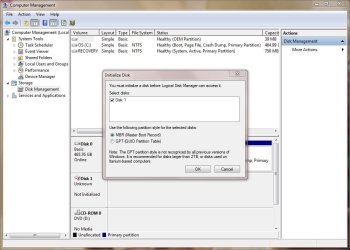
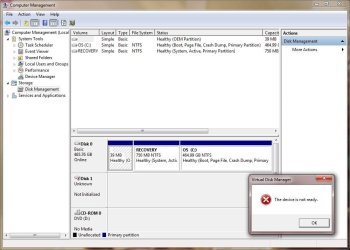
I ran BIOS diagnostics on a Dell OptiPlex 3010 yesterday and received an error code (2000-0142) - short self test unsuccessful. I pulled the drive and swapped a new SATA drive to get the user back up and running quickly. I'm trying to connect the drive with the error to my laptop using a StarTech USB 2.0 to IDE SATA Adapter. When I open Disk Management I see Disk 0 (my laptop drive) and Disk 1 (the connected drive). It says Unknown / Not Initialized. When I right click and try to initialize it says "The device is not ready." I've tried the more actions > refresh / rescan. Now when I right click the option to Initialize Disk is grayed out and I can only see Offline and Properties.
I browsed through a thread from about 2 years ago and couldn't find a helpful solution.
The drive: Western Digital 250GB SATA / 16MB Cache - WD2500AAKX
I browsed through a thread from about 2 years ago and couldn't find a helpful solution.
The drive: Western Digital 250GB SATA / 16MB Cache - WD2500AAKX
My Computer
- Computer type
- Laptop
- Computer Manufacturer/Model Number
- Dell Latitude E6430
- OS
- Windows 7 Professional 64-bit
- CPU
- Intel Core i5-3380M @ 2.90GHz
- Memory
- 6.00 GB
- Graphics Card(s)
- Intel HD Graphics 4000 / NVIDIA NVS 5200M
- Hard Drives
- HGST Travelstar Z7K500 500GB / WD My Passport Ultra 2TB
- Antivirus
- Symantec Endpoint Protection 12.1.3001.165
- Browser
- Chrome / IE 10