Solved Disk Management - Unknown / Not Initialized Drive

bkcouturier

New member
Local time
10:14 AM
Messages
4
Location
Dayton
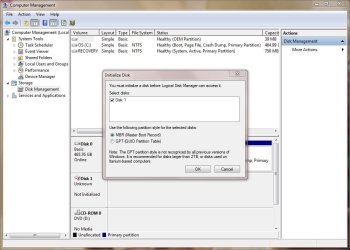
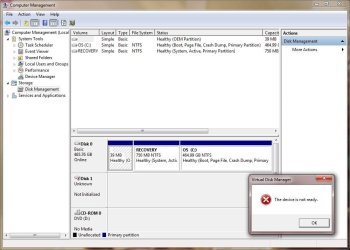
I ran BIOS diagnostics on a Dell OptiPlex 3010 yesterday and received an error code (2000-0142) - short self test unsuccessful. I pulled the drive and swapped a new SATA drive to get the user back up and running quickly. I'm trying to connect the drive with the error to my laptop using a StarTech USB 2.0 to IDE SATA Adapter. When I open Disk Management I see Disk 0 (my laptop drive) and Disk 1 (the connected drive). It says Unknown / Not Initialized. When I right click and try to initialize it says "The device is not ready." I've tried the more actions > refresh / rescan. Now when I right click the option to Initialize Disk is grayed out and I can only see Offline and Properties.

I browsed through a thread from about 2 years ago and couldn't find a helpful solution.

The drive: Western Digital 250GB SATA / 16MB Cache - WD2500AAKX
 

My Computer

Computer type
Laptop
Computer Manufacturer/Model Number
Dell Latitude E6430
OS
Windows 7 Professional 64-bit
CPU
Intel Core i5-3380M @ 2.90GHz
Memory
6.00 GB
Graphics Card(s)
Intel HD Graphics 4000 / NVIDIA NVS 5200M
Hard Drives
HGST Travelstar Z7K500 500GB / WD My Passport Ultra 2TB
Antivirus
Symantec Endpoint Protection 12.1.3001.165
Browser
Chrome / IE 10
Have you attempted to run Western Digital's Data Lifeguard diagnostic software? It has a short test and an extended test.

Are you trying to recover anything from this drive? Or just trying to find out if it's broken?
 

My Computer

Computer type
PC/Desktop
Computer Manufacturer/Model Number
Ignatz Special; 4 speed manual gearbox; factory air conditioning; one of one
OS
Windows 7 Home Premium SP1, 64-bit
CPU
Intel Skylake i5-6600K, not overclocked
Motherboard
AsRock Z170M Extreme 4, micro ATX
Memory
8 GB HyperX DDR4-2666 (2 x 4 GB)
Graphics Card(s)
none; graphics are integrated on CPU
Sound Card
onboard: Realtek ALC1150; external: USB Behringer UF0-202
Monitor(s) Displays
Dell S2340M 23 inch IPS
Screen Resolution
1600 x 900
Hard Drives
System: Crucial MX100 series SSD, 128 GB;
Data: Samsung Spinpoint 103SJ, 1 TB;
Backup: WD Caviar Green WD30EZRX-00D8PB0, 3 TB
PSU
Rosewill SilentNight 500 watt fanless, semi-modular
Case
Antec Solo II
Cooling
Noctua NH-U12S; Noctua F12 intake, Noctua S12A exhaust
Keyboard
Microsoft 200 6JH-00001 USB
Mouse
Dell or Microsoft optical wired; USB
Antivirus
Microsoft Security Essentials and Malwarebytes Premium
Browser
Pale Moon
Other Info
All fans PWM; speeds at idle: CPU circa 500 rpm; intake circa 600 rpm; exhaust circa 600 rpm; CPU temps 27 idle and 47 C load in a warm room (27 C/81 F) when running Intel Extreme Tuning Utility stress test.
Hi bk, can you post a picture of the full Disk management with the HD plugged in?
 

My Computer

Computer type
PC/Desktop
Computer Manufacturer/Model Number
Custom
OS
Dual Boot: Windows 8.1 & Server 2012r2 VMs: Kali Linux, Backbox, Matriux, Windows 8.1
CPU
A10 7700 Kavari SteamRoller
Motherboard
ASUS A88XM-PLUS (FM2+ )
Memory
8GB DDR3 SDRAM PC3-8500
Graphics Card(s)
1024MB ATI AMD Radeon R7 Graphics
Sound Card
Realtek High Definition Audio
Monitor(s) Displays
Samsung
Hard Drives
SSD Crucial 120gb
WD VelociRaptor 1tb
PSU
Rosewill Gaming 650w
Case
Rosewill Galaxy 2
Internet Speed
55/12
Antivirus
Malwarebytes, MSE, SAS
Browser
FireFox, Chrome
Yes, I ran both and they both passed. I'm trying to recover user data to transfer to the new drive.
 

My Computer

Computer type
Laptop
Computer Manufacturer/Model Number
Dell Latitude E6430
OS
Windows 7 Professional 64-bit
CPU
Intel Core i5-3380M @ 2.90GHz
Memory
6.00 GB
Graphics Card(s)
Intel HD Graphics 4000 / NVIDIA NVS 5200M
Hard Drives
HGST Travelstar Z7K500 500GB / WD My Passport Ultra 2TB
Antivirus
Symantec Endpoint Protection 12.1.3001.165
Browser
Chrome / IE 10
See attached (2) images...
 

Attachments

  • DiskManagement1.JPG
    DiskManagement1.JPG
    84.5 KB · Views: 0
  • DiskManagement2.JPG
    DiskManagement2.JPG
    80 KB · Views: 1

My Computer

Computer type
Laptop
Computer Manufacturer/Model Number
Dell Latitude E6430
OS
Windows 7 Professional 64-bit
CPU
Intel Core i5-3380M @ 2.90GHz
Memory
6.00 GB
Graphics Card(s)
Intel HD Graphics 4000 / NVIDIA NVS 5200M
Hard Drives
HGST Travelstar Z7K500 500GB / WD My Passport Ultra 2TB
Antivirus
Symantec Endpoint Protection 12.1.3001.165
Browser
Chrome / IE 10
Unknown and not initialized.

Sounds like you should first concentrate on recovering the partitions--as opposed to recovering the data. If you can do the former, the files may just be sitting there and you wouldn't need to do any formal file recovery.

I think the recommended tool is Partition Wizard--it has a couple of scans. Try the quick test first and see where it leads you. I'm not an expert on PW, but there are a couple of guys here who are quite skilled in partition recovery.

If you can't recover the partitions, then you would be forced to try data recovery apps proper.
 

My Computer

Computer type
PC/Desktop
Computer Manufacturer/Model Number
Ignatz Special; 4 speed manual gearbox; factory air conditioning; one of one
OS
Windows 7 Home Premium SP1, 64-bit
CPU
Intel Skylake i5-6600K, not overclocked
Motherboard
AsRock Z170M Extreme 4, micro ATX
Memory
8 GB HyperX DDR4-2666 (2 x 4 GB)
Graphics Card(s)
none; graphics are integrated on CPU
Sound Card
onboard: Realtek ALC1150; external: USB Behringer UF0-202
Monitor(s) Displays
Dell S2340M 23 inch IPS
Screen Resolution
1600 x 900
Hard Drives
System: Crucial MX100 series SSD, 128 GB;
Data: Samsung Spinpoint 103SJ, 1 TB;
Backup: WD Caviar Green WD30EZRX-00D8PB0, 3 TB
PSU
Rosewill SilentNight 500 watt fanless, semi-modular
Case
Antec Solo II
Cooling
Noctua NH-U12S; Noctua F12 intake, Noctua S12A exhaust
Keyboard
Microsoft 200 6JH-00001 USB
Mouse
Dell or Microsoft optical wired; USB
Antivirus
Microsoft Security Essentials and Malwarebytes Premium
Browser
Pale Moon
Other Info
All fans PWM; speeds at idle: CPU circa 500 rpm; intake circa 600 rpm; exhaust circa 600 rpm; CPU temps 27 idle and 47 C load in a warm room (27 C/81 F) when running Intel Extreme Tuning Utility stress test.

My Computer

Computer type
PC/Desktop
Computer Manufacturer/Model Number
Custom
OS
Dual Boot: Windows 8.1 & Server 2012r2 VMs: Kali Linux, Backbox, Matriux, Windows 8.1
CPU
A10 7700 Kavari SteamRoller
Motherboard
ASUS A88XM-PLUS (FM2+ )
Memory
8GB DDR3 SDRAM PC3-8500
Graphics Card(s)
1024MB ATI AMD Radeon R7 Graphics
Sound Card
Realtek High Definition Audio
Monitor(s) Displays
Samsung
Hard Drives
SSD Crucial 120gb
WD VelociRaptor 1tb
PSU
Rosewill Gaming 650w
Case
Rosewill Galaxy 2
Internet Speed
55/12
Antivirus
Malwarebytes, MSE, SAS
Browser
FireFox, Chrome
Alright, I appreciate the advise. I might give that Partition Wizard a go. Thank you.
 

My Computer

Computer type
Laptop
Computer Manufacturer/Model Number
Dell Latitude E6430
OS
Windows 7 Professional 64-bit
CPU
Intel Core i5-3380M @ 2.90GHz
Memory
6.00 GB
Graphics Card(s)
Intel HD Graphics 4000 / NVIDIA NVS 5200M
Hard Drives
HGST Travelstar Z7K500 500GB / WD My Passport Ultra 2TB
Antivirus
Symantec Endpoint Protection 12.1.3001.165
Browser
Chrome / IE 10
Plug the drive into it's PC alone and boot free Partition Wizard to post back a picture of its output which may be different without the USB controller in between. Attach pic using paper clip icon in reply box.

Then you can run Partition Wizard Partition Recovery Wizard - Video Help which is an undelete process in case the partition somehow got deleted which is a long shot in this case.

More likely you have a failing HD so as suggested boot and run the Extended Test for WD Diagnostics for Flash Stick.
 
Yep, greg is absolutely right. When you get the device not ready message, that may be ( but need not necessarily be) due to the controller. So one of the first things that one should try is putting it on to a different controller. What else could be best than connecting it to a direct SATA port and its SATA controller?

You need not necessarily recall the customer's DELL desktop, but can connect it internally to any desktop that may be accessible to you immediately.

Once in, run Western Digital Datalifeguard dignostics for Windows to know the health of the drive.( If you can access the data copy it first even before running the diagnostics.)

EDIT: I do not know what the DELL error code "error code (2000-0142)" signifies. Let us know what it is that prompted you to change the drive.

And ignore all said in this post, if your problem is already resolved for I see the solved tick mark.
 

My Computer

OS
Windows 7 Home Premium 32 bit
Back
Top