Disk not initiazed

biswabhusan

New member
Local time
12:17 PM
Messages
2
HI experts,

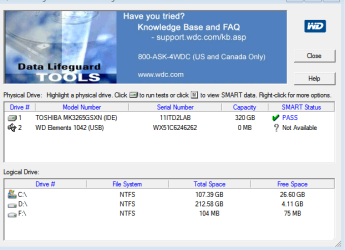
I a having the same error. In my case, the size of the disk is also unknown.I have attached the screenshot for reference.Can anyone please suggest if the solution suggested here will work in my case.

Thanks
Biswa
 

Attachments

  • Capture.PNG
    Capture.PNG
    10 KB · Views: 0
Last edited by a moderator:

My Computer

Computer type
PC/Desktop
OS
windows 7 64bit
Please check your drive with the manufacturer's Test/Diagnostic utility. You may have to use the DOS version.
 

My Computer

OS
Windows 7 Home Premium 32 bit
Hi,
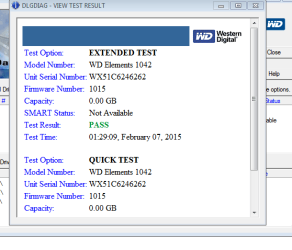
I downloaded the utility & ran it.Attached is the scan result.
I idnt ran Write Zeros as it will erase all the data that I have.Please suggest.
Thanks
Biswa
 

Attachments

  • Capture.PNG
    Capture.PNG
    14.2 KB · Views: 9
  • Capture1.PNG
    Capture1.PNG
    35 KB · Views: 9

My Computer

Computer type
PC/Desktop
OS
windows 7 64bit
False positive. The extended test did not run really. It should have taken quite sometime to check each and every sector. In your case it would have finished in a quick second for it really did not run.

Without doubt, your external HDD is faulty. If it is under warranty, contact WD and get it replaced.

If it is not under warranty, you may remove the HDD from its casing, plug it in as a second drive on a desktop and check whether it reads. (In some WD external drives the interface SATA to USB electronics is integrated into the drive and in such a case you may not be able to connect it as a second drive.)

If it does not read it is the HDD that has died and no DIY data recovery possible. Needs professional data recovery service.
 
Last edited:

My Computer

OS
Windows 7 Home Premium 32 bit
Back
Top