Disk part>List disk - Disks show no media?

Dovahkoon

New member
Local time
6:18 AM
Messages
1
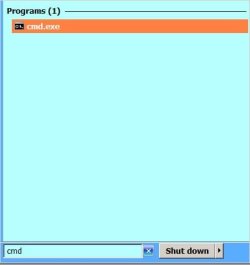
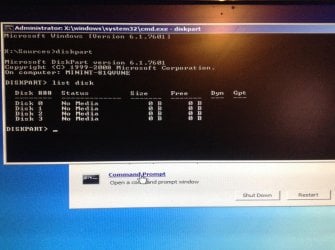
I'm new to this forum, and I have no idea what to do, but I started up my computer, and it didn't start up all the way, so I put in an install/recovery disk and checked my CMD, and it shows a X:\Sources .. I don't know what that is.
I tried inputting C: but it says "The device is not ready."
I entered Diskpart and list disk, and it shows 4 disks, all the statuses say "No media" all the sizes are "0 b" and I have no clue what to do from this point on.
I'm very lost and not so good at computers, so any help to fix this solution will be much appreciated.
 

Attachments
  • image.jpg
    image.jpg
    514 KB · Views: 1

My Computer My Computer

At a glance

Windows 7 Ultimate x64
Computer type
PC/Desktop
Computer Manufacturer/Model Number
HP
OS
Windows 7 Ultimate x64
Hi Dovahkoon, welcome to Seven Forums.
Run CMD as Admin again from within Windows NOT from a DVD.

RR.jpg
 

My Computer My Computer

At a glance

Win7 H.Prem. 32bit+SP1
Computer Manufacturer/Model Number
Look in my Signature.
OS
Win7 H.Prem. 32bit+SP1
Mmmm. That is quite odd.

It is highly unlikely that 4 hard drives died at once, so we need to look at other reasons. The common denominator is the SATA controller - but let's hope it is not that.

For a start, try disconnecting all of the hard drives and optical drives except for the one that contains Windows. Start up and see if it will work with just one drive.
 

My Computer My Computer

At a glance

Windows 7 64 Bit Home Premium SP1i7-3820GSkill F3-14900CL9Q - 16GBEVGA GeForce GTX660 - Driver 352.86
Computer type
PC/Desktop
Computer Manufacturer/Model Number
Home Built - Jan 2013
OS
Windows 7 64 Bit Home Premium SP1
CPU
i7-3820
Motherboard
Asus P9X79-PRO - Bios 4608
Memory
GSkill F3-14900CL9Q - 16GB
Graphics Card(s)
EVGA GeForce GTX660 - Driver 352.86
Sound Card
On board Realtek ALC898
Monitor(s) Displays
Acer S271HL
Screen Resolution
1920 x 1080
Hard Drives
#1- Samsung 840 Pro Series
#2- Western Digital WD1002FAEX Sata3 Black
#3- Western Digital WD1002FAEX Sata3 Black
PSU
Corsair CMPSU-850TX-V2 - 850 watt (by Seasonic)
Case
Corsair Obsidian 550D
Cooling
Standard 3 120mm case fans, Cooler Master Hyper 212 EVO
Keyboard
MS KC-0405
Mouse
Intellimouse 5-button
Internet Speed
56 Mbits/Sec (on a good day)
Antivirus
Avast & Malwarebytes
Browser
Firefox
Other Info
Asus DVD - DRW-24B1ST 24X
The reason it is run from disk is because the OP can't boot into windows. Another suggestion is to boot into bios and see if bios can see the disks.
 

My Computers My Computers

  • At a glance

    Windows 11 ProRyzen 9 5900X32GB G Skill DDR4-3600EVGA RTX 3080 FTW 3 Ultra
    Computer type
    PC/Desktop
    Computer Manufacturer/Model Number
    ALWAYS UNDER CONSTRUCTION
    OS
    Windows 11 Pro
    CPU
    Ryzen 9 5900X
    Motherboard
    Asus X570 Crosshair Viii Hero
    Memory
    32GB G Skill DDR4-3600
    Graphics Card(s)
    EVGA RTX 3080 FTW 3 Ultra
    Sound Card
    On Board/Sennheiser PC37X Headset
    Monitor(s) Displays
    3 X Asus 27"
    Screen Resolution
    2560x1440
    Hard Drives
    2 X 1 TB NVME drives
    PSU
    EVGA 850
    Case
    Phanteks Eclipse P400A
    Cooling
    EVGA 280 AIO
    Keyboard
    Logitech G510s/ Logitech G13
    Mouse
    Logitech G502
    Internet Speed
    24/1
    Antivirus
    ESET/MBAM Pro/SAS Pro
    Browser
    Chrome/ Firefox/ Edge
  • At a glance

    Windows 11 ProIntel Ultra 9 288V32 GB LPDDR5X 8533
    Computer type
    Laptop
    System Manufacturer/Model Number
    Dell 16 Plus
    OS
    Windows 11 Pro
    CPU
    Intel Ultra 9 288V
    Memory
    32 GB LPDDR5X 8533
    Monitor(s) Displays
    16" Mini-LED HDR600 Touch 90 Hz
    Screen Resolution
    2560X1600
    Hard Drives
    1 TB NVME
Hi Dovahkoon,

Tell us what exactly happens when you power on the PC.

Does the BIOS run and carryout the check? Do you hear a single beep on completion of BIOS run?

If the BIOS itself does not run, it may be a problem with the Power Supply - either it has gone bad or shutting down due a defective addon.

I go with TVeblen in troubleshooting. Disconnect all your hard drives (except the system disk with Windows), optical/floppy drives, all cooling fans (other than the ones connected to your motherboard). (Remove both power cables and datacables from the additional addons)

Power on your PC with this minimum configuration and give a verbatim report what exactly happens when you power on without missing any detail.
 

My Computer My Computer

At a glance

Windows 7 Home Premium 32 bit
OS
Windows 7 Home Premium 32 bit
Back
Top