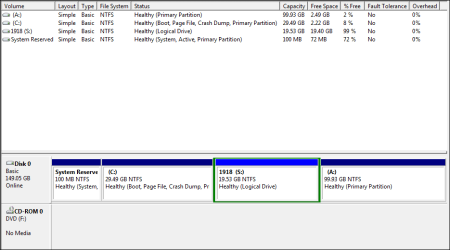
How can i change logical partition into primary and primary into logical??
Download and install
Partition Wizard Home Edition (free).
Also
download the ISO image for Partition Wizard standalone boot CD and burn it to CD, which can do everything the installed PW version can do as well as work on the Windows C-partition itself (which the installed version cannot do while Windows is booted and running).
PW can change logical to primary and primary to logical, as long as the resulting partition arrangement is consistent and meets several requirements:
(1) There can be no more than four primary partitions on a "basic" disk.
(2) In order to support one or more logical partitions on a drive, one of the four possible primary partitions must be conceptually reassigned to instead be called the "extended partition". As such, it is no longer one of the four maximum true primary partitions available for your use, as it is now strictly used to hold the one or more logical partitions sub-defined inside of it. That means there are now only three true primary partitions on the drive available for your use. The re-allocation of that primary partition to become an "extended partition" is done by Partition Wizard as necessary. It is also un-done by Partition Wizard if you delete all logical partitions thus making all of the space now available again for use as a true primary partition, if you want. It might be necessary to delete the entire "extended partition" once you delete all the logical partitions inside of it (thus returning all that total space to "primary unallocated", and then "create partition" type primary, to get it back as a true fourth primary partition for your use.
(3) if you have one or more logical partitions inside that "extended partition", they must be consecutive with no primary partition separating them. They can, however, have "logical unallocated" space between them which theoretically can be used to define more logical partitions.
(4) There is no limit to the number of logical partitions which can be sub-defined inside of a single "extended partition". There can only be one "extended partition" on a drive, but there can be any number of logical partitions sub-defined within that one "extended partition".
You can do anything you want when booted to the standalone boot CD.
So if you boot to the standalone PW CD you can convert logical to primary or vice versa, or do anything else PW can do. This is generally considered the prudent, safer way to do anything with PW.
Or, if your partitions of concern don't involve the C-partition where Windows lives, you can do the same thing through the installed program under Win7. Again, you can use the installed program to do anything not involving the C-partition.