Solved Disk partitions Query

Kumaranil1918

New member
Member
VIP
Local time
5:23 AM
Messages
153
Location
Cuttack,Orissa
Hi,
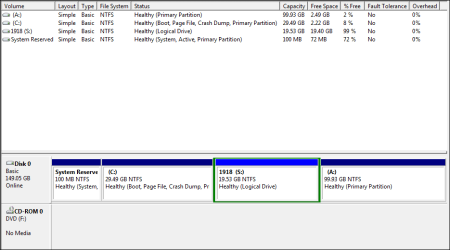
My lap has the disk partitions as shown in the screenshot below.Is it ok to have partitions like this?I'm running win7 professional 32-bit.
 

Attachments

  • My lap disk partitions.PNG
    My lap disk partitions.PNG
    10.6 KB · Views: 33

My Computer

Computer Manufacturer/Model Number
Compaq Presario CQ50-130US
OS
Windows 7 professional 32-bit
CPU
Intel(R) Pentium(R)Dual CPU [email protected] 2.00Ghz
Memory
2.00 GB
Monitor(s) Displays
Generic PnP Monitor
Screen Resolution
1280x800
Internet Speed
Lan
It's fine, as in, it won't break anything. My observations are:

  • 30GB for W7 and installed programs is pretty tight. It will work fine as long as you do not exceed about 85% capacity. Windows needs room to breath in normal usage.
  • The dark blue partitions are Primary Partitions. You can have a maximum of 4 of these. That light blue partition with the green box around it is an Extended Partition and S: is a Logical Drive. This is good. You do not want to create dynamic disks! (unless you mean to) You can have many more than 4 partitions inside an Extended Partition as Logical Drives. For that matter it may make more sense to use the 99GB space as the Extended Partition.
  • Finally, it is a PC convention to use Drive letters A and B for floppy disk drives. Now I know that floppy disks are a fading memory and in most cases you will have no issues with naming a Hard Disk partition A or B, but it can cause a problem with older programs that assume that A or B must be a floppy. If you have no older programs and will never use one then you don't need to worry about this.
 

My Computer

Computer type
PC/Desktop
Computer Manufacturer/Model Number
Home Built - Jan 2013
OS
Windows 7 64 Bit Home Premium SP1
CPU
i7-3820
Motherboard
Asus P9X79-PRO - Bios 4608
Memory
GSkill F3-14900CL9Q - 16GB
Graphics Card(s)
EVGA GeForce GTX660 - Driver 352.86
Sound Card
On board Realtek ALC898
Monitor(s) Displays
Acer S271HL
Screen Resolution
1920 x 1080
Hard Drives
#1- Samsung 840 Pro Series
#2- Western Digital WD1002FAEX Sata3 Black
#3- Western Digital WD1002FAEX Sata3 Black
PSU
Corsair CMPSU-850TX-V2 - 850 watt (by Seasonic)
Case
Corsair Obsidian 550D
Cooling
Standard 3 120mm case fans, Cooler Master Hyper 212 EVO
Keyboard
MS KC-0405
Mouse
Intellimouse 5-button
Internet Speed
56 Mbits/Sec (on a good day)
Antivirus
Avast & Malwarebytes
Browser
Firefox
Other Info
Asus DVD - DRW-24B1ST 24X
Tanx.. Do you mean to say that its f9 now but i have to extend some space in C?? Actually before i allocated 25gb each for C & S drive respectively.Den i found less space for installing softwares so i extended it to 30.I could have mixed S drive in C and remove partition for S but i kept it becaouse if anything happens to my windows den i can install linux in S drive and use it.Dats y i din't delete S partition.
 

My Computer

Computer Manufacturer/Model Number
Compaq Presario CQ50-130US
OS
Windows 7 professional 32-bit
CPU
Intel(R) Pentium(R)Dual CPU [email protected] 2.00Ghz
Memory
2.00 GB
Monitor(s) Displays
Generic PnP Monitor
Screen Resolution
1280x800
Internet Speed
Lan
Tanx.. Do you mean to say that its f9 now but i have to extend some space in C??

You may need to extend space into C. Now or later. It is more of a preference than a rule.
 

My Computer

Computer type
PC/Desktop
Computer Manufacturer/Model Number
Home Built - Jan 2013
OS
Windows 7 64 Bit Home Premium SP1
CPU
i7-3820
Motherboard
Asus P9X79-PRO - Bios 4608
Memory
GSkill F3-14900CL9Q - 16GB
Graphics Card(s)
EVGA GeForce GTX660 - Driver 352.86
Sound Card
On board Realtek ALC898
Monitor(s) Displays
Acer S271HL
Screen Resolution
1920 x 1080
Hard Drives
#1- Samsung 840 Pro Series
#2- Western Digital WD1002FAEX Sata3 Black
#3- Western Digital WD1002FAEX Sata3 Black
PSU
Corsair CMPSU-850TX-V2 - 850 watt (by Seasonic)
Case
Corsair Obsidian 550D
Cooling
Standard 3 120mm case fans, Cooler Master Hyper 212 EVO
Keyboard
MS KC-0405
Mouse
Intellimouse 5-button
Internet Speed
56 Mbits/Sec (on a good day)
Antivirus
Avast & Malwarebytes
Browser
Firefox
Other Info
Asus DVD - DRW-24B1ST 24X
K.. Tank u.. But help me with my post.. Pls read it fully and help me.
 

My Computer

Computer Manufacturer/Model Number
Compaq Presario CQ50-130US
OS
Windows 7 professional 32-bit
CPU
Intel(R) Pentium(R)Dual CPU [email protected] 2.00Ghz
Memory
2.00 GB
Monitor(s) Displays
Generic PnP Monitor
Screen Resolution
1280x800
Internet Speed
Lan
If you intend to install Linux (or any other OS) you may only be able to install it into a Primary partition. Sorry, I do not have any experience with dual boot Linux installations. I know that W7 can be installed to a Logical partition, I just don't know about Linux.

That is why I suggested making your small 19GB S partition the Primary, and your large 99GB partition the Extended/Logical one.

Maybe someone else will come along that has more experience with Linux.

Was there another question I missed?
 

My Computer

Computer type
PC/Desktop
Computer Manufacturer/Model Number
Home Built - Jan 2013
OS
Windows 7 64 Bit Home Premium SP1
CPU
i7-3820
Motherboard
Asus P9X79-PRO - Bios 4608
Memory
GSkill F3-14900CL9Q - 16GB
Graphics Card(s)
EVGA GeForce GTX660 - Driver 352.86
Sound Card
On board Realtek ALC898
Monitor(s) Displays
Acer S271HL
Screen Resolution
1920 x 1080
Hard Drives
#1- Samsung 840 Pro Series
#2- Western Digital WD1002FAEX Sata3 Black
#3- Western Digital WD1002FAEX Sata3 Black
PSU
Corsair CMPSU-850TX-V2 - 850 watt (by Seasonic)
Case
Corsair Obsidian 550D
Cooling
Standard 3 120mm case fans, Cooler Master Hyper 212 EVO
Keyboard
MS KC-0405
Mouse
Intellimouse 5-button
Internet Speed
56 Mbits/Sec (on a good day)
Antivirus
Avast & Malwarebytes
Browser
Firefox
Other Info
Asus DVD - DRW-24B1ST 24X
K.. Tanx..
 

My Computer

Computer Manufacturer/Model Number
Compaq Presario CQ50-130US
OS
Windows 7 professional 32-bit
CPU
Intel(R) Pentium(R)Dual CPU [email protected] 2.00Ghz
Memory
2.00 GB
Monitor(s) Displays
Generic PnP Monitor
Screen Resolution
1280x800
Internet Speed
Lan
If you intend to install Linux (or any other OS) you may only be able to install it into a Primary partition. Sorry, I do not have any experience with dual boot Linux installations. I know that W7 can be installed to a Logical partition, I just don't know about Linux.

That is why I suggested making your small 19GB S partition the Primary, and your large 99GB partition the Extended/Logical one.

Maybe someone else will come along that has more experience with Linux.

Was there another question I missed?

How can i change logical partition into primary and primary into logical??
 

My Computer

Computer Manufacturer/Model Number
Compaq Presario CQ50-130US
OS
Windows 7 professional 32-bit
CPU
Intel(R) Pentium(R)Dual CPU [email protected] 2.00Ghz
Memory
2.00 GB
Monitor(s) Displays
Generic PnP Monitor
Screen Resolution
1280x800
Internet Speed
Lan
How can i change logical partition into primary and primary into logical??
Download and install Partition Wizard Home Edition (free).

Also download the ISO image for Partition Wizard standalone boot CD and burn it to CD, which can do everything the installed PW version can do as well as work on the Windows C-partition itself (which the installed version cannot do while Windows is booted and running).

PW can change logical to primary and primary to logical, as long as the resulting partition arrangement is consistent and meets several requirements:

(1) There can be no more than four primary partitions on a "basic" disk.

(2) In order to support one or more logical partitions on a drive, one of the four possible primary partitions must be conceptually reassigned to instead be called the "extended partition". As such, it is no longer one of the four maximum true primary partitions available for your use, as it is now strictly used to hold the one or more logical partitions sub-defined inside of it. That means there are now only three true primary partitions on the drive available for your use. The re-allocation of that primary partition to become an "extended partition" is done by Partition Wizard as necessary. It is also un-done by Partition Wizard if you delete all logical partitions thus making all of the space now available again for use as a true primary partition, if you want. It might be necessary to delete the entire "extended partition" once you delete all the logical partitions inside of it (thus returning all that total space to "primary unallocated", and then "create partition" type primary, to get it back as a true fourth primary partition for your use.

(3) if you have one or more logical partitions inside that "extended partition", they must be consecutive with no primary partition separating them. They can, however, have "logical unallocated" space between them which theoretically can be used to define more logical partitions.

(4) There is no limit to the number of logical partitions which can be sub-defined inside of a single "extended partition". There can only be one "extended partition" on a drive, but there can be any number of logical partitions sub-defined within that one "extended partition".

You can do anything you want when booted to the standalone boot CD.

So if you boot to the standalone PW CD you can convert logical to primary or vice versa, or do anything else PW can do. This is generally considered the prudent, safer way to do anything with PW.

Or, if your partitions of concern don't involve the C-partition where Windows lives, you can do the same thing through the installed program under Win7. Again, you can use the installed program to do anything not involving the C-partition.

 

My Computer

Computer type
PC/Desktop
Computer Manufacturer/Model Number
Home-built, two systems (1) and (2)
OS
Windows 7 Pro x64 (1), Win7 Pro X64 (2)
CPU
i5-3350p 3.1Ghz/6MB-cache (1); E8400 3.0Ghz/6MB-cache (2)
Motherboard
ASUS P8Z77-V Pro (1); ASUS P5Q3 (2)
Memory
8GB PC3-12800 DDR3 (1); 4GB PC3-10600 DDR3 (2)
Graphics Card(s)
ATI HD7750 (1), (see TV cards); ATI R7 250 (2)
Sound Card
Realtek ALC892 HD Audio (1); Realtek ALC1200 HD Audio (2)
Monitor(s) Displays
Eizo HD2441W LCD, Eizo S2433W (1); Eizo 24" S2433W (2)
Screen Resolution
1920x1200, 1920x1200 (1); 1920x1200 (2)
Hard Drives
(1) 1TB SATA-II (7200RPM), 2x2TB SATA-III (7200RPM), 250GB SATA-III (10000RPM) for OS; 2x2TB external USB 3.0

(2) 320GB SATA-II (7200RPM), 750GB SATA-II (7200RPM), 150GB SATA-II (10000RPM) for OS; 2TB external USB 3.0
PSU
Nesteq ECS-6001 600W (1); Nesteq ECS-5001 500W (2)
Case
Acousti-Case 360 (1) and (2)
Cooling
Noctua NH-U12P SE2 for CPU, 2x120mm case fans (1) and (2)
Keyboard
IBM PS/2 (1) and (2)
Mouse
Logitech MX Revolution wireless (1); Microsoft wired (2)
Internet Speed
100mbps down / 10mbps up
Antivirus
Microsoft Security Essentials; Malwarebyte Anti-Malware Pro
Browser
Firefox
Other Info
Ceton InfiniTV 4-tuner cablecard-enabled TV card as well as Hauppauge HVR-2250 OTA/ATSC 2-tuner TV card in (1), running under Win7 WMC
Tank u all for ur help & support in solving my problems.I reinstalled my windows 7 PE 32-bit on 14.04.12.
 

My Computer

Computer Manufacturer/Model Number
Compaq Presario CQ50-130US
OS
Windows 7 professional 32-bit
CPU
Intel(R) Pentium(R)Dual CPU [email protected] 2.00Ghz
Memory
2.00 GB
Monitor(s) Displays
Generic PnP Monitor
Screen Resolution
1280x800
Internet Speed
Lan
Back
Top