DISKPART : At PC Startup

Open Windows DISKPART at System Startup
This is an outline of the methods to boot (start) the PC to open DISKPART so you can manipulate the Solid State Drive (SSD) or Hard Disk Drive (HDD) partitions before you start an installation or for any other reason.

Let's get started!


Method One

Windows 7 Full Installer


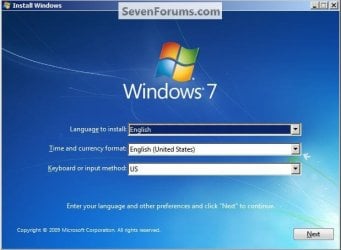
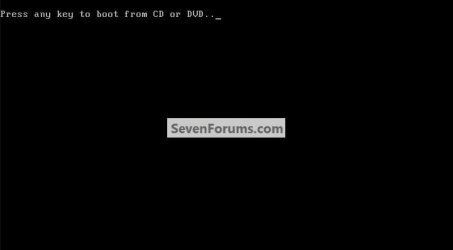
1) In the BIOS set the boot order to boot first from the CD/DVD Drive, insert the Windows 7 instalation DVD and restart the PC, at the first black/screen hit the space bar for the "Press any key ... " prompt, then at the "Language" screen hold the "Shift" key and hit the F10 hot-key to open a command window.


click any image to enlarge
Any Key2.jpg
Select3.jpg
2) In the command window that opens type diskpart <enter> to get started.

To close the command window when finished type exit <enter> to leave diskpart, then exit <enter> again to close the command window and get back to the installer.
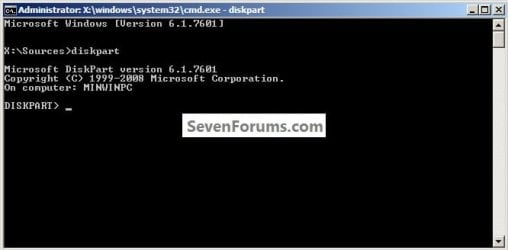
DISKPART.jpg


Method Two

Windows Repair CD


In the BIOS set the boot order to boot first from the CD/DVD Drive, insert the created repair CD and restart the PC.

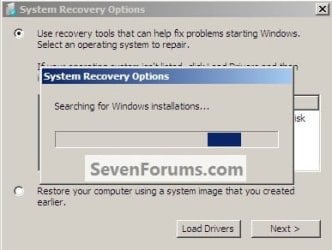
1) At the first black/screen hit the space bar for the "Press any key ... " prompt, after the "Loading Files" screen, select your language, then it'll do a search.
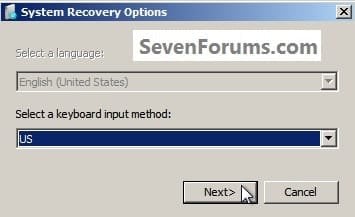
Recovery.jpg
Search.jpg
2) Select the desired OS and click next.
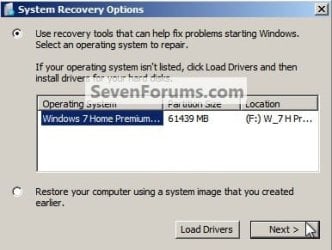
Next.jpg
3) In the Choose a Recovery Tool dialog box click Command Prompt, in the command window that opens type diskpart <enter> to get started.
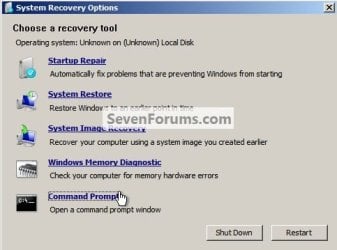
Command.jpg
When finished with diskpart type exit <enter> to leave diskpart, then exit <enter> again to close the command window.

Then click Restart in the Choose a Recovery Tool dialog box that's still open to finish up.


Method Three

Vista Full Installer


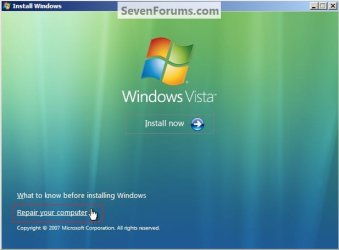
In the BIOS set the boot order to boot first from the CD/DVD Drive, insert the Windows Vista full installer DVD and restart the PC, at the first black/screen hit the space bar for the "Press any key ... " prompt, then at the "Language" screen click next, at the "Install ... " screen click Repair Your Computer.

From there the steps are exactly the same as in Method Two above, starting at step #1 to get to the command window, also to close the command window and finish up.
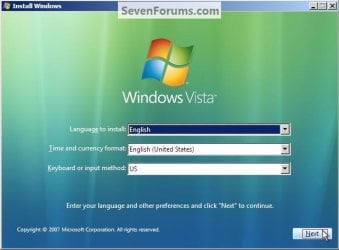
VistaLanguage.jpg
VistaRepair.jpg
Enjoy! :)


Last edited:
I am off to a bad start. I want to use method one. I get to the language screen, I hold shift and press F10 but nothing happens. Any suggestions for getting the command prompt?
 

My Computer

Computer type
PC/Desktop
Computer Manufacturer/Model Number
Custom Build
OS
Windows 7 Home Premium 64 bit SP1
CPU
Intel i7 4790k
Motherboard
MSI Z97-G55 SLI
Memory
16 GB Corsair 2400 MHz DDR3
Graphics Card(s)
Visiontek Radeon R9 285
Sound Card
None
Monitor(s) Displays
Gateway FHX2402L
Screen Resolution
1920 X 1080
Hard Drives
Samsung 840 EVO 500GB
PSU
Corsair 750 TX
Case
Fractal Design
Cooling
Stock fans
Keyboard
Logitech K800
Mouse
Logitech M510
Internet Speed
60.88 Mbps download 10.47 Mbps upload (Speedtest.net)
Antivirus
Norton
Browser
Opera
Other Info
First Computer used: A Commodore Pet of course
Love using Manjaro KDE Linux 64 bit and Windows 7/10 64 bit
I am off to a bad start. I want to use method one. I get to the language screen, I hold shift and press F10 but nothing happens. Any suggestions for getting the command prompt?

Hello mate.


Just to make sure, exactly what type disk are you trying this with, is it a full version Windows 7 installation disk?
 

My Computer

Computer Manufacturer/Model Number
* BFK Customs *
OS
W 7 64-bit Ultimate
CPU
Intel Q9550 Yorkfield
Motherboard
ASUS P5Q Pro
Memory
8GB Dominator 8500C5D
Graphics Card(s)
ATI : XFX 5870
Sound Card
Realtek HD Audio 7-1
Monitor(s) Displays
1x 47" LCD HDMI & 3x 26" LCD HDMI
Screen Resolution
1920x1080P & 1920x1200
Hard Drives
1x 80GB Intel X25-M G2 SSD : 1x 500GB & 1x 640GB WD Caviar Black(s)
PSU
Corsair 620HX
Case
Cooler Master RC-690
Cooling
Tuniq Tower 120, 2x 140mm and 3x 120mm case fans
Keyboard
Microsoft 500
Mouse
Razer Diamondback 3G
Internet Speed
14 Mb/s
Other Info
1x Koutech 3Gb/s SATA HDD Hot Swap Rack
Yes, OEM Windows 7 Home Premium 64 bit full version.
 

My Computer

Computer type
PC/Desktop
Computer Manufacturer/Model Number
Custom Build
OS
Windows 7 Home Premium 64 bit SP1
CPU
Intel i7 4790k
Motherboard
MSI Z97-G55 SLI
Memory
16 GB Corsair 2400 MHz DDR3
Graphics Card(s)
Visiontek Radeon R9 285
Sound Card
None
Monitor(s) Displays
Gateway FHX2402L
Screen Resolution
1920 X 1080
Hard Drives
Samsung 840 EVO 500GB
PSU
Corsair 750 TX
Case
Fractal Design
Cooling
Stock fans
Keyboard
Logitech K800
Mouse
Logitech M510
Internet Speed
60.88 Mbps download 10.47 Mbps upload (Speedtest.net)
Antivirus
Norton
Browser
Opera
Other Info
First Computer used: A Commodore Pet of course
Love using Manjaro KDE Linux 64 bit and Windows 7/10 64 bit
Hello again.


Have a look at Method Three to see if that will start and be sure to keep me informed.
 

My Computer

Computer Manufacturer/Model Number
* BFK Customs *
OS
W 7 64-bit Ultimate
CPU
Intel Q9550 Yorkfield
Motherboard
ASUS P5Q Pro
Memory
8GB Dominator 8500C5D
Graphics Card(s)
ATI : XFX 5870
Sound Card
Realtek HD Audio 7-1
Monitor(s) Displays
1x 47" LCD HDMI & 3x 26" LCD HDMI
Screen Resolution
1920x1080P & 1920x1200
Hard Drives
1x 80GB Intel X25-M G2 SSD : 1x 500GB & 1x 640GB WD Caviar Black(s)
PSU
Corsair 620HX
Case
Cooler Master RC-690
Cooling
Tuniq Tower 120, 2x 140mm and 3x 120mm case fans
Keyboard
Microsoft 500
Mouse
Razer Diamondback 3G
Internet Speed
14 Mb/s
Other Info
1x Koutech 3Gb/s SATA HDD Hot Swap Rack
Method 3 worked like a charm! I have wiped and optimized my SSD and have re-installed Windows 7 on it.

Thanks
 

My Computer

Computer type
PC/Desktop
Computer Manufacturer/Model Number
Custom Build
OS
Windows 7 Home Premium 64 bit SP1
CPU
Intel i7 4790k
Motherboard
MSI Z97-G55 SLI
Memory
16 GB Corsair 2400 MHz DDR3
Graphics Card(s)
Visiontek Radeon R9 285
Sound Card
None
Monitor(s) Displays
Gateway FHX2402L
Screen Resolution
1920 X 1080
Hard Drives
Samsung 840 EVO 500GB
PSU
Corsair 750 TX
Case
Fractal Design
Cooling
Stock fans
Keyboard
Logitech K800
Mouse
Logitech M510
Internet Speed
60.88 Mbps download 10.47 Mbps upload (Speedtest.net)
Antivirus
Norton
Browser
Opera
Other Info
First Computer used: A Commodore Pet of course
Love using Manjaro KDE Linux 64 bit and Windows 7/10 64 bit
My pleasure mate, good to see you got it sorted and thanks for the update.
 

My Computer

Computer Manufacturer/Model Number
* BFK Customs *
OS
W 7 64-bit Ultimate
CPU
Intel Q9550 Yorkfield
Motherboard
ASUS P5Q Pro
Memory
8GB Dominator 8500C5D
Graphics Card(s)
ATI : XFX 5870
Sound Card
Realtek HD Audio 7-1
Monitor(s) Displays
1x 47" LCD HDMI & 3x 26" LCD HDMI
Screen Resolution
1920x1080P & 1920x1200
Hard Drives
1x 80GB Intel X25-M G2 SSD : 1x 500GB & 1x 640GB WD Caviar Black(s)
PSU
Corsair 620HX
Case
Cooler Master RC-690
Cooling
Tuniq Tower 120, 2x 140mm and 3x 120mm case fans
Keyboard
Microsoft 500
Mouse
Razer Diamondback 3G
Internet Speed
14 Mb/s
Other Info
1x Koutech 3Gb/s SATA HDD Hot Swap Rack
I have tried to correct my boot issue following your suggestions. But after going into diskmgmt.msc and making active the partition I have been unable to (using the recovery cd I made) get into diskmgmt from a cmd prompt. After booting to recovery mode and choosing language, I am not offered a choice for a cmd prompt. This computer is 1 day old and this is the second problem. Computer is Gateway Windows 7 Home 6GB Ram 1 TB HDD Intel Duo 3.0Ghz. Need some assistance as now getting bootmgr is missing error. Which I know is because I haven't been able to do the 3 startup repairs and move the bootimg to the correct partition. I can still start the computer and boat to windows with the recovery disk in the cd drive
 

My Computer

Computer Manufacturer/Model Number
Gateway SX2801-07E
OS
Windows 7 Home Premium 64
CPU
Intel Pentium Duel Core E5700 3.0 Ghz
Memory
6 GB DDR3
Monitor(s) Displays
23" LCD
Hard Drives
1TB HDD
PSU
250 watt
Hello cajunbear333, welcome to Seven Forums!


You need to use the method outlined in this tutorial at the link below to run the 3 separate starup repairs and be sure to post back with any further questions you may have and to keep us informed.


How to Run a Startup Repair in Windows 7
 

My Computer

Computer Manufacturer/Model Number
* BFK Customs *
OS
W 7 64-bit Ultimate
CPU
Intel Q9550 Yorkfield
Motherboard
ASUS P5Q Pro
Memory
8GB Dominator 8500C5D
Graphics Card(s)
ATI : XFX 5870
Sound Card
Realtek HD Audio 7-1
Monitor(s) Displays
1x 47" LCD HDMI & 3x 26" LCD HDMI
Screen Resolution
1920x1080P & 1920x1200
Hard Drives
1x 80GB Intel X25-M G2 SSD : 1x 500GB & 1x 640GB WD Caviar Black(s)
PSU
Corsair 620HX
Case
Cooler Master RC-690
Cooling
Tuniq Tower 120, 2x 140mm and 3x 120mm case fans
Keyboard
Microsoft 500
Mouse
Razer Diamondback 3G
Internet Speed
14 Mb/s
Other Info
1x Koutech 3Gb/s SATA HDD Hot Swap Rack
keep getting the boot image missing error and not letting me get to the option of F8
 

My Computer

Computer Manufacturer/Model Number
Gateway SX2801-07E
OS
Windows 7 Home Premium 64
CPU
Intel Pentium Duel Core E5700 3.0 Ghz
Memory
6 GB DDR3
Monitor(s) Displays
23" LCD
Hard Drives
1TB HDD
PSU
250 watt

My Computer

Computer Manufacturer/Model Number
* BFK Customs *
OS
W 7 64-bit Ultimate
CPU
Intel Q9550 Yorkfield
Motherboard
ASUS P5Q Pro
Memory
8GB Dominator 8500C5D
Graphics Card(s)
ATI : XFX 5870
Sound Card
Realtek HD Audio 7-1
Monitor(s) Displays
1x 47" LCD HDMI & 3x 26" LCD HDMI
Screen Resolution
1920x1080P & 1920x1200
Hard Drives
1x 80GB Intel X25-M G2 SSD : 1x 500GB & 1x 640GB WD Caviar Black(s)
PSU
Corsair 620HX
Case
Cooler Master RC-690
Cooling
Tuniq Tower 120, 2x 140mm and 3x 120mm case fans
Keyboard
Microsoft 500
Mouse
Razer Diamondback 3G
Internet Speed
14 Mb/s
Other Info
1x Koutech 3Gb/s SATA HDD Hot Swap Rack
yes i understand that but for some reason when the gateway logo comes up i press the F8 key and the computer still loads windows. at the moment i'm unable to get to the advanced options
 

My Computer

Computer Manufacturer/Model Number
Gateway SX2801-07E
OS
Windows 7 Home Premium 64
CPU
Intel Pentium Duel Core E5700 3.0 Ghz
Memory
6 GB DDR3
Monitor(s) Displays
23" LCD
Hard Drives
1TB HDD
PSU
250 watt
You have to boot the created Windows repair disk then use Option Two of this tutorial to get to where you can do the startup repairs.

How to Boot to the System Recovery Options in Windows 7


It's also shown in this same tutorial at Method Two though when at step #3 you would click "Startup Repair" instead of Command Prompt.


Please pay attention, forget about the F8 anything.

Boot the Windows repair disk and when it says "Press any key ... " press the space bar, then you will get a "Loading Files" window then follow the steps at Method Two and at step #3 click "Startup Repair" not command prompt, do that same thing three (3) separate times to recreate the Windows boot files to the partition you marked active.
 

My Computer

Computer Manufacturer/Model Number
* BFK Customs *
OS
W 7 64-bit Ultimate
CPU
Intel Q9550 Yorkfield
Motherboard
ASUS P5Q Pro
Memory
8GB Dominator 8500C5D
Graphics Card(s)
ATI : XFX 5870
Sound Card
Realtek HD Audio 7-1
Monitor(s) Displays
1x 47" LCD HDMI & 3x 26" LCD HDMI
Screen Resolution
1920x1080P & 1920x1200
Hard Drives
1x 80GB Intel X25-M G2 SSD : 1x 500GB & 1x 640GB WD Caviar Black(s)
PSU
Corsair 620HX
Case
Cooler Master RC-690
Cooling
Tuniq Tower 120, 2x 140mm and 3x 120mm case fans
Keyboard
Microsoft 500
Mouse
Razer Diamondback 3G
Internet Speed
14 Mb/s
Other Info
1x Koutech 3Gb/s SATA HDD Hot Swap Rack
Success! Thanks for your patience.
The problem was I had the wrong disk. After burning the windows repair disk I had no issue in getting into the advanced menu. I just checked and now the system and boot file are on the same partition. The guides were very straight forward and go the job done. Much appreciated.
Shawn
 

My Computer

Computer Manufacturer/Model Number
Gateway SX2801-07E
OS
Windows 7 Home Premium 64
CPU
Intel Pentium Duel Core E5700 3.0 Ghz
Memory
6 GB DDR3
Monitor(s) Displays
23" LCD
Hard Drives
1TB HDD
PSU
250 watt
Success! Thanks for your patience.
The problem was I had the wrong disk. After burning the windows repair disk I had no issue in getting into the advanced menu. I just checked and now the system and boot file are on the same partition. The guides were very straight forward and go the job done. Much appreciated.
Shawn


I'm glad to see you got it sorted and thanks for the update.
 

My Computer

Computer Manufacturer/Model Number
* BFK Customs *
OS
W 7 64-bit Ultimate
CPU
Intel Q9550 Yorkfield
Motherboard
ASUS P5Q Pro
Memory
8GB Dominator 8500C5D
Graphics Card(s)
ATI : XFX 5870
Sound Card
Realtek HD Audio 7-1
Monitor(s) Displays
1x 47" LCD HDMI & 3x 26" LCD HDMI
Screen Resolution
1920x1080P & 1920x1200
Hard Drives
1x 80GB Intel X25-M G2 SSD : 1x 500GB & 1x 640GB WD Caviar Black(s)
PSU
Corsair 620HX
Case
Cooler Master RC-690
Cooling
Tuniq Tower 120, 2x 140mm and 3x 120mm case fans
Keyboard
Microsoft 500
Mouse
Razer Diamondback 3G
Internet Speed
14 Mb/s
Other Info
1x Koutech 3Gb/s SATA HDD Hot Swap Rack
Excellent article ...got it working in very first attempt .:dinesh:
 

My Computer

Computer Manufacturer/Model Number
Custom self assembled
OS
Windows 7 Ultimate x64
CPU
Intel Core i7 930
Motherboard
Gigabyte GA X58A UD7
Memory
Gskill 2x3 GB Ram
Graphics Card(s)
Sapphire ATI Radeon HD 5870
Monitor(s) Displays
LG 24MP88 24" LED Monitor
Screen Resolution
1920 X 1080
Hard Drives
Seagate barracuda 1 TB
PSU
Corsair GS 600W
Case
Cooler Master 690 II Plus
Cooling
Cooler Master Hyper 212X
Keyboard
Logitech G15 Gaming keyboard
Mouse
Logitech MX518 Gaming Mouse
Internet Speed
Broadband 50 Mbps speed [Hathway]
Other Info
Xbox 360 Wired Controller (x2)
AverMedia TV tuner Card [Internal]
Logitech HD C110 Web Camera
Netgear WGR614 Wireless-N 150 Router
Razer Goliathus Fragged Alpha Control Edition Mouse Pad
I know this is an older thread, but I am trying to follow the steps and having a lot of problems. I have a seven-month-old Asus x53e which died a couple of days ago. A call to Asus Tech Support was zero help, and I'm trying to avoid shipping it across the country to have it fixed.

I was able to create a Windows Repair CD, and I have run the Startup Repair 3 times and it hasn't work, SO I'm starting over and trying to follow the instructions here in this thread.

Now, I'm trying to follow Method 2. The problem is that it cannot locate my OS. What do I do? Should I just click "next" and open the command prompt anyway? Should it take a long time for DISKPART> to appear in the command box? After I exit diskpart, should I then go ahead and run the startup repair 3 times?

Any thoughts, suggestions, comments are GREATLY appreciated. I have lost at least 12 hours of my life to this fun problem and I'm about to pick the laptop up and throw it. :cry:
 

My Computer

OS
Windows 7 Home Premium 64bit
Back
Top