Network connection hangs at PC start-up

Vladimir 1

New member
Member
Local time
6:38 PM
Messages
58
Hello,

Lately I noticed this problem on my PC, whenever I start up my PC it boots fast / normal as it should, however there is a problem with the Network which hangs / tries to connect for a while.
The thing is I cant start Mozilla Firefox / Google Chrome until the network is done connecting and this is really annoying.

Any help would be appreciated.

Thank you
 

My Computer

Computer type
PC/Desktop
OS
Windows 7 Professional 64bit
CPU
Intel Xeon E5645 6 cores 2,4 GHz 50% Overclocked to 3,6 GHz
Motherboard
MSI X58 Pro-E
Memory
Kingston 3x4GB DDR3 1600 MHz
Graphics Card(s)
MSI Nvidia GTX 560 Ti Twin Frozr ii OC
Screen Resolution
19'
Hard Drives
1X Western Digital Blue 1TB
1x Western Digital Blue 500GB
PSU
Cooler Master B500 V2 500W
Internet Speed
30 MB/s download speed, 15 mb/s upload speed
Antivirus
Avast Free
Browser
Mozilla

My Computer

Computer type
PC/Desktop
Computer Manufacturer/Model Number
Custom Build
OS
Windows 7 Ultimate x64 SP1
CPU
AMD Phenom 2 1090T
Motherboard
Gigabyte GA-890FXA-UD5
Memory
2x8GB Kingston HyperX Fury Black 1600Mhz Unganged
Graphics Card(s)
MSI GTX 970 Gaming 4G
Sound Card
Realtek On-Board HD 7.1 Audio / Logitech G35
Monitor(s) Displays
3xAcer GD245HQ
Screen Resolution
1920x1080
Hard Drives
Samsung 850 Pro 512GB SSD - OS /
WD Caviar Black SATA 3 - 1 TBx2 - Dynamic RAID 0 /
WD Caviar Green SATA 2 - 640GBx2 - Dynamic RAID 0 /
WD Caviar Green SATA 2 - 640GB - Internal Backup /
Seagate Barracude SATA 3 - 3TB - External Backup/ Sync
PSU
HighPower 1000W
Case
Cooler Master HAF 932
Cooling
Noctua NH-D14
Keyboard
Logitech G19
Mouse
Logitech G500
Internet Speed
100/4 Mbit Cable (100GB quota)
Antivirus
ZoneAlarm Extreme Security / MBAM Pro / MBAE Free / SAS Free
Browser
IE 11 - Firefox - Chrome
Other Info
Logitech F710/ G27/ G940/ Z5500 // TrackIR 5 // Nvidia 3D Surround Vision
I forgot to mention what have I tried to fix the problem so far

Ok so, I changed the DNS settings the same as in this thread
http://www.sevenforums.com/tutorials/15037-dns-addressing-how-change-windows-7-a.html
- I enabled local policy and disabled IPv6 ( https://social.technet.microsoft.co...tup-for-some-programs?forum=w7itpronetworking ) - the first 2 suggestions
- I tried defragmenting both my C and D disks, disk C was 1% fragmented and D disk was 11% fragmented, now both of them are 0% fragmented.

So far nothing changed, I also let windows search automatically for network drivers but it says the one I have is up to date

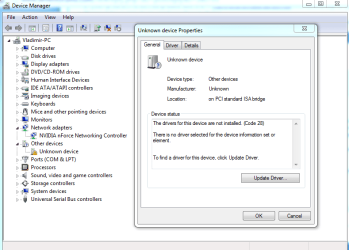
What I noticed in my device manager there's one which is unknown, all it says is its location which is " on PCI Standard ISA bridge ", does this have anything to do with the problem I have ? Please see the screenshot bellow
 

Attachments

  • gd.PNG
    gd.PNG
    27.4 KB · Views: 0

My Computer

Computer type
PC/Desktop
OS
Windows 7 Professional 64bit
CPU
Intel Xeon E5645 6 cores 2,4 GHz 50% Overclocked to 3,6 GHz
Motherboard
MSI X58 Pro-E
Memory
Kingston 3x4GB DDR3 1600 MHz
Graphics Card(s)
MSI Nvidia GTX 560 Ti Twin Frozr ii OC
Screen Resolution
19'
Hard Drives
1X Western Digital Blue 1TB
1x Western Digital Blue 500GB
PSU
Cooler Master B500 V2 500W
Internet Speed
30 MB/s download speed, 15 mb/s upload speed
Antivirus
Avast Free
Browser
Mozilla
According to ASUS website your motherboard should have "Realtek® 8211CL-VB, 1 x Gigabit LAN Controller(s), featuring AI NET2". Is this the same PC as in your specs?

For the unknown device - once in properties switch to Details tab, select Hardware Ids, and copy paste the contents of the lower box here.
 

My Computer

Computer type
PC/Desktop
Computer Manufacturer/Model Number
Custom Build
OS
Windows 7 Ultimate x64 SP1
CPU
AMD Phenom 2 1090T
Motherboard
Gigabyte GA-890FXA-UD5
Memory
2x8GB Kingston HyperX Fury Black 1600Mhz Unganged
Graphics Card(s)
MSI GTX 970 Gaming 4G
Sound Card
Realtek On-Board HD 7.1 Audio / Logitech G35
Monitor(s) Displays
3xAcer GD245HQ
Screen Resolution
1920x1080
Hard Drives
Samsung 850 Pro 512GB SSD - OS /
WD Caviar Black SATA 3 - 1 TBx2 - Dynamic RAID 0 /
WD Caviar Green SATA 2 - 640GBx2 - Dynamic RAID 0 /
WD Caviar Green SATA 2 - 640GB - Internal Backup /
Seagate Barracude SATA 3 - 3TB - External Backup/ Sync
PSU
HighPower 1000W
Case
Cooler Master HAF 932
Cooling
Noctua NH-D14
Keyboard
Logitech G19
Mouse
Logitech G500
Internet Speed
100/4 Mbit Cable (100GB quota)
Antivirus
ZoneAlarm Extreme Security / MBAM Pro / MBAE Free / SAS Free
Browser
IE 11 - Firefox - Chrome
Other Info
Logitech F710/ G27/ G940/ Z5500 // TrackIR 5 // Nvidia 3D Surround Vision
Yes, I use the same PC as the one in my profile's PC specs.

More information of my problem:
- This problem lasts for about 2-3 minutes once my PC starts up.
- I dont have a Wi-Fi router
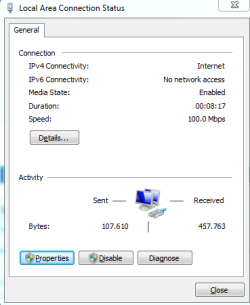
- In the LAN status I can see that IPv6 has no network access ( screenshot bellow )

Shall I maybe try cleaning the registry files with CCleaner ?

As for the hardware IDs of the unknown device, this is what I can see
- ACPI\ ATK0110
*ATK0110
 

Attachments

  • nn.PNG
    nn.PNG
    8.1 KB · Views: 16

My Computer

Computer type
PC/Desktop
OS
Windows 7 Professional 64bit
CPU
Intel Xeon E5645 6 cores 2,4 GHz 50% Overclocked to 3,6 GHz
Motherboard
MSI X58 Pro-E
Memory
Kingston 3x4GB DDR3 1600 MHz
Graphics Card(s)
MSI Nvidia GTX 560 Ti Twin Frozr ii OC
Screen Resolution
19'
Hard Drives
1X Western Digital Blue 1TB
1x Western Digital Blue 500GB
PSU
Cooler Master B500 V2 500W
Internet Speed
30 MB/s download speed, 15 mb/s upload speed
Antivirus
Avast Free
Browser
Mozilla
That one is unrelated to LAN as far as I can recall.

Try what I have proposed in post #2. Hopefully that will fix it :)
 

My Computer

Computer type
PC/Desktop
Computer Manufacturer/Model Number
Custom Build
OS
Windows 7 Ultimate x64 SP1
CPU
AMD Phenom 2 1090T
Motherboard
Gigabyte GA-890FXA-UD5
Memory
2x8GB Kingston HyperX Fury Black 1600Mhz Unganged
Graphics Card(s)
MSI GTX 970 Gaming 4G
Sound Card
Realtek On-Board HD 7.1 Audio / Logitech G35
Monitor(s) Displays
3xAcer GD245HQ
Screen Resolution
1920x1080
Hard Drives
Samsung 850 Pro 512GB SSD - OS /
WD Caviar Black SATA 3 - 1 TBx2 - Dynamic RAID 0 /
WD Caviar Green SATA 2 - 640GBx2 - Dynamic RAID 0 /
WD Caviar Green SATA 2 - 640GB - Internal Backup /
Seagate Barracude SATA 3 - 3TB - External Backup/ Sync
PSU
HighPower 1000W
Case
Cooler Master HAF 932
Cooling
Noctua NH-D14
Keyboard
Logitech G19
Mouse
Logitech G500
Internet Speed
100/4 Mbit Cable (100GB quota)
Antivirus
ZoneAlarm Extreme Security / MBAM Pro / MBAE Free / SAS Free
Browser
IE 11 - Firefox - Chrome
Other Info
Logitech F710/ G27/ G940/ Z5500 // TrackIR 5 // Nvidia 3D Surround Vision
Alright, thank you for your replies, I'll make sure I do that tomorrow because it's a bit late now.
Once I do it I'll edit my message / post whether it worked or not.
 

My Computer

Computer type
PC/Desktop
OS
Windows 7 Professional 64bit
CPU
Intel Xeon E5645 6 cores 2,4 GHz 50% Overclocked to 3,6 GHz
Motherboard
MSI X58 Pro-E
Memory
Kingston 3x4GB DDR3 1600 MHz
Graphics Card(s)
MSI Nvidia GTX 560 Ti Twin Frozr ii OC
Screen Resolution
19'
Hard Drives
1X Western Digital Blue 1TB
1x Western Digital Blue 500GB
PSU
Cooler Master B500 V2 500W
Internet Speed
30 MB/s download speed, 15 mb/s upload speed
Antivirus
Avast Free
Browser
Mozilla

My Computer

Computer type
PC/Desktop
Computer Manufacturer/Model Number
Custom Build
OS
Windows 7 Ultimate x64 SP1
CPU
AMD Phenom 2 1090T
Motherboard
Gigabyte GA-890FXA-UD5
Memory
2x8GB Kingston HyperX Fury Black 1600Mhz Unganged
Graphics Card(s)
MSI GTX 970 Gaming 4G
Sound Card
Realtek On-Board HD 7.1 Audio / Logitech G35
Monitor(s) Displays
3xAcer GD245HQ
Screen Resolution
1920x1080
Hard Drives
Samsung 850 Pro 512GB SSD - OS /
WD Caviar Black SATA 3 - 1 TBx2 - Dynamic RAID 0 /
WD Caviar Green SATA 2 - 640GBx2 - Dynamic RAID 0 /
WD Caviar Green SATA 2 - 640GB - Internal Backup /
Seagate Barracude SATA 3 - 3TB - External Backup/ Sync
PSU
HighPower 1000W
Case
Cooler Master HAF 932
Cooling
Noctua NH-D14
Keyboard
Logitech G19
Mouse
Logitech G500
Internet Speed
100/4 Mbit Cable (100GB quota)
Antivirus
ZoneAlarm Extreme Security / MBAM Pro / MBAE Free / SAS Free
Browser
IE 11 - Firefox - Chrome
Other Info
Logitech F710/ G27/ G940/ Z5500 // TrackIR 5 // Nvidia 3D Surround Vision
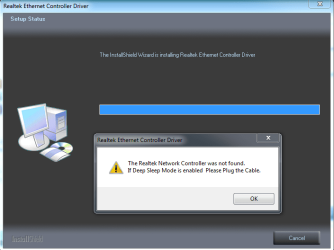
I created a manual System Restore point and installed the chipset driver by Asus but it didnt change anything.
As for the Realtek drivers, there's an installation error.
Please note that I didnt uninstall the current installed network drivers as you said.
 

Attachments

  • pr.PNG
    pr.PNG
    20.6 KB · Views: 0

My Computer

Computer type
PC/Desktop
OS
Windows 7 Professional 64bit
CPU
Intel Xeon E5645 6 cores 2,4 GHz 50% Overclocked to 3,6 GHz
Motherboard
MSI X58 Pro-E
Memory
Kingston 3x4GB DDR3 1600 MHz
Graphics Card(s)
MSI Nvidia GTX 560 Ti Twin Frozr ii OC
Screen Resolution
19'
Hard Drives
1X Western Digital Blue 1TB
1x Western Digital Blue 500GB
PSU
Cooler Master B500 V2 500W
Internet Speed
30 MB/s download speed, 15 mb/s upload speed
Antivirus
Avast Free
Browser
Mozilla
You will have to uninstall the device and drivers as well when prompted. And restart PC afterwards to let it auto-install drivers.
 

My Computer

Computer type
PC/Desktop
Computer Manufacturer/Model Number
Custom Build
OS
Windows 7 Ultimate x64 SP1
CPU
AMD Phenom 2 1090T
Motherboard
Gigabyte GA-890FXA-UD5
Memory
2x8GB Kingston HyperX Fury Black 1600Mhz Unganged
Graphics Card(s)
MSI GTX 970 Gaming 4G
Sound Card
Realtek On-Board HD 7.1 Audio / Logitech G35
Monitor(s) Displays
3xAcer GD245HQ
Screen Resolution
1920x1080
Hard Drives
Samsung 850 Pro 512GB SSD - OS /
WD Caviar Black SATA 3 - 1 TBx2 - Dynamic RAID 0 /
WD Caviar Green SATA 2 - 640GBx2 - Dynamic RAID 0 /
WD Caviar Green SATA 2 - 640GB - Internal Backup /
Seagate Barracude SATA 3 - 3TB - External Backup/ Sync
PSU
HighPower 1000W
Case
Cooler Master HAF 932
Cooling
Noctua NH-D14
Keyboard
Logitech G19
Mouse
Logitech G500
Internet Speed
100/4 Mbit Cable (100GB quota)
Antivirus
ZoneAlarm Extreme Security / MBAM Pro / MBAE Free / SAS Free
Browser
IE 11 - Firefox - Chrome
Other Info
Logitech F710/ G27/ G940/ Z5500 // TrackIR 5 // Nvidia 3D Surround Vision
I uninstalled the device and drivers, restarted PC and installed the new ones and now it's the same, nothing changed.

When I start up my PC, the blue cyrcle appears on the network icon and remains there for 2-3 minutes, before it's done connecting to the network there's a yellow sign appearing on the network icon and says " no connection/ network found " and disappears very fast.

That makes me think that the problem has something to do with the IPv6 connection because as I already mentioned, just before it connects there's the yellow sign which means no network found and the status of the IPv6 is always " not connected - No Network access ".
Do you think that might be causing the problem ?

Also, shall I try cleaning the registry files with CCleaner ?
 

My Computer

Computer type
PC/Desktop
OS
Windows 7 Professional 64bit
CPU
Intel Xeon E5645 6 cores 2,4 GHz 50% Overclocked to 3,6 GHz
Motherboard
MSI X58 Pro-E
Memory
Kingston 3x4GB DDR3 1600 MHz
Graphics Card(s)
MSI Nvidia GTX 560 Ti Twin Frozr ii OC
Screen Resolution
19'
Hard Drives
1X Western Digital Blue 1TB
1x Western Digital Blue 500GB
PSU
Cooler Master B500 V2 500W
Internet Speed
30 MB/s download speed, 15 mb/s upload speed
Antivirus
Avast Free
Browser
Mozilla
Mine shows IPv6 as no network also.

Do you have 2 DHCP servers on the network by any chance? Old and new router perhaps, or some wireless access point etc. (This would cause more issues but never know)

By the way did you try restarting your router?
 

My Computer

Computer type
PC/Desktop
Computer Manufacturer/Model Number
Custom Build
OS
Windows 7 Ultimate x64 SP1
CPU
AMD Phenom 2 1090T
Motherboard
Gigabyte GA-890FXA-UD5
Memory
2x8GB Kingston HyperX Fury Black 1600Mhz Unganged
Graphics Card(s)
MSI GTX 970 Gaming 4G
Sound Card
Realtek On-Board HD 7.1 Audio / Logitech G35
Monitor(s) Displays
3xAcer GD245HQ
Screen Resolution
1920x1080
Hard Drives
Samsung 850 Pro 512GB SSD - OS /
WD Caviar Black SATA 3 - 1 TBx2 - Dynamic RAID 0 /
WD Caviar Green SATA 2 - 640GBx2 - Dynamic RAID 0 /
WD Caviar Green SATA 2 - 640GB - Internal Backup /
Seagate Barracude SATA 3 - 3TB - External Backup/ Sync
PSU
HighPower 1000W
Case
Cooler Master HAF 932
Cooling
Noctua NH-D14
Keyboard
Logitech G19
Mouse
Logitech G500
Internet Speed
100/4 Mbit Cable (100GB quota)
Antivirus
ZoneAlarm Extreme Security / MBAM Pro / MBAE Free / SAS Free
Browser
IE 11 - Firefox - Chrome
Other Info
Logitech F710/ G27/ G940/ Z5500 // TrackIR 5 // Nvidia 3D Surround Vision
As I already said, I dont have router
 

My Computer

Computer type
PC/Desktop
OS
Windows 7 Professional 64bit
CPU
Intel Xeon E5645 6 cores 2,4 GHz 50% Overclocked to 3,6 GHz
Motherboard
MSI X58 Pro-E
Memory
Kingston 3x4GB DDR3 1600 MHz
Graphics Card(s)
MSI Nvidia GTX 560 Ti Twin Frozr ii OC
Screen Resolution
19'
Hard Drives
1X Western Digital Blue 1TB
1x Western Digital Blue 500GB
PSU
Cooler Master B500 V2 500W
Internet Speed
30 MB/s download speed, 15 mb/s upload speed
Antivirus
Avast Free
Browser
Mozilla
How are you connected to the Internet? Unless you can only connect 1 PC to Internet you have one (in a modem/router combo if only 1 device).

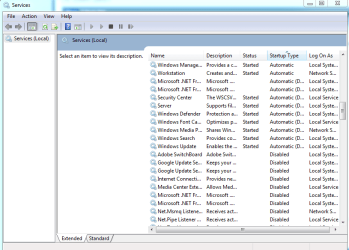
I have one more idea though, one of the required services are set to a delayed start. Run services.msc, sort by Startup Type and scroll down a bit until you find "Automatic (Delayed)" ones. Take a screenshot and post here.

Also check these services startup types:
- DHCP client (Automatic)
- DNS client (Automatic)
- Network Connections (Manual)
- Network Location Awareness (Automatic)
- Network List Service (Automatic)
- Remote Procedure Call (RPC) (Automatic)
- Network Store Interface Service (Automatic)
 

My Computer

Computer type
PC/Desktop
Computer Manufacturer/Model Number
Custom Build
OS
Windows 7 Ultimate x64 SP1
CPU
AMD Phenom 2 1090T
Motherboard
Gigabyte GA-890FXA-UD5
Memory
2x8GB Kingston HyperX Fury Black 1600Mhz Unganged
Graphics Card(s)
MSI GTX 970 Gaming 4G
Sound Card
Realtek On-Board HD 7.1 Audio / Logitech G35
Monitor(s) Displays
3xAcer GD245HQ
Screen Resolution
1920x1080
Hard Drives
Samsung 850 Pro 512GB SSD - OS /
WD Caviar Black SATA 3 - 1 TBx2 - Dynamic RAID 0 /
WD Caviar Green SATA 2 - 640GBx2 - Dynamic RAID 0 /
WD Caviar Green SATA 2 - 640GB - Internal Backup /
Seagate Barracude SATA 3 - 3TB - External Backup/ Sync
PSU
HighPower 1000W
Case
Cooler Master HAF 932
Cooling
Noctua NH-D14
Keyboard
Logitech G19
Mouse
Logitech G500
Internet Speed
100/4 Mbit Cable (100GB quota)
Antivirus
ZoneAlarm Extreme Security / MBAM Pro / MBAE Free / SAS Free
Browser
IE 11 - Firefox - Chrome
Other Info
Logitech F710/ G27/ G940/ Z5500 // TrackIR 5 // Nvidia 3D Surround Vision
Vlad,
I take it you have a direct plug-in to an Ethenet port.

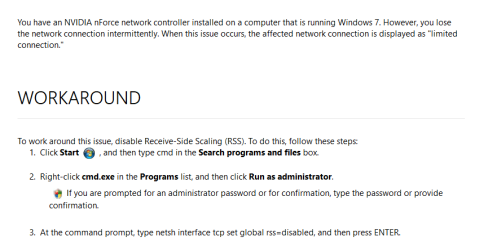
You DO NOT have Realtek drivers you have a Nvidia network controller, Which provides your internet.

See screenshot for possible cause/fix issued by MS years ago.

Roy
 

Attachments

  • ether.PNG
    ether.PNG
    12.4 KB · Views: 1

My Computer

Computer type
PC/Desktop
Computer Manufacturer/Model Number
medionl/Aspire 6930G/acer x55a
OS
W7 home premium 32bit/W7HP 64bit/w10 tp insider ring
CPU
E5300 dual core
Motherboard
medion MS7366
Memory
3gb
Graphics Card(s)
Nvidia Geforce 7100 Nforce 630i
Monitor(s) Displays
avixc
Internet Speed
n (isp resticted to 72)
Antivirus
mse/pands
Browser
palemoon
Other Info
Belkin Fd7050 n USB using Railink RT2870 drivers, more upto date
Hey,

Indeed, I have a direct plug-in cable to the Ethernet port.

So I tried what you suggested but unfortunately it's still the same .. Maybe I shall uninstall the realtek drivers I installed ?

Again, does this perhaps have anything to do with the registry files ? Shall I try cleaning them if so ?

@Gokay
All of those services were exactly as you listed except 1, Network List Service was set to Disabled I think and I changed it to Automatic, let's see if this helps.
EDIT: Again, same, nothing changed regarding the problem
 

My Computer

Computer type
PC/Desktop
OS
Windows 7 Professional 64bit
CPU
Intel Xeon E5645 6 cores 2,4 GHz 50% Overclocked to 3,6 GHz
Motherboard
MSI X58 Pro-E
Memory
Kingston 3x4GB DDR3 1600 MHz
Graphics Card(s)
MSI Nvidia GTX 560 Ti Twin Frozr ii OC
Screen Resolution
19'
Hard Drives
1X Western Digital Blue 1TB
1x Western Digital Blue 500GB
PSU
Cooler Master B500 V2 500W
Internet Speed
30 MB/s download speed, 15 mb/s upload speed
Antivirus
Avast Free
Browser
Mozilla
Please still take a screenshot of Automatic (Delayed) services just in case I have missed a crucial service.
 

My Computer

Computer type
PC/Desktop
Computer Manufacturer/Model Number
Custom Build
OS
Windows 7 Ultimate x64 SP1
CPU
AMD Phenom 2 1090T
Motherboard
Gigabyte GA-890FXA-UD5
Memory
2x8GB Kingston HyperX Fury Black 1600Mhz Unganged
Graphics Card(s)
MSI GTX 970 Gaming 4G
Sound Card
Realtek On-Board HD 7.1 Audio / Logitech G35
Monitor(s) Displays
3xAcer GD245HQ
Screen Resolution
1920x1080
Hard Drives
Samsung 850 Pro 512GB SSD - OS /
WD Caviar Black SATA 3 - 1 TBx2 - Dynamic RAID 0 /
WD Caviar Green SATA 2 - 640GBx2 - Dynamic RAID 0 /
WD Caviar Green SATA 2 - 640GB - Internal Backup /
Seagate Barracude SATA 3 - 3TB - External Backup/ Sync
PSU
HighPower 1000W
Case
Cooler Master HAF 932
Cooling
Noctua NH-D14
Keyboard
Logitech G19
Mouse
Logitech G500
Internet Speed
100/4 Mbit Cable (100GB quota)
Antivirus
ZoneAlarm Extreme Security / MBAM Pro / MBAE Free / SAS Free
Browser
IE 11 - Firefox - Chrome
Other Info
Logitech F710/ G27/ G940/ Z5500 // TrackIR 5 // Nvidia 3D Surround Vision
Here it is
 

Attachments

  • Capture.PNG
    Capture.PNG
    20.1 KB · Views: 0

My Computer

Computer type
PC/Desktop
OS
Windows 7 Professional 64bit
CPU
Intel Xeon E5645 6 cores 2,4 GHz 50% Overclocked to 3,6 GHz
Motherboard
MSI X58 Pro-E
Memory
Kingston 3x4GB DDR3 1600 MHz
Graphics Card(s)
MSI Nvidia GTX 560 Ti Twin Frozr ii OC
Screen Resolution
19'
Hard Drives
1X Western Digital Blue 1TB
1x Western Digital Blue 500GB
PSU
Cooler Master B500 V2 500W
Internet Speed
30 MB/s download speed, 15 mb/s upload speed
Antivirus
Avast Free
Browser
Mozilla
"Server" service is network related, try setting it as Automatic instead of delayed.

Bah, couldn't reproduce in a virtual machine. Try it anyway :)
 

My Computer

Computer type
PC/Desktop
Computer Manufacturer/Model Number
Custom Build
OS
Windows 7 Ultimate x64 SP1
CPU
AMD Phenom 2 1090T
Motherboard
Gigabyte GA-890FXA-UD5
Memory
2x8GB Kingston HyperX Fury Black 1600Mhz Unganged
Graphics Card(s)
MSI GTX 970 Gaming 4G
Sound Card
Realtek On-Board HD 7.1 Audio / Logitech G35
Monitor(s) Displays
3xAcer GD245HQ
Screen Resolution
1920x1080
Hard Drives
Samsung 850 Pro 512GB SSD - OS /
WD Caviar Black SATA 3 - 1 TBx2 - Dynamic RAID 0 /
WD Caviar Green SATA 2 - 640GBx2 - Dynamic RAID 0 /
WD Caviar Green SATA 2 - 640GB - Internal Backup /
Seagate Barracude SATA 3 - 3TB - External Backup/ Sync
PSU
HighPower 1000W
Case
Cooler Master HAF 932
Cooling
Noctua NH-D14
Keyboard
Logitech G19
Mouse
Logitech G500
Internet Speed
100/4 Mbit Cable (100GB quota)
Antivirus
ZoneAlarm Extreme Security / MBAM Pro / MBAE Free / SAS Free
Browser
IE 11 - Firefox - Chrome
Other Info
Logitech F710/ G27/ G940/ Z5500 // TrackIR 5 // Nvidia 3D Surround Vision
Changing the " Server " service didnt change anything regarding my problem..

I tried many things and it didnt fix my problem so far, does this maybe have to do something with my ISP ? Is that a possibility ?
Also, what about cleaning registry files ? Anything else to try ?
 

My Computer

Computer type
PC/Desktop
OS
Windows 7 Professional 64bit
CPU
Intel Xeon E5645 6 cores 2,4 GHz 50% Overclocked to 3,6 GHz
Motherboard
MSI X58 Pro-E
Memory
Kingston 3x4GB DDR3 1600 MHz
Graphics Card(s)
MSI Nvidia GTX 560 Ti Twin Frozr ii OC
Screen Resolution
19'
Hard Drives
1X Western Digital Blue 1TB
1x Western Digital Blue 500GB
PSU
Cooler Master B500 V2 500W
Internet Speed
30 MB/s download speed, 15 mb/s upload speed
Antivirus
Avast Free
Browser
Mozilla
Back
Top