diskpart

deanie44

New member
Member
Local time
1:42 PM
Messages
66
Location
West Haven, CT
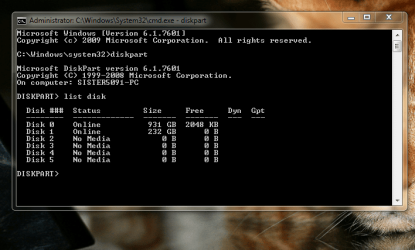
Hi everyone. I have an external harddrive that is unreadable, so I used DBAN to clean it. I think it fixed the disk. Unfortunately, I cannot open it or assign a drive letter. I was trying to use diskpart, but it doesn't work. I am uploading a screenshot of the problem. Any assistance will be appreciated. deanie:confused:
 

Attachments

  • DISPART.PNG
    DISPART.PNG
    267 KB · Views: 185

My Computer

Computer Manufacturer/Model Number
INSPIRON 560MT
OS
windows 7 X64
CPU
Intel(R) Pentium(4) CPU 3.06 GHz
Memory
4 GB OF RAM
Sound Card
REALTEK HD AUDIO
Monitor(s) Displays
Dell Generic Monitor and Vizio E320VL LCD TV
Screen Resolution
1280 X 720
Hard Drives
1 TB SATA II HARDDRIVE
Keyboard
Dell generic keyboard
Internet Speed
16 Mbp
Does the Ext HD show up in Disk Management as unallocated ?
 

Attachments

  • Disk_Mgmt_New_HD_500gb_WD_Initialize.JPG
    Disk_Mgmt_New_HD_500gb_WD_Initialize.JPG
    155.4 KB · Views: 88

My Computer

Computer type
PC/Desktop
Computer Manufacturer/Model Number
Built them myself, Science Experiments !
OS
Win7 Enterprise, Win7 x86 (Ult 7600), Win7 x64 Ult 7600, TechNet RTM on AMD x64 (2.8Ghz)
CPU
AMD fx8350 4ghz, AMD-32 2400mhz, AMD-64 3200mhz, AMDx64 2.8G
Motherboard
SIS 755, ECS-K8M890M-M (Ult 7600), GigaByte & others
Memory
2gb, 4gb on the Ult 7600, 4gb on Technet RTM, 32gb on FX8350
Graphics Card(s)
Draw my own Graphics, several nVidia cards
Sound Card
on motherboard
Monitor(s) Displays
19" flat scr, 28" I-Inc widescr,22" Emprex Widescr, 23" Acer
Screen Resolution
1280 x 1024, 1440 x 900, 1920 x 1080
Hard Drives
6 pata Ide HD's & 2 Sata HD's
added 80gb external on Ult 7600 computer,
numerous extra 1tb, 2TB, 3Tb SATA HD's
A collection of ext HD Docks w/ HDs
PSU
430w, 550w, 600w, 700, 800, etc
Case
All Generic Full Towers
Cooling
Open Air & a few fans, some w/ colored LEDs
Keyboard
Compaq & Dell recycled from GoodWill
Mouse
Made in China Optical Wired Mouse
Internet Speed
Fast Cable InterNet
Antivirus
AVG Free on 24 different Desktops, NO Problems!
Browser
IE 8 is preferred, but use FireFox sometimes
Other Info
Linksys Routers, switches, & Hubs
Too Many USB Flash Drives to count, Biggest is 64GB !
Eight computers in my home network.
Sixteen computers at my business network.
Linked via TeamViewer !
Lots of old used spare computer parts everywhere!
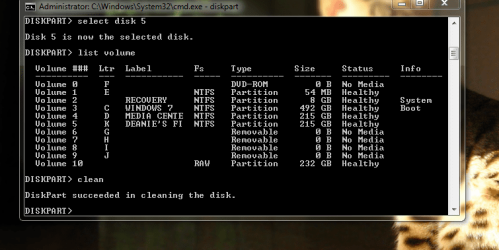
Hi DocBrown. Thank you for answering my post. The external hd was showing up in the disk management console, but it disappeared. It was shown as "healthy" and "raw". I tried to format it, but it was no go. Here is a picture of what I try to do next. Maybe the external hd is toast. Thanks. deanie
 

Attachments

  • DISPART 2.PNG
    DISPART 2.PNG
    193.2 KB · Views: 101
Last edited:

My Computer

Computer Manufacturer/Model Number
INSPIRON 560MT
OS
windows 7 X64
CPU
Intel(R) Pentium(4) CPU 3.06 GHz
Memory
4 GB OF RAM
Sound Card
REALTEK HD AUDIO
Monitor(s) Displays
Dell Generic Monitor and Vizio E320VL LCD TV
Screen Resolution
1280 X 720
Hard Drives
1 TB SATA II HARDDRIVE
Keyboard
Dell generic keyboard
Internet Speed
16 Mbp
I'm a bit confused. Is this a RAID setup? Or a straight IDE/SATA drive setup?

This is an "external USB" drive??

Why does your second screenshot talk about "disk 5", and then have 11 volumes shown? Is this the same "disk 5" from your first screenshot, which shows "no media"?

I'm confused... but then I'm not familiar with RAID arrangements, and have never used DISKPART. I'm also unclear as to what I'm seeing.

Could this external disk be a "dynamic disk" rather than "basic disk"? Just thinking out loud.

Is this external drive visible and understood say with a product like Partition Wizard Home Edition v5.2? What does it see this drive as?

(sorry for my ignorance of "volumes")
 

My Computer

Computer type
PC/Desktop
Computer Manufacturer/Model Number
Home-built, two systems (1) and (2)
OS
Windows 7 Pro x64 (1), Win7 Pro X64 (2)
CPU
i5-3350p 3.1Ghz/6MB-cache (1); E8400 3.0Ghz/6MB-cache (2)
Motherboard
ASUS P8Z77-V Pro (1); ASUS P5Q3 (2)
Memory
8GB PC3-12800 DDR3 (1); 4GB PC3-10600 DDR3 (2)
Graphics Card(s)
ATI HD7750 (1), (see TV cards); ATI R7 250 (2)
Sound Card
Realtek ALC892 HD Audio (1); Realtek ALC1200 HD Audio (2)
Monitor(s) Displays
Eizo HD2441W LCD, Eizo S2433W (1); Eizo 24" S2433W (2)
Screen Resolution
1920x1200, 1920x1200 (1); 1920x1200 (2)
Hard Drives
(1) 1TB SATA-II (7200RPM), 2x2TB SATA-III (7200RPM), 250GB SATA-III (10000RPM) for OS; 2x2TB external USB 3.0

(2) 320GB SATA-II (7200RPM), 750GB SATA-II (7200RPM), 150GB SATA-II (10000RPM) for OS; 2TB external USB 3.0
PSU
Nesteq ECS-6001 600W (1); Nesteq ECS-5001 500W (2)
Case
Acousti-Case 360 (1) and (2)
Cooling
Noctua NH-U12P SE2 for CPU, 2x120mm case fans (1) and (2)
Keyboard
IBM PS/2 (1) and (2)
Mouse
Logitech MX Revolution wireless (1); Microsoft wired (2)
Internet Speed
100mbps down / 10mbps up
Antivirus
Microsoft Security Essentials; Malwarebyte Anti-Malware Pro
Browser
Firefox
Other Info
Ceton InfiniTV 4-tuner cablecard-enabled TV card as well as Hauppauge HVR-2250 OTA/ATSC 2-tuner TV card in (1), running under Win7 WMC
I'm confused by the Diskpart Volumes snip, also. Could you give a snip of your current Disk Management ? Also what is the Make, model & size (in GBs) of the Ext HD ?
 

My Computer

Computer type
PC/Desktop
Computer Manufacturer/Model Number
Built them myself, Science Experiments !
OS
Win7 Enterprise, Win7 x86 (Ult 7600), Win7 x64 Ult 7600, TechNet RTM on AMD x64 (2.8Ghz)
CPU
AMD fx8350 4ghz, AMD-32 2400mhz, AMD-64 3200mhz, AMDx64 2.8G
Motherboard
SIS 755, ECS-K8M890M-M (Ult 7600), GigaByte & others
Memory
2gb, 4gb on the Ult 7600, 4gb on Technet RTM, 32gb on FX8350
Graphics Card(s)
Draw my own Graphics, several nVidia cards
Sound Card
on motherboard
Monitor(s) Displays
19" flat scr, 28" I-Inc widescr,22" Emprex Widescr, 23" Acer
Screen Resolution
1280 x 1024, 1440 x 900, 1920 x 1080
Hard Drives
6 pata Ide HD's & 2 Sata HD's
added 80gb external on Ult 7600 computer,
numerous extra 1tb, 2TB, 3Tb SATA HD's
A collection of ext HD Docks w/ HDs
PSU
430w, 550w, 600w, 700, 800, etc
Case
All Generic Full Towers
Cooling
Open Air & a few fans, some w/ colored LEDs
Keyboard
Compaq & Dell recycled from GoodWill
Mouse
Made in China Optical Wired Mouse
Internet Speed
Fast Cable InterNet
Antivirus
AVG Free on 24 different Desktops, NO Problems!
Browser
IE 8 is preferred, but use FireFox sometimes
Other Info
Linksys Routers, switches, & Hubs
Too Many USB Flash Drives to count, Biggest is 64GB !
Eight computers in my home network.
Sixteen computers at my business network.
Linked via TeamViewer !
Lots of old used spare computer parts everywhere!
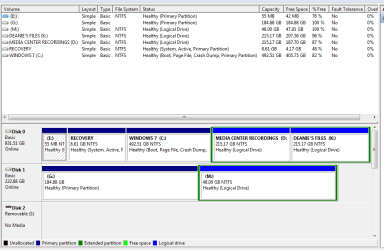
Hi. Here is a picture of the disk management console and the external harddrive is an Iomega Prestige--250gb--54AJ34J763
 

Attachments

  • disk management.PNG
    disk management.PNG
    41.7 KB · Views: 64

My Computer

Computer Manufacturer/Model Number
INSPIRON 560MT
OS
windows 7 X64
CPU
Intel(R) Pentium(4) CPU 3.06 GHz
Memory
4 GB OF RAM
Sound Card
REALTEK HD AUDIO
Monitor(s) Displays
Dell Generic Monitor and Vizio E320VL LCD TV
Screen Resolution
1280 X 720
Hard Drives
1 TB SATA II HARDDRIVE
Keyboard
Dell generic keyboard
Internet Speed
16 Mbp
How many hard drives do you have in your machine? In your stats you only list 1 1TB hard drive which appears to have 5 partitions. In the last disk management screen shot - the top section the first listing is blank. In the bottom section it shows disk 1 as 232GB (which is about the size of a 250GB HD). Is disk 1 your external?
 

My Computers

System One System Two

  • Computer type
    PC/Desktop
    Computer Manufacturer/Model Number
    ALWAYS UNDER CONSTRUCTION
    OS
    Windows 11 Pro
    CPU
    Ryzen 9 5900X
    Motherboard
    Asus X570 Crosshair Viii Hero
    Memory
    32GB G Skill DDR4-3600
    Graphics Card(s)
    EVGA RTX 3080 FTW 3 Ultra
    Sound Card
    On Board/Sennheiser PC37X Headset
    Monitor(s) Displays
    3 X Asus 27"
    Screen Resolution
    2560x1440
    Hard Drives
    2 X 1 TB NVME drives
    PSU
    EVGA 850
    Case
    Phanteks Eclipse P400A
    Cooling
    EVGA 280 AIO
    Keyboard
    Logitech G510s/ Logitech G13
    Mouse
    Logitech G502
    Internet Speed
    24/1
    Antivirus
    ESET/MBAM Pro/SAS Pro
    Browser
    Chrome/ Firefox/ Edge
  • Computer type
    Laptop
    System Manufacturer/Model Number
    Dell 16 Plus
    OS
    Windows 11 Pro
    CPU
    Intel Ultra 9 288V
    Memory
    32 GB LPDDR5X 8533
    Monitor(s) Displays
    16" Mini-LED HDR600 Touch 90 Hz
    Screen Resolution
    2560X1600
    Hard Drives
    1 TB NVME
Ok. I think the DISKPART presentations you've shown are confusing, but the DISKMGMT image shows your two drives:

Disk0 (1TB) - 5 partition: E - 55MB (primary), Recovery (no letter) - 8GB (active + primary), C - 492GB (primary), D - 215GB (logical), K - 215GB (logical)

Disk1 (250GB) - unusable 232GB

Just a recommendation... when you run any of these utilities (e.g. DISKMGMT) if you will go to full-screen mode, and then spread the column separators so that all the text in each column is visible in the screenshot or the graphic presentation of the drive's partitions, it will much more readable and understandable to us.


Anyway, here's my recommendation:

(1) Download and install [free] Partition Wizard Home Edition v5.2.

(2) Also download the ISO image and burn the standalone boot CD version of Partition Wizard, which can be used conveniently when the functions you're performing cannot be completed while booted to the OS, but must be run outside of the OS.

(3) Run Partition Wizard while under Win7 because work on this external drive (Disk1 for DISKMGMT, Disk 2 for Partition Wizard) can be run this way without any limitations.

Maximize the window to fill the screen, and spread the columns where information is shown, so that you can see all text in all columns. It's just much more readable that way.

(4) Select that external drive which will be titled "Disk 2" in the presentation, by clicking on the "Disk 2" title itself, not on any of the detail lines underneath it.

(5) When you select the drive itself (i.e. "Disk 2") on the left side of the screen you will see an available item under "Operations" named "delete all partitions". Select that "delete all partitions" and reply "yes" to the confirmation asking you if you want to delete all partitions.

This will add the "delete all partitions" operation to the queued list of operations now shown at the bottom-left corner of the screen. And the presentation for the contents of Disk 2" will now be modified to appear as if the entire 250GB (i.e. 232GB after formatting) space is now unallocated and fully available for partitioning.

(6) Push the APPLY button at the bottom left of the screen, to perform this one pending operation to "delete all partitions" on the external drive "Disk 2". This will perform and complete it, and the list of queued operations will be emptied.

(7) Select the "unallocated" space now appearing under the "Disk 2" title. Now, on the left side of the screen in the "Operations" section you will see the "create partition" item.

Select this "create partition" item, to bring up the "Create New Partition" window. The options on the window should be completely intuitive, and you can either allocate it completely as one partition or you can create two or more smaller partitions in the 232GB available space.

You use sliders and/or entered values to specify the size and location of the partition you're creating, and you can also install a label for the partition.

My suggestion is that you create the one or more partitions on this second drive as "logical" partitions instead of "parimary partitions. Functionally, they're essentially identical, but with "logical" partitions you don't have the "maximum of four primary partitions on a basic hard drive" to contend with. You have no limit on the number of "logical" partitions. Obviously if you only want to have one partition on this drive it doesn't really matter whether you use "logical" or "primary".

(8) When you push the OK button, the "create partition" operation will be queued in the list at the bottom-left corner of the screen.

You can now repeat the "create partition" process a second time if you want to build more than one partition into that 232GB drive. Pushing OK will add this second partition's create to the queued pending operation list.

Repeat again as required.

(9) When you're done, push the APPLY button in the lower-left, and the one or more partitions you want to create on the external hard drive will be created.

(10) You will get default drive letters assigned by this process. You can use Partition Wizard or Win7's DISKMGMT.MSC to change the drive letters to be whatever you want.

Again, if you use Partition Wizard to change the drive letters, you just select the partition from the list in the upper part of the screen or the graphic presentation in the lower part of the screen, and then select the "change drive letter" operation in the "Operations" group shown on the left side of the screen.

As before, push OK after you're finished setting things up, and you can repeat if you want to change another drive letter. All of these operations will again be queued into the pending operations list at the bottom-left corner.

Again, push APPLY, and the drive letter changes will occur.

(11) I don't think you will need to reboot Win7 in order to accomplish any of this. It can all be done and completed while Partition Wizard is running under Win7.

Worst case, you may be prompted to re-boot, but I honestly don't think this will happen for the operations I've listed above.


===>> PARTITION WIZARD is by far the easiest, most intuitive, most flexible, and most capable [free] 3rd-party utility to accomplish this type of function.

I believe the "delete all partitions" function of Partition Wizard should simply vaporize whatever's on that external drive, no matter what it is and no matter what about its current stat that's causing your mysterious problems for Win7's DISKMGMT or DISKPART.

Doesn't matter. Just use Partition Wizard to "delete all partitions" and start from scratch.

Partition Wizard. Download it, install it, use it. You won't be sorry.

 

My Computer

Computer type
PC/Desktop
Computer Manufacturer/Model Number
Home-built, two systems (1) and (2)
OS
Windows 7 Pro x64 (1), Win7 Pro X64 (2)
CPU
i5-3350p 3.1Ghz/6MB-cache (1); E8400 3.0Ghz/6MB-cache (2)
Motherboard
ASUS P8Z77-V Pro (1); ASUS P5Q3 (2)
Memory
8GB PC3-12800 DDR3 (1); 4GB PC3-10600 DDR3 (2)
Graphics Card(s)
ATI HD7750 (1), (see TV cards); ATI R7 250 (2)
Sound Card
Realtek ALC892 HD Audio (1); Realtek ALC1200 HD Audio (2)
Monitor(s) Displays
Eizo HD2441W LCD, Eizo S2433W (1); Eizo 24" S2433W (2)
Screen Resolution
1920x1200, 1920x1200 (1); 1920x1200 (2)
Hard Drives
(1) 1TB SATA-II (7200RPM), 2x2TB SATA-III (7200RPM), 250GB SATA-III (10000RPM) for OS; 2x2TB external USB 3.0

(2) 320GB SATA-II (7200RPM), 750GB SATA-II (7200RPM), 150GB SATA-II (10000RPM) for OS; 2TB external USB 3.0
PSU
Nesteq ECS-6001 600W (1); Nesteq ECS-5001 500W (2)
Case
Acousti-Case 360 (1) and (2)
Cooling
Noctua NH-U12P SE2 for CPU, 2x120mm case fans (1) and (2)
Keyboard
IBM PS/2 (1) and (2)
Mouse
Logitech MX Revolution wireless (1); Microsoft wired (2)
Internet Speed
100mbps down / 10mbps up
Antivirus
Microsoft Security Essentials; Malwarebyte Anti-Malware Pro
Browser
Firefox
Other Info
Ceton InfiniTV 4-tuner cablecard-enabled TV card as well as Hauppauge HVR-2250 OTA/ATSC 2-tuner TV card in (1), running under Win7 WMC
dsperber, Maybe you see something I don't. But the last snip shown shows Disk 1 as a healthy, active, primary partition. It just does not have a drive letter assigned.
 

My Computers

System One System Two

  • Computer type
    PC/Desktop
    Computer Manufacturer/Model Number
    ALWAYS UNDER CONSTRUCTION
    OS
    Windows 11 Pro
    CPU
    Ryzen 9 5900X
    Motherboard
    Asus X570 Crosshair Viii Hero
    Memory
    32GB G Skill DDR4-3600
    Graphics Card(s)
    EVGA RTX 3080 FTW 3 Ultra
    Sound Card
    On Board/Sennheiser PC37X Headset
    Monitor(s) Displays
    3 X Asus 27"
    Screen Resolution
    2560x1440
    Hard Drives
    2 X 1 TB NVME drives
    PSU
    EVGA 850
    Case
    Phanteks Eclipse P400A
    Cooling
    EVGA 280 AIO
    Keyboard
    Logitech G510s/ Logitech G13
    Mouse
    Logitech G502
    Internet Speed
    24/1
    Antivirus
    ESET/MBAM Pro/SAS Pro
    Browser
    Chrome/ Firefox/ Edge
  • Computer type
    Laptop
    System Manufacturer/Model Number
    Dell 16 Plus
    OS
    Windows 11 Pro
    CPU
    Intel Ultra 9 288V
    Memory
    32 GB LPDDR5X 8533
    Monitor(s) Displays
    16" Mini-LED HDR600 Touch 90 Hz
    Screen Resolution
    2560X1600
    Hard Drives
    1 TB NVME
dsperber, Maybe you see something I don't. But the last snip shown shows Disk 1 as a healthy, active, primary partition. It just does not have a drive letter assigned.
Correct. There is a plethora of mysterious screenshots, coupled with OP's problem description: "Unfortunately, I cannot open it or assign a drive letter."

I don't know exactly what that means.

Nevertheless, I don't think it's worth it to spend any more time trying to get to the bottom of what's really occurring, and why if the drive shows up as "healthy" that it can't be assigned a drive letter.

Now normally, there would only be ONE "active" partition, on the drive which is set in the BIOS as "hard disk #1". That's the particular partition on the particular drive where you'd also expect to see either see the WinXP or Win7 (or EasyBCD) boot manager files. Normally, installing Win7 on a brand new empty drive would create that small "system reserved" 100MB partition and mark it "active + primary", with the real Win7 boot partition marked as "boot + primary". Other partitions would either be "primary" or "logical", including partitions on other hard drives.

In this case, there is already one "active + primary" partition on the first hard drive, shown as "recovery partition". And his final Diskmgmt screenshot shows a second "active + primary" partition on the second external drive. I find this two "active" parititions certainly unusual, and I suppose may possibly be directly connected to why there can't be a drive letter assigned to it (although I certainly can't explain why)... according to OP.


So, again, I just don't think we're going to get to the bottom of it, and even if we did the probable solution steps would be the same... namely the same "delete all partitions" using PW and just starting from scratch.

I'm confident that when the partition(s) on the external second drive is/are built, they will NOT be "active".

And I'm confident that my suggested steps (which are not unusual, just standard) for preparing the external drive's partition(s) will solve the problem.
 

My Computer

Computer type
PC/Desktop
Computer Manufacturer/Model Number
Home-built, two systems (1) and (2)
OS
Windows 7 Pro x64 (1), Win7 Pro X64 (2)
CPU
i5-3350p 3.1Ghz/6MB-cache (1); E8400 3.0Ghz/6MB-cache (2)
Motherboard
ASUS P8Z77-V Pro (1); ASUS P5Q3 (2)
Memory
8GB PC3-12800 DDR3 (1); 4GB PC3-10600 DDR3 (2)
Graphics Card(s)
ATI HD7750 (1), (see TV cards); ATI R7 250 (2)
Sound Card
Realtek ALC892 HD Audio (1); Realtek ALC1200 HD Audio (2)
Monitor(s) Displays
Eizo HD2441W LCD, Eizo S2433W (1); Eizo 24" S2433W (2)
Screen Resolution
1920x1200, 1920x1200 (1); 1920x1200 (2)
Hard Drives
(1) 1TB SATA-II (7200RPM), 2x2TB SATA-III (7200RPM), 250GB SATA-III (10000RPM) for OS; 2x2TB external USB 3.0

(2) 320GB SATA-II (7200RPM), 750GB SATA-II (7200RPM), 150GB SATA-II (10000RPM) for OS; 2TB external USB 3.0
PSU
Nesteq ECS-6001 600W (1); Nesteq ECS-5001 500W (2)
Case
Acousti-Case 360 (1) and (2)
Cooling
Noctua NH-U12P SE2 for CPU, 2x120mm case fans (1) and (2)
Keyboard
IBM PS/2 (1) and (2)
Mouse
Logitech MX Revolution wireless (1); Microsoft wired (2)
Internet Speed
100mbps down / 10mbps up
Antivirus
Microsoft Security Essentials; Malwarebyte Anti-Malware Pro
Browser
Firefox
Other Info
Ceton InfiniTV 4-tuner cablecard-enabled TV card as well as Hauppauge HVR-2250 OTA/ATSC 2-tuner TV card in (1), running under Win7 WMC
dsperber, don't get the wrong impression, I was not questioning your instructions or saying you were wrong. I just thought you saw something in the last screenshot I didn't. I also agree that your solution should solve the problem. I wasn't questioning you, I thought I may learn something.
 

My Computers

System One System Two

  • Computer type
    PC/Desktop
    Computer Manufacturer/Model Number
    ALWAYS UNDER CONSTRUCTION
    OS
    Windows 11 Pro
    CPU
    Ryzen 9 5900X
    Motherboard
    Asus X570 Crosshair Viii Hero
    Memory
    32GB G Skill DDR4-3600
    Graphics Card(s)
    EVGA RTX 3080 FTW 3 Ultra
    Sound Card
    On Board/Sennheiser PC37X Headset
    Monitor(s) Displays
    3 X Asus 27"
    Screen Resolution
    2560x1440
    Hard Drives
    2 X 1 TB NVME drives
    PSU
    EVGA 850
    Case
    Phanteks Eclipse P400A
    Cooling
    EVGA 280 AIO
    Keyboard
    Logitech G510s/ Logitech G13
    Mouse
    Logitech G502
    Internet Speed
    24/1
    Antivirus
    ESET/MBAM Pro/SAS Pro
    Browser
    Chrome/ Firefox/ Edge
  • Computer type
    Laptop
    System Manufacturer/Model Number
    Dell 16 Plus
    OS
    Windows 11 Pro
    CPU
    Intel Ultra 9 288V
    Memory
    32 GB LPDDR5X 8533
    Monitor(s) Displays
    16" Mini-LED HDR600 Touch 90 Hz
    Screen Resolution
    2560X1600
    Hard Drives
    1 TB NVME
dsperber, don't get the wrong impression, I was not questioning your instructions or saying you were wrong.
No offense taken.


I just thought you saw something in the last screenshot I didn't. I also agree that your solution should solve the problem. I wasn't questioning you, I thought I may learn something.
Nope... I was just confused by the screenshots and verbal description of "cannot assign a drive letter". I was trying to make sense out of it all, like we all were.

I've never used DISKPART (preferring other programs, like Partition Wizard) and so just didn't know what a "volume" was, although matching its output up against DISKMGMT it's kind of intuitive I guess. Certainly the order of objects shown seemed to be shuffled, depending on what screenshot was looked at, and again I was confused.

All in all, I just didn't think there was going to be any further revelation coming which would explain why this external drive could not get a drive letter assigned to it by OP. Yes, it is unexpected and uncommon to see TWO partitions marked "active" (although they're on different hard drives, so I wouldn't think that should prevent a drive letter from going to that second drive's partition), but I really just felt it was time to take a course of action that would get the situation resolved satisfactorily.

And as we know, my "recipe" is nothing at all unusual or non-standard. It's straightforward and vanilla, just using Partition Wizard and preparing a drive for partitioning using the "delete all partitions" operation which pretty much undoes anything harmful that you've previously done to the drive.

I just wanted to introduce OP to PW, and provide the step-by-step method that's familiar to those of us who have done this same thing many times before, but might seem daunting to someone who's never had experience with multiple hard drives or multiple partitions before.


Again, no offense taken. We're all just trying to help.
 

My Computer

Computer type
PC/Desktop
Computer Manufacturer/Model Number
Home-built, two systems (1) and (2)
OS
Windows 7 Pro x64 (1), Win7 Pro X64 (2)
CPU
i5-3350p 3.1Ghz/6MB-cache (1); E8400 3.0Ghz/6MB-cache (2)
Motherboard
ASUS P8Z77-V Pro (1); ASUS P5Q3 (2)
Memory
8GB PC3-12800 DDR3 (1); 4GB PC3-10600 DDR3 (2)
Graphics Card(s)
ATI HD7750 (1), (see TV cards); ATI R7 250 (2)
Sound Card
Realtek ALC892 HD Audio (1); Realtek ALC1200 HD Audio (2)
Monitor(s) Displays
Eizo HD2441W LCD, Eizo S2433W (1); Eizo 24" S2433W (2)
Screen Resolution
1920x1200, 1920x1200 (1); 1920x1200 (2)
Hard Drives
(1) 1TB SATA-II (7200RPM), 2x2TB SATA-III (7200RPM), 250GB SATA-III (10000RPM) for OS; 2x2TB external USB 3.0

(2) 320GB SATA-II (7200RPM), 750GB SATA-II (7200RPM), 150GB SATA-II (10000RPM) for OS; 2TB external USB 3.0
PSU
Nesteq ECS-6001 600W (1); Nesteq ECS-5001 500W (2)
Case
Acousti-Case 360 (1) and (2)
Cooling
Noctua NH-U12P SE2 for CPU, 2x120mm case fans (1) and (2)
Keyboard
IBM PS/2 (1) and (2)
Mouse
Logitech MX Revolution wireless (1); Microsoft wired (2)
Internet Speed
100mbps down / 10mbps up
Antivirus
Microsoft Security Essentials; Malwarebyte Anti-Malware Pro
Browser
Firefox
Other Info
Ceton InfiniTV 4-tuner cablecard-enabled TV card as well as Hauppauge HVR-2250 OTA/ATSC 2-tuner TV card in (1), running under Win7 WMC
thanks
 

My Computers

System One System Two

  • Computer type
    PC/Desktop
    Computer Manufacturer/Model Number
    ALWAYS UNDER CONSTRUCTION
    OS
    Windows 11 Pro
    CPU
    Ryzen 9 5900X
    Motherboard
    Asus X570 Crosshair Viii Hero
    Memory
    32GB G Skill DDR4-3600
    Graphics Card(s)
    EVGA RTX 3080 FTW 3 Ultra
    Sound Card
    On Board/Sennheiser PC37X Headset
    Monitor(s) Displays
    3 X Asus 27"
    Screen Resolution
    2560x1440
    Hard Drives
    2 X 1 TB NVME drives
    PSU
    EVGA 850
    Case
    Phanteks Eclipse P400A
    Cooling
    EVGA 280 AIO
    Keyboard
    Logitech G510s/ Logitech G13
    Mouse
    Logitech G502
    Internet Speed
    24/1
    Antivirus
    ESET/MBAM Pro/SAS Pro
    Browser
    Chrome/ Firefox/ Edge
  • Computer type
    Laptop
    System Manufacturer/Model Number
    Dell 16 Plus
    OS
    Windows 11 Pro
    CPU
    Intel Ultra 9 288V
    Memory
    32 GB LPDDR5X 8533
    Monitor(s) Displays
    16" Mini-LED HDR600 Touch 90 Hz
    Screen Resolution
    2560X1600
    Hard Drives
    1 TB NVME
Hi fellows. I followed dsperber instructions and I am uploading the results. Unfortunately when I plug the external harddrive into the PC, I receive a message stating check the local disk for consistency. It takes forever to scan the disk. I had a power surge, so I had to start over. Why is it asking to check the disk? It is showing in disk management as healthy. I am a little scared to place files on this external hd, because they might disappear. What do you think? deanie
 

Attachments

  • disk management.PNG 2.PNG
    disk management.PNG 2.PNG
    54.8 KB · Views: 26

My Computer

Computer Manufacturer/Model Number
INSPIRON 560MT
OS
windows 7 X64
CPU
Intel(R) Pentium(4) CPU 3.06 GHz
Memory
4 GB OF RAM
Sound Card
REALTEK HD AUDIO
Monitor(s) Displays
Dell Generic Monitor and Vizio E320VL LCD TV
Screen Resolution
1280 X 720
Hard Drives
1 TB SATA II HARDDRIVE
Keyboard
Dell generic keyboard
Internet Speed
16 Mbp
Not quite sure what you have done there - but G appears not to have been formatted - at least not with a filesystem windows understands.

Try rt click G and do a quick format.

Next run windows checkdisk on G and then M

NOTE - You can put an extra set of boot files on there - always handy.
 

My Computers

System One System Two

  • Computer type
    PC/Desktop
    OS
    7 X64
    CPU
    i5 8400
    Motherboard
    gigabyte b365m ds3h
    Memory
    2x8gb 3200mhz
    Hard Drives
    various
    PSU
    pure power 11 400w cm
    Case
    Coolermaster
    Cooling
    cryorig m9i
  • Computer type
    PC/Desktop
    OS
    7x64
    CPU
    g5400
    Motherboard
    ga b365m ds3h
    Memory
    8gb ddr4 2400
    PSU
    xfx pro 450w
Hi fellows. I followed dsperber instructions and I am uploading the results. Unfortunately when I plug the external harddrive into the PC, I receive a message stating check the local disk for consistency. It takes forever to scan the disk. I had a power surge, so I had to start over. Why is it asking to check the disk? It is showing in disk management as healthy. I am a little scared to place files on this external hd, because they might disappear. What do you think? deanie
Looks like you didn't do the right thing on G.

It is shown with no file system, when it should be NTFS. I don't know what else it could be, but it's not showing NTFS as it should. I'm sure that's why CHECKDSK is kicking in, because it doesn't know what it's looking at.

Also, it is a "primary" partition, whereas your other M partition is a "logical" partition. I honestly recommend you make G logical as well as M. There's really no mandatory reason for any "primary" partitions on drives other than your first hard drive with the "active" and "boot" partitions.

So, start again. I don't know how you got G to have no file system on it, but forget it. Once again, use PW to "delete all partitions" and start again.

Then "create partition" (type "logical", file system "NTFS") for the 184GB partition and then repeat it for the second 48GB partition (again, "logical" and "NTFS").

Report back if this time it works.


P.S. - thank you very much for maximizing that DISKMGMT presentation and spreading the columns. Much more readable, I think you must agree. Certainly MUCH more useful for us, looking at your screenshots.
 

My Computer

Computer type
PC/Desktop
Computer Manufacturer/Model Number
Home-built, two systems (1) and (2)
OS
Windows 7 Pro x64 (1), Win7 Pro X64 (2)
CPU
i5-3350p 3.1Ghz/6MB-cache (1); E8400 3.0Ghz/6MB-cache (2)
Motherboard
ASUS P8Z77-V Pro (1); ASUS P5Q3 (2)
Memory
8GB PC3-12800 DDR3 (1); 4GB PC3-10600 DDR3 (2)
Graphics Card(s)
ATI HD7750 (1), (see TV cards); ATI R7 250 (2)
Sound Card
Realtek ALC892 HD Audio (1); Realtek ALC1200 HD Audio (2)
Monitor(s) Displays
Eizo HD2441W LCD, Eizo S2433W (1); Eizo 24" S2433W (2)
Screen Resolution
1920x1200, 1920x1200 (1); 1920x1200 (2)
Hard Drives
(1) 1TB SATA-II (7200RPM), 2x2TB SATA-III (7200RPM), 250GB SATA-III (10000RPM) for OS; 2x2TB external USB 3.0

(2) 320GB SATA-II (7200RPM), 750GB SATA-II (7200RPM), 150GB SATA-II (10000RPM) for OS; 2TB external USB 3.0
PSU
Nesteq ECS-6001 600W (1); Nesteq ECS-5001 500W (2)
Case
Acousti-Case 360 (1) and (2)
Cooling
Noctua NH-U12P SE2 for CPU, 2x120mm case fans (1) and (2)
Keyboard
IBM PS/2 (1) and (2)
Mouse
Logitech MX Revolution wireless (1); Microsoft wired (2)
Internet Speed
100mbps down / 10mbps up
Antivirus
Microsoft Security Essentials; Malwarebyte Anti-Malware Pro
Browser
Firefox
Other Info
Ceton InfiniTV 4-tuner cablecard-enabled TV card as well as Hauppauge HVR-2250 OTA/ATSC 2-tuner TV card in (1), running under Win7 WMC
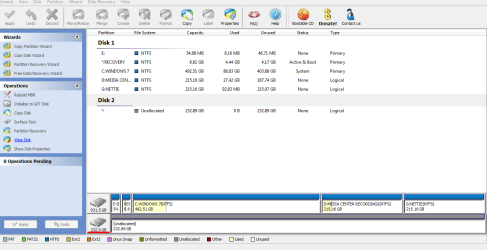
Hi dsperber. I tried to start from "scratch", but the disk is reading as unallocated so I cannot delete it. Here a picture of what I am talking about. deanie
 

Attachments

  • PARTITION WIZARD 2.PNG
    PARTITION WIZARD 2.PNG
    113.8 KB · Views: 17

My Computer

Computer Manufacturer/Model Number
INSPIRON 560MT
OS
windows 7 X64
CPU
Intel(R) Pentium(4) CPU 3.06 GHz
Memory
4 GB OF RAM
Sound Card
REALTEK HD AUDIO
Monitor(s) Displays
Dell Generic Monitor and Vizio E320VL LCD TV
Screen Resolution
1280 X 720
Hard Drives
1 TB SATA II HARDDRIVE
Keyboard
Dell generic keyboard
Internet Speed
16 Mbp
You HAVE started over. The whole disk IS UNALLOCATED! You're all set to go... for the next step, which is to create the partitions. This is where you were earlier, but somehow caused a 182GB partition to be created that did not show NTFS.

So whatever you did to get back to where you are now, that's where I wanted you to be. You obviously have now deleted those two partitions from your earlier screenshot, and are now back to "step (7)" in my earlier recipe.


Now you click on the space itself (i.e. the word "unallocated", below the "Disk 2" title) and that should light up the set of operations on the left side which permit you to "create partition"... as in "step (7)".

And as I requested, when you get the "create new partition" window, specify both a type of "logical" and a file format of "NTFS". The size is up to you, but go with the originally specified 184GB if that's what you want again. Push OK, and the operation will get queued into the lower-left corner of the screen.

You'll also see that second line (which a moment ago showed "unallocated 232GB") has now become divided, with the left side showing your 184GB NTFS partition (not yet actually applied, but it will be when you eventually push the APPLY button) and the right side showing the remaining 48GB now as "unallocated".

Again, click on that new 48GB "unallocated" space, and again on the left side select "create new partition". Again, from the popup "create new partition" window select "logical" partition type and "NTFS" as file system. And again, OK. Now this second operation will appear in the queued operation list at the lower left corner of the screen. The "unallocated" space will also have changed into a 48GB NTFS partition on that second line... which it will become, once you push APPLY.

Now push the APPLY button, and your two partitions will be created. This happened for you earlier, but somehow you must have made a mistake creating that first partition G because it came out incorrect (i.e. with no file system, when it should have showed NTFS).

Worst case... boot to the standalone Partition Wizard CD, and do these exact same sequence of operations standalone, not under Win7. There's nothing you should be able to do on Disk 2 while booted standalone that you can't also do while under Win7 on Disk 2, so this really shouldn't be necessary... although it would be good practice for you, to experiment with standalone boot CD use of Partition Wizard.

But I don't think you need to do that. Under Win7 right now, you're exactly at where "step (7)" wanted you to be. You must have already repeated the "delete all partitions", because your current screenshot shows the entire 232GB unallocated and your previous screenshot showed two partitions.

So... just start with what I enumerated above, namely "step (7)" from my original recipe, and the rest of the instructions that followed.

Go.
 

My Computer

Computer type
PC/Desktop
Computer Manufacturer/Model Number
Home-built, two systems (1) and (2)
OS
Windows 7 Pro x64 (1), Win7 Pro X64 (2)
CPU
i5-3350p 3.1Ghz/6MB-cache (1); E8400 3.0Ghz/6MB-cache (2)
Motherboard
ASUS P8Z77-V Pro (1); ASUS P5Q3 (2)
Memory
8GB PC3-12800 DDR3 (1); 4GB PC3-10600 DDR3 (2)
Graphics Card(s)
ATI HD7750 (1), (see TV cards); ATI R7 250 (2)
Sound Card
Realtek ALC892 HD Audio (1); Realtek ALC1200 HD Audio (2)
Monitor(s) Displays
Eizo HD2441W LCD, Eizo S2433W (1); Eizo 24" S2433W (2)
Screen Resolution
1920x1200, 1920x1200 (1); 1920x1200 (2)
Hard Drives
(1) 1TB SATA-II (7200RPM), 2x2TB SATA-III (7200RPM), 250GB SATA-III (10000RPM) for OS; 2x2TB external USB 3.0

(2) 320GB SATA-II (7200RPM), 750GB SATA-II (7200RPM), 150GB SATA-II (10000RPM) for OS; 2TB external USB 3.0
PSU
Nesteq ECS-6001 600W (1); Nesteq ECS-5001 500W (2)
Case
Acousti-Case 360 (1) and (2)
Cooling
Noctua NH-U12P SE2 for CPU, 2x120mm case fans (1) and (2)
Keyboard
IBM PS/2 (1) and (2)
Mouse
Logitech MX Revolution wireless (1); Microsoft wired (2)
Internet Speed
100mbps down / 10mbps up
Antivirus
Microsoft Security Essentials; Malwarebyte Anti-Malware Pro
Browser
Firefox
Other Info
Ceton InfiniTV 4-tuner cablecard-enabled TV card as well as Hauppauge HVR-2250 OTA/ATSC 2-tuner TV card in (1), running under Win7 WMC
Deanie44 clearly states he has not deleted anything.

There is at least one bug in Partition Wizard v5.2.

I reported it to MT a while ago.

Got a reply from them straight away.

Thank you for the feedback.
Your information is very valuable for us to identify this problem.Our developer is working on this and hope we can fix it in the next release.

I now understand that others have also reported the issue.
 

My Computers

System One System Two

  • Computer type
    PC/Desktop
    OS
    7 X64
    CPU
    i5 8400
    Motherboard
    gigabyte b365m ds3h
    Memory
    2x8gb 3200mhz
    Hard Drives
    various
    PSU
    pure power 11 400w cm
    Case
    Coolermaster
    Cooling
    cryorig m9i
  • Computer type
    PC/Desktop
    OS
    7x64
    CPU
    g5400
    Motherboard
    ga b365m ds3h
    Memory
    8gb ddr4 2400
    PSU
    xfx pro 450w
Deanie44 clearly states he has not deleted anything.
And yet, we have two apparently conflicting screenshots:

(a) first is from DISKMGMT and shows two partitions, one of which has no file system and the other of which is NTFS.

(b) second is from PW and shows all unallocated space.

Are we to believe nothing took place in between, but that these are two simultaneous views of the same hard drive? Hard for me to believe.

I'd like to see a fresh pair of simultaneous screenshots right now, of the same exact hard drive from the two programs. If they're really this different, it is a very interesting mystery.

And I'd still like to suggest booting to the standalone PW CD, to eliminate something Win7 is doing because of a failed CHKDSK or something, which may be feeding wrong information to both DISKMGMT and PW while they're running under Win7. I'd like to hear what standalone boot PW shows is on that drive.

Anyway, the last screenshot we see absolutely shows that all the space seems currently unallocated to PW. Unfortunately, he's got the "Disk 2" title bar selected, so what's shown on the available operations does not include "create partition". But certainly that's what WOULD appear, if he'd instead selected the "unallocated" space below the "Disk 2" title bar.

So... however he got back to what we last see, he's ready to "create partition" again... if you ask me.


There is at least one bug in Partition Wizard v5.2.

I reported it to MT a while ago.
What is this problem?
 

My Computer

Computer type
PC/Desktop
Computer Manufacturer/Model Number
Home-built, two systems (1) and (2)
OS
Windows 7 Pro x64 (1), Win7 Pro X64 (2)
CPU
i5-3350p 3.1Ghz/6MB-cache (1); E8400 3.0Ghz/6MB-cache (2)
Motherboard
ASUS P8Z77-V Pro (1); ASUS P5Q3 (2)
Memory
8GB PC3-12800 DDR3 (1); 4GB PC3-10600 DDR3 (2)
Graphics Card(s)
ATI HD7750 (1), (see TV cards); ATI R7 250 (2)
Sound Card
Realtek ALC892 HD Audio (1); Realtek ALC1200 HD Audio (2)
Monitor(s) Displays
Eizo HD2441W LCD, Eizo S2433W (1); Eizo 24" S2433W (2)
Screen Resolution
1920x1200, 1920x1200 (1); 1920x1200 (2)
Hard Drives
(1) 1TB SATA-II (7200RPM), 2x2TB SATA-III (7200RPM), 250GB SATA-III (10000RPM) for OS; 2x2TB external USB 3.0

(2) 320GB SATA-II (7200RPM), 750GB SATA-II (7200RPM), 150GB SATA-II (10000RPM) for OS; 2TB external USB 3.0
PSU
Nesteq ECS-6001 600W (1); Nesteq ECS-5001 500W (2)
Case
Acousti-Case 360 (1) and (2)
Cooling
Noctua NH-U12P SE2 for CPU, 2x120mm case fans (1) and (2)
Keyboard
IBM PS/2 (1) and (2)
Mouse
Logitech MX Revolution wireless (1); Microsoft wired (2)
Internet Speed
100mbps down / 10mbps up
Antivirus
Microsoft Security Essentials; Malwarebyte Anti-Malware Pro
Browser
Firefox
Other Info
Ceton InfiniTV 4-tuner cablecard-enabled TV card as well as Hauppauge HVR-2250 OTA/ATSC 2-tuner TV card in (1), running under Win7 WMC
Back
Top