Solved DISM Error: 0xc1420117 when trying to unmount and commit.

Paul Black

I WANT TO BELIEVE!
Guru
Gold Member
VIP
Local time
6:37 AM
Messages
3,823
Location
Planet Earth VGhlIFgtRmlsZXM=
Good evening,

I have successfully integrated updates into the install.wim.

I then used the command:
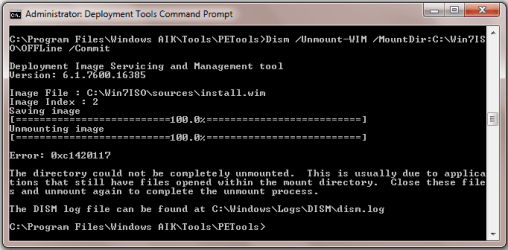
Dism /Unmount-WIM /MountDir:C:\Win7ISO\OFFLine /Commit

It says: Error: 0xc1420117

The directory could not be completely unmounted.
This is usually due to applications that still have files opened withing the directory.
Close these files and unmount again to complete the unmount image.
Do I need to delete the directory C:\Win7ISO\OFFLine and try again?

Any ideas please?

Thanks in advance.

EDIT:
Does it make a difference the fact that I put the offline image in the folder where the extracted ISO files are?
Do I need to delete that folder first and try again?
 
Last edited:

My Computer My Computer

Computer type
Laptop
Computer Manufacturer/Model Number
Fujitsu LIFEBOOK
OS
Win 7 HP SP1 64-bit Vista HB SP2 32-bit Linux Mint 18.3
CPU
Intel(R) Pentium(R) CPU P6200 @ 2.13GHz
Motherboard
FUJITSU FJNBB06
Memory
4.00 GB
Graphics Card(s)
Intel(R) Graphics Media Accelerator HD
Sound Card
[1] Realtek High Definition Audio [2] Intel(R) Display Audio
Screen Resolution
1366 x 768 x 32 bits (4294967296 colors) @ 59 Hz
Hard Drives
TOSHIBA MK5076GSX
Antivirus
AVG FREE
Good afternoon,

I have tried this again and still have an error.
I have attached a screenshot of the CMD Prompt and the DISM.log (cut down to include the error part I think!).

I created the directory:

mkdir C:\Win7ISO\OFFLine

The mount command is:

Dism /Mount-WIM /WimFile:C:\Win7ISO\sources\install.wim /Name:"Windows 7 HOMEPREMIUM" /MountDir:C:\Win7ISO\OFFLine

I can't move on until I get this sorted! :banghead:

Thanks in advance.
 

Attachments

Last edited:

My Computer My Computer

Computer type
Laptop
Computer Manufacturer/Model Number
Fujitsu LIFEBOOK
OS
Win 7 HP SP1 64-bit Vista HB SP2 32-bit Linux Mint 18.3
CPU
Intel(R) Pentium(R) CPU P6200 @ 2.13GHz
Motherboard
FUJITSU FJNBB06
Memory
4.00 GB
Graphics Card(s)
Intel(R) Graphics Media Accelerator HD
Sound Card
[1] Realtek High Definition Audio [2] Intel(R) Display Audio
Screen Resolution
1366 x 768 x 32 bits (4294967296 colors) @ 59 Hz
Hard Drives
TOSHIBA MK5076GSX
Antivirus
AVG FREE
Update:

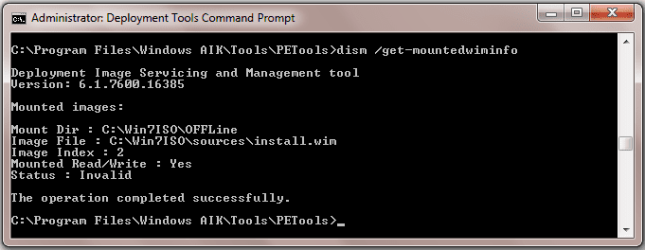
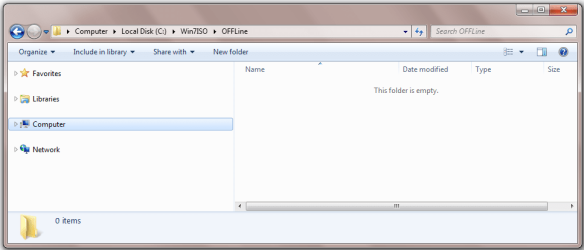
I ran: DISM /Get-MountedWimInfo and got the following results and I also checked the mounted OFFLine directory which shows it as being empty.
 

Attachments

  • 9d.png
    9d.png
    10.4 KB · Views: 23
  • 9e.png
    9e.png
    19.8 KB · Views: 1

My Computer My Computer

Computer type
Laptop
Computer Manufacturer/Model Number
Fujitsu LIFEBOOK
OS
Win 7 HP SP1 64-bit Vista HB SP2 32-bit Linux Mint 18.3
CPU
Intel(R) Pentium(R) CPU P6200 @ 2.13GHz
Motherboard
FUJITSU FJNBB06
Memory
4.00 GB
Graphics Card(s)
Intel(R) Graphics Media Accelerator HD
Sound Card
[1] Realtek High Definition Audio [2] Intel(R) Display Audio
Screen Resolution
1366 x 768 x 32 bits (4294967296 colors) @ 59 Hz
Hard Drives
TOSHIBA MK5076GSX
Antivirus
AVG FREE
OK, I have done some testing.

I created a directory to mount the install.wim to: C:\Win7ISO\OFFLine

I mounted the install.wim: Dism /Mount-WIM /WimFile:C:\Win7ISO\sources\install.wim /Name:"Windows 7 HOMEPREMIUM" /MountDir:C:\Win7ISO\OFFLine

I unmounted and committed: Dism /Unmount-WIM /MountDir:C:\Win7ISO\OFFLine /Commit

I still got the error which proves it must be something above.

It saves the image OK but will not unmount it properly.

Any help will be greatly appreciated.
 
Last edited:

My Computer My Computer

Computer type
Laptop
Computer Manufacturer/Model Number
Fujitsu LIFEBOOK
OS
Win 7 HP SP1 64-bit Vista HB SP2 32-bit Linux Mint 18.3
CPU
Intel(R) Pentium(R) CPU P6200 @ 2.13GHz
Motherboard
FUJITSU FJNBB06
Memory
4.00 GB
Graphics Card(s)
Intel(R) Graphics Media Accelerator HD
Sound Card
[1] Realtek High Definition Audio [2] Intel(R) Display Audio
Screen Resolution
1366 x 768 x 32 bits (4294967296 colors) @ 59 Hz
Hard Drives
TOSHIBA MK5076GSX
Antivirus
AVG FREE
DISM Error when trying to unmount and commit.

Not to worry, I figured it out :doh:.
 
Last edited:

My Computer My Computer

Computer type
Laptop
Computer Manufacturer/Model Number
Fujitsu LIFEBOOK
OS
Win 7 HP SP1 64-bit Vista HB SP2 32-bit Linux Mint 18.3
CPU
Intel(R) Pentium(R) CPU P6200 @ 2.13GHz
Motherboard
FUJITSU FJNBB06
Memory
4.00 GB
Graphics Card(s)
Intel(R) Graphics Media Accelerator HD
Sound Card
[1] Realtek High Definition Audio [2] Intel(R) Display Audio
Screen Resolution
1366 x 768 x 32 bits (4294967296 colors) @ 59 Hz
Hard Drives
TOSHIBA MK5076GSX
Antivirus
AVG FREE
Back
Top