
Display Adapters errors staying even after updates

brandough

New member
Local time
12:05 AM
Messages
31
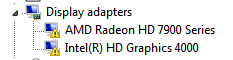
I can't figure out how I can get the error symbol on these drivers to go away and get the drivers to work properly.
For my AMD Radeon HD 79000 Series I went here and downloaded the autodetect tool. When I ran it, it displayed all the correct information and it proceeded to download the drivers. I do everything it says and reboot the computer, but the error symbol is still there. I'm not sure what went wrong there.
For the Intel(R) HD Graphics 4000 I went here and followed all the directions the same way I did with the AMD Radeon and it didn't take that update either with the error code still being present.

I'm not sure why my computer isn't taking these updates and letting it work properly.

In the attachments I have included my dxdiag and a screenshot of the drivers in my device managers.

Thank you for any help!
 

Attachments
  • DxDiag.txt
    DxDiag.txt
    22.8 KB · Views: 7
  • display.PNG
    display.PNG
    1.9 KB · Views: 25
Last edited:

My Computer

Computer type
PC/Desktop
OS
Windows 7 64 bit
Desktop

Which motherboard make/model do you have?
 

My Computer

Computer type
PC/Desktop
Computer Manufacturer/Model Number
Custom build
OS
Windows 7 64-bit
CPU
i7 2600k
Motherboard
Asus p8p67
Memory
8 Gb @ 1600
Graphics Card(s)
Radeon HD 5870
Antivirus
Kaspersky Internet Security 2015
Browser
IE 10, Firefox 36.0, TOR Brower 31
Sorry I took so long to get back to this. I ended up trying a few things at the time, but they all ended up failing and nothing was resolved. All these months later I'm still in the same situation.

I tried a clean install with Display Driver Uninstaller and then trying to reload the drivers with AMD Catalyst Control Center, but that didn't do anything either. The Control Center seemed to download the drivers, but then I'll still back to where I am in the opening post. I did that like 9 hours ago. Now when I try to open the AMD Catalyst Control Center I get "AMD Catalyst Control Center cannot be started. There are currently no settings that can be configured using AMD Catalyst Control Center." It's possible I did something wrong, but I don't know.


Any help would be very appreciated. Thank you!

Desktop

Which motherboard make/model do you have?

My motherboard is ASRock Z77 Extreme6.
 

My Computer

Computer type
PC/Desktop
OS
Windows 7 64 bit
Download the catalyst drivers Desktop
uninstall the old drivers, Then reinstall the drivers only from the catalyst, No control centre etc...

The HD graphics is not showing in my display adapters, Cant remember but i think i might have disabled/removed it,
And only installed display drivers for the GFX card.
 

My Computer

Computer type
PC/Desktop
Computer Manufacturer/Model Number
Custom build
OS
Windows 7 64-bit
CPU
i7 2600k
Motherboard
Asus p8p67
Memory
8 Gb @ 1600
Graphics Card(s)
Radeon HD 5870
Antivirus
Kaspersky Internet Security 2015
Browser
IE 10, Firefox 36.0, TOR Brower 31
Download the catalyst drivers Desktop
uninstall the old drivers, Then reinstall the drivers only from the catalyst, No control centre etc...

Tried it and it still looks the same like it does in the original post.
Just to make sure I actually did it twice. Clean uninstall and then install the drivers and nothing else.
 

My Computer

Computer type
PC/Desktop
OS
Windows 7 64 bit
Sorry for the double post, but found out something interesting.

Best Buy said I could return a graphics driver within 2 weeks even if opened, so I went and bought one to test out how my computer would handle a different one. Plugged it in correctly and ran the provided disc to install the drivers... and it looks exactly like the other driver did.

qsI0lNE.png


Now I'm really confused as to what the problem is. Maybe the motherboard? Any suggestions? :\
 

My Computer

Computer type
PC/Desktop
OS
Windows 7 64 bit
Just checked your DXDiag.txt (should have done that earlier) and there is no card being detected. After trying 2 card's,
I suspect it is the PCI-E port that's faulty.
Your probably right, And need a new mobo.
 

My Computer

Computer type
PC/Desktop
Computer Manufacturer/Model Number
Custom build
OS
Windows 7 64-bit
CPU
i7 2600k
Motherboard
Asus p8p67
Memory
8 Gb @ 1600
Graphics Card(s)
Radeon HD 5870
Antivirus
Kaspersky Internet Security 2015
Browser
IE 10, Firefox 36.0, TOR Brower 31
Just checked your DXDiag.txt (should have done that earlier) and there is no card being detected. After trying 2 card's,
I suspect it is the PCI-E port that's faulty.
Your probably right, And need a new mobo.

Now that I think about it, it probably really is the motherboard.
Sometimes when I have windows updates the computer has problems upon the reboot. Like, it gets stuck on the loading windows screen or asks me to repair windows upon the restart.
Do you think that's also because of a faulty motherboard?
Would you recommend getting a new one?
 

My Computer

Computer type
PC/Desktop
OS
Windows 7 64 bit
Is this a new install of windows?

I would at least try installing/reinstalling the chipset drivers for your mobo before writing it off,

2015-11-11_21h50_02.png

ASRock > Z77 Extreme6
 

My Computer

Computer type
PC/Desktop
Computer Manufacturer/Model Number
Self Built
OS
Win 10 Pro x64
CPU
Intel I5-2500K @3.3GHz
Motherboard
Asrock P67 Extreme4
Memory
16GB G.Skill Ripjaws X (4x4GB)
Graphics Card(s)
EVGA GeForce 750 Ti SC 2GB
Sound Card
ASUS Xonar DG 5.1 Channels 24-bit 96KHz PCI Interface Sound
Monitor(s) Displays
auria eq2367
Screen Resolution
1920 x 1080
Hard Drives
250GB Samsung 850 EVO SSD
1TB WD Blue
1TB Hitachi
PSU
SeaSonic X 650W 80 Plus Gold
Case
Corsair Obsidian 750D
Cooling
Corsair H60, Three 140mm case fans
Keyboard
Logitech Wireless Keyboard K520
Mouse
Logitech Wireless Mouse M310
Internet Speed
Wave Broadband ~ 100 dn 5 up
Antivirus
Windows Defender, Malwarebytes Premium
Browser
Edge, IE11, Chrome
Other Info
Laptop specs: HP g7-1365dx /
CPU: AMD A6-3420M APU with Radeon(tm) HD Graphics /
RAM: Crucial 8Gb (2x4Gb) /
SSD: Crucial M4-CT128M4SSD2 ATA Device/ FW 000F /
GFX: AMD Radeon HD 6520G /
OS: Windows 10 Pro x64
Back
Top
