display driver stopped responding and has recovered.

Jj1nN

New member
Local time
8:50 PM
Messages
26
Windows 7 Ultimate x64
AMD PHENOMII 955 (4x3.2GHZ)
GEFORCE GTX470
1000GB SATAII WD 7200RPM

I am writing this from "safe mode" since my system is not stable enough to run and write this at the same time.

My problem started when playing League of Legends (Dominion) Normally i would not have a problem, but once in a while the screen would freeze, occasional artifacts would show on screen. Screen would go black for a second or two, and a pop-up lower right corner would show, saying: "Display driver Nvidia version xxx whatever stopped responding and has recovered" This was not so much of a problem really, since it only happened in the beginning of the game, i searched the forums (league of legends) and noticed other people complaining about this as well, so i figured it would be dealt with at some point by someone else.

The problem is this started happening more and more often. So i decided to update my nvidia drivers to the newest version. Changed nothing, it actually made it worse from what i could tell.. So i downgraded to some older drivers.. didn't change a thing. And yes i did everything by the book, deleting all folders, safe mode driver sweeper etc. I also updated windows 7 completely, since i had the bug where a certain update would "jam" the windows updater, i updated it manually.

I then tested different stuff. If i opened Nvidia control panel, and marked the section where you see a slowly spinning logo, after 20-40 seconds my screen would flash black a couple of times, and the message "display driver stopped etc" would pop up.

I tried running furmark stability test, i could hardly see the first "image" when running the test, it would shut down instantly.

When running minecraft, just running the exe and logging in to the menu, would cause strange artifacts after 10-40 secs and also jamming the system, flashing black and responding with: "display driver stopped etc" (in this case i downloaded Ntune, to monitor the graphic card temperature, it climbed from around 40C to 70C)

Currently i'm at a point where i boot my system, and when i hit(as in arrive at) desktop, my screen starts flashing b"l"ack and forth. As in showing the desktop and showing a black screen, flickering.. and then rebooting automatically.

I can not provide you with a Perfmon /report atm since i am running in fail safe mode.. But i will attempt to see if system will let me.

I attached a zip.
 

My Computer My Computer

At a glance

Windows 7 Ultimate x64AMD PHENOMII 955 (4x3.2GHZ)4GB 1333MHZ DDR3, GEILGEFORCE GTX470
OS
Windows 7 Ultimate x64
CPU
AMD PHENOMII 955 (4x3.2GHZ)
Motherboard
MSI 770-C45
Memory
4GB 1333MHZ DDR3, GEIL
Graphics Card(s)
GEFORCE GTX470
Sound Card
7.1 SURROUND SOUND
Hard Drives
1000GB SATAII WD 7200RPM
PSU
750W psu,17DB
Windows 7 Ultimate x64
AMD PHENOMII 955 (4x3.2GHZ)
GEFORCE GTX470
1000GB SATAII WD 7200RPM

I am writing this from "safe mode" since my system is not stable enough to run and write this at the same time.

My problem started when playing League of Legends (Dominion) Normally i would not have a problem, but once in a while the screen would freeze, occasional artifacts would show on screen. Screen would go black for a second or two, and a pop-up lower right corner would show, saying: "Display driver Nvidia version xxx whatever stopped responding and has recovered" This was not so much of a problem really, since it only happened in the beginning of the game, i searched the forums (league of legends) and noticed other people complaining about this as well, so i figured it would be dealt with at some point by someone else.

The problem is this started happening more and more often. So i decided to update my nvidia drivers to the newest version. Changed nothing, it actually made it worse from what i could tell.. So i downgraded to some older drivers.. didn't change a thing. And yes i did everything by the book, deleting all folders, safe mode driver sweeper etc. I also updated windows 7 completely, since i had the bug where a certain update would "jam" the windows updater, i updated it manually.

I then tested different stuff. If i opened Nvidia control panel, and marked the section where you see a slowly spinning logo, after 20-40 seconds my screen would flash black a couple of times, and the message "display driver stopped etc" would pop up.

I tried running furmark stability test, i could hardly see the first "image" when running the test, it would shut down instantly.

When running minecraft, just running the exe and logging in to the menu, would cause strange artifacts after 10-40 secs and also jamming the system, flashing black and responding with: "display driver stopped etc" (in this case i downloaded Ntune, to monitor the graphic card temperature, it climbed from around 40C to 70C)

Currently i'm at a point where i boot my system, and when i hit(as in arrive at) desktop, my screen starts flashing b"l"ack and forth. As in showing the desktop and showing a black screen, flickering.. and then rebooting automatically.

I can not provide you with a Perfmon /report atm since i am running in fail safe mode.. But i will attempt to see if system will let me.

I attached a zip.
Two things.

One Related to nvoclk64.sys NVidia System Utility Driver. Yours from 2008. It is an overclock utility. remove it to test.

"It's not a true crash, in the sense that the bluescreen was initiated only because the combination of video driver and video hardware was being unresponsive, and not because of any synchronous processing exception".

Since Vista, the "Timeout Detection and Recovery" (TDR) components of the OS video subsystem have been capable of doing some truly impressive things to try to recover from issues which would have caused earlier OSs like XP to crash.

As a last resort, the TDR subsystem sends the video driver a "please restart yourself now!" command and waits a few seconds.

If there's no response, the OS concludes that the video driver/hardware combo has truly collapsed in a heap, and it fires off that stop 0x116 BSOD.

If playing with video driver versions hasn't helped, make sure the box is not overheating.

Try removing a side panel and aiming a big mains fan straight at the motherboard and GPU.

Run it like that for a few hours or days - long enough to ascertain whether cooler temperatures make a difference.

If so, it might be as simple as dust buildup and subsequently inadequate cooling.

I would download cpu-z and gpu-z (both free) and keep an eye on the video temps Let us know if you need help
http://www.sevenforums.com/crash-lo...op-0x116-video_tdr_error-troubleshooting.html
 
Last edited:

My Computer My Computer

At a glance

Win 8 Release candidate 8400[email protected]4 gigsNvidia 9600M
Computer Manufacturer/Model Number
HP Pavillion dv-7 1005 Tx
OS
Win 8 Release candidate 8400
CPU
[email protected]
Memory
4 gigs
Graphics Card(s)
Nvidia 9600M
Sound Card
HD built-in
Monitor(s) Displays
17" Wxga
Screen Resolution
1440x900
Cooling
none
Internet Speed
45Mb down 5Mb up
Thanks for responding.

I will look into this tomorrow, since it's getting late here.
 

My Computer My Computer

At a glance

Windows 7 Ultimate x64AMD PHENOMII 955 (4x3.2GHZ)4GB 1333MHZ DDR3, GEILGEFORCE GTX470
OS
Windows 7 Ultimate x64
CPU
AMD PHENOMII 955 (4x3.2GHZ)
Motherboard
MSI 770-C45
Memory
4GB 1333MHZ DDR3, GEIL
Graphics Card(s)
GEFORCE GTX470
Sound Card
7.1 SURROUND SOUND
Hard Drives
1000GB SATAII WD 7200RPM
PSU
750W psu,17DB

My Computer My Computer

At a glance

Win 8 Release candidate 8400[email protected]4 gigsNvidia 9600M
Computer Manufacturer/Model Number
HP Pavillion dv-7 1005 Tx
OS
Win 8 Release candidate 8400
CPU
[email protected]
Memory
4 gigs
Graphics Card(s)
Nvidia 9600M
Sound Card
HD built-in
Monitor(s) Displays
17" Wxga
Screen Resolution
1440x900
Cooling
none
Internet Speed
45Mb down 5Mb up
Currently writing from my gf's labtop.

I uninstalled Ntune (this was the program i used to monitor temperature, = NVidia System Utility Driver you mentioned)

Ok i had to remove my nvidia drivers and use some basic vga drivers to be able to run in normal mode, since i had the issue with screen flashing 4-6 times when arriving at desktop resulting in the "116" BSOD. From the basic vga mode i tested if a certain old nvidia driver could make the system somewhat stable. So i installed 275.33 and rebooted. It acted a bit strange to begin with, giving me pink-ish borders around every window, while installing GPU-Z. But it seems to run somewhat stable, when doing nothing right now.

dwz.png


I tried running League of Legends, worked fine.. Tried running some other games..

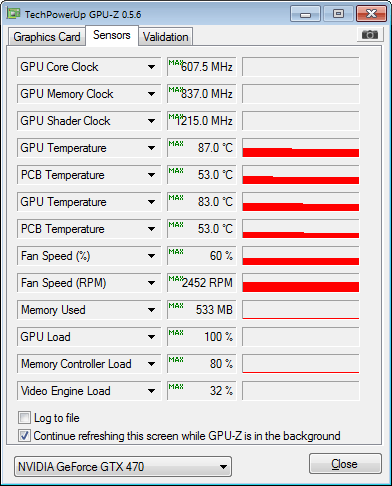
It seems that when GPU reaches around 80C+ things begin to fail fast. Artifacts showing on screen, and the "stopped responding" message shows.

MAX values showing:

9x5.png
 

My Computer My Computer

At a glance

Windows 7 Ultimate x64AMD PHENOMII 955 (4x3.2GHZ)4GB 1333MHZ DDR3, GEILGEFORCE GTX470
OS
Windows 7 Ultimate x64
CPU
AMD PHENOMII 955 (4x3.2GHZ)
Motherboard
MSI 770-C45
Memory
4GB 1333MHZ DDR3, GEIL
Graphics Card(s)
GEFORCE GTX470
Sound Card
7.1 SURROUND SOUND
Hard Drives
1000GB SATAII WD 7200RPM
PSU
750W psu,17DB
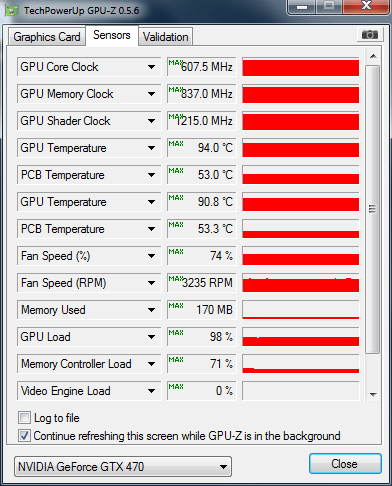
I don't understand this, i made a reboot after above test. This time i was able to do a furmark test.. I had to stop it manually (instead of well having it result in a crash) since it reached 94C.. after this test, i can now sit and look at the minecraft "menu" that does not crash.. even when system was way above 85C while running it.. (in all other cases it crashes after like 10-30 seconds with artifacts showing) this time it was running for like 5 minutes... (without crashing, i closed it myself)

I don't understand...

gg2.png


From what i can tell, the difference in that GPU load did not reach 100% But i guess the "not responding" could cause this, dunno..

edit:running various games produces artifacts in game, running the minecraft menu produces artifacts and shuts down screen flashing black... after flashing for a while, screen freezes with a white screen, and the original menu being all black, so sort of a black box within a white box.

Had to manually reboot.

Edit edit: After this reboot, i am back to the problem where when arriving at desktop it flashes a couple of times, but this time it does not result in a BSOD, just a black screen.

edit edit edit: I then went to fail safe mode and restarted, from there.. now i'm back to desktop in normal mode, no restart yet and it has been running for 2 hours. What do i test from here? o_o
 
Last edited:

My Computer My Computer

At a glance

Windows 7 Ultimate x64AMD PHENOMII 955 (4x3.2GHZ)4GB 1333MHZ DDR3, GEILGEFORCE GTX470
OS
Windows 7 Ultimate x64
CPU
AMD PHENOMII 955 (4x3.2GHZ)
Motherboard
MSI 770-C45
Memory
4GB 1333MHZ DDR3, GEIL
Graphics Card(s)
GEFORCE GTX470
Sound Card
7.1 SURROUND SOUND
Hard Drives
1000GB SATAII WD 7200RPM
PSU
750W psu,17DB
I tried removing the old Nvidia drivers, and installing the latest beta drivers.

290.36-desktop-win7-winvista-64bit-international-beta

So far everything is running without crashes... Will report back later. (cause as we all know, people always think it works, but then.. :) )

EDIT: Actually things were running fine even at high temperatures 80-90, but then i rebooted and tried running the same programs again. This time they almost failed instantly O_o Now im stuck at initial problem, where when you arrive at desktop from boot, screen flashes 4-8 times then BSOD/reboot.
 
Last edited:

My Computer My Computer

At a glance

Windows 7 Ultimate x64AMD PHENOMII 955 (4x3.2GHZ)4GB 1333MHZ DDR3, GEILGEFORCE GTX470
OS
Windows 7 Ultimate x64
CPU
AMD PHENOMII 955 (4x3.2GHZ)
Motherboard
MSI 770-C45
Memory
4GB 1333MHZ DDR3, GEIL
Graphics Card(s)
GEFORCE GTX470
Sound Card
7.1 SURROUND SOUND
Hard Drives
1000GB SATAII WD 7200RPM
PSU
750W psu,17DB
I tried removing the old Nvidia drivers, and installing the latest beta drivers.

290.36-desktop-win7-winvista-64bit-international-beta

So far everything is running without crashes... Will report back later. (cause as we all know, people always think it works, but then.. :) )

EDIT: Actually things were running fine even at high temperatures 80-90, but then i rebooted and tried running the same programs again. This time they almost failed instantly O_o Now im stuck at initial problem, where when you arrive at desktop from boot, screen flashes 4-8 times then BSOD/reboot.


From this link ( AMD Game Forums - ATIKMDAG.sys problems and TDR FAQ ):
The following hardware issues are examples that can cause a TDR event:
- Failing overclock on CPU or GPU (stop overclocking)
- Bad sector in memory resulting in corrupt data being communicated between GPU and the system (either video or system memory) ( MemTest and a video memory stress test: |MG| Video Memory Stress Test 1.7.116 Download )
- Corrupt hard drive/windows install resulting in corruption to the system registry or the page file (Hard drive diagnostics ( HD Diagnostic ), reset your pagefile and run the System File Checker )
- Over heating of GPU or CPU again resulting in corrupt data being communicated. (Point a house fan at the video card, take temperature readings from the card with an IR detector (or your finger - but be very, very careful!!!)
- GPU failure due to any sort of issue from insufficient power(VERY common) to heat. (check the power leads, use a multimeter to check the power output, try another, more powerful PSU)
The following software issues are examples that can cause a TDR event:
-Incompatible drivers of any sort (either GPU, sound, etc) ( Windows 7 Compatibility: Software Programs & Hardware Devices: Find Updates, Drivers, & Downloads )
-Messy registry (I doubt this and don't approve of registry cleaners)
-Known vista issues resounding around multiple displays, aero, dreamscape, and various display drivers. (none known for this OS)
-Known vista issues that sometimes cause corrupt information to be sent to the video card from system memory (will be addressed completely in SP2, has had various fixes applied since vista's release) (none known for this OS)
-Bad direct x files (uninstall, then reinstall DirectX)
-bad system files (System File Checker - was run above)
-Bad driver (some drivers will cause an event due to internal bugs, however these are not nearly as common as many think due to all of the previous things causing the same symptom) - (remove all 3rd party programs and check to be sure drivers aren't loading. Then install only the necessary 3rd party stuff, and ensure it's the latest version and that it's compatible with Win7)
 

My Computer My Computer

At a glance

Win 8 Release candidate 8400[email protected]4 gigsNvidia 9600M
Computer Manufacturer/Model Number
HP Pavillion dv-7 1005 Tx
OS
Win 8 Release candidate 8400
CPU
[email protected]
Memory
4 gigs
Graphics Card(s)
Nvidia 9600M
Sound Card
HD built-in
Monitor(s) Displays
17" Wxga
Screen Resolution
1440x900
Cooling
none
Internet Speed
45Mb down 5Mb up
Thanks again, i will try it out tomorrow.
 

My Computer My Computer

At a glance

Windows 7 Ultimate x64AMD PHENOMII 955 (4x3.2GHZ)4GB 1333MHZ DDR3, GEILGEFORCE GTX470
OS
Windows 7 Ultimate x64
CPU
AMD PHENOMII 955 (4x3.2GHZ)
Motherboard
MSI 770-C45
Memory
4GB 1333MHZ DDR3, GEIL
Graphics Card(s)
GEFORCE GTX470
Sound Card
7.1 SURROUND SOUND
Hard Drives
1000GB SATAII WD 7200RPM
PSU
750W psu,17DB

My Computer My Computer

At a glance

Win 8 Release candidate 8400[email protected]4 gigsNvidia 9600M
Computer Manufacturer/Model Number
HP Pavillion dv-7 1005 Tx
OS
Win 8 Release candidate 8400
CPU
[email protected]
Memory
4 gigs
Graphics Card(s)
Nvidia 9600M
Sound Card
HD built-in
Monitor(s) Displays
17" Wxga
Screen Resolution
1440x900
Cooling
none
Internet Speed
45Mb down 5Mb up
Hello again, i wanted to mention one other symptom, before doing the things you suggest above.

I went back to the latest non-beta driver available before doing the tests. Now on every boot, my gpu fan goes crazy, like 5000rpm 98% fan speed. No heat issue though. And when visiting device manager, it tells me windows has disabled the device.

Anyway trying to re-install drivers and see if i can fix.

Edit: Can't fix it really.. most of the times when i boot the machine the gpu-fan will do the 100% fan speed. This time around it didn't but in both cases:

Windows has stopped this device because it has reported problems. (Code 43)

in device manager, when looking at gtx 470
 
Last edited:

My Computer My Computer

At a glance

Windows 7 Ultimate x64AMD PHENOMII 955 (4x3.2GHZ)4GB 1333MHZ DDR3, GEILGEFORCE GTX470
OS
Windows 7 Ultimate x64
CPU
AMD PHENOMII 955 (4x3.2GHZ)
Motherboard
MSI 770-C45
Memory
4GB 1333MHZ DDR3, GEIL
Graphics Card(s)
GEFORCE GTX470
Sound Card
7.1 SURROUND SOUND
Hard Drives
1000GB SATAII WD 7200RPM
PSU
750W psu,17DB
I was just wondering if it was pointless troubleshooting the TDR-stuff you provided, since i've encountered a new problem?

Does this entire scenario point towards a ruined gpu?

I mean, i started having artifacts showing in a game, with screen flashing black and the message "stopped responding etc" more and more often.

I then toyed around with drivers, and the problem kept getting worse from there. "spreading" to other games.

Or has the "not responding" flashes messed up some software/hardware settings...

I Don't know what to do.
 

My Computer My Computer

At a glance

Windows 7 Ultimate x64AMD PHENOMII 955 (4x3.2GHZ)4GB 1333MHZ DDR3, GEILGEFORCE GTX470
OS
Windows 7 Ultimate x64
CPU
AMD PHENOMII 955 (4x3.2GHZ)
Motherboard
MSI 770-C45
Memory
4GB 1333MHZ DDR3, GEIL
Graphics Card(s)
GEFORCE GTX470
Sound Card
7.1 SURROUND SOUND
Hard Drives
1000GB SATAII WD 7200RPM
PSU
750W psu,17DB
I was just wondering if it was pointless troubleshooting the TDR-stuff you provided, since i've encountered a new problem?

Does this entire scenario point towards a ruined gpu?

I mean, i started having artifacts showing in a game, with screen flashing black and the message "stopped responding etc" more and more often.

I then toyed around with drivers, and the problem kept getting worse from there. "spreading" to other games.

Or has the "not responding" flashes messed up some software/hardware settings...

I Don't know what to do.

I am unsure. Could be any number of things.
 

My Computer My Computer

At a glance

Win 8 Release candidate 8400[email protected]4 gigsNvidia 9600M
Computer Manufacturer/Model Number
HP Pavillion dv-7 1005 Tx
OS
Win 8 Release candidate 8400
CPU
[email protected]
Memory
4 gigs
Graphics Card(s)
Nvidia 9600M
Sound Card
HD built-in
Monitor(s) Displays
17" Wxga
Screen Resolution
1440x900
Cooling
none
Internet Speed
45Mb down 5Mb up
Back
Top