
Okay this is weird. I was using Windows 7 build 7068 or something before and I didn't have the following problem:
Problem:
I have 2 CRT monitors, one displays 1280x1024 default at 85 Hz, the other displays 1600x1200 (which I do not like) when W7 is installed. So I decided to switch to 1280x1024. At first everything looked blurry, so I changed the refreshrate to 85 Hz (the monitor accepts up to 120 Hz at 1280x1024). Anyways now I have the problem the screen is "shrinked".
I cannot explain myself better, but even using the monitors OSD to increase the horizontal / vertical span doesn't offer a solution. Even at 100 it still comes to short.
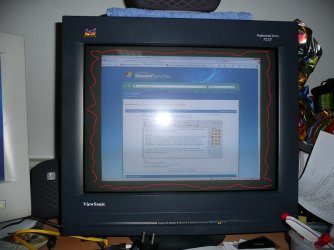
Since my English isn't very good, I have taken a photo with my camera. Which will probably explain the situation better than my English description.
As you can see on the picture; Windows does not "fill" the screen and it should fit till it reaches the red colored part.
Any ideas?
Checklist:
- Latest drivers for my Nvidia 285 GTX card
- Installed the Viewsonic driver for my monitor
- Tried changing refreshrates*
All without succes.
* Changing the refreshrate to 75 Hz does fill up the screen (like it should), however it gives me a headache. And since I am at it, is it possible to get my refreshrate back to 100 Hz? Cause I am used to that and the monitors are more than capable of doing this. Except I cannot select 100 Hz.
Please help. Thanks.
Problem:
I have 2 CRT monitors, one displays 1280x1024 default at 85 Hz, the other displays 1600x1200 (which I do not like) when W7 is installed. So I decided to switch to 1280x1024. At first everything looked blurry, so I changed the refreshrate to 85 Hz (the monitor accepts up to 120 Hz at 1280x1024). Anyways now I have the problem the screen is "shrinked".
I cannot explain myself better, but even using the monitors OSD to increase the horizontal / vertical span doesn't offer a solution. Even at 100 it still comes to short.
Since my English isn't very good, I have taken a photo with my camera. Which will probably explain the situation better than my English description.
As you can see on the picture; Windows does not "fill" the screen and it should fit till it reaches the red colored part.
Any ideas?
Checklist:
- Latest drivers for my Nvidia 285 GTX card
- Installed the Viewsonic driver for my monitor
- Tried changing refreshrates*
All without succes.
* Changing the refreshrate to 75 Hz does fill up the screen (like it should), however it gives me a headache. And since I am at it, is it possible to get my refreshrate back to 100 Hz? Cause I am used to that and the monitors are more than capable of doing this. Except I cannot select 100 Hz.
Please help. Thanks.
Attachments
My Computer
- OS
- Windows 7 & Windows XP x64


 LOL
LOL
