Display shuts off, lost signal, widows freezes, tower stays running.

Atemup

New member
Member
Local time
11:37 PM
Messages
27
Display shuts off, lost signal, windows freezes, tower stays running.

My display shuts off, lost signal, windows freezes, tower stays running without a hiccup.My display or displays shut off and windows freezes when playing games. It started with Fps game loading inside of a window the size of the screen instead of full screen. I then tried playing another graphically demanding game with the settings maxed and the display shut off after several minutes of gameplay. Over time it gradually got worse and worse until it would shut off the display as soon as it loaded windows. I thoroughly cleaned the entire case and components, cleaned and recovered the system back a couple years and I got a full week of Gaming on maxed out settings without issue. Repeating the same steps didn't yield the same results and the display shuts off. At around certain points every time in certain games the display will lose signal. Its been like this for over a year and I think I narrowed it down to faulty drivers or overheating gpu. If it's faulty drivers, do I delete all present drivers and replace them with the newest? If it's a overheating gpu, do I take it apart and replace the thermal paste? Any suggestions? I maybe completely wrong?


PC/Desktop:Custom build
OS:Windows 7 home premium 64 bit
CPU:AMD Phenom II x6 1075t
Motherboard:Gigabyte 990FXA-UD3
Memory:Patriot 4g DDR3 x2
Graphics Card(s):GeForce GTX 560 ti 1024mb
Sound Card:Onboard
Monitor(s) Displays:SCEA 24" stereoscopic 3D Dispay
Screen Resolution:1920x1080 60htz
Hard Drives:Western Digital Velociraptor 300g10,000rpm x2 in Raid 0
PSU:OCZ 850w
Case:Antec 900
Cooling:x5120mm blue lit case fans/200mm top fan
Keyboard:Microsoft ergo
Mouse:Cyborg R.A.T
Antivirus:Advance system care ultimate 7
 
Last edited:

My Computer My Computer

At a glance

Windows 7 home premium 64 bitAMD Phenom II x6 1075tPatriot 4g DDR3 x2GeForce GTX 560 ti 1024mb
Computer type
PC/Desktop
Computer Manufacturer/Model Number
Custom build
OS
Windows 7 home premium 64 bit
CPU
AMD Phenom II x6 1075t
Motherboard
Gigabyte 990FXA-UD3
Memory
Patriot 4g DDR3 x2
Graphics Card(s)
GeForce GTX 560 ti 1024mb
Sound Card
Onboard
Monitor(s) Displays
SCEA 24" stereoscopic 3D Dispay
Screen Resolution
1920x1080 60htz
Hard Drives
Western Digital Velociraptor 300g 10,000rpm x2 in Raid 0
PSU
OCZ 850w
Case
Antec 900
Cooling
x6 120mm blue lit case fans
Keyboard
Microsoft ergo
Mouse
Cyborg R.A.T
Antivirus
Advance system care ultimate 7
Browser
N/A
Hello and welcome Atemup mate the GPU driver would be a good start Drivers | GeForce it is the latest driver and did wonders for my three desktops.

You could also check this
UsingHW Info PSU

Download HW Info and pick the right bit version -
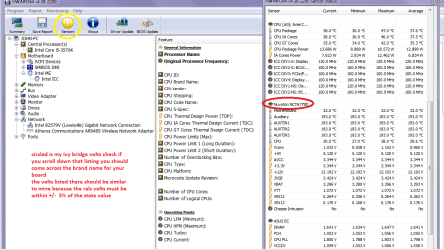
HWiNFO, HWiNFO32/64 - Download -(copyand paste this site into the search bar) If you do not need the runninginformation in the smaller right hand panel close it. In the left hand windowclick on the + for the individual device groupings and they will open out tothe various components.

Go on opening out further until you get to the device itself. click on it and it will highlight. In the right hand window there will be a very detailed description of that device as in brand, speeds model number etc etc These are very detailed and are just what is needed for searching for drivers etc.


To get the PSU volts you need to select the Sensor button circled in yellow in the pic for PSU testing do the same and scroll down the readout as in my pic to where it has Nuvoton = yours might be a different section name / title. Post back a pic of that please.

If you want a more definitive test see this
http://www.sevenforums.com/tutorials/301799-psu-test-dc-output-voltage.html but please only use a digital multimeter and not an analogue as they inject typically 9v into a circuit to test and into a 3.3v or 5v rail - not a good idea!!see the partial pic of the correct sort of meter in that tutorial. details if you scroll down that listing.


Now a good reference article is this
Voltage Rails - Power Supply 101: A Reference Of Specifications it will explain in detail what the voltages are and functions of the PSU/
 

Attachments

  • HW Info PSU VOLTS DSEKTOP.PNG
    HW Info PSU VOLTS DSEKTOP.PNG
    51.7 KB · Views: 1
  • HW INFO X.PNG
    HW INFO X.PNG
    30.8 KB · Views: 0

My Computer My Computer

At a glance

Desk1 7 Home Prem / Desk2 10 Pro / Main lap A...Desk1 i5 3750K / Laptop i7 GTX 860M / Desk2 i...Desk1 8GB (1866) / Desk2 16GB (1333) / Laptop...Desk 1& 2NVidia GTX 650 & Laptops on board Intel
Computer type
PC/Desktop
Computer Manufacturer/Model Number
Own build (new) Desk1 / Asus ROG Win 7 / Desk2 1st build
OS
Desk1 7 Home Prem / Desk2 10 Pro / Main lap Asus ROG 10 Pro 2 laptop Toshiba 7 Pro Asus P2520 7 & 10
CPU
Desk1 i5 3750K / Laptop i7 GTX 860M / Desk2 i5 2500
Motherboard
Desk1 Asus P877-V / Desk2 Gigabyte H67 UD3H / Laptop ?
Memory
Desk1 8GB (1866) / Desk2 16GB (1333) / Laptop 8Gb DDR3
Graphics Card(s)
Desk 1& 2NVidia GTX 650 & Laptops on board Intel
Sound Card
Desk 1 & 2 -XONAR DG Realtek High Def audio Laptop
Monitor(s) Displays
Desk 1 Benq HD 2450 / Desk2 Philips 24" / Laptop 17.5"
Screen Resolution
1920x1080 D1 & D2 & Laptop 1
Hard Drives
Desk1 Samsung 120GB 830 SSD
Asus ROG 256GB 850 Pro SSD
Desk2 Samsung 840 256 SSD
Toshiba 120GB EVO
PSU
Desk 1 Corsair HX 1050/ Laptop ? / Desk 2 Corsair HX 650
Case
Desk 1 Cooler HAF XM ? Toshiba laptop / Desk2 Coolermaster
Cooling
Fans on all Desk1 -2 Desk2 - all Coolermasters 5 Laptop ?
Keyboard
Desk 1 MS Sidewinder X6 Desk 2 MS Sidewinder X 4
Mouse
Desk 1&2 - Gigabyte MS 900 gamer - laptop - Logitec wireless
Internet Speed
ADSL2+
Other Info
One other Desktop (tester) and spare Toshba laptop both with SSD's
Running Kaspersky 2016 ISS on all machines config'd identically
Logitec audio stereo systems on each machine (x3)
Canon MG5250MFC
Router/modem TP-Link running WPA2SK
I'm guessing you have reason to believe this May be a PSU problem?
 

My Computer My Computer

At a glance

Windows 7 home premium 64 bitAMD Phenom II x6 1075tPatriot 4g DDR3 x2GeForce GTX 560 ti 1024mb
Computer type
PC/Desktop
Computer Manufacturer/Model Number
Custom build
OS
Windows 7 home premium 64 bit
CPU
AMD Phenom II x6 1075t
Motherboard
Gigabyte 990FXA-UD3
Memory
Patriot 4g DDR3 x2
Graphics Card(s)
GeForce GTX 560 ti 1024mb
Sound Card
Onboard
Monitor(s) Displays
SCEA 24" stereoscopic 3D Dispay
Screen Resolution
1920x1080 60htz
Hard Drives
Western Digital Velociraptor 300g 10,000rpm x2 in Raid 0
PSU
OCZ 850w
Case
Antec 900
Cooling
x6 120mm blue lit case fans
Keyboard
Microsoft ergo
Mouse
Cyborg R.A.T
Antivirus
Advance system care ultimate 7
Browser
N/A
10653732_706027726146681_5160014483513993489_n.jpg
 

My Computer My Computer

At a glance

Windows 7 home premium 64 bitAMD Phenom II x6 1075tPatriot 4g DDR3 x2GeForce GTX 560 ti 1024mb
Computer type
PC/Desktop
Computer Manufacturer/Model Number
Custom build
OS
Windows 7 home premium 64 bit
CPU
AMD Phenom II x6 1075t
Motherboard
Gigabyte 990FXA-UD3
Memory
Patriot 4g DDR3 x2
Graphics Card(s)
GeForce GTX 560 ti 1024mb
Sound Card
Onboard
Monitor(s) Displays
SCEA 24" stereoscopic 3D Dispay
Screen Resolution
1920x1080 60htz
Hard Drives
Western Digital Velociraptor 300g 10,000rpm x2 in Raid 0
PSU
OCZ 850w
Case
Antec 900
Cooling
x6 120mm blue lit case fans
Keyboard
Microsoft ergo
Mouse
Cyborg R.A.T
Antivirus
Advance system care ultimate 7
Browser
N/A

Well I was starting with the PSU simply because it is the cause of moreproblems than some realize.

Your readouts are ok the 5v rail a tad low for my liking being only justabove the 5% minimum rail voltage. As the GPU runs off that rail means to me atleast it could have been an issue.

Now the driver for that GPU needs updating if you haven't done it is this - the latest I found it worked wonders with my GTX 650's
Drivers | GeForce (344.11)

But first try reseating the card into the slot and doing the same with the RAM sticks and all power leads.
 

My Computer My Computer

At a glance

Desk1 7 Home Prem / Desk2 10 Pro / Main lap A...Desk1 i5 3750K / Laptop i7 GTX 860M / Desk2 i...Desk1 8GB (1866) / Desk2 16GB (1333) / Laptop...Desk 1& 2NVidia GTX 650 & Laptops on board Intel
Computer type
PC/Desktop
Computer Manufacturer/Model Number
Own build (new) Desk1 / Asus ROG Win 7 / Desk2 1st build
OS
Desk1 7 Home Prem / Desk2 10 Pro / Main lap Asus ROG 10 Pro 2 laptop Toshiba 7 Pro Asus P2520 7 & 10
CPU
Desk1 i5 3750K / Laptop i7 GTX 860M / Desk2 i5 2500
Motherboard
Desk1 Asus P877-V / Desk2 Gigabyte H67 UD3H / Laptop ?
Memory
Desk1 8GB (1866) / Desk2 16GB (1333) / Laptop 8Gb DDR3
Graphics Card(s)
Desk 1& 2NVidia GTX 650 & Laptops on board Intel
Sound Card
Desk 1 & 2 -XONAR DG Realtek High Def audio Laptop
Monitor(s) Displays
Desk 1 Benq HD 2450 / Desk2 Philips 24" / Laptop 17.5"
Screen Resolution
1920x1080 D1 & D2 & Laptop 1
Hard Drives
Desk1 Samsung 120GB 830 SSD
Asus ROG 256GB 850 Pro SSD
Desk2 Samsung 840 256 SSD
Toshiba 120GB EVO
PSU
Desk 1 Corsair HX 1050/ Laptop ? / Desk 2 Corsair HX 650
Case
Desk 1 Cooler HAF XM ? Toshiba laptop / Desk2 Coolermaster
Cooling
Fans on all Desk1 -2 Desk2 - all Coolermasters 5 Laptop ?
Keyboard
Desk 1 MS Sidewinder X6 Desk 2 MS Sidewinder X 4
Mouse
Desk 1&2 - Gigabyte MS 900 gamer - laptop - Logitec wireless
Internet Speed
ADSL2+
Other Info
One other Desktop (tester) and spare Toshba laptop both with SSD's
Running Kaspersky 2016 ISS on all machines config'd identically
Logitec audio stereo systems on each machine (x3)
Canon MG5250MFC
Router/modem TP-Link running WPA2SK
I downloaded those drivers last night with a clean install. I'll try reseating today...
 

My Computer My Computer

At a glance

Windows 7 home premium 64 bitAMD Phenom II x6 1075tPatriot 4g DDR3 x2GeForce GTX 560 ti 1024mb
Computer type
PC/Desktop
Computer Manufacturer/Model Number
Custom build
OS
Windows 7 home premium 64 bit
CPU
AMD Phenom II x6 1075t
Motherboard
Gigabyte 990FXA-UD3
Memory
Patriot 4g DDR3 x2
Graphics Card(s)
GeForce GTX 560 ti 1024mb
Sound Card
Onboard
Monitor(s) Displays
SCEA 24" stereoscopic 3D Dispay
Screen Resolution
1920x1080 60htz
Hard Drives
Western Digital Velociraptor 300g 10,000rpm x2 in Raid 0
PSU
OCZ 850w
Case
Antec 900
Cooling
x6 120mm blue lit case fans
Keyboard
Microsoft ergo
Mouse
Cyborg R.A.T
Antivirus
Advance system care ultimate 7
Browser
N/A
Ok mate sounds a good way to go and try this

SLOT CLEANING

Now as for the slots toclean them use a strip of old credit card about 1/2 inch wide nip the cornersoff one end - preferably round them off hold a piece of thin lint free clothover the end dab on some form of alcohol - iso propyl alcohol (what we swab theskin with before an injection) is good and GENTLYswipe along the slots.

This can also be done forthe GPU slot/s and do not forget to clean the contacts on the cards / stickseither.

It is an idea to clean thecontacts on the sticks / cards while you are at it but be VERY gentle whendoing this.
 

Attachments

  • STICK.PNG
    STICK.PNG
    6 KB · Views: 0

My Computer My Computer

At a glance

Desk1 7 Home Prem / Desk2 10 Pro / Main lap A...Desk1 i5 3750K / Laptop i7 GTX 860M / Desk2 i...Desk1 8GB (1866) / Desk2 16GB (1333) / Laptop...Desk 1& 2NVidia GTX 650 & Laptops on board Intel
Computer type
PC/Desktop
Computer Manufacturer/Model Number
Own build (new) Desk1 / Asus ROG Win 7 / Desk2 1st build
OS
Desk1 7 Home Prem / Desk2 10 Pro / Main lap Asus ROG 10 Pro 2 laptop Toshiba 7 Pro Asus P2520 7 & 10
CPU
Desk1 i5 3750K / Laptop i7 GTX 860M / Desk2 i5 2500
Motherboard
Desk1 Asus P877-V / Desk2 Gigabyte H67 UD3H / Laptop ?
Memory
Desk1 8GB (1866) / Desk2 16GB (1333) / Laptop 8Gb DDR3
Graphics Card(s)
Desk 1& 2NVidia GTX 650 & Laptops on board Intel
Sound Card
Desk 1 & 2 -XONAR DG Realtek High Def audio Laptop
Monitor(s) Displays
Desk 1 Benq HD 2450 / Desk2 Philips 24" / Laptop 17.5"
Screen Resolution
1920x1080 D1 & D2 & Laptop 1
Hard Drives
Desk1 Samsung 120GB 830 SSD
Asus ROG 256GB 850 Pro SSD
Desk2 Samsung 840 256 SSD
Toshiba 120GB EVO
PSU
Desk 1 Corsair HX 1050/ Laptop ? / Desk 2 Corsair HX 650
Case
Desk 1 Cooler HAF XM ? Toshiba laptop / Desk2 Coolermaster
Cooling
Fans on all Desk1 -2 Desk2 - all Coolermasters 5 Laptop ?
Keyboard
Desk 1 MS Sidewinder X6 Desk 2 MS Sidewinder X 4
Mouse
Desk 1&2 - Gigabyte MS 900 gamer - laptop - Logitec wireless
Internet Speed
ADSL2+
Other Info
One other Desktop (tester) and spare Toshba laptop both with SSD's
Running Kaspersky 2016 ISS on all machines config'd identically
Logitec audio stereo systems on each machine (x3)
Canon MG5250MFC
Router/modem TP-Link running WPA2SK
Do you think filthy slots is the culprit? It seems like something more precise to me, display only sometimes shutting down after a specific action.....
 
Last edited:

My Computer My Computer

At a glance

Windows 7 home premium 64 bitAMD Phenom II x6 1075tPatriot 4g DDR3 x2GeForce GTX 560 ti 1024mb
Computer type
PC/Desktop
Computer Manufacturer/Model Number
Custom build
OS
Windows 7 home premium 64 bit
CPU
AMD Phenom II x6 1075t
Motherboard
Gigabyte 990FXA-UD3
Memory
Patriot 4g DDR3 x2
Graphics Card(s)
GeForce GTX 560 ti 1024mb
Sound Card
Onboard
Monitor(s) Displays
SCEA 24" stereoscopic 3D Dispay
Screen Resolution
1920x1080 60htz
Hard Drives
Western Digital Velociraptor 300g 10,000rpm x2 in Raid 0
PSU
OCZ 850w
Case
Antec 900
Cooling
x6 120mm blue lit case fans
Keyboard
Microsoft ergo
Mouse
Cyborg R.A.T
Antivirus
Advance system care ultimate 7
Browser
N/A
Do you think filthy slots is the culprit? It seems like something more precise to me, display only sometimes shutting down after a specific action.....
Well Atemup as I have just told someone else I am a firm believer in eliminating the simpler things first before diving into long and time consuming and tedious tests.

You are under no obligation to do anything I say as I have already suggested some things to check and it you want to wait I will keep on looking and maybe someone else might pick this thread up.

Just so you know I pick up a lot of threads that have been posted a while and have a heap of views but no answers and I feel some obligation as a senior member to anyone in that situation to have at least a go for them. I have seen threads go on for very long periods of time and having been there done that have some empathy for those folks:)
 

My Computer My Computer

At a glance

Desk1 7 Home Prem / Desk2 10 Pro / Main lap A...Desk1 i5 3750K / Laptop i7 GTX 860M / Desk2 i...Desk1 8GB (1866) / Desk2 16GB (1333) / Laptop...Desk 1& 2NVidia GTX 650 & Laptops on board Intel
Computer type
PC/Desktop
Computer Manufacturer/Model Number
Own build (new) Desk1 / Asus ROG Win 7 / Desk2 1st build
OS
Desk1 7 Home Prem / Desk2 10 Pro / Main lap Asus ROG 10 Pro 2 laptop Toshiba 7 Pro Asus P2520 7 & 10
CPU
Desk1 i5 3750K / Laptop i7 GTX 860M / Desk2 i5 2500
Motherboard
Desk1 Asus P877-V / Desk2 Gigabyte H67 UD3H / Laptop ?
Memory
Desk1 8GB (1866) / Desk2 16GB (1333) / Laptop 8Gb DDR3
Graphics Card(s)
Desk 1& 2NVidia GTX 650 & Laptops on board Intel
Sound Card
Desk 1 & 2 -XONAR DG Realtek High Def audio Laptop
Monitor(s) Displays
Desk 1 Benq HD 2450 / Desk2 Philips 24" / Laptop 17.5"
Screen Resolution
1920x1080 D1 & D2 & Laptop 1
Hard Drives
Desk1 Samsung 120GB 830 SSD
Asus ROG 256GB 850 Pro SSD
Desk2 Samsung 840 256 SSD
Toshiba 120GB EVO
PSU
Desk 1 Corsair HX 1050/ Laptop ? / Desk 2 Corsair HX 650
Case
Desk 1 Cooler HAF XM ? Toshiba laptop / Desk2 Coolermaster
Cooling
Fans on all Desk1 -2 Desk2 - all Coolermasters 5 Laptop ?
Keyboard
Desk 1 MS Sidewinder X6 Desk 2 MS Sidewinder X 4
Mouse
Desk 1&2 - Gigabyte MS 900 gamer - laptop - Logitec wireless
Internet Speed
ADSL2+
Other Info
One other Desktop (tester) and spare Toshba laptop both with SSD's
Running Kaspersky 2016 ISS on all machines config'd identically
Logitec audio stereo systems on each machine (x3)
Canon MG5250MFC
Router/modem TP-Link running WPA2SK
I do appreciate it! :)
 

My Computer My Computer

At a glance

Windows 7 home premium 64 bitAMD Phenom II x6 1075tPatriot 4g DDR3 x2GeForce GTX 560 ti 1024mb
Computer type
PC/Desktop
Computer Manufacturer/Model Number
Custom build
OS
Windows 7 home premium 64 bit
CPU
AMD Phenom II x6 1075t
Motherboard
Gigabyte 990FXA-UD3
Memory
Patriot 4g DDR3 x2
Graphics Card(s)
GeForce GTX 560 ti 1024mb
Sound Card
Onboard
Monitor(s) Displays
SCEA 24" stereoscopic 3D Dispay
Screen Resolution
1920x1080 60htz
Hard Drives
Western Digital Velociraptor 300g 10,000rpm x2 in Raid 0
PSU
OCZ 850w
Case
Antec 900
Cooling
x6 120mm blue lit case fans
Keyboard
Microsoft ergo
Mouse
Cyborg R.A.T
Antivirus
Advance system care ultimate 7
Browser
N/A
Just out of curiosity what id the temp for the GPU? It isn't a big job to reapply the thermal compound if need be. Use Speccy for that Speccy - Download and if this looks ok then maybe a stress test might be in order.
Again try testing the volts on it's lead - don't forget the warning re the analogue meter.

I suppose the monitor software is update to date and the cable is alright too?
 

My Computer My Computer

At a glance

Desk1 7 Home Prem / Desk2 10 Pro / Main lap A...Desk1 i5 3750K / Laptop i7 GTX 860M / Desk2 i...Desk1 8GB (1866) / Desk2 16GB (1333) / Laptop...Desk 1& 2NVidia GTX 650 & Laptops on board Intel
Computer type
PC/Desktop
Computer Manufacturer/Model Number
Own build (new) Desk1 / Asus ROG Win 7 / Desk2 1st build
OS
Desk1 7 Home Prem / Desk2 10 Pro / Main lap Asus ROG 10 Pro 2 laptop Toshiba 7 Pro Asus P2520 7 & 10
CPU
Desk1 i5 3750K / Laptop i7 GTX 860M / Desk2 i5 2500
Motherboard
Desk1 Asus P877-V / Desk2 Gigabyte H67 UD3H / Laptop ?
Memory
Desk1 8GB (1866) / Desk2 16GB (1333) / Laptop 8Gb DDR3
Graphics Card(s)
Desk 1& 2NVidia GTX 650 & Laptops on board Intel
Sound Card
Desk 1 & 2 -XONAR DG Realtek High Def audio Laptop
Monitor(s) Displays
Desk 1 Benq HD 2450 / Desk2 Philips 24" / Laptop 17.5"
Screen Resolution
1920x1080 D1 & D2 & Laptop 1
Hard Drives
Desk1 Samsung 120GB 830 SSD
Asus ROG 256GB 850 Pro SSD
Desk2 Samsung 840 256 SSD
Toshiba 120GB EVO
PSU
Desk 1 Corsair HX 1050/ Laptop ? / Desk 2 Corsair HX 650
Case
Desk 1 Cooler HAF XM ? Toshiba laptop / Desk2 Coolermaster
Cooling
Fans on all Desk1 -2 Desk2 - all Coolermasters 5 Laptop ?
Keyboard
Desk 1 MS Sidewinder X6 Desk 2 MS Sidewinder X 4
Mouse
Desk 1&2 - Gigabyte MS 900 gamer - laptop - Logitec wireless
Internet Speed
ADSL2+
Other Info
One other Desktop (tester) and spare Toshba laptop both with SSD's
Running Kaspersky 2016 ISS on all machines config'd identically
Logitec audio stereo systems on each machine (x3)
Canon MG5250MFC
Router/modem TP-Link running WPA2SK
29c , the highest I've seen it is 71c. The cable is good but I'm using a sony SCEI monitor and I've heard many problems about them when using them for pc, although I have got the same results using a genuine monitor, HDTV or a HMZ-T1.
 

My Computer My Computer

At a glance

Windows 7 home premium 64 bitAMD Phenom II x6 1075tPatriot 4g DDR3 x2GeForce GTX 560 ti 1024mb
Computer type
PC/Desktop
Computer Manufacturer/Model Number
Custom build
OS
Windows 7 home premium 64 bit
CPU
AMD Phenom II x6 1075t
Motherboard
Gigabyte 990FXA-UD3
Memory
Patriot 4g DDR3 x2
Graphics Card(s)
GeForce GTX 560 ti 1024mb
Sound Card
Onboard
Monitor(s) Displays
SCEA 24" stereoscopic 3D Dispay
Screen Resolution
1920x1080 60htz
Hard Drives
Western Digital Velociraptor 300g 10,000rpm x2 in Raid 0
PSU
OCZ 850w
Case
Antec 900
Cooling
x6 120mm blue lit case fans
Keyboard
Microsoft ergo
Mouse
Cyborg R.A.T
Antivirus
Advance system care ultimate 7
Browser
N/A
Well actually you have stolen my next suggestion and that was to be checking out the monitor.
I am not familiar with that brand as I have used BenQ, Philips, and HP for the most part all TN panels but I did buy just a while ago a Samsung similar to this (IPS) panel S27D590P | SAMSUNG Levant once I got it set up (very fiddly) with the latest NVidia drivers is just something else.
So not knowing how your budget is I would suggest replacing the Sony which I am assuming you have tried on another machine. I cannot find the driver for it on their site (surprise surprise).

But in any case if you do go for another monitor check out the pros and cons of the different panels types mate. I know I am probably preaching to the converted but......LOL!!
 

My Computer My Computer

At a glance

Desk1 7 Home Prem / Desk2 10 Pro / Main lap A...Desk1 i5 3750K / Laptop i7 GTX 860M / Desk2 i...Desk1 8GB (1866) / Desk2 16GB (1333) / Laptop...Desk 1& 2NVidia GTX 650 & Laptops on board Intel
Computer type
PC/Desktop
Computer Manufacturer/Model Number
Own build (new) Desk1 / Asus ROG Win 7 / Desk2 1st build
OS
Desk1 7 Home Prem / Desk2 10 Pro / Main lap Asus ROG 10 Pro 2 laptop Toshiba 7 Pro Asus P2520 7 & 10
CPU
Desk1 i5 3750K / Laptop i7 GTX 860M / Desk2 i5 2500
Motherboard
Desk1 Asus P877-V / Desk2 Gigabyte H67 UD3H / Laptop ?
Memory
Desk1 8GB (1866) / Desk2 16GB (1333) / Laptop 8Gb DDR3
Graphics Card(s)
Desk 1& 2NVidia GTX 650 & Laptops on board Intel
Sound Card
Desk 1 & 2 -XONAR DG Realtek High Def audio Laptop
Monitor(s) Displays
Desk 1 Benq HD 2450 / Desk2 Philips 24" / Laptop 17.5"
Screen Resolution
1920x1080 D1 & D2 & Laptop 1
Hard Drives
Desk1 Samsung 120GB 830 SSD
Asus ROG 256GB 850 Pro SSD
Desk2 Samsung 840 256 SSD
Toshiba 120GB EVO
PSU
Desk 1 Corsair HX 1050/ Laptop ? / Desk 2 Corsair HX 650
Case
Desk 1 Cooler HAF XM ? Toshiba laptop / Desk2 Coolermaster
Cooling
Fans on all Desk1 -2 Desk2 - all Coolermasters 5 Laptop ?
Keyboard
Desk 1 MS Sidewinder X6 Desk 2 MS Sidewinder X 4
Mouse
Desk 1&2 - Gigabyte MS 900 gamer - laptop - Logitec wireless
Internet Speed
ADSL2+
Other Info
One other Desktop (tester) and spare Toshba laptop both with SSD's
Running Kaspersky 2016 ISS on all machines config'd identically
Logitec audio stereo systems on each machine (x3)
Canon MG5250MFC
Router/modem TP-Link running WPA2SK
I think that I have pretty much ruled out a monitor issue. I've gotten the same results with an ASUS and Samsung monitors. While looking around for related issues I did learn how to get the monitor to sleep and wake with the pc, so that works :P
 

My Computer My Computer

At a glance

Windows 7 home premium 64 bitAMD Phenom II x6 1075tPatriot 4g DDR3 x2GeForce GTX 560 ti 1024mb
Computer type
PC/Desktop
Computer Manufacturer/Model Number
Custom build
OS
Windows 7 home premium 64 bit
CPU
AMD Phenom II x6 1075t
Motherboard
Gigabyte 990FXA-UD3
Memory
Patriot 4g DDR3 x2
Graphics Card(s)
GeForce GTX 560 ti 1024mb
Sound Card
Onboard
Monitor(s) Displays
SCEA 24" stereoscopic 3D Dispay
Screen Resolution
1920x1080 60htz
Hard Drives
Western Digital Velociraptor 300g 10,000rpm x2 in Raid 0
PSU
OCZ 850w
Case
Antec 900
Cooling
x6 120mm blue lit case fans
Keyboard
Microsoft ergo
Mouse
Cyborg R.A.T
Antivirus
Advance system care ultimate 7
Browser
N/A
Well it sort of pointing the finger at the GPU and or its driver - just how old is the GPU? and one more thing is it capable of supporting a monitor like that one?

I am no genius with graphics to be honest but have you considered replacing the GPU with a slightly higher performing one? I don't know what though cos as I said I am no expert mate. I know a mate of mine who might be better off to advise you so I will ask if that is ok?
 

My Computer My Computer

At a glance

Desk1 7 Home Prem / Desk2 10 Pro / Main lap A...Desk1 i5 3750K / Laptop i7 GTX 860M / Desk2 i...Desk1 8GB (1866) / Desk2 16GB (1333) / Laptop...Desk 1& 2NVidia GTX 650 & Laptops on board Intel
Computer type
PC/Desktop
Computer Manufacturer/Model Number
Own build (new) Desk1 / Asus ROG Win 7 / Desk2 1st build
OS
Desk1 7 Home Prem / Desk2 10 Pro / Main lap Asus ROG 10 Pro 2 laptop Toshiba 7 Pro Asus P2520 7 & 10
CPU
Desk1 i5 3750K / Laptop i7 GTX 860M / Desk2 i5 2500
Motherboard
Desk1 Asus P877-V / Desk2 Gigabyte H67 UD3H / Laptop ?
Memory
Desk1 8GB (1866) / Desk2 16GB (1333) / Laptop 8Gb DDR3
Graphics Card(s)
Desk 1& 2NVidia GTX 650 & Laptops on board Intel
Sound Card
Desk 1 & 2 -XONAR DG Realtek High Def audio Laptop
Monitor(s) Displays
Desk 1 Benq HD 2450 / Desk2 Philips 24" / Laptop 17.5"
Screen Resolution
1920x1080 D1 & D2 & Laptop 1
Hard Drives
Desk1 Samsung 120GB 830 SSD
Asus ROG 256GB 850 Pro SSD
Desk2 Samsung 840 256 SSD
Toshiba 120GB EVO
PSU
Desk 1 Corsair HX 1050/ Laptop ? / Desk 2 Corsair HX 650
Case
Desk 1 Cooler HAF XM ? Toshiba laptop / Desk2 Coolermaster
Cooling
Fans on all Desk1 -2 Desk2 - all Coolermasters 5 Laptop ?
Keyboard
Desk 1 MS Sidewinder X6 Desk 2 MS Sidewinder X 4
Mouse
Desk 1&2 - Gigabyte MS 900 gamer - laptop - Logitec wireless
Internet Speed
ADSL2+
Other Info
One other Desktop (tester) and spare Toshba laptop both with SSD's
Running Kaspersky 2016 ISS on all machines config'd identically
Logitec audio stereo systems on each machine (x3)
Canon MG5250MFC
Router/modem TP-Link running WPA2SK
I haven't seen anything that says it doesn't support it. I was easily able to play games in 3D before this happened. I currently have no budget but do plan on upgrading to a GTX 970 someday.
 

My Computer My Computer

At a glance

Windows 7 home premium 64 bitAMD Phenom II x6 1075tPatriot 4g DDR3 x2GeForce GTX 560 ti 1024mb
Computer type
PC/Desktop
Computer Manufacturer/Model Number
Custom build
OS
Windows 7 home premium 64 bit
CPU
AMD Phenom II x6 1075t
Motherboard
Gigabyte 990FXA-UD3
Memory
Patriot 4g DDR3 x2
Graphics Card(s)
GeForce GTX 560 ti 1024mb
Sound Card
Onboard
Monitor(s) Displays
SCEA 24" stereoscopic 3D Dispay
Screen Resolution
1920x1080 60htz
Hard Drives
Western Digital Velociraptor 300g 10,000rpm x2 in Raid 0
PSU
OCZ 850w
Case
Antec 900
Cooling
x6 120mm blue lit case fans
Keyboard
Microsoft ergo
Mouse
Cyborg R.A.T
Antivirus
Advance system care ultimate 7
Browser
N/A
It doesn't always work right after a force shut down and after waiting a few minutes it will. It has started to get worse again and shutting off as soon as any game goes full screen. I digressed from making any attempts to run a game for a day or so, then it started up a game then shut off after committing a specific in game action that has caused it before...
 

My Computer My Computer

At a glance

Windows 7 home premium 64 bitAMD Phenom II x6 1075tPatriot 4g DDR3 x2GeForce GTX 560 ti 1024mb
Computer type
PC/Desktop
Computer Manufacturer/Model Number
Custom build
OS
Windows 7 home premium 64 bit
CPU
AMD Phenom II x6 1075t
Motherboard
Gigabyte 990FXA-UD3
Memory
Patriot 4g DDR3 x2
Graphics Card(s)
GeForce GTX 560 ti 1024mb
Sound Card
Onboard
Monitor(s) Displays
SCEA 24" stereoscopic 3D Dispay
Screen Resolution
1920x1080 60htz
Hard Drives
Western Digital Velociraptor 300g 10,000rpm x2 in Raid 0
PSU
OCZ 850w
Case
Antec 900
Cooling
x6 120mm blue lit case fans
Keyboard
Microsoft ergo
Mouse
Cyborg R.A.T
Antivirus
Advance system care ultimate 7
Browser
N/A

If you want a more definitive test see this
http://www.sevenforums.com/tutorials/301799-psu-test-dc-output-voltage.html but please only use a digital multimeter and not an analogue as they inject typically 9v into a circuit to test and into a 3.3v or 5v rail - not a good idea!!see the partial pic of the correct sort of meter in that tutorial. details if you scroll down that listing.


Utter nonsense.

An analog meter (measuring volts) takes a small amount of current from the circuit via the probes and uses it to drive a sensitive meter needle. This loads the circuit slightly, and when testing a high impedance circuit can give slightly false readings. A digital meter has a high impedance amplifier on the input that does not load the source and so gives a more accurate reading. Since a psu is a high power/low impedance device, analog and digital voltmeters should give the same reading.

re : injecting a voltage - both analog and digital meters, when testing resistance, have a low voltage at the probes - the current drawn measures the resistance. This is ok for passive items eg resistors or testing continuity in cables, but should not be used to test sensitive items eg computer components (such a test would not give any useful data anyway). More rugged semiconductors eg diodes, transistors, (and also capacitors) can be checked to some degree using resistance settings. In that circumstance, an analog meter can give more useful info. Note - connecting a meter (analog or digital) to a voltage source when on resistance setting can damage the meter.

A digital meter is best for general use - mainly due to low price and tough construction. Drop an analog meter on the floor and the delicate needle assembly goes south.
 
Last edited:

My Computer My Computer

At a glance

Windows 7 pro x64 SP1Intel i7-2600k o/c to 4.6GHz8GB Mushkin 1866MHzNvidia GTX 750 Ti 2GB
Computer type
PC/Desktop
Computer Manufacturer/Model Number
self build
OS
Windows 7 pro x64 SP1
CPU
Intel i7-2600k o/c to 4.6GHz
Motherboard
MSI Z68-GD80
Memory
8GB Mushkin 1866MHz
Graphics Card(s)
Nvidia GTX 750 Ti 2GB
Sound Card
integrated
Monitor(s) Displays
Liyama ProLite 27"
Screen Resolution
1920*1080 px
Hard Drives
Seagate 2TB
PSU
Coolermaster GX 750W
Case
Antec 300 case + 5 fans
Cooling
Dark Rock Pro
Internet Speed
62Mbit down 18Mbit up
Antivirus
MSE
Browser
Firefox
Other Info
Blackgold BGT3650 Quad HD TV card. Also have various 3770 + 4770K render boxes.
Could it be my CPU power connector?
 

My Computer My Computer

At a glance

Windows 7 home premium 64 bitAMD Phenom II x6 1075tPatriot 4g DDR3 x2GeForce GTX 560 ti 1024mb
Computer type
PC/Desktop
Computer Manufacturer/Model Number
Custom build
OS
Windows 7 home premium 64 bit
CPU
AMD Phenom II x6 1075t
Motherboard
Gigabyte 990FXA-UD3
Memory
Patriot 4g DDR3 x2
Graphics Card(s)
GeForce GTX 560 ti 1024mb
Sound Card
Onboard
Monitor(s) Displays
SCEA 24" stereoscopic 3D Dispay
Screen Resolution
1920x1080 60htz
Hard Drives
Western Digital Velociraptor 300g 10,000rpm x2 in Raid 0
PSU
OCZ 850w
Case
Antec 900
Cooling
x6 120mm blue lit case fans
Keyboard
Microsoft ergo
Mouse
Cyborg R.A.T
Antivirus
Advance system care ultimate 7
Browser
N/A

If you want a more definitive test see this http://www.sevenforums.com/tutorials/301799-psu-test-dc-output-voltage.html but please only use a digital multimeter and not an analogue as they inject typically 9v into a circuit to test and into a 3.3v or 5v rail - not a good idea!!see the partial pic of the correct sort of meter in that tutorial. details if you scroll down that listing.

Utter nonsense.

An analog meter (measuring volts) takes a small amount of current from the circuit via the probes and uses it to drive a sensitive meter needle. This loads the circuit slightly, and when testing a high impedance circuit can give slightly false readings. A digital meter has a high impedance amplifier on the input that does not load the source and so gives a more accurate reading. Since a psu is a high power/low impedance device, analog and digital voltmeters should give the same reading.

re : injecting a voltage - both analog and digital meters, when testing resistance, have a low voltage at the probes - the current drawn measures the resistance. This is ok for passive items eg resistors or testing continuity in cables, but should not be used to test sensitive items eg computer components (such a test would not give any useful data anyway). More rugged semiconductors eg diodes, transistors, (and also capacitors) can be checked to some degree using resistance settings. In that circumstance, an analog meter can give more useful info. Note - connecting a meter (analog or digital) to a voltage source when on resistance setting can damage the meter.

A digital meter is best for general use - mainly due to low price and tough construction. Drop an analog meter on the floor and the delicate needle assembly goes south.
Well you clearly know more than I so I shall let the OP know and let him decide on what to follow.
What I quoted is just to make sure the uninitiated - unlike those like yourself - do not go willy nilly into using devices they do or may not know and what I think is safe advice is to post what I do.

If you have any problems with what I tell other members then I suggest you report me to the forum Admin's and let them deal with what I post:sarc:
 

My Computer My Computer

At a glance

Desk1 7 Home Prem / Desk2 10 Pro / Main lap A...Desk1 i5 3750K / Laptop i7 GTX 860M / Desk2 i...Desk1 8GB (1866) / Desk2 16GB (1333) / Laptop...Desk 1& 2NVidia GTX 650 & Laptops on board Intel
Computer type
PC/Desktop
Computer Manufacturer/Model Number
Own build (new) Desk1 / Asus ROG Win 7 / Desk2 1st build
OS
Desk1 7 Home Prem / Desk2 10 Pro / Main lap Asus ROG 10 Pro 2 laptop Toshiba 7 Pro Asus P2520 7 & 10
CPU
Desk1 i5 3750K / Laptop i7 GTX 860M / Desk2 i5 2500
Motherboard
Desk1 Asus P877-V / Desk2 Gigabyte H67 UD3H / Laptop ?
Memory
Desk1 8GB (1866) / Desk2 16GB (1333) / Laptop 8Gb DDR3
Graphics Card(s)
Desk 1& 2NVidia GTX 650 & Laptops on board Intel
Sound Card
Desk 1 & 2 -XONAR DG Realtek High Def audio Laptop
Monitor(s) Displays
Desk 1 Benq HD 2450 / Desk2 Philips 24" / Laptop 17.5"
Screen Resolution
1920x1080 D1 & D2 & Laptop 1
Hard Drives
Desk1 Samsung 120GB 830 SSD
Asus ROG 256GB 850 Pro SSD
Desk2 Samsung 840 256 SSD
Toshiba 120GB EVO
PSU
Desk 1 Corsair HX 1050/ Laptop ? / Desk 2 Corsair HX 650
Case
Desk 1 Cooler HAF XM ? Toshiba laptop / Desk2 Coolermaster
Cooling
Fans on all Desk1 -2 Desk2 - all Coolermasters 5 Laptop ?
Keyboard
Desk 1 MS Sidewinder X6 Desk 2 MS Sidewinder X 4
Mouse
Desk 1&2 - Gigabyte MS 900 gamer - laptop - Logitec wireless
Internet Speed
ADSL2+
Other Info
One other Desktop (tester) and spare Toshba laptop both with SSD's
Running Kaspersky 2016 ISS on all machines config'd identically
Logitec audio stereo systems on each machine (x3)
Canon MG5250MFC
Router/modem TP-Link running WPA2SK
Back
Top