
Display Switch Shortcut - Create

How to Create a "Display Switch" Shortcut in Windows 7

   Information
This will show you how to create or download a Display Switch shortcut to use to change the presentation mode for how your desktop is displayed in Windows 7.

   Note
You can also press the Windows Key + P to open Display Switch.


EXAMPLE: Display Switch
NOTE: This is what the shortcut in OPTION ONE, and the first choice in step 2 of OPTION TWO, will open to select how you want your desktop to be displayed.
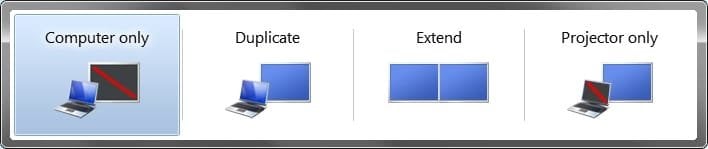
switch.jpg


OPTION ONE

To Download a "Display Switch" Shortcut


1. Click on the Download button below to download the file below.
NOTE: This shortcut opens Display Switch.
Display_Switch.zip


Download


2. Click on Save, and save the .zip file to the desktop.

3. Open the .zip file and extract the Display Switch shortcut to the desktop.

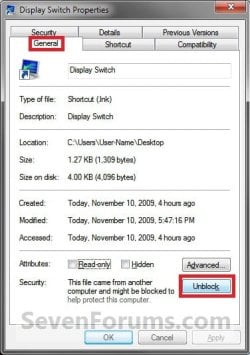
4. Right click on the Display Switch shortcut, and click on Properties, General tab, and on the Unblock button. (See screenshot below)
NOTE: If you do not have a Unblock button under the General tab, then the shortcut is already unblocked and you can continue on to step 5.
Unblock.jpg
5. You can now Pin to Taskbar or Pin to Start Menu this shortcut, assign a keyboard shortcut to it, or move it where you like for easy use.

6. When done, you can delete the downloaded .zip file on the desktop if you like, or save it to use again.


OPTION TWO

Manually Create "Display Switch" Shortcuts


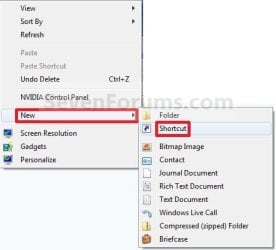
1. Right click on a empty area on desktop, and click on New and Shortcut. (See screenshot below)
Right_Click.jpg
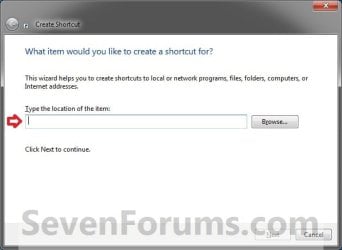
2. Type in one of the commands below into the location area that you want, and click on the Next button. (See screenshot below)

  • Opens Display Switch
%windir%\System32\DisplaySwitch.exe

  • Switches to External or "Projector" Display Immediately
%windir%\System32\DisplaySwitch.exe /external

  • Switches to "Computer only" Display Immediately
%windir%\System32\DisplaySwitch.exe /internal

  • Switches to "Duplicate" Display Immediately
%windir%\System32\DisplaySwitch.exe /clone

  • Switches to "Extend" Display Immediately
%windir%\System32\DisplaySwitch.exe /extend
Step1.jpg
3. Type Display Switch for the name, and click on the Finish button. (See screenshot below)
NOTE: You can name this anything you would like though.
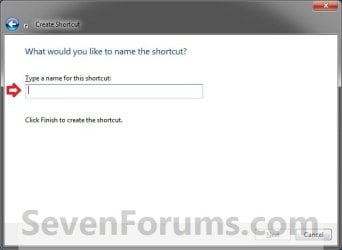
Step2.jpg
4. You can now Pin to Taskbar or Pin to Start Menu this shortcut, assign a keyboard shortcut to it, or move it where you like for easy use.
That's it,
Shawn


Attachments

Last edited:
Why not create up to 4 shortcuts to switch automaticly

C:\Windows\System32\DisplaySwitch.exe /external
C:\Windows\System32\DisplaySwitch.exe /internal
C:\Windows\System32\DisplaySwitch.exe /clone
C:\Windows\System32\DisplaySwitch.exe /extend
 

My Computer

OS
7 x64 (well that's what they claim)
CPU
Q6700 @2.66
Motherboard
AB9pro
Memory
DDR2 4Gig 332.5
Graphics Card(s)
geforce 8800GTS
Sound Card
terratec EWS88MT
Monitor(s) Displays
Samsung 226; panasonic TV
Screen Resolution
1680:1050 // 1920:1080
Internet Speed
50Mb u/d
Hello Seomantor, and welcome to Seven Forums.

Thank you for sharing this tip. :)
 

My Computer

Computer type
PC/Desktop
Computer Manufacturer/Model Number
Self built custom
OS
64-bit Windows 11 Pro for Workstations
CPU
Intel i7-8700K OC'd to 5 GHz
Motherboard
ASUS ROG Maximus XI Formula Z390
Memory
64 GB (4x16GB) G.SKILL TridentZ RGB DDR4 3600 MHz
Graphics Card(s)
ASUS ROG-STRIX-GTX1080TI-O11G-GAMING
Sound Card
Integrated
Monitor(s) Displays
2 x Samsung Odyssey G7 27"
Screen Resolution
2560x1440
Hard Drives
1TB Samsung 990 PRO M.2,
4TB Samsung 990 PRO PRO M.2,
TerraMaster F8 SSD Plus NAS
PSU
Seasonic Prime Titanium 850W
Case
Thermaltake Core P3
Cooling
Corsair Hydro H115i
Keyboard
Logitech wireless K800
Mouse
Logitech MX Master 4
Internet Speed
2 Gb/s Download and 100 Mb/s Upload
Antivirus
Malwarebyte Anti-Malware Premium
Browser
Google Chrome
Other Info
Logitech Z625 speaker system,
Logitech BRIO 4K Pro webcam,
HP Color LaserJet Pro MFP M477fdn,
APC SMART-UPS RT 1000 XL - SURT1000XLI,
Galaxy S23 Plus phone
hotkeys using Autohotkey

Hey all,

I had a problem when switching from my dual monitor setup to my projector and back. I wrote this simple ahk script that launches the commands that Brink posted above.

the problem was that sometimes when i turn off my projector the screen would not come back to my dual monitor setup, forcing me to turn the projector back on and manually hitting win + P to hit extended and everything would go back to normal.

Anyways, you will need to install autohotkey.
to use the attached script. the hotkeys are as follows:


ctrl+alt + E (For extended)
ctrl+alt + I (For Internal)
ctrl+alt + C (For clone)
ctrl+alt + P (for projector)


Note that you will need to change the extension from .txt to .ahk for it to be used with autohotkey. you can switch back to .txt for editing (change the shortcuts or whatever you like!)

hope this helps!
 

Attachments

Last edited:

My Computer

OS
windows 7
Thank you, this should save some wear and tear on my keyboard. I often switch from dual to single and back again when playing games.
 

My Computer

Computer type
PC/Desktop
Computer Manufacturer/Model Number
Home Built
OS
Windows 10 Education 64 bit
CPU
AMD Phenom II X4 980 Black Edition Deneb 3.7GHz
Motherboard
Asus M4N68T-M V2 µATX Motherboard
Memory
8GB 4GBx2 Kingston PC10600 DDR3 1333 Memory
Graphics Card(s)
Zotac NVIDIA Geforce GT640 2 Gig DDR3 PCIe
Sound Card
VIA VT1708s High Definition Audio 8-channel Onboard
Monitor(s) Displays
22" LG E2242 1080p and 2 19" I-INC AG191D
Screen Resolution
1280x1024 - 1920x1080 - 1280x1024
Hard Drives
Crucial M100 256 GB SSD and 500 GB WD Blue SATA
PSU
Thermaltake TR 620
Case
Power Up Black ATX Mid-Tower Case
Cooling
Stock heatsink and fan
Keyboard
Logitech Wireless K350 Wave
Mouse
Logitech Wireless M570 Trackman Wheel
Internet Speed
80 Mbps Down 30 Mbps Up
Antivirus
Windows Defender
Browser
Internet Explorer 11
Other Info
HP DVD1040e Lightscribe - External USB2
This is a very handy guide and I thank you. Although sadly my system sees it backwards with the TV as the computer monitor as it is connected with HDMI and my monitor as the external as it is connected with DVI, not sure how to fix it, but bleh not sure if it is worth it
 

My Computer

Computer Manufacturer/Model Number
custom build
OS
Windows 7 Pro X64
CPU
AMD Phenom II X4 975 Black Edition
Motherboard
MSI 870A-G54 (FX)
Memory
CORSAIR Vengeance 8GB (2 x 4GB) 240-Pin DDR3 SDRAM DDR3 1600
Graphics Card(s)
ASUS EN9800GT HB/HTDI/512M GeForce 9800 GT 512MB 256-bit GDD
Sound Card
Realtek ALC892
Monitor(s) Displays
Viewsonic 19' 16:10
Screen Resolution
1680X1050
Hard Drives
Western Digital Caviar Black WD6401AALS 640GB 7200 RPM SATA,
Western Digital Caviar Black 1TB 7200RPM SATA
PSU
Thermaltake Purepower W0100RU 500W ATX 12V
Case
COOLER MASTER Elite RC-331-KKN1-GP Black SECC ATX Mid Tower
Cooling
Nothing beyond what etch part came with
Keyboard
Logitech G11
Mouse
USB Logitech gaming mouse
Internet Speed
Cable
Other Info
New CPU, Motherboard, and Ram installed 02/2012

Logitech G35 Headset
Hey smsff,

If the monitor has a different connection that you can use, you might see how it works with it instead for now. :)
 

My Computer

Computer type
PC/Desktop
Computer Manufacturer/Model Number
Self built custom
OS
64-bit Windows 11 Pro for Workstations
CPU
Intel i7-8700K OC'd to 5 GHz
Motherboard
ASUS ROG Maximus XI Formula Z390
Memory
64 GB (4x16GB) G.SKILL TridentZ RGB DDR4 3600 MHz
Graphics Card(s)
ASUS ROG-STRIX-GTX1080TI-O11G-GAMING
Sound Card
Integrated
Monitor(s) Displays
2 x Samsung Odyssey G7 27"
Screen Resolution
2560x1440
Hard Drives
1TB Samsung 990 PRO M.2,
4TB Samsung 990 PRO PRO M.2,
TerraMaster F8 SSD Plus NAS
PSU
Seasonic Prime Titanium 850W
Case
Thermaltake Core P3
Cooling
Corsair Hydro H115i
Keyboard
Logitech wireless K800
Mouse
Logitech MX Master 4
Internet Speed
2 Gb/s Download and 100 Mb/s Upload
Antivirus
Malwarebyte Anti-Malware Premium
Browser
Google Chrome
Other Info
Logitech Z625 speaker system,
Logitech BRIO 4K Pro webcam,
HP Color LaserJet Pro MFP M477fdn,
APC SMART-UPS RT 1000 XL - SURT1000XLI,
Galaxy S23 Plus phone
Can you specify Displays by #?
Due to my video card's port config, my primary monitor is identified as #3.
 

My Computer

Computer type
PC/Desktop
OS
Windows 7 Ultimate 32bit

My Computer

Computer type
PC/Desktop
Computer Manufacturer/Model Number
Self built custom
OS
64-bit Windows 11 Pro for Workstations
CPU
Intel i7-8700K OC'd to 5 GHz
Motherboard
ASUS ROG Maximus XI Formula Z390
Memory
64 GB (4x16GB) G.SKILL TridentZ RGB DDR4 3600 MHz
Graphics Card(s)
ASUS ROG-STRIX-GTX1080TI-O11G-GAMING
Sound Card
Integrated
Monitor(s) Displays
2 x Samsung Odyssey G7 27"
Screen Resolution
2560x1440
Hard Drives
1TB Samsung 990 PRO M.2,
4TB Samsung 990 PRO PRO M.2,
TerraMaster F8 SSD Plus NAS
PSU
Seasonic Prime Titanium 850W
Case
Thermaltake Core P3
Cooling
Corsair Hydro H115i
Keyboard
Logitech wireless K800
Mouse
Logitech MX Master 4
Internet Speed
2 Gb/s Download and 100 Mb/s Upload
Antivirus
Malwarebyte Anti-Malware Premium
Browser
Google Chrome
Other Info
Logitech Z625 speaker system,
Logitech BRIO 4K Pro webcam,
HP Color LaserJet Pro MFP M477fdn,
APC SMART-UPS RT 1000 XL - SURT1000XLI,
Galaxy S23 Plus phone
Back
Top