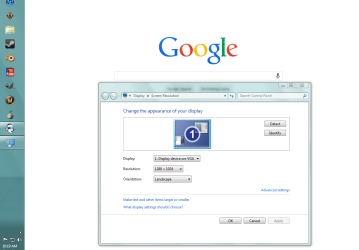
C cuervo363 New member Local time 12:05 PM Messages 4 Nov 9, 2013 #1 I started up my computer this morning and noticed almost immediately that my display was too large and doesn't fit my screen properly. I have a 19" monitor and I am running at 1280x1024. Any idea why my display is so huge? Screenshot included Attachments screenshot help.PNG 49.1 KB · Views: 2 My Computer My Computer At a glance windows 7 home premium 64 bitComputer typePC/DesktopOSwindows 7 home premium 64 bit
I started up my computer this morning and noticed almost immediately that my display was too large and doesn't fit my screen properly. I have a 19" monitor and I am running at 1280x1024. Any idea why my display is so huge? Screenshot included
AddRAM R.I.P. Guru Gold Member VIP Local time 1:05 PM Messages 13,491 Location New Jersey Nov 9, 2013 #2 Reset your monitor to defaults by using the buttons on the monitor, see if that helps. And make sure you have the monitor set to it`s native resolution. My Computer My Computer At a glance Windows 10 Pro x64Intel Core i7 6700KGSkill TridentZ RGB 16GB 3600 16-16-16-36EVGA GTX 980 Ti SC x2Computer typePC/DesktopComputer Manufacturer/Model NumberSkylake Special #666OSWindows 10 Pro x64CPUIntel Core i7 6700KMotherboardAsus Sabertooth Z170 Mark 1MemoryGSkill TridentZ RGB 16GB 3600 16-16-16-36Graphics Card(s)EVGA GTX 980 Ti SC x2Sound CardRealtek High DefinitionMonitor(s) DisplaysAOC G2460PGScreen Resolution1920 x 1080 144HzHard DrivesSamsung 860 Pro 256GB, Seagate Barracuda 4TB x2PSUEVGA 1000 P2, EVGA White Custom Braided CablesCaseCorsair Vengeance C70 Gunmetal BlackCoolingCorsair H100i v2, Corsair ML120 x2, Thermal Grizzly KryonautKeyboardLogitech G910 Orion SpectrumMouseLogitech G700sInternet SpeedVerizon Fios Quantum Gateway 75/75AntivirusWindows Defender, Malwarebytes Free 3.8.3BrowserChromeOther InfoCorsair SP120 x4, LG Blu-ray Drive, Durabrand HT-395 100 Watt Dolby Digital Amp, Corsair H2100 Wireless 7.1 Headset
Reset your monitor to defaults by using the buttons on the monitor, see if that helps. And make sure you have the monitor set to it`s native resolution.
C cuervo363 New member Thread Starter Local time 12:05 PM Messages 4 Nov 9, 2013 #3 I reset and made sure the monitor is at 1280x1024, still no change. My Computer My Computer At a glance windows 7 home premium 64 bitComputer typePC/DesktopOSwindows 7 home premium 64 bit
AddRAM R.I.P. Guru Gold Member VIP Local time 1:05 PM Messages 13,491 Location New Jersey Nov 9, 2013 #4 Then you can try uninstalling your video drivers and reinstalling them. You can do it easily through the device manager. Last edited: Apr 22, 2015 My Computer My Computer At a glance Windows 10 Pro x64Intel Core i7 6700KGSkill TridentZ RGB 16GB 3600 16-16-16-36EVGA GTX 980 Ti SC x2Computer typePC/DesktopComputer Manufacturer/Model NumberSkylake Special #666OSWindows 10 Pro x64CPUIntel Core i7 6700KMotherboardAsus Sabertooth Z170 Mark 1MemoryGSkill TridentZ RGB 16GB 3600 16-16-16-36Graphics Card(s)EVGA GTX 980 Ti SC x2Sound CardRealtek High DefinitionMonitor(s) DisplaysAOC G2460PGScreen Resolution1920 x 1080 144HzHard DrivesSamsung 860 Pro 256GB, Seagate Barracuda 4TB x2PSUEVGA 1000 P2, EVGA White Custom Braided CablesCaseCorsair Vengeance C70 Gunmetal BlackCoolingCorsair H100i v2, Corsair ML120 x2, Thermal Grizzly KryonautKeyboardLogitech G910 Orion SpectrumMouseLogitech G700sInternet SpeedVerizon Fios Quantum Gateway 75/75AntivirusWindows Defender, Malwarebytes Free 3.8.3BrowserChromeOther InfoCorsair SP120 x4, LG Blu-ray Drive, Durabrand HT-395 100 Watt Dolby Digital Amp, Corsair H2100 Wireless 7.1 Headset
Then you can try uninstalling your video drivers and reinstalling them. You can do it easily through the device manager.
C cuervo363 New member Thread Starter Local time 12:05 PM Messages 4 Nov 9, 2013 #5 i'll do that in just a moment, hopefully it works. thanks for helping me by the way My Computer My Computer At a glance windows 7 home premium 64 bitComputer typePC/DesktopOSwindows 7 home premium 64 bit
C cuervo363 New member Thread Starter Local time 12:05 PM Messages 4 Nov 9, 2013 #6 That did the trick, thanks so much for your help AddRAM!!!! My Computer My Computer At a glance windows 7 home premium 64 bitComputer typePC/DesktopOSwindows 7 home premium 64 bit
AddRAM R.I.P. Guru Gold Member VIP Local time 1:05 PM Messages 13,491 Location New Jersey Nov 9, 2013 #7 Awesome, I`m so glad you got it fixed, good job My Computer My Computer At a glance Windows 10 Pro x64Intel Core i7 6700KGSkill TridentZ RGB 16GB 3600 16-16-16-36EVGA GTX 980 Ti SC x2Computer typePC/DesktopComputer Manufacturer/Model NumberSkylake Special #666OSWindows 10 Pro x64CPUIntel Core i7 6700KMotherboardAsus Sabertooth Z170 Mark 1MemoryGSkill TridentZ RGB 16GB 3600 16-16-16-36Graphics Card(s)EVGA GTX 980 Ti SC x2Sound CardRealtek High DefinitionMonitor(s) DisplaysAOC G2460PGScreen Resolution1920 x 1080 144HzHard DrivesSamsung 860 Pro 256GB, Seagate Barracuda 4TB x2PSUEVGA 1000 P2, EVGA White Custom Braided CablesCaseCorsair Vengeance C70 Gunmetal BlackCoolingCorsair H100i v2, Corsair ML120 x2, Thermal Grizzly KryonautKeyboardLogitech G910 Orion SpectrumMouseLogitech G700sInternet SpeedVerizon Fios Quantum Gateway 75/75AntivirusWindows Defender, Malwarebytes Free 3.8.3BrowserChromeOther InfoCorsair SP120 x4, LG Blu-ray Drive, Durabrand HT-395 100 Watt Dolby Digital Amp, Corsair H2100 Wireless 7.1 Headset