
Dllhost.exe uses an enormous quantity of RAM

But you still haven't and may never figure it out. After reinstall, do the folder "test". Also, do it after installing each program or change made to the system.

Ok ;)

If you don't want reinstall, maybe you can circumvent the problem by changing the view settings of the folder to show list instead of icons.

It's already "list" but I tried other view, same things.

I'm thinking now, we can reinstall windows (not repair) without formating the partition, can't we ?

Thanks.
 

My Computer My Computer

At a glance

Windows 7 Home Premium (in French)Inter Core 2 Quad Q6600 @ 2.40GHz (Kentsfield...3.0GB Dual-Channel DDR2 @ 333MHz 5-5-5-15GeForce 8600 GT 512MB
OS
Windows 7 Home Premium (in French)
CPU
Inter Core 2 Quad Q6600 @ 2.40GHz (Kentsfield 65nm Techno.)
Motherboard
PEGATRON CORPORATION Benicia (CPU 1)
Memory
3.0GB Dual-Channel DDR2 @ 333MHz 5-5-5-15
Graphics Card(s)
GeForce 8600 GT 512MB
Sound Card
Realtek High Definition Audio
Monitor(s) Displays
ASUS VK266H
Screen Resolution
1920x1200 (Native)
Hard Drives
Seagate ST3500630AS (SATA) 488.39GB
Keyboard
Microsoft® Wired Keyboard 500
Mouse
HP 5189URF (M)
Internet Speed
ADSL Down : 5.66Mb/s - Up: 0.62Mb/s
I'm thinking now, we can reinstall windows (not repair) without formating the partition, can't we ?

Yes. Whatever is on the partition will be moved to a folder named "Windows.old"

Or to format:

When you get to the screen asking where to install, click Advanced and (make sure it's the C drive) Format. It's quick, only a few seconds.
 
Last edited:

My Computer My Computer

At a glance

Windows 7 RCCore 2 Duo T7200 2GHz2GBFireGL V5250
Computer Manufacturer/Model Number
ThinkPad T60p
OS
Windows 7 RC
CPU
Core 2 Duo T7200 2GHz
Memory
2GB
Graphics Card(s)
FireGL V5250
Monitor(s) Displays
15.4" Widescreen
Screen Resolution
1680x1050
Other Info
☺ NEW COOL TOY: ASUS Eee PC 1000HE w/2GB 800MHz RAM, Samsung 64GB SLC SSD and, of course, Windows 7 ☺
When you get to the screen asking where to install, click Advanced and (make sure it's the C drive) Format. It's quick, only a few seconds.
Ok I'll see that ;). I hope it will make a real reinstall, deleting the programm files & windows folders. But not everything in C. I put all my backup on a folder directly on C:.

I'm going to reinstall it now. ;)
 

My Computer My Computer

At a glance

Windows 7 Home Premium (in French)Inter Core 2 Quad Q6600 @ 2.40GHz (Kentsfield...3.0GB Dual-Channel DDR2 @ 333MHz 5-5-5-15GeForce 8600 GT 512MB
OS
Windows 7 Home Premium (in French)
CPU
Inter Core 2 Quad Q6600 @ 2.40GHz (Kentsfield 65nm Techno.)
Motherboard
PEGATRON CORPORATION Benicia (CPU 1)
Memory
3.0GB Dual-Channel DDR2 @ 333MHz 5-5-5-15
Graphics Card(s)
GeForce 8600 GT 512MB
Sound Card
Realtek High Definition Audio
Monitor(s) Displays
ASUS VK266H
Screen Resolution
1920x1200 (Native)
Hard Drives
Seagate ST3500630AS (SATA) 488.39GB
Keyboard
Microsoft® Wired Keyboard 500
Mouse
HP 5189URF (M)
Internet Speed
ADSL Down : 5.66Mb/s - Up: 0.62Mb/s
NO! get your stuff you want to save off of the C drive or DON'T format.
 
Last edited:

My Computer My Computer

At a glance

Windows 7 RCCore 2 Duo T7200 2GHz2GBFireGL V5250
Computer Manufacturer/Model Number
ThinkPad T60p
OS
Windows 7 RC
CPU
Core 2 Duo T7200 2GHz
Memory
2GB
Graphics Card(s)
FireGL V5250
Monitor(s) Displays
15.4" Widescreen
Screen Resolution
1680x1050
Other Info
☺ NEW COOL TOY: ASUS Eee PC 1000HE w/2GB 800MHz RAM, Samsung 64GB SLC SSD and, of course, Windows 7 ☺
Don't worry bum, I didn't lose anything since I didn't make a formatting.

I reinstalled Windows and it is perfect now, I just chose C: without formatting, and that moved the old files of “Documents” “Programm Files” and “Windows” to a folder “Windows.old” and Installed a fresh new Windows. But I had already backup all my files in a C:\Backup folder. Because I knew that Windows was not going to remove what was created by me in the root of C:.

So it works perfectly now, I don't have any more all my problems:

- dllhost.exe
- startmenu disappearing
- key usb not recognized

(all those problems that I had since the beginning of my upgrading from Vista to Seven).

All is solved, even after having installed the antivirus (Kasperky), I still do not have the problem of dllhost. I will check each time I install a new software and keep you informed if I discover from where the problem came.

Thank you.
 

My Computer My Computer

At a glance

Windows 7 Home Premium (in French)Inter Core 2 Quad Q6600 @ 2.40GHz (Kentsfield...3.0GB Dual-Channel DDR2 @ 333MHz 5-5-5-15GeForce 8600 GT 512MB
OS
Windows 7 Home Premium (in French)
CPU
Inter Core 2 Quad Q6600 @ 2.40GHz (Kentsfield 65nm Techno.)
Motherboard
PEGATRON CORPORATION Benicia (CPU 1)
Memory
3.0GB Dual-Channel DDR2 @ 333MHz 5-5-5-15
Graphics Card(s)
GeForce 8600 GT 512MB
Sound Card
Realtek High Definition Audio
Monitor(s) Displays
ASUS VK266H
Screen Resolution
1920x1200 (Native)
Hard Drives
Seagate ST3500630AS (SATA) 488.39GB
Keyboard
Microsoft® Wired Keyboard 500
Mouse
HP 5189URF (M)
Internet Speed
ADSL Down : 5.66Mb/s - Up: 0.62Mb/s
Don't worry bum, I didn't lose anything since I didn't make a formatting.

I reinstalled Windows and it is perfect now, I just chose C: without formatting, and that moved the old files of “Documents” “Programm Files” and “Windows” to a folder “Windows.old” and Installed a fresh new Windows. But I had already backup all my files in a C:\Backup folder. Because I knew that Windows was not going to remove what was created by me in the root of C:.

So it works perfectly now, I don't have any more all my problems:

- dllhost.exe
- startmenu disappearing
- key usb not recognized

(all those problems that I had since the beginning of my upgrading from Vista to Seven).

All is solved, even after having installed the antivirus (Kasperky), I still do not have the problem of dllhost. I will check each time I install a new software and keep you informed if I discover from where the problem came.

Thank you.
Most excellent...I will mark this thread as solved. If you have any more questions or concerns than please come back and post or start a new thread on the subject
 

My Computer My Computer

At a glance

Windows 7 Home Premium x64 - Mac OS X 10.6.4 x64Intel Core 2 Duo T9300 2.5 GHz4GB Kingston DDR2-800NVIDIA Geforce 8600M GT (512MB Model)
Computer Manufacturer/Model Number
Compal JFT02 (Custom Build Laptop)
OS
Windows 7 Home Premium x64 - Mac OS X 10.6.4 x64
CPU
Intel Core 2 Duo T9300 2.5 GHz
Motherboard
JFT02
Memory
4GB Kingston DDR2-800
Graphics Card(s)
NVIDIA Geforce 8600M GT (512MB Model)
Sound Card
Realtek HD Audio
Monitor(s) Displays
WUXGA Standard Laptop Display
Screen Resolution
1680*1050
Hard Drives
Toshiba 320GB 5400RPM Laptop HD
PSU
Standard Laptop Power Supply
Case
Standard Laptop Case
Cooling
Standard Laptop Cooling
Keyboard
Standard Laptop 105 Key-Keyboard
Mouse
Synaptics Touchpad
Internet Speed
Verizion Online DSL 3360/864 kbs (dl/up)
For those of you who are still struggling with this I think I found something. I had some large audio files (and video files) on my desktop. Once I moved those to another folder, the locked 25% dllhost issue cleared.

Prior to that I tried these things which did not solve:
- Malwarebytes Full Scan
- Microsoft Security Essentials Full Scan
- System restore to 2 weeks prior
- Removal of K-lite (Base, Full and 64bit)
- Removal of Tversity
- Close all open programs using procexp
 

My Computer My Computer

At a glance

Windows 7 Ultimate 64bitAMD Phenom II X4 940 3.0 GhzOCZ 6GBNVidia Geforce 9800 GTX+
Computer Manufacturer/Model Number
Self-Built
OS
Windows 7 Ultimate 64bit
CPU
AMD Phenom II X4 940 3.0 Ghz
Motherboard
Forgot and am too lazy to check.
Memory
OCZ 6GB
Graphics Card(s)
NVidia Geforce 9800 GTX+
Sound Card
Creative SB X-Fi Gamer
Monitor(s) Displays
Viewsonic 17" LCD
Hard Drives
ST3200822As
ST3300831A
ST350082
ST350082
WDC WD2500YD-01NVB1
WDC WD500KS-00MNB0
PSU
FSP FX600-GLN
Case
Cheapy
Cooling
AMD Stock
The below is me mostly copy and pasting what I posted in another forum for reasons I explain in the last section.

Fix that worked for me:
1. Install this thing: BabelSoft / ????
2. Once its installed, open it and go under file formats(it might go there for you), check all the video formats that you don't get thumbnails of in folders.
(For me I checked everything under flash video, MPEG-4 Part 14, and Windows Media)

Check if it worked
-Go to your video folder with the video files previously causing dllhost to explode, and the green bar thing at the top should finish, thumbnails should show up (if they don't go check off more things with the method explained above in 2.), and dllhost shouldn't explode.

I had a similar problem (same problem of dllhost taking up tons of memory), and found out that it was apparently caused by windows epic failing at making thumbnail previews. Thus, after hours of installing crap and trying other 'fixes' that didn't work at all, I tried downloading the extension linked above that previews thumbnails. I proceeded to do what I listed in the instructions in the top area of this post and dllhost didn't explode when I went into the folders that previously caused it to. Also, all of the thumbnails that previously would not load loaded, with the exception of one, but nonetheless dllhost didn't explode for that one, so I'm happy.

Posted here cuz this thread came up a lot when I searched for this problem, I've posted in the other thread that came up a lot for me when I searched for this problem too. If the fix works for you guys as well, please go ahead and post it in other threads that came up a lot for you when you searched. I wasted way too much time getting this fixed. >_>
 

My Computer My Computer

At a glance

Windows 7 Home Premium - 64 Bit8.00 GB RAM
Computer type
Laptop
Computer Manufacturer/Model Number
HP
OS
Windows 7 Home Premium - 64 Bit
Memory
8.00 GB RAM
Antivirus
Norton 360
Browser
Google Chrome
After re-installing Windows 7, and the problem coming back again, I tried another approach, which is to download Nirsoft shexview, or ShellExView.

This allows you to disable shell handler properties. There is a section of Media Foundation handlers:

MF ADTS Property Handler
MF ASF Property Handler
MF AVI Property Handler
MF MPEG Property Handler
ETC

The one giving me the problem is MF MPEG-4 Property Handler

My shell no longer agonises over my folders. I feel you could probably fix a few problems this way.
 

My Computer My Computer

At a glance

Windows 7, 64bit, HomeAMD x4 645
Computer type
PC/Desktop
Computer Manufacturer/Model Number
custom
OS
Windows 7, 64bit, Home
CPU
AMD x4 645
Hard Drives
SSD
Antivirus
none
Browser
Firefox
I've had this problem before. I believe it's a Windows 7 error. When you have a large amount of files (mine have all been with mp4 videos) in the same folder, The COM Surrogate begins to "leak" memory. For me, it starts low, around 25% and then gradually builds to 100% and then eventually slows my computer to a halt. This happens even if I open the folder and then close it.

Essentially the COM Surrogate gets the job of making the thumbnail previews, has an error in it's coding, and becomes a memory leak, stealing your RAM from other potential uses.

I don't have any idea how to fix this. Does anyone have any thoughts? Most of the previous suggestions seem to be ineffective.
 

My Computer My Computer

At a glance

Windows 7 Ultimate x64 Steve Ballmer EditionCore i7 920 @ 3.6GHz6Gb Kingston DDR3 1066MHzMSI GTX460 1GB Cyclone
OS
Windows 7 Ultimate x64 Steve Ballmer Edition
CPU
Core i7 920 @ 3.6GHz
Motherboard
EVGA X58 SLI Micro
Memory
6Gb Kingston DDR3 1066MHz
Graphics Card(s)
MSI GTX460 1GB Cyclone
Monitor(s) Displays
LG W2361V
Screen Resolution
1920 x 1080p
Hard Drives
64GB Microcenter SSD (Adata S599)
1TB SeaGate Barracuda 7200
PSU
Corsair HX750
Case
Antec 1200
Cooling
Corsair H50
Mouse
Logitech M/X Revolution
Internet Speed
2mb/s
Other Info
SSD Boot drive with MS Office
That's why you use shex, to stop it making thumbnails for half of the types.
 

My Computer My Computer

At a glance

Windows 7, 64bit, HomeAMD x4 645
Computer type
PC/Desktop
Computer Manufacturer/Model Number
custom
OS
Windows 7, 64bit, Home
CPU
AMD x4 645
Hard Drives
SSD
Antivirus
none
Browser
Firefox
Why would I want it to stop making thumbnails? I just want to stop the memory leak. I thought maybe someone would know how to do that.
 

My Computer My Computer

At a glance

Windows 7 Ultimate x64 Steve Ballmer EditionCore i7 920 @ 3.6GHz6Gb Kingston DDR3 1066MHzMSI GTX460 1GB Cyclone
OS
Windows 7 Ultimate x64 Steve Ballmer Edition
CPU
Core i7 920 @ 3.6GHz
Motherboard
EVGA X58 SLI Micro
Memory
6Gb Kingston DDR3 1066MHz
Graphics Card(s)
MSI GTX460 1GB Cyclone
Monitor(s) Displays
LG W2361V
Screen Resolution
1920 x 1080p
Hard Drives
64GB Microcenter SSD (Adata S599)
1TB SeaGate Barracuda 7200
PSU
Corsair HX750
Case
Antec 1200
Cooling
Corsair H50
Mouse
Logitech M/X Revolution
Internet Speed
2mb/s
Other Info
SSD Boot drive with MS Office
omg

wow im having the same issue with my laptop.
the memory goes to 98% and the only way for me to lower it ( temporarily) is by closing the dllhost from the task manager... so far this seems to help me.
also this problem happened to me after i downloaded couple of mp4 videos from youtube.... probably shouldn't have done that :/
 

My Computer My Computer

At a glance

64
Computer type
Laptop
Computer Manufacturer/Model Number
acer
OS
64
Antivirus
avast
This now seems to be happening consistently, whether I open a folder with large files or not.

Anyone have any ideas?
 

My Computer My Computer

At a glance

Windows 7 Ultimate x64 Steve Ballmer EditionCore i7 920 @ 3.6GHz6Gb Kingston DDR3 1066MHzMSI GTX460 1GB Cyclone
OS
Windows 7 Ultimate x64 Steve Ballmer Edition
CPU
Core i7 920 @ 3.6GHz
Motherboard
EVGA X58 SLI Micro
Memory
6Gb Kingston DDR3 1066MHz
Graphics Card(s)
MSI GTX460 1GB Cyclone
Monitor(s) Displays
LG W2361V
Screen Resolution
1920 x 1080p
Hard Drives
64GB Microcenter SSD (Adata S599)
1TB SeaGate Barracuda 7200
PSU
Corsair HX750
Case
Antec 1200
Cooling
Corsair H50
Mouse
Logitech M/X Revolution
Internet Speed
2mb/s
Other Info
SSD Boot drive with MS Office
same issue, when i open folder with lots of videos dllhost opens and uses millions of memory
 

My Computer My Computer

At a glance

windows 7 64 bit
Computer type
Laptop
Computer Manufacturer/Model Number
HP
OS
windows 7 64 bit
Just registered to post that this exact same issue is happening to me. It's only started happening in the past month or so, and the only change on my end is that I've been working with .mp4 videos a lot more frequently. (I've always done video editing but I've been using mp4s much more frequently for various reasons).

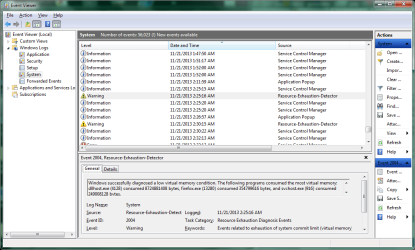
Same symptoms. dllhost climbs in RAM usage until it's consumed it all, then windows becomes completely unresponsive. The service
"Resource-Exhaustion-Detector" appears to leave an entry in the system log (Event Viewer -> Windows Logs -> System)
(See attached screenshot, or http://i.imgur.com/xFOP8fi.png)


Anyways, killing the dllhost process when this happens appears to temporarily fix it. But I can't reproduce exactly when the memory leak starts, it just always seems to happen when I'm dealing with mp4 video files.

I'm using Windows 7 Professional 64 bit.

EDIT: I should add that I've already tried running the System File Checker sfc /scannow, and windows reported no integrity violations with system files.
 

Attachments

  • LowMemoryEvent.png
    LowMemoryEvent.png
    45.3 KB · Views: 1

My Computer My Computer

At a glance

Windows 7 Professional 64 bit
Computer type
PC/Desktop
OS
Windows 7 Professional 64 bit
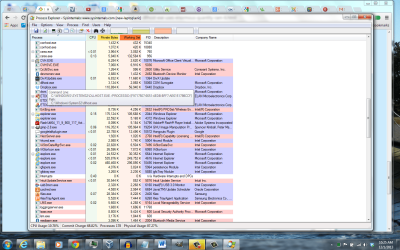
Try downloading and installing Process Explorer. It is a great program for figuring out what application or process is taking up all of the computers resources. Once it is running hover your mouse pointer over the dllhost that is causing the problem and it should pop up a box that will tel you what application is causing the issue.
 

Attachments

  • process explorer screenshot.png
    process explorer screenshot.png
    148.1 KB · Views: 1

My Computer My Computer

At a glance

Win 7 x64Core I5
Computer type
PC/Desktop
Computer Manufacturer/Model Number
Dell
OS
Win 7 x64
CPU
Core I5
I have the same problem. The process dllhost.exe * 32 is running on my PC and is using a large amount of both cpu and memory. I have killed the process several times and each time it comes back and slowly builds up using more and more cpu and memory.

I have other strange issues such as popups that look like windows warnings reminding me about FREE Computer Backups. I also had random Windows popups trying to prevent me from downloading process explorer.

Can anyone help me determine how to disable this task whatever it is?
 

Attachments

  • Capture.PNG
    Capture.PNG
    49.3 KB · Views: 4

My Computer My Computer

At a glance

Windows 7
Computer type
PC/Desktop
Computer Manufacturer/Model Number
Asus
OS
Windows 7
Anyone?
 

My Computer My Computer

At a glance

Windows 7
Computer type
PC/Desktop
Computer Manufacturer/Model Number
Asus
OS
Windows 7
I have the same problem. The process dllhost.exe * 32 is running on my PC and is using a large amount of both cpu and memory. I have killed the process several times and each time it comes back and slowly builds up using more and more cpu and memory.

I have other strange issues such as popups that look like windows warnings reminding me about FREE Computer Backups. I also had random Windows popups trying to prevent me from downloading process explorer.

Can anyone help me determine how to disable this task whatever it is?

The problem you have is called "MyPC Backup" get rid of it.
 

My Computer My Computer

At a glance

Windows 10 Pro (x64)Intel Core i7-3930K (3.2GHz - 4.5GHz)4x Samsung 4GB PC3-12800 DDR3 (16GB 1600MHz)Nvidia Geforce GTX 690
Computer type
PC/Desktop
Computer Manufacturer/Model Number
Alienware Aurora ALX R4
OS
Windows 10 Pro (x64)
CPU
Intel Core i7-3930K (3.2GHz - 4.5GHz)
Motherboard
Alienware Aurora-R4 x79
Memory
4x Samsung 4GB PC3-12800 DDR3 (16GB 1600MHz)
Graphics Card(s)
Nvidia Geforce GTX 690
Sound Card
SteelSeries Siberia Elite
Monitor(s) Displays
Dell UltraSharp U3011
Screen Resolution
2560x1600
Hard Drives
Samsung 850 Pro 256 GB, Seagate 1TB Desktop Hybrid HDD, 2x Western Digital 4TB Green HDD
PSU
875W Some Dell PSU <.<
Case
Alienware Aurora ALX
Cooling
Custom Liquid Cooling (EK CPU & GPU blocks) dual EK 480RAD
Keyboard
Logitech G710+ Mechanical
Mouse
Logitech G700s
Internet Speed
Verizon Fios (50 mbps average)
Other Info
Server: Intel NUC D54250WYK: i5-4250U, 16GB, 256 GB mSATA, Windows Server 2012 R2
Back
Top