
Hey guys/gals.
I am having the DNS server error I have read about on this site, but nothing has worked to fix. I have tried flushing my DNS cache, OpenDNS, Goggle's DNS, disabled the Microsoft Virtual WiFi Miniport Adapter, and disabled McAfee Security Center....nothing worked.
I only have issues when I am through my Netgear WNDR3400 wireless router (even tried my old school router [WGR624] to see if that would work...same problem). When I connect through my cable modem (Netgear CMD311) directly, I have no issues (like now). This happened out of the blue last night while browsing (nothing sinister, just ESPN.com), just stopped working while I was reading an article.
Whole house is WiFiless and getting frustrated...
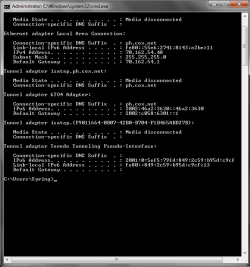
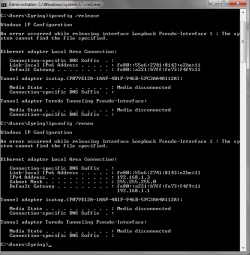
I attached my cmd screen & ipconfig command when my PC is through my modem, and when it is through the WiFi Router...hope it helps someone.
Let me know if you need more info...
I am having the DNS server error I have read about on this site, but nothing has worked to fix. I have tried flushing my DNS cache, OpenDNS, Goggle's DNS, disabled the Microsoft Virtual WiFi Miniport Adapter, and disabled McAfee Security Center....nothing worked.
I only have issues when I am through my Netgear WNDR3400 wireless router (even tried my old school router [WGR624] to see if that would work...same problem). When I connect through my cable modem (Netgear CMD311) directly, I have no issues (like now). This happened out of the blue last night while browsing (nothing sinister, just ESPN.com), just stopped working while I was reading an article.
Whole house is WiFiless and getting frustrated...
I attached my cmd screen & ipconfig command when my PC is through my modem, and when it is through the WiFi Router...hope it helps someone.
Let me know if you need more info...
Attachments
My Computer
At a glance
Win7 Home Premium 64-bitG460 1.8GHz4GB
- Computer type
- PC/Desktop
- Computer Manufacturer/Model Number
- Dell
- OS
- Win7 Home Premium 64-bit
- CPU
- G460 1.8GHz
- Memory
- 4GB
- Antivirus
- McAfee
- Browser
- Chrome


