
Do I Have A Corrupted User Account?

Ex_Brit

Older But No Wiser
Guru
VIP
Local time
7:42 AM
Messages
1,633
Location
Toronto, Canada
I see that my original thread on this issue has been marked as solved so I'll start a new one.
At startup quite often my W7 doesn't fully "wake up" as I complained about in that original thread. (Avast orb is stationary, right-click menus almost invisible, task manager empty etc). However I've found out that if I boot into the Administrator account first, which I had previously activated, it always starts properly and then if I switch user, that way it works fine.

I can only assume that my own Profile is somehow corrupted, what do you guys think?

I could create another user account I suppose and transfer everything over, but then those things that I had to give myself permission to use, such as Windows Mail, Sidebar etc. etc. - wont they be screwed up if I then delete the old user account?

I've done an sfc /scannow and it failed at 74%. That's a first for me as usually I'm fault-free. I guess I've been lucky.
 

My Computer

Computer type
PC/Desktop
Computer Manufacturer/Model Number
Alienware® ALX X58
OS
Win 7 Ult SP1/Win 10 Pro (all x64)
CPU
Intel® Core™ i7-975 Extreme O/C to 4.02 GHz, 8MB Cache
Motherboard
Asus® P6T Deluxe V2 X58 LGA1366
Memory
24GB Corsair Vengeance DDR3 SDRAM at 1600MHz - 6 x 4096MB
Graphics Card(s)
1792 MB NVIDIA® GeForce® GTX 295 Dual Core
Sound Card
Onboard Soundmax® High-Definition 7.1 Performance Audio
Monitor(s) Displays
Samsung XL2370 LED backlit 23" W/S 2ms response time
Screen Resolution
1920 X 1080
Hard Drives
2 x 500gb SATA II
1 x 1TB SATA II
1 external eSATA LaCie 3TB
(Non-RAID)
PSU
Alienware® 1200 Watt Multi-GPU
Case
Alienware® P2 ALX Chassis with AlienIce™ 3.0 Video Cooling
Cooling
Alienware® High-Perf. Liquid Cooling + Acoustic Dampening
Keyboard
Microsoft® Wireless Entertainment 8000 + Logitech® G15 Wired
Mouse
Microsoft® Wireless Laser 8000 + Logitech® G9 Wired
Internet Speed
1Gb/s
Antivirus
McAfee LiveSafe
Browser
Firefox - latest
Other Info
Using non-RAID on purpose as I find RAID to be too temperamental.
Now set to AHCI
I think a repair install will work for you but you will need to setup Windows Mail again, Sidebar etc, so it would probably be better if you just made a new user account if that works it will be allot quicker.
 

My Computer

Computer Manufacturer/Model Number
Home Brew
OS
Windows 7 Ultimate Vista Ultimate x64
CPU
Core 2 Duo E8500 3.16Ghz @ 3.8Ghz
Motherboard
eVGA 750i FTW
Memory
2x2Gigs Patriot PC2-6400 LL
Graphics Card(s)
Inno3D GeForce GTX260 216 SP
Monitor(s) Displays
ASUS VW222U 22" 2ms Response time
Screen Resolution
1680x1050
Hard Drives
SATA 150GB
SATA II 250GB
USB IDE 750GB Ext.
PSU
HYTEC 600W & Thermaltake 650W Toughpower Power Exp
Case
Thermaltake Armor LCS (Liquid Cooling System)
Cooling
Liquid Cooling System
Keyboard
Logitech G15 Gaming Keyboard
Mouse
Logitech G9 Gaming Mouse
I'll try and see how it goes. Thanks.
 

My Computer

Computer type
PC/Desktop
Computer Manufacturer/Model Number
Alienware® ALX X58
OS
Win 7 Ult SP1/Win 10 Pro (all x64)
CPU
Intel® Core™ i7-975 Extreme O/C to 4.02 GHz, 8MB Cache
Motherboard
Asus® P6T Deluxe V2 X58 LGA1366
Memory
24GB Corsair Vengeance DDR3 SDRAM at 1600MHz - 6 x 4096MB
Graphics Card(s)
1792 MB NVIDIA® GeForce® GTX 295 Dual Core
Sound Card
Onboard Soundmax® High-Definition 7.1 Performance Audio
Monitor(s) Displays
Samsung XL2370 LED backlit 23" W/S 2ms response time
Screen Resolution
1920 X 1080
Hard Drives
2 x 500gb SATA II
1 x 1TB SATA II
1 external eSATA LaCie 3TB
(Non-RAID)
PSU
Alienware® 1200 Watt Multi-GPU
Case
Alienware® P2 ALX Chassis with AlienIce™ 3.0 Video Cooling
Cooling
Alienware® High-Perf. Liquid Cooling + Acoustic Dampening
Keyboard
Microsoft® Wireless Entertainment 8000 + Logitech® G15 Wired
Mouse
Microsoft® Wireless Laser 8000 + Logitech® G9 Wired
Internet Speed
1Gb/s
Antivirus
McAfee LiveSafe
Browser
Firefox - latest
Other Info
Using non-RAID on purpose as I find RAID to be too temperamental.
Now set to AHCI
I see that my original thread on this issue has been marked as solved so I'll start a new one.
At startup quite often my W7 doesn't fully "wake up" as I complained about in that original thread. (Avast orb is stationary, right-click menus almost invisible, task manager empty etc). However I've found out that if I boot into the Administrator account first, which I had previously activated, it always starts properly and then if I switch user, that way it works fine.

I can only assume that my own Profile is somehow corrupted, what do you guys think?

I could create another user account I suppose and transfer everything over, but then those things that I had to give myself permission to use, such as Windows Mail, Sidebar etc. etc. - wont they be screwed up if I then delete the old user account?

I've done an sfc /scannow and it failed at 74%. That's a first for me as usually I'm fault-free. I guess I've been lucky.

My apologies for not following up on that thread :o

If you're out for a bit of an adventure and create another user profile, I'd suggest using the "Windows Easy Transfer" tool (Start>All Programs>Accessories>System Tools>Windows Easy Transfer), the beauty of that is you don't have to go through all the configurations in all you've done for your system. After creating a transfer profile, you can then erase the defective one and after logging in to the new one, you can then just restore. This is similar to the Office Transfer Wizard but this time it's a system wide implementation.

I'm still curious as to what's causing your weird shadow windows.
 

My Computer

Computer Manufacturer/Model Number
Custom Build
OS
Windows 7 Build 7048 x64
CPU
Athlon 64 X2 Dual Core 4600+
Motherboard
EMX-AMD750G-PRO
Memory
4 x 1GB Kingston 400MHz 6-6-6-18 (800MHz)
Graphics Card(s)
ATI Radeon 3650
Sound Card
Realtek HD Audio
Monitor(s) Displays
22" AOC 2216Vw
Screen Resolution
1680x1050
Cooling
Arctic Cooling Freezer 64 Pro PWM
Keyboard
Generic Enhanced Natural Keyboard
Mouse
Logitech VX Nano
Other Info
Edifier M1550
I just went through what Windows Help & Support suggests for transferring data from one user to another.....what a disaster that was. Files & Folders went across fine but not a single setting and they say to quote approximately..

"with hidden files and system files showing....blah blah...

copy everything under C\Users\Old-UserName EXCEPT Ntuser.dat, Ntuser.dat.log and Ntuser.ini"

The trouble is there are several of the 1st one, dozens of the second one...grrrrrr.

After a while I gave up, deleted the new account and am back at square one again...LOL

Strangely Windows just booted up straight into my user (the old one) without hesitation.....right now I'm preparing to drop my PC off my 12th floor balcony if it as much as blinks at me in the next few hours.

If I attempt it again I will try the easy transfer route. Thanks for that tip.

The weird shadow windows are caused by something in the root not starting up properly I can only assume & are obviously connected with the Task Manager being blank.

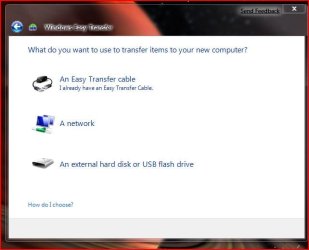
Addendum: I always get stuck with Windows "Easy" Transfer at which of the attached I choose for transferring files etc within the same system.
 

Attachments

  • wet.JPG
    wet.JPG
    33.6 KB · Views: 57
Last edited:

My Computer

Computer type
PC/Desktop
Computer Manufacturer/Model Number
Alienware® ALX X58
OS
Win 7 Ult SP1/Win 10 Pro (all x64)
CPU
Intel® Core™ i7-975 Extreme O/C to 4.02 GHz, 8MB Cache
Motherboard
Asus® P6T Deluxe V2 X58 LGA1366
Memory
24GB Corsair Vengeance DDR3 SDRAM at 1600MHz - 6 x 4096MB
Graphics Card(s)
1792 MB NVIDIA® GeForce® GTX 295 Dual Core
Sound Card
Onboard Soundmax® High-Definition 7.1 Performance Audio
Monitor(s) Displays
Samsung XL2370 LED backlit 23" W/S 2ms response time
Screen Resolution
1920 X 1080
Hard Drives
2 x 500gb SATA II
1 x 1TB SATA II
1 external eSATA LaCie 3TB
(Non-RAID)
PSU
Alienware® 1200 Watt Multi-GPU
Case
Alienware® P2 ALX Chassis with AlienIce™ 3.0 Video Cooling
Cooling
Alienware® High-Perf. Liquid Cooling + Acoustic Dampening
Keyboard
Microsoft® Wireless Entertainment 8000 + Logitech® G15 Wired
Mouse
Microsoft® Wireless Laser 8000 + Logitech® G9 Wired
Internet Speed
1Gb/s
Antivirus
McAfee LiveSafe
Browser
Firefox - latest
Other Info
Using non-RAID on purpose as I find RAID to be too temperamental.
Now set to AHCI
I've tried going through the motions of using the Windows "Easy" Transfer :D
It just finished.

The steps I did were
Clicked on "Windows Easy Transfer"
On the Welcome screen, clicked on "Next"
On the "What do you want to use to transfer items to your new computer?", clicked on "An external hard disk or USB flash drive"
On the "Which computer are you using now?", clicked on "This is my old computer"
It then proceeds to scanning your profile and shared files, at which point whether it's finished scanning or not, you can customize which of the items you want transferred that also contains an "Advanced" button if you want to include some other stuff from your computer. After your selection you will be presented with the result of the estimated sizes, clicked on "Next"
You are then asked if you want to password protect your file settings, then clicked on "Save"
You can now then select where you want to save your file.
 

My Computer

Computer Manufacturer/Model Number
Custom Build
OS
Windows 7 Build 7048 x64
CPU
Athlon 64 X2 Dual Core 4600+
Motherboard
EMX-AMD750G-PRO
Memory
4 x 1GB Kingston 400MHz 6-6-6-18 (800MHz)
Graphics Card(s)
ATI Radeon 3650
Sound Card
Realtek HD Audio
Monitor(s) Displays
22" AOC 2216Vw
Screen Resolution
1680x1050
Cooling
Arctic Cooling Freezer 64 Pro PWM
Keyboard
Generic Enhanced Natural Keyboard
Mouse
Logitech VX Nano
Other Info
Edifier M1550
That sounds pretty simple. I'll look further into it then...not sure when though as I'm in the midst of another job right now.

Thanks for your help.
 

My Computer

Computer type
PC/Desktop
Computer Manufacturer/Model Number
Alienware® ALX X58
OS
Win 7 Ult SP1/Win 10 Pro (all x64)
CPU
Intel® Core™ i7-975 Extreme O/C to 4.02 GHz, 8MB Cache
Motherboard
Asus® P6T Deluxe V2 X58 LGA1366
Memory
24GB Corsair Vengeance DDR3 SDRAM at 1600MHz - 6 x 4096MB
Graphics Card(s)
1792 MB NVIDIA® GeForce® GTX 295 Dual Core
Sound Card
Onboard Soundmax® High-Definition 7.1 Performance Audio
Monitor(s) Displays
Samsung XL2370 LED backlit 23" W/S 2ms response time
Screen Resolution
1920 X 1080
Hard Drives
2 x 500gb SATA II
1 x 1TB SATA II
1 external eSATA LaCie 3TB
(Non-RAID)
PSU
Alienware® 1200 Watt Multi-GPU
Case
Alienware® P2 ALX Chassis with AlienIce™ 3.0 Video Cooling
Cooling
Alienware® High-Perf. Liquid Cooling + Acoustic Dampening
Keyboard
Microsoft® Wireless Entertainment 8000 + Logitech® G15 Wired
Mouse
Microsoft® Wireless Laser 8000 + Logitech® G9 Wired
Internet Speed
1Gb/s
Antivirus
McAfee LiveSafe
Browser
Firefox - latest
Other Info
Using non-RAID on purpose as I find RAID to be too temperamental.
Now set to AHCI
You're welcome ;)

Please do let us know how this issue turns out for yah...
 

My Computer

Computer Manufacturer/Model Number
Custom Build
OS
Windows 7 Build 7048 x64
CPU
Athlon 64 X2 Dual Core 4600+
Motherboard
EMX-AMD750G-PRO
Memory
4 x 1GB Kingston 400MHz 6-6-6-18 (800MHz)
Graphics Card(s)
ATI Radeon 3650
Sound Card
Realtek HD Audio
Monitor(s) Displays
22" AOC 2216Vw
Screen Resolution
1680x1050
Cooling
Arctic Cooling Freezer 64 Pro PWM
Keyboard
Generic Enhanced Natural Keyboard
Mouse
Logitech VX Nano
Other Info
Edifier M1550
Well this user account seems to be behaving itself since I tried "cloning" it. Who knows? Maybe it knocked some sense into it...LOL!!

a_hit3.gif
 

My Computer

Computer type
PC/Desktop
Computer Manufacturer/Model Number
Alienware® ALX X58
OS
Win 7 Ult SP1/Win 10 Pro (all x64)
CPU
Intel® Core™ i7-975 Extreme O/C to 4.02 GHz, 8MB Cache
Motherboard
Asus® P6T Deluxe V2 X58 LGA1366
Memory
24GB Corsair Vengeance DDR3 SDRAM at 1600MHz - 6 x 4096MB
Graphics Card(s)
1792 MB NVIDIA® GeForce® GTX 295 Dual Core
Sound Card
Onboard Soundmax® High-Definition 7.1 Performance Audio
Monitor(s) Displays
Samsung XL2370 LED backlit 23" W/S 2ms response time
Screen Resolution
1920 X 1080
Hard Drives
2 x 500gb SATA II
1 x 1TB SATA II
1 external eSATA LaCie 3TB
(Non-RAID)
PSU
Alienware® 1200 Watt Multi-GPU
Case
Alienware® P2 ALX Chassis with AlienIce™ 3.0 Video Cooling
Cooling
Alienware® High-Perf. Liquid Cooling + Acoustic Dampening
Keyboard
Microsoft® Wireless Entertainment 8000 + Logitech® G15 Wired
Mouse
Microsoft® Wireless Laser 8000 + Logitech® G9 Wired
Internet Speed
1Gb/s
Antivirus
McAfee LiveSafe
Browser
Firefox - latest
Other Info
Using non-RAID on purpose as I find RAID to be too temperamental.
Now set to AHCI
Well this user account seems to be behaving itself since I tried "cloning" it. Who knows? Maybe it knocked some sense into it...LOL!!

a_hit3.gif

That's so funny!
emot76.gif
 

My Computer

Computer Manufacturer/Model Number
Custom Build
OS
Windows 7 Build 7048 x64
CPU
Athlon 64 X2 Dual Core 4600+
Motherboard
EMX-AMD750G-PRO
Memory
4 x 1GB Kingston 400MHz 6-6-6-18 (800MHz)
Graphics Card(s)
ATI Radeon 3650
Sound Card
Realtek HD Audio
Monitor(s) Displays
22" AOC 2216Vw
Screen Resolution
1680x1050
Cooling
Arctic Cooling Freezer 64 Pro PWM
Keyboard
Generic Enhanced Natural Keyboard
Mouse
Logitech VX Nano
Other Info
Edifier M1550
Hey people,

i recently have a new kind of problem, and it seem relatated to this topic...

somtimes when i restart my computer after a shut down or do a reboot, i get a warning message something like

C:/Windows/System32..../user profile could not be loaded

all my icons are gone in my taskbar, no folders on my desktop, no programs in system tray, worse... it looks like i'm running on windows 95 style, 32 color type haha... and even worse, i can't open firefox neither safari.

finally my explorer stop working on it own,

i have to restart 2 or 3 times to load it perfectly, this is very weird,

anybody has that problem??

Thanks
 

My Computer

OS
Windows 7 7068
CPU
Dual Core 2.0 Ghz
Memory
2Gb
Graphics Card(s)
ATI X1400
Sound Card
Sigmatell 9200
Monitor(s) Displays
Laptop Dell
Screen Resolution
1050x1680
Hard Drives
120GB
Keyboard
azerty Dell
Internet Speed
fibre obtic 32mbs
Review the Event Viewer logs. Look for additional information and search for related profile (userenv) events.
 

My Computer

Computer type
PC/Desktop
Computer Manufacturer/Model Number
Bruce ... somewhere in his 40's
OS
Windows 7 Ultimate 32bit SP1
CPU
Intel(R) Core(TM)2 Quad CPU @ 2.40GHz, 2400 MHz
Motherboard
INTEL/D975XBX2
Memory
4 GB
Graphics Card(s)
ATI Radeon HD 2600 Pro
Monitor(s) Displays
Samsung SyncMaster 914v
Screen Resolution
1280 x 1024
Hard Drives
2/500GB each ... ST3500630AS ATA Device.
One is not connected
PSU
Rocketfish 700 W
Case
G.Skill Gigabyte Chassis
Keyboard
Standard PS/2 Keyboard
Mouse
Microsoft PS/2 Mouse
Internet Speed
DSL
Antivirus
Avira Internet Security
Browser
IE 11
Other Info
ATI HDMI Audio
Back
Top