Solved Do I have the w32 Blaster?

After your night's sleep, please go back to my bat.file and follow the instructions.
Then go back and download TFC and follow my instructions from there.
 

My Computer My Computer

At a glance

Windows 7 Ultimate 32bit SP1Intel(R) Core(TM)2 Quad CPU @ 2.40GHz, 2400 MHz4 GBATI Radeon HD 2600 Pro
Computer type
PC/Desktop
Computer Manufacturer/Model Number
Bruce ... somewhere in his 40's
OS
Windows 7 Ultimate 32bit SP1
CPU
Intel(R) Core(TM)2 Quad CPU @ 2.40GHz, 2400 MHz
Motherboard
INTEL/D975XBX2
Memory
4 GB
Graphics Card(s)
ATI Radeon HD 2600 Pro
Monitor(s) Displays
Samsung SyncMaster 914v
Screen Resolution
1280 x 1024
Hard Drives
2/500GB each ... ST3500630AS ATA Device.
One is not connected
PSU
Rocketfish 700 W
Case
G.Skill Gigabyte Chassis
Keyboard
Standard PS/2 Keyboard
Mouse
Microsoft PS/2 Mouse
Internet Speed
DSL
Antivirus
Avira Internet Security
Browser
IE 11
Other Info
ATI HDMI Audio
The ESET ServicesRepair download site is working OK at this end.
Try these alternate sites:
http://kb.eset.com/library/ESET/KB%20Team%20Only/Malware/ServicesRepair.exe
http://www.forospyware.com/attachments/forum16/3546d1345593669-servicesrepair.exe

Regarding Post #118...
How to get to the C:\Windows\System32\Drivers\etc folder

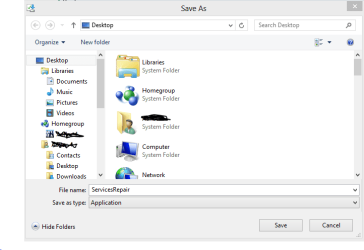
When you download the HOSTS file, select: Save target as...
The Save As prompt appears.

In the Save As prompt, on the left column, scroll down to: Computer
Under Computer, you should see the C drive. (It may have a name preceeding the C drive)

Click the > to the left of C: to expand it.
You will now see the Windows folder under C:

Click the > to the left of the Windows folder to expand it.
You will now see the System32 folder under Windows

Click the > to the left of the System32 folder to expand it
You will now see the Drivers folder under System32

Click the > to the left of the Drivers folder to expand it
You will now see the etc folder <<---this is where the downloaded file goes

Still in the Save As prompt, press the Save button. :) That should do it.
 

Attachments

  • Capture 2.PNG
    Capture 2.PNG
    17.7 KB · Views: 2
Last edited:

My Computer My Computer

At a glance

Windows 7 Home Premium
Computer type
PC/Desktop
Computer Manufacturer/Model Number
An ol' eMachines
OS
Windows 7 Home Premium
Internet Speed
Fine for me...I'm retired!
@Layback Bear,

I did notice this in post #111

ATTENTION!=====> C:\Program Files\Windows Defender\MpSvc.dll IS INFECTED AND SHOULD BE REPLACED.

I'm aware of that, and hoping the ESET ServicesRepair Utility will take care of that, and all sorts of other services that have problems.

Will just have to wait and see. The OP has a plate full of instructions right now.
He has to go one step at a time. This stuff can give you shell-shock. :shock:
 

My Computer My Computer

At a glance

Windows 7 Home Premium
Computer type
PC/Desktop
Computer Manufacturer/Model Number
An ol' eMachines
OS
Windows 7 Home Premium
Internet Speed
Fine for me...I'm retired!
Good morning troops!

I downloaded ESET via Chrome and it's setting in "downloads" ready to go.

I have to use Chrome for all these downloads since IE gives that VIRUS DETECTED message.

Now! When I download the HOSTS file in Chrome it goes directly to "downloads" without giving me a "Save as" option.
 

My Computer My Computer

At a glance

Windows 7 home premium 64 bit
Computer type
PC/Desktop
Computer Manufacturer/Model Number
Dell studio xps 8100
OS
Windows 7 home premium 64 bit
Jacee,

I, got the BAT in notepad but the left side of it's screen is under the computer screen and I can't get to the left of VIEW to save it. ????
 

My Computer My Computer

At a glance

Windows 7 home premium 64 bit
Computer type
PC/Desktop
Computer Manufacturer/Model Number
Dell studio xps 8100
OS
Windows 7 home premium 64 bit
Prescottbob,

For that hosts file that is in the Downloads folder...

Let's see if the following moves the hosts file to where it belongs, in the etc folder...
(C:\Windows\System32\drivers\etc)

Go to Start > Search programs and files, and type in: cmd
Click cmd to open

At the Command Prompt, type in (or copy/paste with the mouse) the following commands, one at a time, and press Enter after each:

Code:
cd \
mv C:\Users\Binnie\Downloads\hosts C:\Windows\System32\drivers\etc

Now, to check the contents of the etc folder, type in (or copy/paste) the following command, and press Enter:
Code:
dir C:\Windows\System32\drivers\etc

Post the results obtained by pressing the black icon on the upper left of the Command Prompt, and choose: Select all
Back at the black icon, select: Copy

Copy the results to Notepad, or copy them straight to your reply.
 

My Computer My Computer

At a glance

Windows 7 Home Premium
Computer type
PC/Desktop
Computer Manufacturer/Model Number
An ol' eMachines
OS
Windows 7 Home Premium
Internet Speed
Fine for me...I'm retired!
It tells me "mv" is not an internal or external command
 

My Computer My Computer

At a glance

Windows 7 home premium 64 bit
Computer type
PC/Desktop
Computer Manufacturer/Model Number
Dell studio xps 8100
OS
Windows 7 home premium 64 bit
Try:

Code:
cd \
move C:\Users\Binnie\Downloads\hosts C:\Windows\System32\drivers\etc
 

My Computer My Computer

At a glance

Windows 7 Home Premium
Computer type
PC/Desktop
Computer Manufacturer/Model Number
An ol' eMachines
OS
Windows 7 Home Premium
Internet Speed
Fine for me...I'm retired!
says access denied
 

My Computer My Computer

At a glance

Windows 7 home premium 64 bit
Computer type
PC/Desktop
Computer Manufacturer/Model Number
Dell studio xps 8100
OS
Windows 7 home premium 64 bit
hold it ---I didn't do the cd \ first
 

My Computer My Computer

At a glance

Windows 7 home premium 64 bit
Computer type
PC/Desktop
Computer Manufacturer/Model Number
Dell studio xps 8100
OS
Windows 7 home premium 64 bit
or should I ?
 

My Computer My Computer

At a glance

Windows 7 home premium 64 bit
Computer type
PC/Desktop
Computer Manufacturer/Model Number
Dell studio xps 8100
OS
Windows 7 home premium 64 bit
Microsoft Windows [Version 6.1.7601]
Copyright (c) 2009 Microsoft Corporation. All rights reserved.
C:\Users\Binnie>cd/
C:\>mv C:\users\Binnie\Downloads\hosts C:Windows\System32\drivers\etc
'mv' is not recognized as an internal or external command,
operable program or batch file.
C:\>move C:\Users\Binnie\Downloads\hosts C:\Windows\System32\drivers\etc
Access is denied.
0 file(s) moved.
C:\>
 

My Computer My Computer

At a glance

Windows 7 home premium 64 bit
Computer type
PC/Desktop
Computer Manufacturer/Model Number
Dell studio xps 8100
OS
Windows 7 home premium 64 bit
Go to Start > Search programs and files, and type in: cmd

Right-click the cmd and select: Run as Administrator

At the Command Prompt, type in (or copy/paste with the mouse) the following commands, one at a time, and press Enter after each:

Code:
cd \
move C:\Users\Binnie\Downloads\hosts C:\Windows\System32\drivers\etc
 

My Computer My Computer

At a glance

Windows 7 Home Premium
Computer type
PC/Desktop
Computer Manufacturer/Model Number
An ol' eMachines
OS
Windows 7 Home Premium
Internet Speed
Fine for me...I'm retired!
Microsoft Windows [Version 6.1.7601]
Copyright (c) 2009 Microsoft Corporation. All rights reserved.
C:\Users\Binnie>cd/
C:\>mv C:\users\Binnie\Downloads\hosts C:Windows\System32\drivers\etc
'mv' is not recognized as an internal or external command,
operable program or batch file.
C:\>move C:\Users\Binnie\Downloads\hosts C:\Windows\System32\drivers\etc
Access is denied.
0 file(s) moved.
C:\>
 

My Computer My Computer

At a glance

Windows 7 home premium 64 bit
Computer type
PC/Desktop
Computer Manufacturer/Model Number
Dell studio xps 8100
OS
Windows 7 home premium 64 bit
disregard # 134. I messed up the paste. It did say it moved 1 file.
 

My Computer My Computer

At a glance

Windows 7 home premium 64 bit
Computer type
PC/Desktop
Computer Manufacturer/Model Number
Dell studio xps 8100
OS
Windows 7 home premium 64 bit
It's no longer in the "downloads"
 

My Computer My Computer

At a glance

Windows 7 home premium 64 bit
Computer type
PC/Desktop
Computer Manufacturer/Model Number
Dell studio xps 8100
OS
Windows 7 home premium 64 bit
Check the contents of the etc folder.
Type in (or copy/paste) the following command, and press Enter:
Code:
dir C:\Windows\System32\drivers\etc


Please post the results obtained.
 

My Computer My Computer

At a glance

Windows 7 Home Premium
Computer type
PC/Desktop
Computer Manufacturer/Model Number
An ol' eMachines
OS
Windows 7 Home Premium
Internet Speed
Fine for me...I'm retired!
no result found
 

My Computer My Computer

At a glance

Windows 7 home premium 64 bit
Computer type
PC/Desktop
Computer Manufacturer/Model Number
Dell studio xps 8100
OS
Windows 7 home premium 64 bit
BTW, I finally maximized notepad to get JAYCEE's flush.bat to the desktop. I did run it by accident but not as ADMIN so I should do it again? Post# 95
 

My Computer My Computer

At a glance

Windows 7 home premium 64 bit
Computer type
PC/Desktop
Computer Manufacturer/Model Number
Dell studio xps 8100
OS
Windows 7 home premium 64 bit
Hmmmm...where did it go?

At the Command Prompt
At C:\Users\Binnie>

You copy/pasted: dir C:\Windows\System32\drivers\etc

It found nothing in the etc folder??

Did you perform all the actions in Post #114?


In any event, please go to Post #95 from Jacee, as well as her Post #112.

When you get done with those, the go to Post #117 and use the ESET ServicesRepair Utility.

Then run the Farbar Service Scanner the same as before, and post the new FSS.txt in your reply.
 

My Computer My Computer

At a glance

Windows 7 Home Premium
Computer type
PC/Desktop
Computer Manufacturer/Model Number
An ol' eMachines
OS
Windows 7 Home Premium
Internet Speed
Fine for me...I'm retired!
Back
Top