Solved Do I have the w32 Blaster?

I understand.
 

My Computer My Computer

At a glance

Windows 7 home premium 64 bit
Computer type
PC/Desktop
Computer Manufacturer/Model Number
Dell studio xps 8100
OS
Windows 7 home premium 64 bit
Later on this evening I will upload the missing Windows Defender file from an x64 machine. Then, there will be no worry about it.

Need to go out for a while and get some chow. Gonna drop on the floor...had no food since breakfast!
 

My Computer My Computer

At a glance

Windows 7 Home Premium
Computer type
PC/Desktop
Computer Manufacturer/Model Number
An ol' eMachines
OS
Windows 7 Home Premium
Internet Speed
Fine for me...I'm retired!
Nice success on this have followed along. Good work everyone!
 

My Computer My Computer

At a glance

Microsoft Windows 7 Home Premium 64-bit 7601 ...AMD Phenom(tm) II X4 965 Processor8.0 GBNVIDIA GeForce GTX 560 Ti
Computer type
PC/Desktop
Computer Manufacturer/Model Number
Custom Build
OS
Microsoft Windows 7 Home Premium 64-bit 7601 Multiprocessor Free Service Pack 1
CPU
AMD Phenom(tm) II X4 965 Processor
Motherboard
ASUSTeK Computer INC. M4A785-M
Memory
8.0 GB
Graphics Card(s)
NVIDIA GeForce GTX 560 Ti
Sound Card
(1) NVIDIA High Definition Audio (2) NVIDIA High Definitio
Monitor(s) Displays
Samsung SyncMaster T220G
Screen Resolution
1680 x 1050 x 32 bits (4294967296 colors) @ 59 Hz
Hard Drives
WDC WD7500AADS-00M2B0
PSU
650 Watt
Case
Cooler Master HAF XM
Cooling
Air
Keyboard
CompUSA SK-6200
Mouse
Logitech M-510
Internet Speed
Comcast
Antivirus
MSE
Browser
Firefox 27.0 IE 11
Other Info
Belkin Hub To Go F5U706
HOUSTON!!! IT's back. I tried another download several times and am getting the detected virus and deleted message again. Everything else is still working fine including the Action Center. Maybe just abandon IE ?
 

My Computer My Computer

At a glance

Windows 7 home premium 64 bit
Computer type
PC/Desktop
Computer Manufacturer/Model Number
Dell studio xps 8100
OS
Windows 7 home premium 64 bit


Let me search some more.

There has to be an answer to this issue.

Maybe someone else has a solution...if not, will see you tomorrow.
 

My Computer My Computer

At a glance

Windows 7 Home Premium
Computer type
PC/Desktop
Computer Manufacturer/Model Number
An ol' eMachines
OS
Windows 7 Home Premium
Internet Speed
Fine for me...I'm retired!
Please go to:
Downloading MiniToolBox

MTB.gif


Save to your Desktop
Double-click to run it.


At the program console, check the following boxes:
  • Report IE Proxy Settings
  • Report FF Proxy Settings (If you have FireFox, if not, just skip.)
  • List content of Hosts
  • List IP configuration
  • List Winsock Entries
  • List last 10 Event Viewer log
  • List Installed Programs
  • List Users, Partitions and Memory size.
Click Go

When done, please attach or post the Result.txt in your reply.
 

My Computer My Computer

At a glance

Windows 7 Home Premium
Computer type
PC/Desktop
Computer Manufacturer/Model Number
An ol' eMachines
OS
Windows 7 Home Premium
Internet Speed
Fine for me...I'm retired!

My Computer My Computer

At a glance

Windows 7 home premium 64 bit
Computer type
PC/Desktop
Computer Manufacturer/Model Number
Dell studio xps 8100
OS
Windows 7 home premium 64 bit
See you Monday between chores.
 

My Computer My Computer

At a glance

Windows 7 home premium 64 bit
Computer type
PC/Desktop
Computer Manufacturer/Model Number
Dell studio xps 8100
OS
Windows 7 home premium 64 bit
Type or copy/paste services.msc in the start search box. When you see the little gear icon and 'services next to it, click to open. Now scroll down to Windows Defender... right click on it and choose 'properties'. Now click on (startup type) --> disable, and stop the service.
Click Appy and OK.

Restart your computer and see if the problem persists.
 

My Computer My Computer

At a glance

Windows 7 Ultimate 32bit SP1Intel(R) Core(TM)2 Quad CPU @ 2.40GHz, 2400 MHz4 GBATI Radeon HD 2600 Pro
Computer type
PC/Desktop
Computer Manufacturer/Model Number
Bruce ... somewhere in his 40's
OS
Windows 7 Ultimate 32bit SP1
CPU
Intel(R) Core(TM)2 Quad CPU @ 2.40GHz, 2400 MHz
Motherboard
INTEL/D975XBX2
Memory
4 GB
Graphics Card(s)
ATI Radeon HD 2600 Pro
Monitor(s) Displays
Samsung SyncMaster 914v
Screen Resolution
1280 x 1024
Hard Drives
2/500GB each ... ST3500630AS ATA Device.
One is not connected
PSU
Rocketfish 700 W
Case
G.Skill Gigabyte Chassis
Keyboard
Standard PS/2 Keyboard
Mouse
Microsoft PS/2 Mouse
Internet Speed
DSL
Antivirus
Avira Internet Security
Browser
IE 11
Other Info
ATI HDMI Audio
@Jacee,

Which problem, the "...contained a virus and was deleted", or the MpSvc.dll gone missing, or both?
 

My Computer My Computer

At a glance

Windows 7 Home Premium
Computer type
PC/Desktop
Computer Manufacturer/Model Number
An ol' eMachines
OS
Windows 7 Home Premium
Internet Speed
Fine for me...I'm retired!
jacee,

I disabled Windows Defender, restarted and have the same virus message. NOTE, on the Windows Defender line there is statement "failed to read Description error code 5" along with disabled.
 

My Computer My Computer

At a glance

Windows 7 home premium 64 bit
Computer type
PC/Desktop
Computer Manufacturer/Model Number
Dell studio xps 8100
OS
Windows 7 home premium 64 bit
The same statement was there before I did the Disable.
 

My Computer My Computer

At a glance

Windows 7 home premium 64 bit
Computer type
PC/Desktop
Computer Manufacturer/Model Number
Dell studio xps 8100
OS
Windows 7 home premium 64 bit
Let's take a look at a Registry entry...

Please download SystemLook from one of the links below:
64-bit system:
Link 1
Link 2


Save the file to the Desktop
  • Double-click SystemLook.exe to run it.
  • Copy the content inside the following quote box into the open field:
:reg
HKEY_LOCAL_MACHINE\SOFTWARE\Microsoft\Windows Defender
  • Click the Look button to start the scan.
  • When finished, a Notepad window opens with the results of the scan.
  • Please post the SystemLook.txt in your reply.
 

My Computer My Computer

At a glance

Windows 7 Home Premium
Computer type
PC/Desktop
Computer Manufacturer/Model Number
An ol' eMachines
OS
Windows 7 Home Premium
Internet Speed
Fine for me...I'm retired!
Error: (05/11/2013 11:49:04 AM) (Source: Ntfs) (User: )
Description: The file system structure on the disk is corrupt and unusable.
Please run the chkdsk utility on the volume OS.

Click on the Start Menu; click My Computer.
Right-click on the hard drive and select Properties

1.Select the Tools Tab and click Check Now.
2.At the Check Disk menu, click both options (to “Automatically fix file system errors” and “Scan for and attempt recovery of bad sectors”).
3.Click Start.

A message will ask you if you want to schedule a disk check, click Yes
1.Close all open menus and programs.
2.Restart your computer.

Windows will run the CHKDSK utility and open your desktop when it has finished.

Note:It may take an hour or two to do this test, so do not perform this test when you have insufficient time.
 

My Computer My Computer

At a glance

Windows 7 Ultimate 32bit SP1Intel(R) Core(TM)2 Quad CPU @ 2.40GHz, 2400 MHz4 GBATI Radeon HD 2600 Pro
Computer type
PC/Desktop
Computer Manufacturer/Model Number
Bruce ... somewhere in his 40's
OS
Windows 7 Ultimate 32bit SP1
CPU
Intel(R) Core(TM)2 Quad CPU @ 2.40GHz, 2400 MHz
Motherboard
INTEL/D975XBX2
Memory
4 GB
Graphics Card(s)
ATI Radeon HD 2600 Pro
Monitor(s) Displays
Samsung SyncMaster 914v
Screen Resolution
1280 x 1024
Hard Drives
2/500GB each ... ST3500630AS ATA Device.
One is not connected
PSU
Rocketfish 700 W
Case
G.Skill Gigabyte Chassis
Keyboard
Standard PS/2 Keyboard
Mouse
Microsoft PS/2 Mouse
Internet Speed
DSL
Antivirus
Avira Internet Security
Browser
IE 11
Other Info
ATI HDMI Audio
Chkdsk is running
 

My Computer My Computer

At a glance

Windows 7 home premium 64 bit
Computer type
PC/Desktop
Computer Manufacturer/Model Number
Dell studio xps 8100
OS
Windows 7 home premium 64 bit
When the CHKDSK utility ran the last time, that is when the "...contained a virus and was deleted" meaasge went away.

Can't quite figure this one out.

Anywho...

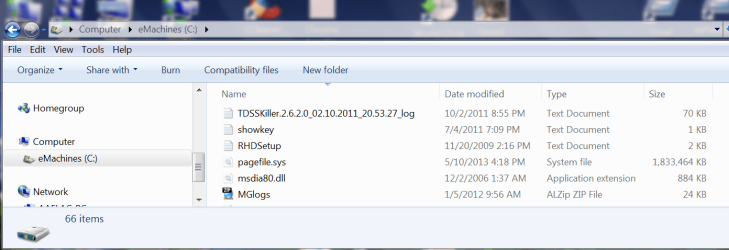
On the following...C:\Program Files\Windows Defender\MpSvc.dll

Please download the MpSvc.dll from here;
http://www.bleepstatic.com/fhost/uploads/1/mpsvc.dll

Place the file in C:\
See image at the end of this post for an example of where it goes...right to C\:!!

Go back to SystemLook (Post #293)
•Right click on SystemLook.exe and select: Run As Administrator
•Copy the content of the following quote box and paste it into the main text field of SystemLook:

:filefind
MpSvc.dll

•Click the Look button to start the scan.

•When finished, Notepad opens with the results of the scan.

Please post new SystemLook.txt to check if the file is in the right location.
 

Attachments

  • Capture C drive.PNG
    Capture C drive.PNG
    57.4 KB · Views: 5

My Computer My Computer

At a glance

Windows 7 Home Premium
Computer type
PC/Desktop
Computer Manufacturer/Model Number
An ol' eMachines
OS
Windows 7 Home Premium
Internet Speed
Fine for me...I'm retired!
Chkdsk at 50 percent of stage 5. :D
 

My Computer My Computer

At a glance

Windows 7 home premium 64 bit
Computer type
PC/Desktop
Computer Manufacturer/Model Number
Dell studio xps 8100
OS
Windows 7 home premium 64 bit
No, stage 4 . :cry:
 

My Computer My Computer

At a glance

Windows 7 home premium 64 bit
Computer type
PC/Desktop
Computer Manufacturer/Model Number
Dell studio xps 8100
OS
Windows 7 home premium 64 bit
Refocused eyes, stage 5! " Have you ever wondered whether you just found a rope or lost your horse"?
 

My Computer My Computer

At a glance

Windows 7 home premium 64 bit
Computer type
PC/Desktop
Computer Manufacturer/Model Number
Dell studio xps 8100
OS
Windows 7 home premium 64 bit
Back
Top