
- Local time
- 4:37 AM
- Messages
- 476
My Computer
At a glance
windows 7 ultimate 64bit
- Computer type
- PC/Desktop
- OS
- windows 7 ultimate 64bit


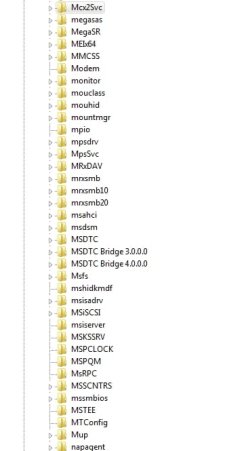
i did it and no integrity violations but can you look at the screenshot and compare to yours from M to N please?Please Run sfc /scan now using option 2 in this tutorial: SFC /SCANNOW Command - System File Checker
Please post back the results.
Please indicate what message was displayed at the end:
Windows found no integrity violations
OR
Corrupt files were found, and windows was unable to fix them.
OR
Corrupt files were found, and windows successfully repaired them

thanksBrink has a Tutorial that should help you.
http://www.sevenforums.com/tutorials/236709-services-restore-default-services-windows-7-a.html

Hey OP, why are you at this point?
By the way if this is within regedit, anything you do there happens immediately.
I checked my own (2 PCs arent likely the same any way) but I have no MPlayer ANYTHING service listed, and you said .exe which is the executable (the actual service program) not the same thing as something listed in regedit except as the data value within one of the entries, not a place to monkey around in.
Sounds like someone is looking for trouble where there is none, maybe.
MPlayerWWService.exe according to the link below is possibly a virus so maybe time to run some checks with MBAM and others to make sure it isn't Herdprotect
yes i compared the list , but is it the same of the registry?As stated already, check the tutorial. It lists all services. Compare yourself.
As stated already, check the tutorial. It lists all services. Compare yourself.
i tried to compare another time ,but my os is not in english , so the service name are differentBrink has a Tutorial that should help you.
http://www.sevenforums.com/tutorials/236709-services-restore-default-services-windows-7-a.html

