Do I need more RAM for my computer?

montecarlo1987

New member
Member
VIP
Local time
7:26 AM
Messages
145
Hello. I need your honest opinion. Do I need more memory???

I am running 4GB (4096 MB) of RAM on my Windows 7 Professional 64-bit. I am planning to install and use high-end SONY video editing software to do some serious video editing. I know these kind of video editing software suites can draw serious system resources. I also plan to do some small tasks (like web browsing, checking e-mail on my Outlook, etc.) while some automatic video editing tasks are occurring at the same time at times.

Now, I know Windows 7 is very efficient with system resources. I took a look into the Windows 7's "Resource Monitor" and specifically "Memory" tab. I know by running more programs will increase the used or cached amount of RAM and reduce available RAM.

I tried to simulate the same experience the best I could. Now normally, I would not *all* of these *at once* typically, but I tried to demonstrate some sort of similarity. I decided to run:

- 4 well-known web browsers open in full screen.
- Outlook 2007 e-mail client in full screen.
- Word 2007 in full screen.
- play Windows Media Player music in full screen.
- run CCleaner's "Cleaner" in full screen.
- run a Webroot Internet Security Complete manual system scan.
- Windows Snipping Tool.

After all these running processes completed and leaving them still up and running even if they are idle for about 15 minutes, I received at max. 56% used physical memory. I attached a image file to this post for you to view.

A. What do you think about that? Do I need more memory if I plan to use a high end video editing software that uses a lot of system resources like memory while I am doing some basic routine tasks too?

B. Also, is it true that once all 100% of the physical memory is used, then the virtual RAM space from free hard drive space is then utilized?

C. I see there is a portion on the attached image that is named "Standby". If the "Free" portion is totally used up and more "Standby" is needed, is this when virtual RAM kicks in?

Please reply.

Thank you!


Some basic general stats of my system:
- Windows 7 Pro 64-Bit.
- Intel Core 2 Quad Q9550 -- Yorkfield 2.83 GHz 1333 MHz processor.
- ASUS P5Q desktop motherboard.
- 4 GB of Corsair XMS2 2x2 GB DDR2 RAM.
- XFX Radeon HD5670 GDDR5 1GB RAM Graphics Card.
 

Attachments
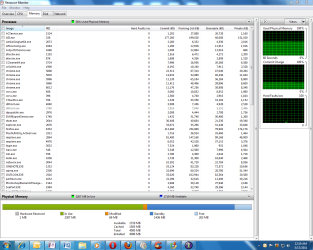
  • Windows Resource Monitor - Running many tasks at once pic. - 5-17-11 AM.PNG
    Windows Resource Monitor - Running many tasks at once pic. - 5-17-11 AM.PNG
    70 KB · Views: 150

My Computer My Computer

Computer type
PC/Desktop
OS
Windows 7 Pro x64 SP1 & Windows 8 & 8.1 Pro x64
I have looked at my ram usage while using Sony Vegas Movie Studio HD 10 and I think you will be just fine with what you have.
 

My Computer My Computer

Computer Manufacturer/Model Number
Samsung Chronos 7
OS
windows 7 Pro 64Bit
CPU
2.2 GHz Intel Core i7-2675QM
Memory
8GB
Graphics Card(s)
Intel HD Graphics 3000/Radeon HD 6490M
Sound Card
Realtek High Definition Audio
Monitor(s) Displays
Built in LCD and external Dell 22 inch LCD
Screen Resolution
1600x900
Hard Drives
1 TB HDD
Internet Speed
20 MBPS Down 1500 KBPS Up
You will need more Ram. To do " serious video editing" you may need an extra 4 gigs or even 8 depending on how serious.

When you run out of ram "virtual" will be used (aka page file) but it is much, much slower so dont use it.

Your tests are not really valid for high end video editing. to guesstimate now you could open say you tube video's while running a malware scan and a search index.

Ram is cheap and you will wish you had if you dont.

Good Luck
 

My Computer My Computer

Computer Manufacturer/Model Number
HP Pavillion dv-7 1005 Tx
OS
Win 8 Release candidate 8400
CPU
[email protected]
Memory
4 gigs
Graphics Card(s)
Nvidia 9600M
Sound Card
HD built-in
Monitor(s) Displays
17" Wxga
Screen Resolution
1440x900
Cooling
none
Internet Speed
45Mb down 5Mb up
Windows 7 is happy to utilise as much memory as you throw at it. If you bump it to say 16GB it may still use 56% physical memory. Virtual memory is always being used unless you have disabled it (not reccommended) Virtual memory keeps its data whereas RAM does not. Windows 7Tries to keep a balance between physical and virtual memory.
That said with what you plan a bump to 8GB may give you some better performance. A better CPU (read quad-core) would probably get you more performance since video editing can tax the CPU and graphics card.
 

My Computer My Computer

Computer type
PC/Desktop
Computer Manufacturer/Model Number
Home Built Desktop By DataTech
OS
Windows 7 Ultimate X64 SP1
CPU
Intel i5-2550K, Differing ~4.4-4.8GHz No built in GPU
Motherboard
ASUS P8Z68-V PRO/GEN3
Memory
16GB G.Skill Sniper 1866MHz @ 2133MHz 2x8GB
Graphics Card(s)
ASUS GTX650TIB-DC2OC-2GD5, (650TI Boost)
Sound Card
Onboard Realtek 5-1
Monitor(s) Displays
Samsung P2570HD
Screen Resolution
1920x1080
Hard Drives
Samsung 840 Pro 256GB SSD for OS, 500GB Seagate Constellation (Enterprise drive) for Data
PSU
Corsair HX650W
Case
Inwin Dragon Rider
Cooling
Hyper 212 EVO w/two Noctua fans, push-pull, @1300 RPM
Keyboard
E-Z Eyes, bright yellow keys with large characters
Mouse
steelseries SENSEI Laser Pro Gaming
Internet Speed
48-51Mbs Mbs down, 11 Mbs up Xfinity Cable
Antivirus
Norton Internet Security 2013
Browser
IE 10, Opera, Pale Moon if needed
Other Info
4 case fans, LG BluRay-RE, ASUS DVD-RW, Mr. Fusion power supply, 1.21 gigawatts.
What high end Sony program are you planning on using?
I use Premiere CS5 and it can consume a lot of memory.
I went from 8GB to 16GB just so I have more headroom.
 

Attachments

  • premiere-test.jpg
    premiere-test.jpg
    78.5 KB · Views: 68
  • editor-2010.jpg
    editor-2010.jpg
    110.2 KB · Views: 103

My Computer My Computer

Computer Manufacturer/Model Number
HAL-9000
OS
Windows 7 Ultimate 64bit
CPU
Intel i7 3770K
Motherboard
Asus Sabertooth Z77
Memory
16GB DDR3 1333 Corsair XMS3
Graphics Card(s)
XFX HD6950 2GB EyeFinity
Sound Card
Logitech G35 & Sennheiser PC135 & VIA HD
Monitor(s) Displays
23" HP 2310e, 23" Samsung B2230, 21.5" Viewsonic
Screen Resolution
5760x1080
Hard Drives
16TB of Storage
128GB & 256GB Crucial M4 SSD's, 2X 1TB WD Black, 3x 2TB WD, 3x 2TB Samsung F4, 1.5TB Seagate, WD 500GB,
PSU
Antec True Power New 650watt
Case
Cooler Master HAF-932
Cooling
Corsair H60 Hydro Cooler, 3x 230mm Fans, 2x120mm Fan
Keyboard
Logitech G15 and G13
Mouse
Logitech G700 Gaming Mouse
Internet Speed
50/10 Mbit
Other Info
Speakers : Alesis M1 Active Mk2 Studio Monitors , APC RS 1200 UPS, HP 4500DN Color Laser, HP P1006 mono Laser, Kodak 8500 Dye-Sub, Epson 1280 inkjet, Epson Worforce 610 MFC
Hello. I need your honest opinion. Do I need more memory???

I am running 4GB (4096 MB) of RAM on my Windows 7 Professional 64-bit. I am planning to install and use high-end SONY video editing software to do some serious video editing. I know these kind of video editing software suites can draw serious system resources. I also plan to do some small tasks (like web browsing, checking e-mail on my Outlook, etc.) while some automatic video editing tasks are occurring at the same time at times.

Now, I know Windows 7 is very efficient with system resources. I took a look into the Windows 7's "Resource Monitor" and specifically "Memory" tab. I know by running more programs will increase the used or cached amount of RAM and reduce available RAM.

I tried to simulate the same experience the best I could. Now normally, I would not *all* of these *at once* typically, but I tried to demonstrate some sort of similarity. I decided to run:

- 4 well-known web browsers open in full screen.
- Outlook 2007 e-mail client in full screen.
- Word 2007 in full screen.
- play Windows Media Player music in full screen.
- run CCleaner's "Cleaner" in full screen.
- run a Webroot Internet Security Complete manual system scan.
- Windows Snipping Tool.

After all these running processes completed and leaving them still up and running even if they are idle for about 15 minutes, I received at max. 56% used physical memory. I attached a image file to this post for you to view.

A. What do you think about that? Do I need more memory if I plan to use a high end video editing software that uses a lot of system resources like memory while I am doing some basic routine tasks too?

B. Also, is it true that once all 100% of the physical memory is used, then the virtual RAM space from free hard drive space is then utilized?

C. I see there is a portion on the attached image that is named "Standby". If the "Free" portion is totally used up and more "Standby" is needed, is this when virtual RAM kicks in?

Please reply.

Thank you!


Some basic general stats of my system:
- Windows 7 Pro 64-Bit.
- Intel Core 2 Quad Q9550 -- Yorkfield 2.83 GHz 1333 MHz processor.
- ASUS P5Q desktop motherboard.
- 4 GB of Corsair XMS2 2x2 GB DDR2 RAM.
- XFX Radeon HD5670 GDDR5 1GB RAM Graphics Card.
I read somewhere a long time ago, that you should buy as much computer as you can afford, and more than you think you'll ever need. Remember when 100MB of RAM was smokin'? If you are good with 4GB of RAM today, I guaranty that you'll need more in a year or two. Back in 2004 over the counter pc's were commonly loaded with 512MB of RAM. I was buying a new pc at the time, so I ordered my DELL with 1GB of RAM to extend the life of the useability of it. I just had to buy again after 7 years. This time I could have got by with 4GB, but got 8GB. I don't do games. :)
 

My Computer My Computer

Computer Manufacturer/Model Number
DELLXPS 8300
OS
WIN7 x64 Home Premium SP1
CPU
Intel Core i5-2400 processor(6MB Cache, 3.1GHz)
Memory
8 GB RAM
Hard Drives
1.5TB C Drive
RAM ?

I have an HP laptop that I upgraded to Win7 x86 from Vista. I have 2 GB ram. Win7 sped everything up a lot, starting, opening programs, etc. Realistically what would increasing the ram to 4 GB do for it? The task manager always shows it is only using 50% of the ram. The only thing that is slow is explorer reading my usb drive folders that have a lot of files like my droid music folder with 1000 songs. I'm thinking that is a limitation of the usb speed and the external drive speed. I also realize that x86 will only read 3 to 3.5 GB of the 4 GB.
 

My Computer My Computer

Computer Manufacturer/Model Number
HP Pavilion dv9700 Notebook PC
OS
Windows 7 Home Premium 32bit
CPU
AMD Turion(tm) 64 X2 TL-60, 2000 Mhz
Motherboard
UMA
Memory
2.00 GB
Graphics Card(s)
NVIDIA GeForce 7150M / nForce 630M
Sound Card
Conexant High Definition SmartAudio 221
Monitor(s) Displays
17.0" WXGA+ HD Brightview Widescreen
Hard Drives
C: 238.5 GB NTFS TOSHIBA MK2552GSX ATA
D: 190.8 GB NTFS TOSHIBA MK2035GSS ATA
E: 238.5 GB NTFS WD 2500BMV External USB
F: 57.2 GB NTFS WD60 0UE-22HCT0 External USB
G: 953.8 GB NTFS TOSHIBA External HDD USB
PSU
2.55Ah, 73Wh
I am running 4GB (4096 MB) of RAM on my Windows 7 Professional 64-bit. I am planning to install and use high-end SONY video editing software to do some serious video editing. I know these kind of video editing software suites can draw serious system resources. I also plan to do some small tasks (like web browsing, checking e-mail on my Outlook, etc.) while some automatic video editing tasks are occurring at the same time at times.
I use Sony Vegas Movie Studio HD 10, and it takes more CPU power than anything else. I have 8GB of RAM myself for running virtual machines, and it's not heavily hit with my video editing.

A better CPU (read quad-core) would probably get you more performance since video editing can tax the CPU and graphics card.
The user has a quad core, it's a Q9550 which is the same model I have and has 12MB of L2 cache like the Extreme Edition processors.
 

My Computer My Computer

Computer Manufacturer/Model Number
Self-Built in July 2009
OS
Windows 7 Ultimate x64
CPU
Intel Q9550 2.83Ghz OC'd to 3.40Ghz
Motherboard
Gigabyte GA-EP45-UD3R rev. 1.1, F12 BIOS
Memory
8GB G.Skill PI DDR2-800, 4-4-4-12 timings
Graphics Card(s)
EVGA 1280MB Nvidia GeForce GTX570
Sound Card
Realtek ALC899A 8 channel onboard audio
Monitor(s) Displays
23" Acer x233H
Screen Resolution
1920x1080
Hard Drives
Intel X25-M 80GB Gen 2 SSD
Western Digital 1TB Caviar Black, 32MB cache. WD1001FALS
PSU
Corsair 620HX modular
Case
Antec P182
Cooling
stock
Keyboard
ABS M1 Mechanical
Mouse
Logitech G9 Laser Mouse
Internet Speed
15/2 cable modem
Other Info
Windows and Linux enthusiast. Logitech G35 Headset.
The user has a quad core, it's a Q9550 which is the same model I have and has 12MB of L2 cache like the Extreme Edition processors.
Oops, there I go again not reading slow enough.:o
 

My Computer My Computer

Computer type
PC/Desktop
Computer Manufacturer/Model Number
Home Built Desktop By DataTech
OS
Windows 7 Ultimate X64 SP1
CPU
Intel i5-2550K, Differing ~4.4-4.8GHz No built in GPU
Motherboard
ASUS P8Z68-V PRO/GEN3
Memory
16GB G.Skill Sniper 1866MHz @ 2133MHz 2x8GB
Graphics Card(s)
ASUS GTX650TIB-DC2OC-2GD5, (650TI Boost)
Sound Card
Onboard Realtek 5-1
Monitor(s) Displays
Samsung P2570HD
Screen Resolution
1920x1080
Hard Drives
Samsung 840 Pro 256GB SSD for OS, 500GB Seagate Constellation (Enterprise drive) for Data
PSU
Corsair HX650W
Case
Inwin Dragon Rider
Cooling
Hyper 212 EVO w/two Noctua fans, push-pull, @1300 RPM
Keyboard
E-Z Eyes, bright yellow keys with large characters
Mouse
steelseries SENSEI Laser Pro Gaming
Internet Speed
48-51Mbs Mbs down, 11 Mbs up Xfinity Cable
Antivirus
Norton Internet Security 2013
Browser
IE 10, Opera, Pale Moon if needed
Other Info
4 case fans, LG BluRay-RE, ASUS DVD-RW, Mr. Fusion power supply, 1.21 gigawatts.
Just went from 2 GB 32 bit to 64 bit and 8 GB. That maxes my motherboard. Everything seems faster. I use Sony Vegas 10 to do some 5 to 10 minute mountain bike vid editing. All's very good.
 

My Computer My Computer

Computer Manufacturer/Model Number
Custom build; parts from the Egg
OS
windows 7 Professional 64 Bit
CPU
I7-3930
Motherboard
Asus P9X79 PRO
Memory
G.Skill 4X 4 GB DR3 240 pin 16GB total
Graphics Card(s)
EVGA 670
Sound Card
Energy Take 5, Sennheiser HD 205 phones, X-FI
Monitor(s) Displays
Hanns G 21.5" HH221 and Samsung 19" 940BW and Hannspree
Screen Resolution
2X 1920X1080 and 1X 1440X900
Hard Drives
3-- internal 250 GB WD; 1-- internal 1 TB Samsung ---plus 3 WD external HDs (sizes vary to 1.5 TB); Crucial M4 128GB SSD, 1 Pioneer BDR-207 Bluray writer;
and 1--LG Lightscribe DVD drive
PSU
1000 Watt XFX Pro Series
Case
Thermaltake Chaser
Cooling
Corsair H80
Keyboard
Logitech Wireless and backlit
Mouse
Logitech Rollerball
Other Info
79 " long desk from Ikea. Sauder 71 inch long "speaker" shelf.

Optical and analog outs to a Yamaha RX-V 650 driving Energy Take 5.1 speaker system. Technics TT. Realistic mixer. Senns cans.
Back
Top