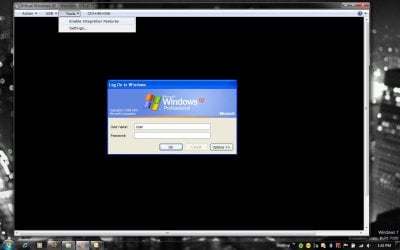
Do I need seperate anti virus for XP mode?

ranjan2001

New member
Power User
Local time
3:03 AM
Messages
143
Location
NewDelhi, India
XP mode say no anti virus but the win 7 is having the AV, do I need separate installation on XP?

Same for the graphic card
My XP mode is running on 16bit resolution do I install separate graphic card drivers if so then should I install x64 version of XP or 32 bit?

MY win7 is x64 & so is the virtual machine but not sure about the XP is running in 32 bit or x64bit?
 

My Computer My Computer

Computer Manufacturer/Model Number
Custom Built
OS
Windows 7 Ultimate x64 build 7600
CPU
Intel C2D 6300 1.86MHz
Motherboard
Asus P5B-dlx wifi
Memory
4x1Gb Transcend JetRAM DDR2 PC2-6400 800MHz
Graphics Card(s)
XFX 7600GT
Sound Card
Creative Audigy Value
Monitor(s) Displays
Lenovo 20"
Screen Resolution
1680x1050
Hard Drives
4 x 1.5TB Seagate barracuda
PSU
Zebronics Platinum 450Watts
Case
Zebronics Peace
Cooling
stock cooling
Keyboard
silicon keyboard
Mouse
Logitech 3 button mouse
Internet Speed
1mbps
You'll need to install a separate AV for your virtualized XP running in Win7. Heard that on Paul Thurott's podcast this week.

Will let someone else handle your graphics driver question.
 

My Computer My Computer

Computer Manufacturer/Model Number
Self built
OS
Windows 7 Ultimate 32 & 64 -(Boot Camped Snow Leopard on a Mac Mini)
CPU
AMD Athlon A64 X2 6000+ 3.1GHz
Motherboard
DFI LanParty Jr 790GX M2RS
Memory
4GB Corsair XMS RAM
Graphics Card(s)
Gigabyte ATI Radeon HD4550/512MB/DDR3 passive cooled
Sound Card
latest RealTek HD/HDMI drivers
Monitor(s) Displays
Samsung LN40A550 (primary); Zalman 7" LCD (secondary)
Screen Resolution
1920x1080 ; 800x600
Hard Drives
WD Raptor for OS
Seagate 7211 640GB
Two Samsung EcoGreens for TV in RAID 0 = 3TB
Two WD MyBook 1TB externals for B/U and Movies
Optical Drive:
LG GGC-H20L Super Multi Blue BluRay/HD-DVD internal
PSU
Corsair HX520W
Case
Zalman HD160XT
Cooling
Zalman CNPS9500Cu on processor - Four Nexus case fans
Keyboard
Gyration wireless Media Center Keyboard
Mouse
Gyration Cordless Optical Air Mouse
Internet Speed
6344 kbps Down/1043 kbps Up (Comcast cable)
Other Info
HDMI audio/video out to Yamaha RX-V1065 receiver.
All controlled by a Harmony One universal remote.

Four other home built computers plus a Mac Mini, but this is my main Win7 testbed.
a little off topic, but how much space does xp mode use on ur hdd?? Oh and if i uninstall it will i regain my space? This is important because i only have 25 gig left on my partition...
 
Last edited:

My Computer My Computer

Computer Manufacturer/Model Number
Sony
OS
Main OS: Windows 7 64 bit, Secondary: Vista 32 bit
CPU
Intel Core 2 Duo P8400 @ 2.26 Ghz
Motherboard
Intel PM45
Memory
4GB DDR2
Graphics Card(s)
ATI Radeon Mobility HD3470
Sound Card
Integrated Realtek
Monitor(s) Displays
Integrated (Laptop) 16.4 inch
Screen Resolution
1600x900
Hard Drives
320 GB
Mouse
Logitech
Internet Speed
1 Mb/s
This is important because i only have 25 gig left on my partition...
It depends how many software do you later need to install on XP mode, uninstalling will claim your space for sure.

Windows Virtual PC requires a computer with 2 GB of DRAM and 20 GB of free storage space for the creation of a virtual hard disk if the disk space is less then it would work but would be slow I guess. The XP Mode drop-in consumes 2 GB on its own, plus another 15 GB for virtual storage.

This link should help
http://www.sevenforums.com/tutorials/8247-windows-xp-mode-install-setup.html
 

My Computer My Computer

Computer Manufacturer/Model Number
Custom Built
OS
Windows 7 Ultimate x64 build 7600
CPU
Intel C2D 6300 1.86MHz
Motherboard
Asus P5B-dlx wifi
Memory
4x1Gb Transcend JetRAM DDR2 PC2-6400 800MHz
Graphics Card(s)
XFX 7600GT
Sound Card
Creative Audigy Value
Monitor(s) Displays
Lenovo 20"
Screen Resolution
1680x1050
Hard Drives
4 x 1.5TB Seagate barracuda
PSU
Zebronics Platinum 450Watts
Case
Zebronics Peace
Cooling
stock cooling
Keyboard
silicon keyboard
Mouse
Logitech 3 button mouse
Internet Speed
1mbps
It depends how many software do you later need to install on XP mode, uninstalling will claim your space for sure.

Windows Virtual PC requires a computer with 2 GB of DRAM and 20 GB of free storage space for the creation of a virtual hard disk if the disk space is less then it would work but would be slow I guess. The XP Mode drop-in consumes 2 GB on its own, plus another 15 GB for virtual storage.

This link should help
http://www.sevenforums.com/tutorials/8247-windows-xp-mode-install-setup.html

thanks for the link mate, but im a little confused. Does it use up 20 gigs when u install it, or only when u run it so that when u close it u regain ur space?
 

My Computer My Computer

Computer Manufacturer/Model Number
Sony
OS
Main OS: Windows 7 64 bit, Secondary: Vista 32 bit
CPU
Intel Core 2 Duo P8400 @ 2.26 Ghz
Motherboard
Intel PM45
Memory
4GB DDR2
Graphics Card(s)
ATI Radeon Mobility HD3470
Sound Card
Integrated Realtek
Monitor(s) Displays
Integrated (Laptop) 16.4 inch
Screen Resolution
1600x900
Hard Drives
320 GB
Mouse
Logitech
Internet Speed
1 Mb/s
XP mode say no anti virus but the win 7 is having the AV, do I need separate installation on XP?

Yes you should
Maybe can you try this:
Panda Cloud Antivirus FREE - The first free cloud antivirus against viruses, spyware, rootkits and adware
It's from the editor of Panda AV

Same for the graphic card
My XP mode is running on 16bit resolution do I install separate graphic card drivers if so then should I install x64 version of XP or 32 bit?

MY win7 is x64 & so is the virtual machine but not sure about the XP is running in 32 bit or x64bit?

Of course it's a 32bit XP that run on the VM of the XP mode.
But XP mode should allready have the good driver for the VGA card of the VM, it's different to the card you have on your computer (I think it's a SIS or something like that).
 

My Computer My Computer

OS
Vista H.P. SP1 x32 Seven RC x64
CPU
Q6600 @ 3.4Ghz
Motherboard
GA-EP45-DS3L
Memory
4Go PC2-6400
Graphics Card(s)
8500GT @ 700/500
Sound Card
Audigy Platinium
Monitor(s) Displays
Mitsubishi Diamond Pro 920 + Mitsubishi Diamond Pro 720
Screen Resolution
1600x1200 twice
Hard Drives
Hitachi 160Go
Maxtor 160Go (system drive)
Maxtor 200Go in Antec MX-1 EC external box (eSATA-USB2.0)
PSU
Corsair VX550W
Case
Thermaltake Xaser III
Cooling
Watercooling (CPU, GPU, HDD, NB)
Keyboard
MS Wireless Multimedia 6000 V2.0
Mouse
IntellEye Explorer 3.0
Internet Speed
ADSL 18Mbit/s/1Mbit/s
i found that if you Disable Integration Features, you can use the 32-bit color for the display. Enabling Integration Features limits you to 16-bit color.
 
Last edited:

My Computer My Computer

Computer Manufacturer/Model Number
Dell Studio XPS13
OS
Win 7 Ultimate x64
CPU
Processor, P8700, 2.53, 3MB, Core Penryn, 25W, R0
Motherboard
Whatever Dell installs
Memory
4GB-Dual In-Line Memory Module, 2GB1067MHZ, 256X64, 8K, 200
Graphics Card(s)
NVidia gForce 9400 G
Monitor(s) Displays
LCD, 13.3WXGA,
Screen Resolution
1280 x 800
Hard Drives
Seagate Momentus 500GB 7200 RPM
Keyboard
studio XPS Backlighting
Mouse
Logitech Nano wireless
Other Info
Wireless, Half Mini-Card DW1515, World Wide
Wireless, Bluetooth, 370 FXCN, 5DB
I would like to know where in windows7 you Disable Integration services?
Or is it XP mode you have to do it?
 

My Computer My Computer

Computer Manufacturer/Model Number
Custom Built
OS
Windows 7 Ultimate x64 build 7600
CPU
Intel C2D 6300 1.86MHz
Motherboard
Asus P5B-dlx wifi
Memory
4x1Gb Transcend JetRAM DDR2 PC2-6400 800MHz
Graphics Card(s)
XFX 7600GT
Sound Card
Creative Audigy Value
Monitor(s) Displays
Lenovo 20"
Screen Resolution
1680x1050
Hard Drives
4 x 1.5TB Seagate barracuda
PSU
Zebronics Platinum 450Watts
Case
Zebronics Peace
Cooling
stock cooling
Keyboard
silicon keyboard
Mouse
Logitech 3 button mouse
Internet Speed
1mbps
I would like to know where in windows7 you Disable Integration services?
Or is it XP mode you have to do it?
once Windows Virtual XP is loaded make sure you're not viewing full screen and then from the Tools Menu, select Enable/Disable Integration Features..
 

Attachments

  • Image1.jpg
    Image1.jpg
    60.4 KB · Views: 516

My Computer My Computer

Computer Manufacturer/Model Number
Dell Studio XPS13
OS
Win 7 Ultimate x64
CPU
Processor, P8700, 2.53, 3MB, Core Penryn, 25W, R0
Motherboard
Whatever Dell installs
Memory
4GB-Dual In-Line Memory Module, 2GB1067MHZ, 256X64, 8K, 200
Graphics Card(s)
NVidia gForce 9400 G
Monitor(s) Displays
LCD, 13.3WXGA,
Screen Resolution
1280 x 800
Hard Drives
Seagate Momentus 500GB 7200 RPM
Keyboard
studio XPS Backlighting
Mouse
Logitech Nano wireless
Other Info
Wireless, Half Mini-Card DW1515, World Wide
Wireless, Bluetooth, 370 FXCN, 5DB
OK done that, it now run in 32bit mode when I changed it in the settings but strangely I cant install the nvidia driver it gives me this error with nvidia XP driver version 180.50.
 

Attachments

  • 2009-05-11_004400.jpg
    2009-05-11_004400.jpg
    11 KB · Views: 269

My Computer My Computer

Computer Manufacturer/Model Number
Custom Built
OS
Windows 7 Ultimate x64 build 7600
CPU
Intel C2D 6300 1.86MHz
Motherboard
Asus P5B-dlx wifi
Memory
4x1Gb Transcend JetRAM DDR2 PC2-6400 800MHz
Graphics Card(s)
XFX 7600GT
Sound Card
Creative Audigy Value
Monitor(s) Displays
Lenovo 20"
Screen Resolution
1680x1050
Hard Drives
4 x 1.5TB Seagate barracuda
PSU
Zebronics Platinum 450Watts
Case
Zebronics Peace
Cooling
stock cooling
Keyboard
silicon keyboard
Mouse
Logitech 3 button mouse
Internet Speed
1mbps
OK done that, it now run in 32bit mode when I changed it in the settings but strangely I cant install the nvidia driver it gives me this error with nvidia XP driver version 180.50.
i don't see the need to install the driver, just go with 32-bit mode, use ClearType and maximize the screen to get the best display resolution. ok, back on topic...
 

My Computer My Computer

Computer Manufacturer/Model Number
Dell Studio XPS13
OS
Win 7 Ultimate x64
CPU
Processor, P8700, 2.53, 3MB, Core Penryn, 25W, R0
Motherboard
Whatever Dell installs
Memory
4GB-Dual In-Line Memory Module, 2GB1067MHZ, 256X64, 8K, 200
Graphics Card(s)
NVidia gForce 9400 G
Monitor(s) Displays
LCD, 13.3WXGA,
Screen Resolution
1280 x 800
Hard Drives
Seagate Momentus 500GB 7200 RPM
Keyboard
studio XPS Backlighting
Mouse
Logitech Nano wireless
Other Info
Wireless, Half Mini-Card DW1515, World Wide
Wireless, Bluetooth, 370 FXCN, 5DB
If your XPM is like mine, it wont have installed an nvidia driver, instead its installed a generic s3 driver, presumably to reduce resources.
 

My Computer My Computer

Computer Manufacturer/Model Number
self built
OS
Windows 7 Professional 64-bit
CPU
Intel E8400 3GHz
Motherboard
Intel DX48BT2
Memory
Kingston PC3-10700H 4Gb
Graphics Card(s)
XFX Radeon HD 5850 BlackEd.
Sound Card
Asus Xonar DG
Monitor(s) Displays
2x Samsung SM-T220HD 22"
Screen Resolution
1680x1050 on two monitors
Hard Drives
OCZ Vertex 2 120gb 3.5" (OS)
Seagate Momentus XT 500gb
Samsung F3 1Tb (games)
2x Samsung F1 1Tb
PSU
Thermaltake ToughPower 850w
Case
Thermaltake Armor
Cooling
Scythe Mugen II
Keyboard
Microsoft Comfort Curve USB
Mouse
Razer Diamondback 3G
Internet Speed
8128/443
but there is more to it than that...
its because thats all that is emulated....
im guessing hardware in very hard to emulate unless your hardware (gpu in this case) has a sort of virtualization technologies like intel and amd have (and that the VMM can use)...
and technically you are right that if another more modern card was emulated there would be massive overhead and then not everyone (even with AMD-V or Intel-VTx) would not be able to use the vm...;)

and also its because thats what VPC 2007 had emulated..:p
 

My Computer My Computer

Computer Manufacturer/Model Number
Tx2500z Tablet Pc/Homemade Server
OS
Windows 7 Ult x64(x2), HomePrem x32(x4), Server 08 (+VM), 08 R2 (VM) , SuSe 11.2 (VM), XP 32 (VM)
CPU
Turion X2 ultra (oh well came with laptop)/P4 @3.2 (yes P4)
Motherboard
IDK HP Motherboard / Intel DG965SS
Memory
OCZ Dual Channel 4GB kit/ 1gb Dual Channel
Graphics Card(s)
HD 3200 graphics /GMA x3100 (yay for intergrated!!)
Sound Card
Realtek HD Audio(mic working, well sort of)/Siig IC-70012
Monitor(s) Displays
built-in Hp 12" laptop screen/ Acer 19"
Screen Resolution
1280x800 /1440x900
Cooling
All Air Cooled
Mouse
Logi MX Rev. /MS Wheel Optical 1.1A /Logitech Optical Mouse
Internet Speed
College baby but its still routed through vpn to 1536k...
Other Info
love my wacom pen and pressure sensitivity...
wished it worked in 7, SUSE for that matter though
Good info here; some questions I had were answered (primarily the 32 bit video mode). To answer one of the questions started on this thread (didn't see anyone answer this) Virutal PC for XP will only run XP in the 32 bit OS. Sorry that is just the nature of the beast.
 

My Computer My Computer

Computer Manufacturer/Model Number
HP Pavilion a4302f
OS
Win 7 Pro x64, VM Win XP, Win7 Pro Sandbox, Kubuntu 11
CPU
AMD Athlon(tm) II X4 640 @ 3.0 Gbz
Memory
12GB 1066MHz DDR3 SDRAM - 2x4GB, 2x2GB
Graphics Card(s)
ATI Radeon HD 4350 HD Graphics/Audio with 512MB
Sound Card
Realtek High Definition Audio
Monitor(s) Displays
1. Dell 23" SP2307, 2. Mitsublishi 40" HDTV, Hannspree 25"
Screen Resolution
1. 2048x1152, 2. 1920-1080, 3. 1920x1200
Hard Drives
Int: 1 120 Gig SSD i
1 - 2.5" 500 USB External HDD
1 -1 Tb USB External HDD
Case
Mid Tower
Cooling
Standard Fans - 5 fans (very quiet)
Keyboard
Microsoft Wireless 2000
Mouse
Microsoft Wireless Mouse 5000
Internet Speed
10 Mbit (realistically 500 Kbit - 1.2 Mbit)
Other Info
Speakers - Bose Desktop (Excellent Sound)
1 external CD|DVD\Blue-ray Recorders/Players (Sony)
i don't see the need to install the driver, just go with 32-bit mode,
One of my application needs GPU processing power (Open GL 2.0) I cant enable this option till the driver is installed.

So it means I cant use XPM with full power, its good only for "able to use old software" anyway I am just testing win7 but things look good & stable I will convert to the final version when launched.
 

My Computer My Computer

Computer Manufacturer/Model Number
Custom Built
OS
Windows 7 Ultimate x64 build 7600
CPU
Intel C2D 6300 1.86MHz
Motherboard
Asus P5B-dlx wifi
Memory
4x1Gb Transcend JetRAM DDR2 PC2-6400 800MHz
Graphics Card(s)
XFX 7600GT
Sound Card
Creative Audigy Value
Monitor(s) Displays
Lenovo 20"
Screen Resolution
1680x1050
Hard Drives
4 x 1.5TB Seagate barracuda
PSU
Zebronics Platinum 450Watts
Case
Zebronics Peace
Cooling
stock cooling
Keyboard
silicon keyboard
Mouse
Logitech 3 button mouse
Internet Speed
1mbps
One of my application needs GPU processing power (Open GL 2.0) I cant enable this option till the driver is installed.

So it means I cant use XPM with full power, its good only for "able to use old software" anyway I am just testing win7 but things look good & stable I will convert to the final version when launched.

nope the closest thing to that is Virtualbox....
but then you need a separate windows xp disc...:(
 

My Computer My Computer

Computer Manufacturer/Model Number
Tx2500z Tablet Pc/Homemade Server
OS
Windows 7 Ult x64(x2), HomePrem x32(x4), Server 08 (+VM), 08 R2 (VM) , SuSe 11.2 (VM), XP 32 (VM)
CPU
Turion X2 ultra (oh well came with laptop)/P4 @3.2 (yes P4)
Motherboard
IDK HP Motherboard / Intel DG965SS
Memory
OCZ Dual Channel 4GB kit/ 1gb Dual Channel
Graphics Card(s)
HD 3200 graphics /GMA x3100 (yay for intergrated!!)
Sound Card
Realtek HD Audio(mic working, well sort of)/Siig IC-70012
Monitor(s) Displays
built-in Hp 12" laptop screen/ Acer 19"
Screen Resolution
1280x800 /1440x900
Cooling
All Air Cooled
Mouse
Logi MX Rev. /MS Wheel Optical 1.1A /Logitech Optical Mouse
Internet Speed
College baby but its still routed through vpn to 1536k...
Other Info
love my wacom pen and pressure sensitivity...
wished it worked in 7, SUSE for that matter though
nope the closest thing to that is Virtualbox....
but then you need a separate windows xp disc...:(


VirtualBox can read VHD drive. Maybe can you use the VHD which come with XP mode ;)
 

My Computer My Computer

OS
Vista H.P. SP1 x32 Seven RC x64
CPU
Q6600 @ 3.4Ghz
Motherboard
GA-EP45-DS3L
Memory
4Go PC2-6400
Graphics Card(s)
8500GT @ 700/500
Sound Card
Audigy Platinium
Monitor(s) Displays
Mitsubishi Diamond Pro 920 + Mitsubishi Diamond Pro 720
Screen Resolution
1600x1200 twice
Hard Drives
Hitachi 160Go
Maxtor 160Go (system drive)
Maxtor 200Go in Antec MX-1 EC external box (eSATA-USB2.0)
PSU
Corsair VX550W
Case
Thermaltake Xaser III
Cooling
Watercooling (CPU, GPU, HDD, NB)
Keyboard
MS Wireless Multimedia 6000 V2.0
Mouse
IntellEye Explorer 3.0
Internet Speed
ADSL 18Mbit/s/1Mbit/s
Good info here; some questions I had were answered (primarily the 32 bit video mode). To answer one of the questions started on this thread (didn't see anyone answer this) Virutal PC for XP will only run XP in the 32 bit OS. Sorry that is just the nature of the beast.


Yes.
 

My Computer My Computer

Computer Manufacturer/Model Number
Asus
OS
Windows 7 x64 Ultimate SP1
CPU
I5 875K Unlocked
Motherboard
P7P55D-E-PRO
Memory
Kingston HyperX Genesis DDR3-1600MHz 9-9-9-27 @ 1.65V XMP
Graphics Card(s)
EVGA GeForce GTX 570 HD 732 MHz GPU 1280 MB, 152 GB Mem
Sound Card
Onboard Via 1828S
Monitor(s) Displays
Samsung T240 HD
Screen Resolution
Dual 1920X1200 1027X768
Hard Drives
OCZ Vertex II Extended Sandforce SSD 60 Gig 2X WD Black Caviar 1 terabyte 6GBS Transer Sata 3 Marvell Chip
PSU
Corsair Gold fully Modular 80 Plus 850
Case
Coolermaster Half X Full Tower
Cooling
Noctua NH-U12P
Keyboard
MS
Mouse
MS
Internet Speed
Fast enough
Other Info
My fridge has a water tap
Its important to remember that a virtual machine is just that, its virtual...meaning pretend.

It doesnt access your hardware directly but rather the hypervisor emulates hardware that the virtual machine uses.
 

My Computer My Computer

OS
Windows Vista Business / Windows 7 Ultimate
If your XPM is like mine, it wont have installed an nvidia driver, instead its installed a generic s3 driver, presumably to reduce resources.


Swarfega,

Is there any way to update the generic s3 driver inside XPM?

This is really killing me and I am kind of bummed that Win 7 XPM virtualization doesn't allow you to override the 2001 S3 Trio32/4 driver.

Thanks
 

My Computer My Computer

Computer Manufacturer/Model Number
Hand built
OS
Win 7 64bit
CPU
i7 920
Motherboard
Asus P6T LGA 1366
Memory
DDR3 12gb 1600mhz
Graphics Card(s)
Nvidia PNY Quadro FX 4800
Sound Card
unknown
Monitor(s) Displays
Wacom Cintiq 21ux - Dell 2408WFP
Hard Drives
WD 300Gb Velociraptor
Samsung 1Tb
PSU
Corsair CMPSU 1000W ATX
Case
Coler Master HAF 932
Cooling
Zalman CNPS9900
Back
Top