Separate Virtual XP Mode Anti Virus with Bit Defender on from W7

Trapper

New member
Power User
Local time
10:16 AM
Messages
207
Location
Hertfordshire UK.
Just installed Virtual Windows XP mode drive using the superb tutorials. I have only done this to run one program 'Labels Unlimited' but also activated internet access to use my WI-fi printer and any updates.

I was wondering if I need to install an AV program on this virtual drive or if the Bit Defender TS 2015 installed on my Windows 7 would cover the virtual drive as well.

BDTS 2015 seems a bit OTT and when I tried an install to see if it accepted it I received a message about available space on the virtual drive so did not install it.

If I do need a separate AV (Which I assume I do) would a free AV like AVG be okay or would this cause problems with BDTS 2015? Not quite sure what to do, so of course posted here!

Okay, I found a few threads on this subject after posting so would think I will find my answer in one of them.
 
Last edited:

My Computer My Computer

At a glance

Windows 7 Professional 64biti5-2500K 3.30Hz 6MB Cache16GB DDR3ASUSGeforce GTX1050Ti 4GB
Computer type
PC/Desktop
Computer Manufacturer/Model Number
Home Build
OS
Windows 7 Professional 64bit
CPU
i5-2500K 3.30Hz 6MB Cache
Motherboard
ASUS P8P67 Pro B3 Revision
Memory
16GB DDR3
Graphics Card(s)
ASUSGeforce GTX1050Ti 4GB
Sound Card
On-Board
Monitor(s) Displays
LG23MP65HQ-P
Hard Drives
WD Caviar Green 500gb
Maxtor 300gb
WD External USB 120gb
WD My Passport USB 2TB
LUX3 External USB 1TB
PSU
Corsair 800W
Case
Antec
Cooling
Arctic 13 Cooler
Antivirus
Bitdefender Total Security 2017
Browser
FireFox
Didn't go to well.:(

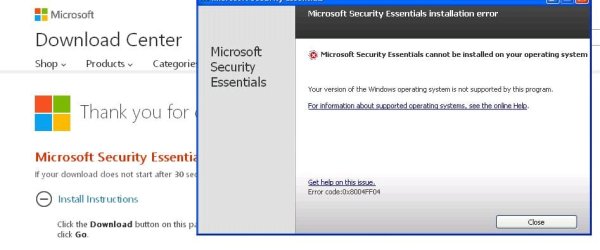
Tried to install MSE and got the attached message.

Tried another version (Not sure which one needed) and that did not install either.

So, installed BDTS 2015, big mistake, the VM ground to a virtual halt, froze, and then would not boot. Re-booted the whole PC and very slowly got VM to boot then uninstalled BDTS which then installed a 60 second AV without apparently asking together with a new pop-up about a 'new LAC connection'.

I am using Windows 7 Pro 64bit and have Windows XP Pre VM installed on my W7. I have upgraded IE on the VM from V6 to V8. and its working fine.

Any idea why MSE will not install and if it cannot install what light weight but competent AV would you suggest? MSE is supposed to work on XP and W7 as far as I can see!
 

Attachments

  • MSE Error msg.JPG
    MSE Error msg.JPG
    45.2 KB · Views: 4

My Computer My Computer

At a glance

Windows 7 Professional 64biti5-2500K 3.30Hz 6MB Cache16GB DDR3ASUSGeforce GTX1050Ti 4GB
Computer type
PC/Desktop
Computer Manufacturer/Model Number
Home Build
OS
Windows 7 Professional 64bit
CPU
i5-2500K 3.30Hz 6MB Cache
Motherboard
ASUS P8P67 Pro B3 Revision
Memory
16GB DDR3
Graphics Card(s)
ASUSGeforce GTX1050Ti 4GB
Sound Card
On-Board
Monitor(s) Displays
LG23MP65HQ-P
Hard Drives
WD Caviar Green 500gb
Maxtor 300gb
WD External USB 120gb
WD My Passport USB 2TB
LUX3 External USB 1TB
PSU
Corsair 800W
Case
Antec
Cooling
Arctic 13 Cooler
Antivirus
Bitdefender Total Security 2017
Browser
FireFox
MSE will run on XP (not sure if updates work) if it was previously installed but new installations are not supported. I believe the link in the dialog shown explains this.
Microsoft Security Essentials: No new installations after April | ZDNet

There are a number of third party AV products that support XP. Be sure that whichever you choose specifically advertises support for XP. Do not assume this.

Edit: An AV product running on the host will provide only limited protection for a client OS. Malware has become very sophisticate in recent years and many viruses can only be detected on a running system. File scans alone are not good enough.
 

My Computer My Computer

At a glance

Windows 7 Pro 64 bitXeon W35208 GBNvidia Geforce 210
Computer type
PC/Desktop
Computer Manufacturer/Model Number
HP
OS
Windows 7 Pro 64 bit
CPU
Xeon W3520
Memory
8 GB
Graphics Card(s)
Nvidia Geforce 210
Thanks for the reply, on reading some threads with similar questions I will go with Panda Cloud AV, seems light enough not to impact much and has good reviews.

I do not think I will be opening my XP machine often so was wondering if when it is closed is it still vulnerable to attack or only when running?
 

My Computer My Computer

At a glance

Windows 7 Professional 64biti5-2500K 3.30Hz 6MB Cache16GB DDR3ASUSGeforce GTX1050Ti 4GB
Computer type
PC/Desktop
Computer Manufacturer/Model Number
Home Build
OS
Windows 7 Professional 64bit
CPU
i5-2500K 3.30Hz 6MB Cache
Motherboard
ASUS P8P67 Pro B3 Revision
Memory
16GB DDR3
Graphics Card(s)
ASUSGeforce GTX1050Ti 4GB
Sound Card
On-Board
Monitor(s) Displays
LG23MP65HQ-P
Hard Drives
WD Caviar Green 500gb
Maxtor 300gb
WD External USB 120gb
WD My Passport USB 2TB
LUX3 External USB 1TB
PSU
Corsair 800W
Case
Antec
Cooling
Arctic 13 Cooler
Antivirus
Bitdefender Total Security 2017
Browser
FireFox
In theory an XP virtual machine should be safe when it isn't running. But with malware being what it has become you can't be 100% certain. Safety is always relative.
 

My Computer My Computer

At a glance

Windows 7 Pro 64 bitXeon W35208 GBNvidia Geforce 210
Computer type
PC/Desktop
Computer Manufacturer/Model Number
HP
OS
Windows 7 Pro 64 bit
CPU
Xeon W3520
Memory
8 GB
Graphics Card(s)
Nvidia Geforce 210
FYI: I have the same configuration: "Windows 7 Pro 64bit and have Windows XP Pre VM installed on my W7. I have upgraded IE on the VM from V6 to V8. and its working fine."

I just downloaded and installed a "Free", "XP Specific" antivirus product from AVAST on it and it totally hosed up two different machines. After spending several hours trying to recover the partitions I ultimately had to totally remove the software, and the partitions, wipe all traces of it on the host machine, and start over again and rebuild them from scratch. I don't know about any other products, but DO NOT USE ANTIVIRUS from AVAST!!!
 

My Computer My Computer

At a glance

Windows-7/Professional6GBnVidia
Computer Manufacturer/Model Number
HP Pavilion DV7-1285dx "Entertainment PC" (notebook)
OS
Windows-7/Professional
Memory
6GB
Graphics Card(s)
nVidia
Sound Card
Add-on: Creative X-Fi notebook
Monitor(s) Displays
built-in 17"
Hard Drives
Two 500Gb
bherber,
What would be the reason to have the XP Virtual Machine go on the internet? I froze the last XP VM that I setup on a W7 host. I open it, use it for a few minutes and then close it. In theory, it should revert to its frozen state upon closing. Any changes that occur while the XP VM is open should be dropped upon closing. I know that this setup won't work for everyone, but it sounds like it would have worked for the OP. (Yes, I know that this is an old thread.)
 

My Computer My Computer

At a glance

W7 Pro SP1 64biti78GBIntel HD Graphics
Computer type
Laptop
Computer Manufacturer/Model Number
Employer provided Dell Latitude
OS
W7 Pro SP1 64bit
CPU
i7
Memory
8GB
Graphics Card(s)
Intel HD Graphics
Hard Drives
crappy SSD
Antivirus
Employer mandated Symantec Endpoint Protection
Browser
Pale Moon 64bit, IE11 64bit & Chrome 64bit
Back
Top