Do i need to update all drivers?

gbu

New member
Member
VIP
Local time
3:45 PM
Messages
144
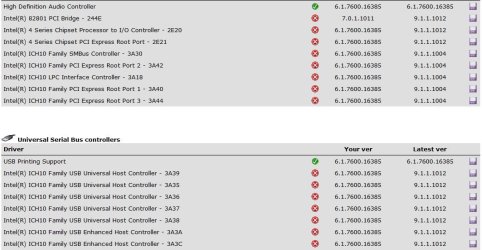
I have just installed and been running Driver Max and there online driver updater is showing many that are out of date, i know this isnt unusual and ui have updated the main ones, graphics card Ethernet etc
Many that are ticked that im not sure about as i have checked in Device Manager and and selected update from there but it says the drivers are up to date but Driver Max says differently.

i have enclosed a pic to show the ones i mean?
 

Attachments
  • max.JPG
    max.JPG
    111.3 KB · Views: 40

My Computer

Computer type
PC/Desktop
OS
Windows 7 Ultimate x64 SP1
CPU
INTEL Core 2 Quad Q8400 2.66GHz 4Mb LGA775 FSB1333
Motherboard
Gigabyte GA-G41MT-S2PT
Memory
Crucial 8GB Kit (4GBx2), 240-pin DIMM, DDR3-1333 • 1.5V
Graphics Card(s)
ASUS EAH4350 Silent 1GB
Hard Drives
x2 640GB Western Digital WD6400AARS Caviar Green, SATA 3Gb/s, 5400rpm, 32MB Cache

SEAGATE ST500DM005 BARRACUDA SPINPOINT 500GB 3.5IN 7200RPM SATA HD502HJ IN OS Windows 7 Installed
PSU
Corsair CMPSU-600CX 600W
Case
Zalman Z9-Plus Mid Tower Case
Cooling
Arctic Cooling Freezer 7 Pro Rev2 Quiet CPU Cooler
I have just installed and been running Driver Max and there online driver updater is showing many that are out of date, i know this isnt unusual and ui have updated the main ones, graphics card Ethernet etc
Many that are ticked that im not sure about as i have checked in Device Manager and and selected update from there but it says the drivers are up to date but Driver Max says differently.

i have enclosed a pic to show the ones i mean?

Perfect description of the problems with using A "driver sweeper" type program.

Are you experiencing any problems?

Are any of the devices not working?

If not dont worry about it.


Ken
 

My Computer

Computer Manufacturer/Model Number
HP Pavillion dv-7 1005 Tx
OS
Win 8 Release candidate 8400
CPU
[email protected]
Memory
4 gigs
Graphics Card(s)
Nvidia 9600M
Sound Card
HD built-in
Monitor(s) Displays
17" Wxga
Screen Resolution
1440x900
Cooling
none
Internet Speed
45Mb down 5Mb up
Well the problems i have been having are in the other thread i have going, so i was just trying to cover all bases and get all my drivers up to date in the hope that its one of those that im having probs with, but im really not sure if any of those are lol
 

My Computer

Computer type
PC/Desktop
OS
Windows 7 Ultimate x64 SP1
CPU
INTEL Core 2 Quad Q8400 2.66GHz 4Mb LGA775 FSB1333
Motherboard
Gigabyte GA-G41MT-S2PT
Memory
Crucial 8GB Kit (4GBx2), 240-pin DIMM, DDR3-1333 • 1.5V
Graphics Card(s)
ASUS EAH4350 Silent 1GB
Hard Drives
x2 640GB Western Digital WD6400AARS Caviar Green, SATA 3Gb/s, 5400rpm, 32MB Cache

SEAGATE ST500DM005 BARRACUDA SPINPOINT 500GB 3.5IN 7200RPM SATA HD502HJ IN OS Windows 7 Installed
PSU
Corsair CMPSU-600CX 600W
Case
Zalman Z9-Plus Mid Tower Case
Cooling
Arctic Cooling Freezer 7 Pro Rev2 Quiet CPU Cooler
go to the intel website and run the driver update utility. that should take care of most of the drivers you listed.

Intel® Driver Update Utility
 

My Computer

Computer Manufacturer/Model Number
Alienware AREA-51 M17x
OS
windows 7 ultimate 64bit
CPU
Intel Core2 Extreme x9000 2.8GHZ
Motherboard
Asus P965 Intel chipset
Memory
4Gig
Graphics Card(s)
2 NVidia GeForce 8800M GTX (SLi)
Sound Card
onboard
Monitor(s) Displays
17in. built-in, 47in JVC LCD
Screen Resolution
1080p
Hard Drives
2 250Gig Hitachi (RAID 0) @ 7200RPM
Case
17in. laptop
Mouse
touchpad, Logitech Anywhere Mouse cordless laser
Internet Speed
cable
I've tried several of these "driver update" apps, and in all cases, it was a complete waste of time. Every one of them flagged several of my drivers as out of date, when I knew for a fact, that ALL my drivers were up to date. It wouldn't be so bad if they would let you download their suggested driver updates and then check them to verify that they ARE newer drivers, but the ones I tried all required you to pay for their service first.

Plus, if you run Windows Update on a regular basis, it does a very good job of finding newer drivers; thus, you most probably don't need any driver updates.
 

My Computer

Computer type
PC/Desktop
Computer Manufacturer/Model Number
Custom
OS
Win7 Pro 32-bit, Win8 Pro 32-bit
CPU
AMD Phenom II X6 1090T
Motherboard
Gigabyte
Memory
4GB ddr3 1300
Graphics Card(s)
AMD HD 4290 onboard
Sound Card
Builtin Realtek HD Audio
Monitor(s) Displays
Samsung 24" widescreen, LG 23" widescreen
Screen Resolution
1920x1200/1920x1080
Hard Drives
Kingston 256GB SSD
Keyboard
Logitech Illuminated Keyboard
Mouse
Logitech M705 wireless mouse
Antivirus
Norton Av 2013
Browser
IE v10
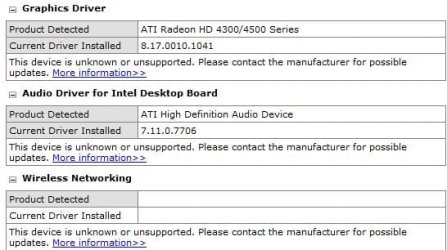
You could be right Mark, i have also just run the Intel Driver Update Utility from kwords link(thank you for helping) that says 3 of my driver are unknown or unsupported even though i got then direct from the manufactures website.

They only showed up 3 drivers and none of the others that where listed by driver max
 

Attachments

  • intel.JPG
    intel.JPG
    48.5 KB · Views: 11

My Computer

Computer type
PC/Desktop
OS
Windows 7 Ultimate x64 SP1
CPU
INTEL Core 2 Quad Q8400 2.66GHz 4Mb LGA775 FSB1333
Motherboard
Gigabyte GA-G41MT-S2PT
Memory
Crucial 8GB Kit (4GBx2), 240-pin DIMM, DDR3-1333 • 1.5V
Graphics Card(s)
ASUS EAH4350 Silent 1GB
Hard Drives
x2 640GB Western Digital WD6400AARS Caviar Green, SATA 3Gb/s, 5400rpm, 32MB Cache

SEAGATE ST500DM005 BARRACUDA SPINPOINT 500GB 3.5IN 7200RPM SATA HD502HJ IN OS Windows 7 Installed
PSU
Corsair CMPSU-600CX 600W
Case
Zalman Z9-Plus Mid Tower Case
Cooling
Arctic Cooling Freezer 7 Pro Rev2 Quiet CPU Cooler
the intel utility only detects intel devices. anything else shows up as unrecognized. try running a program such as sisoftsandra, everest, or speccy. then you will have a list of all devices and what driver version is installed, so ou can hunt the drivers down yourself from the manufacturers' websites if you need them.
 

My Computer

Computer Manufacturer/Model Number
Alienware AREA-51 M17x
OS
windows 7 ultimate 64bit
CPU
Intel Core2 Extreme x9000 2.8GHZ
Motherboard
Asus P965 Intel chipset
Memory
4Gig
Graphics Card(s)
2 NVidia GeForce 8800M GTX (SLi)
Sound Card
onboard
Monitor(s) Displays
17in. built-in, 47in JVC LCD
Screen Resolution
1080p
Hard Drives
2 250Gig Hitachi (RAID 0) @ 7200RPM
Case
17in. laptop
Mouse
touchpad, Logitech Anywhere Mouse cordless laser
Internet Speed
cable
I would definitely update them, but I'd stop using/trusting a third party app to do it. I've heard of many issues with them, and you shouldn't need any hand-holding to download and install a driver.
 

My Computer

OS
Windows 7 Ultimate x64 SP1
CPU
Intel Core i7-2600
Motherboard
Gigabyte GA-P67A-UD3P-B3
Memory
12 GB Patriot Extreme DDR3-1333
Graphics Card(s)
Nvidia GTX 470
Monitor(s) Displays
Dell UltraSharp 2209WA
Hard Drives
OCZ Agility3 240 GB, WD5001AALS, WD7501AALS
PSU
OCZ ModStream 700W
Case
CoolerMaster HAF 912 Advanced
Cooling
CoolerMaster Hyper 212 Plus
Back
Top