do these temps look right under load???

sotorious

New member
Power User
Local time
1:49 AM
Messages
512
Location
Houston
i was running some tests and those temps looked a tad high. i was using prime 95

the feature max heat, power consumption, some ram tested.
 

Attachments

  • testing.PNG
    testing.PNG
    212.2 KB · Views: 164

My Computer

OS
windows 7 professional 64 bit
CPU
intel core i7 920 (1366)
Motherboard
Asus P6T Deluxe V2
Memory
Corsair Dominators (TR3X6G1600C8D)
Graphics Card(s)
Sapphire 5970
Sound Card
on board / Asus Xonar D2
Monitor(s) Displays
lg flatron wide 22" 2x
Hard Drives
caviar black 1tb
caviar green 1tb

external western digital my book 1tb
external western my book digital 500gb
PSU
corsair 750w
Case
antec 1200
Cooling
sythek mugen - 2
Keyboard
flico maje
Mouse
g500
Internet Speed
comcast houstont x, 16mb down with boost. 2mb up
i was running some tests and those temps looked a tad high. i was using prime 95

the feature max heat, power consumption, some ram tested.

I think those temps look good, if you are using the standard heat sink.
For lower temps then you would need to consider an after market heat sink.

Here is a temp chart so you can see what the Max temp should be.

Intel Core i7 CPU chart

And here are some reviews for some different Heatsinks

Testing Results: Temperature - Intel Core i7 Heatsink Roundup Q309 | [H]ard|OCP

or if your interested in water cooling you might want to have a read of this one.

MADSHRIMPS - Hardware Reviews ,Crazy Projects, Modding Tutorials and Overclocking
 

My Computer

Computer Manufacturer/Model Number
Home Brew
OS
Windows 7 Ultimate Vista Ultimate x64
CPU
Core 2 Duo E8500 3.16Ghz @ 3.8Ghz
Motherboard
eVGA 750i FTW
Memory
2x2Gigs Patriot PC2-6400 LL
Graphics Card(s)
Inno3D GeForce GTX260 216 SP
Monitor(s) Displays
ASUS VW222U 22" 2ms Response time
Screen Resolution
1680x1050
Hard Drives
SATA 150GB
SATA II 250GB
USB IDE 750GB Ext.
PSU
HYTEC 600W & Thermaltake 650W Toughpower Power Exp
Case
Thermaltake Armor LCS (Liquid Cooling System)
Cooling
Liquid Cooling System
Keyboard
Logitech G15 Gaming Keyboard
Mouse
Logitech G9 Gaming Mouse
i have a mugen 2, thing is massive, and thank you for the links.
 

My Computer

OS
windows 7 professional 64 bit
CPU
intel core i7 920 (1366)
Motherboard
Asus P6T Deluxe V2
Memory
Corsair Dominators (TR3X6G1600C8D)
Graphics Card(s)
Sapphire 5970
Sound Card
on board / Asus Xonar D2
Monitor(s) Displays
lg flatron wide 22" 2x
Hard Drives
caviar black 1tb
caviar green 1tb

external western digital my book 1tb
external western my book digital 500gb
PSU
corsair 750w
Case
antec 1200
Cooling
sythek mugen - 2
Keyboard
flico maje
Mouse
g500
Internet Speed
comcast houstont x, 16mb down with boost. 2mb up
After looking at some reviews for your heatsink I would say it's a little high, maybe try reseating the the heatsink again and make sure your only using a thin layer of thermal paste.
The same thing was mentioned here and this solution worked for him.

Thanks for your input. I fourtunately fixed my issue however. I took my comp apart and reseated the mugen applying a much smaller amount of paste. This helps a small bit (2-3 degrees c). However the main issue was my voltage. I had done the "research" and tried to duplicate an overclock that was done on an 920 with C0 stepping. Come to realize mine has D0 stepping, so yeah less voltage was needed. I have it deadnuts stable at 3.8ghz with 1.24v and temps dont go above 62 degrees c even after hours of prime95.

 

My Computer

Computer Manufacturer/Model Number
Home Brew
OS
Windows 7 Ultimate Vista Ultimate x64
CPU
Core 2 Duo E8500 3.16Ghz @ 3.8Ghz
Motherboard
eVGA 750i FTW
Memory
2x2Gigs Patriot PC2-6400 LL
Graphics Card(s)
Inno3D GeForce GTX260 216 SP
Monitor(s) Displays
ASUS VW222U 22" 2ms Response time
Screen Resolution
1680x1050
Hard Drives
SATA 150GB
SATA II 250GB
USB IDE 750GB Ext.
PSU
HYTEC 600W & Thermaltake 650W Toughpower Power Exp
Case
Thermaltake Armor LCS (Liquid Cooling System)
Cooling
Liquid Cooling System
Keyboard
Logitech G15 Gaming Keyboard
Mouse
Logitech G9 Gaming Mouse
After looking at some reviews for your heatsink I would say it's a little high, maybe try reseating the the heatsink again and make sure your only using a thin layer of thermal paste.
The same thing was mentioned here and this solution worked for him.

Thanks for your input. I fourtunately fixed my issue however. I took my comp apart and reseated the mugen applying a much smaller amount of paste. This helps a small bit (2-3 degrees c). However the main issue was my voltage. I had done the "research" and tried to duplicate an overclock that was done on an 920 with C0 stepping. Come to realize mine has D0 stepping, so yeah less voltage was needed. I have it deadnuts stable at 3.8ghz with 1.24v and temps dont go above 62 degrees c even after hours of prime95.

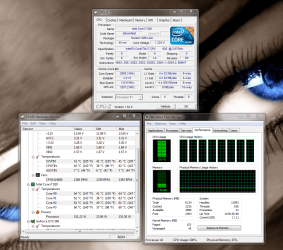
omg... to take out everything i did... i got everything wired nicely, are those heats damaging?? i mean if the cpu could live i will let it be but if its hazardous then ill re do it. i have no oc so i dont think voltage would be a problem.
 

My Computer

OS
windows 7 professional 64 bit
CPU
intel core i7 920 (1366)
Motherboard
Asus P6T Deluxe V2
Memory
Corsair Dominators (TR3X6G1600C8D)
Graphics Card(s)
Sapphire 5970
Sound Card
on board / Asus Xonar D2
Monitor(s) Displays
lg flatron wide 22" 2x
Hard Drives
caviar black 1tb
caviar green 1tb

external western digital my book 1tb
external western my book digital 500gb
PSU
corsair 750w
Case
antec 1200
Cooling
sythek mugen - 2
Keyboard
flico maje
Mouse
g500
Internet Speed
comcast houstont x, 16mb down with boost. 2mb up
i would like to add it was a few c's lower till i put full power in power management in 7, and made it go up a Celsius or 2.
 

My Computer

OS
windows 7 professional 64 bit
CPU
intel core i7 920 (1366)
Motherboard
Asus P6T Deluxe V2
Memory
Corsair Dominators (TR3X6G1600C8D)
Graphics Card(s)
Sapphire 5970
Sound Card
on board / Asus Xonar D2
Monitor(s) Displays
lg flatron wide 22" 2x
Hard Drives
caviar black 1tb
caviar green 1tb

external western digital my book 1tb
external western my book digital 500gb
PSU
corsair 750w
Case
antec 1200
Cooling
sythek mugen - 2
Keyboard
flico maje
Mouse
g500
Internet Speed
comcast houstont x, 16mb down with boost. 2mb up
It's still safe at that temp but possibly if you reseat it, the temps may be better, but I would not be concerned about those temps as they are still less then what you have with stock coolers.
 

My Computer

Computer Manufacturer/Model Number
Home Brew
OS
Windows 7 Ultimate Vista Ultimate x64
CPU
Core 2 Duo E8500 3.16Ghz @ 3.8Ghz
Motherboard
eVGA 750i FTW
Memory
2x2Gigs Patriot PC2-6400 LL
Graphics Card(s)
Inno3D GeForce GTX260 216 SP
Monitor(s) Displays
ASUS VW222U 22" 2ms Response time
Screen Resolution
1680x1050
Hard Drives
SATA 150GB
SATA II 250GB
USB IDE 750GB Ext.
PSU
HYTEC 600W & Thermaltake 650W Toughpower Power Exp
Case
Thermaltake Armor LCS (Liquid Cooling System)
Cooling
Liquid Cooling System
Keyboard
Logitech G15 Gaming Keyboard
Mouse
Logitech G9 Gaming Mouse
Ok just maybe sunday i will do it if i have time, its just such a pain in the ass with this cooler.

I checked a computer that has my same i7 on a stock cooler and just being at the desktop sitting at around 60...
 

My Computer

OS
windows 7 professional 64 bit
CPU
intel core i7 920 (1366)
Motherboard
Asus P6T Deluxe V2
Memory
Corsair Dominators (TR3X6G1600C8D)
Graphics Card(s)
Sapphire 5970
Sound Card
on board / Asus Xonar D2
Monitor(s) Displays
lg flatron wide 22" 2x
Hard Drives
caviar black 1tb
caviar green 1tb

external western digital my book 1tb
external western my book digital 500gb
PSU
corsair 750w
Case
antec 1200
Cooling
sythek mugen - 2
Keyboard
flico maje
Mouse
g500
Internet Speed
comcast houstont x, 16mb down with boost. 2mb up
Just a thought. If you have a place to put an addition case fan then do that. Also sometimes you can add a larger rear fan if your not already running a 120mm exhausting air. I Know with my case I could, and did add a 120mm front fan blowing in. It was a pain in the a@@ to remove my front panel and had to actually bend my case a little to squeeze the fan through the opening , but it lowered my hardrive temps and overall temps. I'll tell you what though on my next build my case is going to be one of the ones that has the cutout behind the cpu just for this exact reason. Fabe
 

My Computer

Computer Manufacturer/Model Number
Self Built
OS
Windows 7 ultimate 64 bit / XP Home sp3
CPU
intel Core 2 Duo E8400 3.0ghz
Motherboard
Asus P5ND bios 1401
Memory
8 gigs 1066 OCZ Fata1ty
Graphics Card(s)
EVGA GTX 580 Call of Duty Black Ops Edition
Sound Card
Creative Soundblaster Audigy 2zs
Monitor(s) Displays
Asus 24in LCD's 2MS X2
Screen Resolution
1920x1080p @60Hz
Hard Drives
WD Caviar 500 Black/ WD Caviar 200 Blue
PSU
OCZ 700W GameXtreme
Case
NZXT Apollo
Cooling
Corsair H50 CPU/120mm x3 /60mm x2 /Corsair Dominator Ram
Keyboard
Logitech Bluetooth Wireless MX5000
Mouse
Logitech Bluetooth Wireless MX1000
Internet Speed
Download 19.83 Upload 0.97
Other Info
Logitech Z2300 Speakers/ Bose Noise Cancelling Headphones/Avermedia PCI-e Hybrid TV Bravo/Epson NX415 all in one/ 4 Port Powered USB Hub/ LG 10x Bluray Burner /TSST Corp DVDRW External
Speaking of temperatures, whats the safe operating temps of my cpu, I get 45-50C under load no OC and 55ish at 3Ghz with stock cooling
 

My Computer

Computer type
PC/Desktop
Computer Manufacturer/Model Number
Me
OS
Windows 7 Home Premium x64
CPU
AMD Bulldozer FX-8 8120 Black Edition @ 4GHz
Motherboard
Asus Crosshair V Formula 990FX
Memory
Corsair Vengeance 16GB DDR3 PC3-12800C9 1600MHz
Graphics Card(s)
MSI nVidia Geforce GTX 670 OC 2048MB GDDR5
Sound Card
Sound Blaster X-Fi 2 MB 2
Monitor(s) Displays
Samsung SyncMaster SA350 22" LED HDMI
Screen Resolution
1920x1080
Hard Drives
Seagate Barracuda SATA II 500GB 16MB Cache 7200.12
PSU
Corsair Professional Series Gold AX1200 (1200Watts)
Case
Antec 1200 Ultimate Gaming Case
Cooling
Antec Kuhler H20 620
Keyboard
Logitech G510
Mouse
Microsoft Wireless 3000
Internet Speed
Upto 40Mb/s Fibre Optic Broadband
@Fluffy Well from what i could find on Intel E5300 is the Thermal Specification max is 74.1c. So I would say your running at a safe temp.Of course the lower the temp the longer the expected life.
 

My Computer

Computer Manufacturer/Model Number
Self Built
OS
Windows 7 ultimate 64 bit / XP Home sp3
CPU
intel Core 2 Duo E8400 3.0ghz
Motherboard
Asus P5ND bios 1401
Memory
8 gigs 1066 OCZ Fata1ty
Graphics Card(s)
EVGA GTX 580 Call of Duty Black Ops Edition
Sound Card
Creative Soundblaster Audigy 2zs
Monitor(s) Displays
Asus 24in LCD's 2MS X2
Screen Resolution
1920x1080p @60Hz
Hard Drives
WD Caviar 500 Black/ WD Caviar 200 Blue
PSU
OCZ 700W GameXtreme
Case
NZXT Apollo
Cooling
Corsair H50 CPU/120mm x3 /60mm x2 /Corsair Dominator Ram
Keyboard
Logitech Bluetooth Wireless MX5000
Mouse
Logitech Bluetooth Wireless MX1000
Internet Speed
Download 19.83 Upload 0.97
Other Info
Logitech Z2300 Speakers/ Bose Noise Cancelling Headphones/Avermedia PCI-e Hybrid TV Bravo/Epson NX415 all in one/ 4 Port Powered USB Hub/ LG 10x Bluray Burner /TSST Corp DVDRW External
Thaks fabe, I would add rep but I recently gave it to you :P
 

My Computer

Computer type
PC/Desktop
Computer Manufacturer/Model Number
Me
OS
Windows 7 Home Premium x64
CPU
AMD Bulldozer FX-8 8120 Black Edition @ 4GHz
Motherboard
Asus Crosshair V Formula 990FX
Memory
Corsair Vengeance 16GB DDR3 PC3-12800C9 1600MHz
Graphics Card(s)
MSI nVidia Geforce GTX 670 OC 2048MB GDDR5
Sound Card
Sound Blaster X-Fi 2 MB 2
Monitor(s) Displays
Samsung SyncMaster SA350 22" LED HDMI
Screen Resolution
1920x1080
Hard Drives
Seagate Barracuda SATA II 500GB 16MB Cache 7200.12
PSU
Corsair Professional Series Gold AX1200 (1200Watts)
Case
Antec 1200 Ultimate Gaming Case
Cooling
Antec Kuhler H20 620
Keyboard
Logitech G510
Mouse
Microsoft Wireless 3000
Internet Speed
Upto 40Mb/s Fibre Optic Broadband
Just a thought. If you have a place to put an addition case fan then do that. Also sometimes you can add a larger rear fan if your not already running a 120mm exhausting air. I Know with my case I could, and did add a 120mm front fan blowing in. It was a pain in the a@@ to remove my front panel and had to actually bend my case a little to squeeze the fan through the opening , but it lowered my hardrive temps and overall temps. I'll tell you what though on my next build my case is going to be one of the ones that has the cutout behind the cpu just for this exact reason. Fabe


well i got a 200mm fan uptop exhausting.
 

My Computer

OS
windows 7 professional 64 bit
CPU
intel core i7 920 (1366)
Motherboard
Asus P6T Deluxe V2
Memory
Corsair Dominators (TR3X6G1600C8D)
Graphics Card(s)
Sapphire 5970
Sound Card
on board / Asus Xonar D2
Monitor(s) Displays
lg flatron wide 22" 2x
Hard Drives
caviar black 1tb
caviar green 1tb

external western digital my book 1tb
external western my book digital 500gb
PSU
corsair 750w
Case
antec 1200
Cooling
sythek mugen - 2
Keyboard
flico maje
Mouse
g500
Internet Speed
comcast houstont x, 16mb down with boost. 2mb up
I was getting upper 60s/low 70s under load and I did a bunch of research and figured I put too much paste on the HSF and decided to re-seat it. After re-seating my temps were low 70s under load! It did nothing! Though maybe it needs to set or something. I have an i7 920 (no OC), 6GB DDR3 OCZ Plat., 120GB OCZ Vertex SSD and Xigmatek Dark Knight.
 

My Computer

OS
Windows 7
CPU
Intel i7 920
Motherboard
Asus P6T Deluxe V2
Memory
6GB DDR3 OCZ Platinum
Graphics Card(s)
XFX 9800GT
Monitor(s) Displays
Dual 28" Hanns G
Hard Drives
OCZ Vertex 120GB SSD
PSU
Corsair 750TX
Case
ThermalTake Element S
Cooling
Xigmatek Dark Knight
Back
Top