
Do you require Microsoft Live Mesh, Live Essentials and Microsoft Silv

Melissa

New member
Power User
Local time
12:52 PM
Messages
394
Dear Forum,

I have noticed in my control panel the following programs:


Windows Live Essential 2011

Windows Live Mesh - in various languages

Microsoft Silverlight

I have read in various items on Google and I am not too sure whether or not to delete the various programs and what they do?

Could someone please assist me on what I can delete or keep?

Should I consider deleting any of the programs on the following skydrive items?

I am looking at cleaning up how much is on my computer that is not required.
 

Attachments
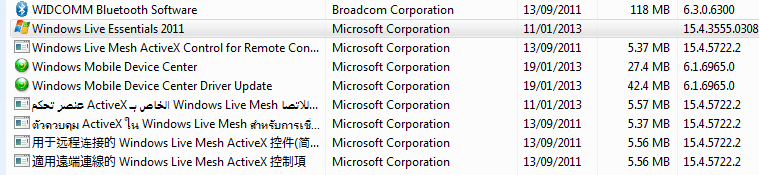
  • windows applications - control panel - 20-04-13.PNG
    windows applications - control panel - 20-04-13.PNG
    10 KB · Views: 11

My Computer My Computer

Computer type
Laptop
Computer Manufacturer/Model Number
Sony VAIO / E Series VPCEB46FG
OS
Windows 7 Home Premium 64bit
CPU
Windows 7 Service Pack 1 x86 NTFS
Motherboard
AMD E-350 Processor
Memory
4 GB
Hard Drives
500GB
Other Info
1.6GHz
Live Mesh is no longer supported. It was replaced by SkyDrive.
Silverlight may be needed to watch some videos, mostly on Microsoft Sites.
Windows Live Essentials has a number of programs among them Windows Live Mail Client, Windows Live Movie Maker and others.
 

My Computer My Computer

Computer type
Laptop
Computer Manufacturer/Model Number
Hewlett-Packard/G62-107SA Notebook
OS
Microsoft Windows 7 Home Premium 64-bit Service Pack 1
CPU
Intel(R) Core(TM) i3 CPU M 330 @ 2.13GHz
Motherboard
Hewlett-Packard 1425
Memory
8 GB DDR3
Graphics Card(s)
Intel(R) HD Graphics
Sound Card
Realtek High Definition Audio
Monitor(s) Displays
Builtin
Screen Resolution
1366 x 768 x 32 bits (4294967296 colors) @ 60 Hz
Hard Drives
250 GB SATA Hard Disk Drive 7200 rpm
2TB Seagate GoFlex USB 2 Drive
1TB Iomega Prestige USB 2 Drive
1.5TB Iomega Prestige USB 2 Drive (Samsung)
2TB WD MyBook Live NAS.
Mouse
Logitech Anywhere MX
Internet Speed
152 Mbs download 10 Mbs upload
Antivirus
Norton 360
Browser
Chrome
I always delete everything in Live Essentials because there is nothing there that I ever use. If you have no use for them, go ahead and remove them.
 

My Computer My Computer

Computer type
Laptop
Computer Manufacturer/Model Number
HP Pavilion g7-1260us Notebook
OS
Desk Top with Win 7 Home Premium 64 bit and Lap Top with Windows 8.1 Pro 64 bit
Memory
8Gig
Screen Resolution
1600x900
I always delete everything in Live Essentials because there is nothing there that I ever use. If you have no use for them, go ahead and remove them.

There's really no need to delete them if you don't install them in the first place - Windows Essentials - Download Windows Live Essentials

@ the OP, If you feel you don't need them, remove them. You can definitely removed the live mesh code as it has been replaced.
 

My Computer My Computer

Computer type
PC/Desktop
Computer Manufacturer/Model Number
Custom built by me.
OS
Windows 10 Pro
CPU
Intel Core i7-4770K (3.5Ghz)
Motherboard
Gigabyte G1 Sniper 5 (F10 Bios)
Memory
32 gig Corsair Dominator Platinum (4x8Gig)
Graphics Card(s)
Sapphire Tri-X R9 Fury
Sound Card
Soundblaster ZXR
Monitor(s) Displays
NEC PA242W 24" LCD Monitor
Screen Resolution
1920 x 1200
Hard Drives
Primary - Samsung 850 Pro (512gig), Samsung 840 Pro (256gig), 2TB WD Caviar Black.
PSU
EVGA Supernova 1000 G2
Case
Cooler Master HAF X
Cooling
Corsair H100i with Corsair Air Series SP120 Quiet Fans
Keyboard
Logitech Wireless Wave
Mouse
Logitech Performance MX
Internet Speed
High Speed Cable
Antivirus
Norton Security
Browser
IE11
Other Info
Memory Timings - 1866MHz @ 9-9-9-27-1T @ 1.5 volts
I just do not wish to impede any operation of Windows software.

I know this is Windows 7 forum, but not knowing the software - I am not sure really what it relates to. And with Windows updating all the time - I am at a loss.

It looks like when I purchased my lap top that Mesh came with it.

Thanks for the assistance people.

I did ask once on this forum what Windows photo gallery - must be part of the Windows Live Essentials - so it must not take up much room on my lap top.
 

My Computer My Computer

Computer type
Laptop
Computer Manufacturer/Model Number
Sony VAIO / E Series VPCEB46FG
OS
Windows 7 Home Premium 64bit
CPU
Windows 7 Service Pack 1 x86 NTFS
Motherboard
AMD E-350 Processor
Memory
4 GB
Hard Drives
500GB
Other Info
1.6GHz
A lot of manufacturers pre-loaded Windows Live Essentials even though they are not needed and can be downloaded free anyway. If you don't use them just uninstall them. If the worst comes to the worse and you discover you did use them you can always download and re-install. There are probably newer versions than you have anyway.
 

My Computer My Computer

Computer type
Laptop
Computer Manufacturer/Model Number
Hewlett-Packard/G62-107SA Notebook
OS
Microsoft Windows 7 Home Premium 64-bit Service Pack 1
CPU
Intel(R) Core(TM) i3 CPU M 330 @ 2.13GHz
Motherboard
Hewlett-Packard 1425
Memory
8 GB DDR3
Graphics Card(s)
Intel(R) HD Graphics
Sound Card
Realtek High Definition Audio
Monitor(s) Displays
Builtin
Screen Resolution
1366 x 768 x 32 bits (4294967296 colors) @ 60 Hz
Hard Drives
250 GB SATA Hard Disk Drive 7200 rpm
2TB Seagate GoFlex USB 2 Drive
1TB Iomega Prestige USB 2 Drive
1.5TB Iomega Prestige USB 2 Drive (Samsung)
2TB WD MyBook Live NAS.
Mouse
Logitech Anywhere MX
Internet Speed
152 Mbs download 10 Mbs upload
Antivirus
Norton 360
Browser
Chrome
Back
Top