Solved Document Library showing private/public

baxtermcc

New member
Local time
12:13 PM
Messages
2
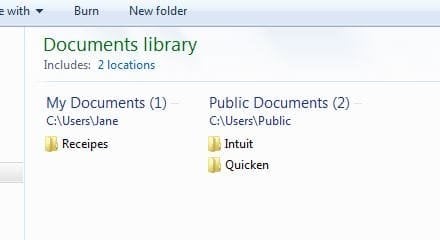
I just purchased a Lenovo laptop with Win 7 Pro installed. When I set up an ID for my wife I somehow managed to get her Documents Library to display both My Documents and Public Documents as separate lists, each showing their full paths (c:\users\name) and c:\users\public.

Any idea how I managed this and how to get the the default My Documents view?

Thanks,
Bob
 

My Computer My Computer

At a glance

Windows 7 Pro x64Intel i5-2520M @ 2.50GHz8 GB
Computer type
PC/Desktop
Computer Manufacturer/Model Number
Lenovo
OS
Windows 7 Pro x64
CPU
Intel i5-2520M @ 2.50GHz
Memory
8 GB
Capture.JPG

I am trying to eliminate the two headers that separately show the My Documents and Public Documents titles (and paths) and just list the files & folders.

Thank you,
Bob
 

My Computer My Computer

At a glance

Windows 7 Pro x64Intel i5-2520M @ 2.50GHz8 GB
Computer type
PC/Desktop
Computer Manufacturer/Model Number
Lenovo
OS
Windows 7 Pro x64
CPU
Intel i5-2520M @ 2.50GHz
Memory
8 GB
All Windows 7 default libraries (Documents, Pictures, Music and Videos) include by default two locations, the user's own personal folder and respective public folder. The contents of both is shown, in your case the contents of User\Username\Documents and Users\Public\Documents. This is totally normal, default behaviour of Windows 7 libraries.

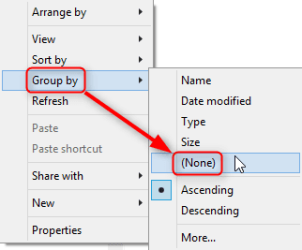
How this content is shown is up to user to decide. You have apparently at the moment the Documents library grouped by folder. To change it right click an empty space inside the library and select Group by > None or any other grouping rule you'd prefer.

2014-04-06_18h42_27.png

Kari
 

My Computer My Computer

At a glance

Windows 10 Pro x64 EN-GB1.6 GHz Intel Core i7-720QM Processor6 GBATI Mobility Radeon HD 5850 Graphics
Computer type
Laptop
Computer Manufacturer/Model Number
HP ENVY 17-1150eg
OS
Windows 10 Pro x64 EN-GB
CPU
1.6 GHz Intel Core i7-720QM Processor
Memory
6 GB
Graphics Card(s)
ATI Mobility Radeon HD 5850 Graphics
Sound Card
Beats sound system with integrated subwoofer
Monitor(s) Displays
17" laptop display, 22" LED and 32" Full HD TV through HDMI
Screen Resolution
1600*900 (1), 1920*1080 (2&3)
Hard Drives
Internal: 2 x 500 GB SATA Hard Disk Drive 7200 rpm
External: 2TB for backups, 3TB USB3 network drive for media
Cooling
As Envy runs a bit warm, I have it on a Cooler Master pad
Keyboard
Logitech diNovo Media Desktop Laser (bluetooth)
Mouse
Logitech Performance Mouse MX
Internet Speed
50/10 Mbps VDSL
Antivirus
Windows Defender 4.3.9431.0
Browser
Maxthon 3.5.2., IE11
The public folders are in 'Users' and are handy to share files across different users.
 

My Computer My Computer

At a glance

Vista, Windows7, Mint Mate, Zorin, Windows 8from 1.6GHz Duo to i7
Computer Manufacturer/Model Number
HP, Dell, Gateway, Toshiba - 4 laptops and 2 desktops
OS
Vista, Windows7, Mint Mate, Zorin, Windows 8
CPU
from 1.6GHz Duo to i7
Monitor(s) Displays
2x HP w2207
Hard Drives
5x HDD, 7x SSD, 12x Externals
Keyboard
with trackball - no mices
Mouse
Trackball mice
Internet Speed
DSL 6000
Back
Top