"Documents" don't show in Start Menu

Markstar

New member
Local time
5:48 PM
Messages
27
Hi,
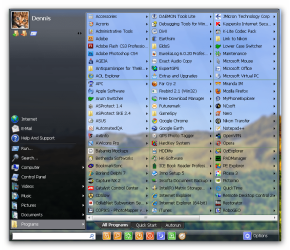
I would like to have my "Documents" folder (not "Personal folder") to show on the right side of the Start menu (I think it is even the default, but at some point I disabled it).

On my other computers I do this by going right-click on the Start menu -> Properties -> Customize -> Documents: Display as menu.

However, it doesn't work and no matter which option I select, the folder is not shown. All the other option work (Downloads, Computer, Music, Personal folder, etc.), just not this one. I did change the My Documents position to D:\My Documents, but everything there seems to be in order (e.g. if I click on My Documents in the Explorer, it does take me to the right path).

I really don't know what else to try - I logged out, restarted, but no change. :cry:

Any help would be appreciated!
 

My Computer

OS
Windows 7 RTM x64, Windows XP, Ubuntu 9.04
CPU
X2 4850e
Motherboard
Jetway HA06
Memory
2*takeMS 2048MB DDR2-800
Graphics Card(s)
Radeon 4870
Sound Card
Audigy 2 eX
Monitor(s) Displays
24", 17"
Screen Resolution
1920*1200, 1280*1024
Hard Drives
2*500GB, 2*1000GB
...sadly no SSD yet...
PSU
bequiet! Straight Power 350W
Case
Chieftec BA-02B-B-B
Keyboard
Logitech G11
Mouse
Logitech M518
Internet Speed
DSL8000
Other Info
Also:
Toshiba Portégé M400 (T7200, 3GB RAM)

My Computer

Computer Manufacturer/Model Number
packard bell IXTREME M5722
OS
Operating System : Windows 7 Home Premium Edition 6.01.7600 SP1 (x64)
CPU
Processor : Intel Core 2 Quad Q8300 @ 2500 MHz
Motherboard
Mainboard : Packard Bell (Acer EG43M )
Memory
Physical Memory :8GB Corsair4x 2GB 800MHz C5 DDR2
Graphics Card(s)
Video Card : XFX 6700 AMD
Monitor(s) Displays
Maestro 234DL - BenQ V2220 - BenQ VW2420H
Screen Resolution
Current Display :1920x1080p pixels at 60 Hz in HD LED
Hard Drives
Hard Disks : WDC (1000 GB)
Drive C: (Hard Disk) : 428 GB available on 491 GB
Drive D: (Hard Disk) : 426 GB available on 492 GB
SAMSUNG spinpoint HD103SJ 1000.2 GB
(X 2) KINGSTON SSD NOW V 30GB
PSU
XFX ProSeries 550W PSU
Case
PACKARD BELL IXTREME
Cooling
System Blower Current: 150mA Air Flow16CFM ;Akasa 90mm rear
Keyboard
Gigabyte Aivia K8100
Mouse
TRUST-Wireless Laser Mouse - Carbon edition MI-7770C
Internet Speed
TP-LINK > TL-WN951N / AV500 Gigabit Powerline Adapters
Browser
chrome dev
Other Info
EXTRA COOLING>(FAN CONTROLLER) PC Bay Cooler 3 x 40mm fans; Akasa AK-HD-BL Blue hard drive cooler 2 x 40 mm fan 4500 rpm 29.7 dBA
Bios> American Megatrends Inc.
Version : P01-A1
Date : 08/31/2009
I did change the My Documents position to D:\My Documents this may have caused it not work proper have you documents in c or did you delete the folder?
 

My Computer

Computer Manufacturer/Model Number
packard bell IXTREME M5722
OS
Operating System : Windows 7 Home Premium Edition 6.01.7600 SP1 (x64)
CPU
Processor : Intel Core 2 Quad Q8300 @ 2500 MHz
Motherboard
Mainboard : Packard Bell (Acer EG43M )
Memory
Physical Memory :8GB Corsair4x 2GB 800MHz C5 DDR2
Graphics Card(s)
Video Card : XFX 6700 AMD
Monitor(s) Displays
Maestro 234DL - BenQ V2220 - BenQ VW2420H
Screen Resolution
Current Display :1920x1080p pixels at 60 Hz in HD LED
Hard Drives
Hard Disks : WDC (1000 GB)
Drive C: (Hard Disk) : 428 GB available on 491 GB
Drive D: (Hard Disk) : 426 GB available on 492 GB
SAMSUNG spinpoint HD103SJ 1000.2 GB
(X 2) KINGSTON SSD NOW V 30GB
PSU
XFX ProSeries 550W PSU
Case
PACKARD BELL IXTREME
Cooling
System Blower Current: 150mA Air Flow16CFM ;Akasa 90mm rear
Keyboard
Gigabyte Aivia K8100
Mouse
TRUST-Wireless Laser Mouse - Carbon edition MI-7770C
Internet Speed
TP-LINK > TL-WN951N / AV500 Gigabit Powerline Adapters
Browser
chrome dev
Other Info
EXTRA COOLING>(FAN CONTROLLER) PC Bay Cooler 3 x 40mm fans; Akasa AK-HD-BL Blue hard drive cooler 2 x 40 mm fan 4500 rpm 29.7 dBA
Bios> American Megatrends Inc.
Version : P01-A1
Date : 08/31/2009
have you checked this
 

Attachments

  • Snap_2010.12.11 09.29.44_004.png
    Snap_2010.12.11 09.29.44_004.png
    29.3 KB · Views: 72

My Computer

Computer Manufacturer/Model Number
packard bell IXTREME M5722
OS
Operating System : Windows 7 Home Premium Edition 6.01.7600 SP1 (x64)
CPU
Processor : Intel Core 2 Quad Q8300 @ 2500 MHz
Motherboard
Mainboard : Packard Bell (Acer EG43M )
Memory
Physical Memory :8GB Corsair4x 2GB 800MHz C5 DDR2
Graphics Card(s)
Video Card : XFX 6700 AMD
Monitor(s) Displays
Maestro 234DL - BenQ V2220 - BenQ VW2420H
Screen Resolution
Current Display :1920x1080p pixels at 60 Hz in HD LED
Hard Drives
Hard Disks : WDC (1000 GB)
Drive C: (Hard Disk) : 428 GB available on 491 GB
Drive D: (Hard Disk) : 426 GB available on 492 GB
SAMSUNG spinpoint HD103SJ 1000.2 GB
(X 2) KINGSTON SSD NOW V 30GB
PSU
XFX ProSeries 550W PSU
Case
PACKARD BELL IXTREME
Cooling
System Blower Current: 150mA Air Flow16CFM ;Akasa 90mm rear
Keyboard
Gigabyte Aivia K8100
Mouse
TRUST-Wireless Laser Mouse - Carbon edition MI-7770C
Internet Speed
TP-LINK > TL-WN951N / AV500 Gigabit Powerline Adapters
Browser
chrome dev
Other Info
EXTRA COOLING>(FAN CONTROLLER) PC Bay Cooler 3 x 40mm fans; Akasa AK-HD-BL Blue hard drive cooler 2 x 40 mm fan 4500 rpm 29.7 dBA
Bios> American Megatrends Inc.
Version : P01-A1
Date : 08/31/2009
Thank you for your replies, brianzion.

have you checked this
Yes, of course! As I said in my original post, I tried all 3 settings but nothing changed, even after rebooting in between tries.

And no, all Documents were properly moved to the new position, so the link to My Documents (where you can also change the path of My Documets via the Location tab of the Properties window) now points to D.
There is a second protected My Documents folder there, but I don't think that is relevant as it is also there on all the other working machines.
 

My Computer

OS
Windows 7 RTM x64, Windows XP, Ubuntu 9.04
CPU
X2 4850e
Motherboard
Jetway HA06
Memory
2*takeMS 2048MB DDR2-800
Graphics Card(s)
Radeon 4870
Sound Card
Audigy 2 eX
Monitor(s) Displays
24", 17"
Screen Resolution
1920*1200, 1280*1024
Hard Drives
2*500GB, 2*1000GB
...sadly no SSD yet...
PSU
bequiet! Straight Power 350W
Case
Chieftec BA-02B-B-B
Keyboard
Logitech G11
Mouse
Logitech M518
Internet Speed
DSL8000
Other Info
Also:
Toshiba Portégé M400 (T7200, 3GB RAM)
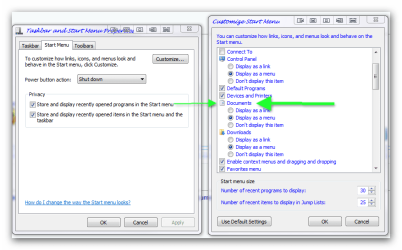
okey dokey have you tried setting the default setting then re-apply your settings?

  1. Click to open Taskbar and Start Menu Properties.
  2. Click the Start Menu tab, and then click Customize.
  3. In the Customize Start Menu dialog box, click Use Default Settings, click OK, and then click OK again.
 

My Computer

Computer Manufacturer/Model Number
packard bell IXTREME M5722
OS
Operating System : Windows 7 Home Premium Edition 6.01.7600 SP1 (x64)
CPU
Processor : Intel Core 2 Quad Q8300 @ 2500 MHz
Motherboard
Mainboard : Packard Bell (Acer EG43M )
Memory
Physical Memory :8GB Corsair4x 2GB 800MHz C5 DDR2
Graphics Card(s)
Video Card : XFX 6700 AMD
Monitor(s) Displays
Maestro 234DL - BenQ V2220 - BenQ VW2420H
Screen Resolution
Current Display :1920x1080p pixels at 60 Hz in HD LED
Hard Drives
Hard Disks : WDC (1000 GB)
Drive C: (Hard Disk) : 428 GB available on 491 GB
Drive D: (Hard Disk) : 426 GB available on 492 GB
SAMSUNG spinpoint HD103SJ 1000.2 GB
(X 2) KINGSTON SSD NOW V 30GB
PSU
XFX ProSeries 550W PSU
Case
PACKARD BELL IXTREME
Cooling
System Blower Current: 150mA Air Flow16CFM ;Akasa 90mm rear
Keyboard
Gigabyte Aivia K8100
Mouse
TRUST-Wireless Laser Mouse - Carbon edition MI-7770C
Internet Speed
TP-LINK > TL-WN951N / AV500 Gigabit Powerline Adapters
Browser
chrome dev
Other Info
EXTRA COOLING>(FAN CONTROLLER) PC Bay Cooler 3 x 40mm fans; Akasa AK-HD-BL Blue hard drive cooler 2 x 40 mm fan 4500 rpm 29.7 dBA
Bios> American Megatrends Inc.
Version : P01-A1
Date : 08/31/2009
Yep, tried that as well (should have mentioned that, sorry).

The Personal folder appears when I do that, but not the Documents folder. :(
 

My Computer

OS
Windows 7 RTM x64, Windows XP, Ubuntu 9.04
CPU
X2 4850e
Motherboard
Jetway HA06
Memory
2*takeMS 2048MB DDR2-800
Graphics Card(s)
Radeon 4870
Sound Card
Audigy 2 eX
Monitor(s) Displays
24", 17"
Screen Resolution
1920*1200, 1280*1024
Hard Drives
2*500GB, 2*1000GB
...sadly no SSD yet...
PSU
bequiet! Straight Power 350W
Case
Chieftec BA-02B-B-B
Keyboard
Logitech G11
Mouse
Logitech M518
Internet Speed
DSL8000
Other Info
Also:
Toshiba Portégé M400 (T7200, 3GB RAM)
Perform a SFC Scan

1. Click Start, click All Programs, click Accessories, right-click Command Prompt, and then click Run as administrator. If you are prompted for an administrator password or for a confirmation, type the password, or click Allow

2. Type the following command, and then press ENTER:

sfc /scannow

A message will appear stating that 'The system scan will begin'. Be patient because the scan may take some time

3. If any files require a replace SFC will replace them. You may be asked to insert your Windows 7 DVD for this process to continue

4. If everything is okay you should, after the scan, see the following message "Windows resource protection did not find any integrity violations"

5. After the scan has completed, close the command prompt window, restart the computer and check.

more information here :ar: How to use the System File Checker tool to troubleshoot missing or corrupted system files on Windows Vista or on Windows 7
 

My Computer

Computer Manufacturer/Model Number
packard bell IXTREME M5722
OS
Operating System : Windows 7 Home Premium Edition 6.01.7600 SP1 (x64)
CPU
Processor : Intel Core 2 Quad Q8300 @ 2500 MHz
Motherboard
Mainboard : Packard Bell (Acer EG43M )
Memory
Physical Memory :8GB Corsair4x 2GB 800MHz C5 DDR2
Graphics Card(s)
Video Card : XFX 6700 AMD
Monitor(s) Displays
Maestro 234DL - BenQ V2220 - BenQ VW2420H
Screen Resolution
Current Display :1920x1080p pixels at 60 Hz in HD LED
Hard Drives
Hard Disks : WDC (1000 GB)
Drive C: (Hard Disk) : 428 GB available on 491 GB
Drive D: (Hard Disk) : 426 GB available on 492 GB
SAMSUNG spinpoint HD103SJ 1000.2 GB
(X 2) KINGSTON SSD NOW V 30GB
PSU
XFX ProSeries 550W PSU
Case
PACKARD BELL IXTREME
Cooling
System Blower Current: 150mA Air Flow16CFM ;Akasa 90mm rear
Keyboard
Gigabyte Aivia K8100
Mouse
TRUST-Wireless Laser Mouse - Carbon edition MI-7770C
Internet Speed
TP-LINK > TL-WN951N / AV500 Gigabit Powerline Adapters
Browser
chrome dev
Other Info
EXTRA COOLING>(FAN CONTROLLER) PC Bay Cooler 3 x 40mm fans; Akasa AK-HD-BL Blue hard drive cooler 2 x 40 mm fan 4500 rpm 29.7 dBA
Bios> American Megatrends Inc.
Version : P01-A1
Date : 08/31/2009
Thank you for staying with me. Sadly, the scan didn't find anything. It's a fresh installation so there are pretty much no programs installed.

I also tried creating a new user, which also didn't help (Documents still don't show). :confused:
 

My Computer

OS
Windows 7 RTM x64, Windows XP, Ubuntu 9.04
CPU
X2 4850e
Motherboard
Jetway HA06
Memory
2*takeMS 2048MB DDR2-800
Graphics Card(s)
Radeon 4870
Sound Card
Audigy 2 eX
Monitor(s) Displays
24", 17"
Screen Resolution
1920*1200, 1280*1024
Hard Drives
2*500GB, 2*1000GB
...sadly no SSD yet...
PSU
bequiet! Straight Power 350W
Case
Chieftec BA-02B-B-B
Keyboard
Logitech G11
Mouse
Logitech M518
Internet Speed
DSL8000
Other Info
Also:
Toshiba Portégé M400 (T7200, 3GB RAM)
hi again its a bit odd this one the scans you have done would of helped to find errors i dont suppose it has anything to do with Windows 7 RTM ?
 

My Computer

Computer Manufacturer/Model Number
packard bell IXTREME M5722
OS
Operating System : Windows 7 Home Premium Edition 6.01.7600 SP1 (x64)
CPU
Processor : Intel Core 2 Quad Q8300 @ 2500 MHz
Motherboard
Mainboard : Packard Bell (Acer EG43M )
Memory
Physical Memory :8GB Corsair4x 2GB 800MHz C5 DDR2
Graphics Card(s)
Video Card : XFX 6700 AMD
Monitor(s) Displays
Maestro 234DL - BenQ V2220 - BenQ VW2420H
Screen Resolution
Current Display :1920x1080p pixels at 60 Hz in HD LED
Hard Drives
Hard Disks : WDC (1000 GB)
Drive C: (Hard Disk) : 428 GB available on 491 GB
Drive D: (Hard Disk) : 426 GB available on 492 GB
SAMSUNG spinpoint HD103SJ 1000.2 GB
(X 2) KINGSTON SSD NOW V 30GB
PSU
XFX ProSeries 550W PSU
Case
PACKARD BELL IXTREME
Cooling
System Blower Current: 150mA Air Flow16CFM ;Akasa 90mm rear
Keyboard
Gigabyte Aivia K8100
Mouse
TRUST-Wireless Laser Mouse - Carbon edition MI-7770C
Internet Speed
TP-LINK > TL-WN951N / AV500 Gigabit Powerline Adapters
Browser
chrome dev
Other Info
EXTRA COOLING>(FAN CONTROLLER) PC Bay Cooler 3 x 40mm fans; Akasa AK-HD-BL Blue hard drive cooler 2 x 40 mm fan 4500 rpm 29.7 dBA
Bios> American Megatrends Inc.
Version : P01-A1
Date : 08/31/2009
i dont suppose it has anything to do with Windows 7 RTM ?
I don't know. It's a normal copy of Win7 Ultimate on a Lenovo T60 Laptop. We have the same model twice - it works on the other one but not on this one. :rolleyes:
 

My Computer

OS
Windows 7 RTM x64, Windows XP, Ubuntu 9.04
CPU
X2 4850e
Motherboard
Jetway HA06
Memory
2*takeMS 2048MB DDR2-800
Graphics Card(s)
Radeon 4870
Sound Card
Audigy 2 eX
Monitor(s) Displays
24", 17"
Screen Resolution
1920*1200, 1280*1024
Hard Drives
2*500GB, 2*1000GB
...sadly no SSD yet...
PSU
bequiet! Straight Power 350W
Case
Chieftec BA-02B-B-B
Keyboard
Logitech G11
Mouse
Logitech M518
Internet Speed
DSL8000
Other Info
Also:
Toshiba Portégé M400 (T7200, 3GB RAM)
have you tried the settings in the pic then change back? (change to old menu)
 

Attachments

  • Snap_2010.12.12 08.40.38_002.png
    Snap_2010.12.12 08.40.38_002.png
    47.3 KB · Views: 11

My Computer

Computer Manufacturer/Model Number
packard bell IXTREME M5722
OS
Operating System : Windows 7 Home Premium Edition 6.01.7600 SP1 (x64)
CPU
Processor : Intel Core 2 Quad Q8300 @ 2500 MHz
Motherboard
Mainboard : Packard Bell (Acer EG43M )
Memory
Physical Memory :8GB Corsair4x 2GB 800MHz C5 DDR2
Graphics Card(s)
Video Card : XFX 6700 AMD
Monitor(s) Displays
Maestro 234DL - BenQ V2220 - BenQ VW2420H
Screen Resolution
Current Display :1920x1080p pixels at 60 Hz in HD LED
Hard Drives
Hard Disks : WDC (1000 GB)
Drive C: (Hard Disk) : 428 GB available on 491 GB
Drive D: (Hard Disk) : 426 GB available on 492 GB
SAMSUNG spinpoint HD103SJ 1000.2 GB
(X 2) KINGSTON SSD NOW V 30GB
PSU
XFX ProSeries 550W PSU
Case
PACKARD BELL IXTREME
Cooling
System Blower Current: 150mA Air Flow16CFM ;Akasa 90mm rear
Keyboard
Gigabyte Aivia K8100
Mouse
TRUST-Wireless Laser Mouse - Carbon edition MI-7770C
Internet Speed
TP-LINK > TL-WN951N / AV500 Gigabit Powerline Adapters
Browser
chrome dev
Other Info
EXTRA COOLING>(FAN CONTROLLER) PC Bay Cooler 3 x 40mm fans; Akasa AK-HD-BL Blue hard drive cooler 2 x 40 mm fan 4500 rpm 29.7 dBA
Bios> American Megatrends Inc.
Version : P01-A1
Date : 08/31/2009
have you tried the settings in the pic then change back? (change to old menu)
That is for Vista. AFAIK they removed the classic Start menu in Win7. :geek:

Also note there is no more "Appearance and Personalization" in Win7 anymore, just "Personalization", which takes you back to the original Start menu settings that you also get by right-clicking on it. ;)
 

My Computer

OS
Windows 7 RTM x64, Windows XP, Ubuntu 9.04
CPU
X2 4850e
Motherboard
Jetway HA06
Memory
2*takeMS 2048MB DDR2-800
Graphics Card(s)
Radeon 4870
Sound Card
Audigy 2 eX
Monitor(s) Displays
24", 17"
Screen Resolution
1920*1200, 1280*1024
Hard Drives
2*500GB, 2*1000GB
...sadly no SSD yet...
PSU
bequiet! Straight Power 350W
Case
Chieftec BA-02B-B-B
Keyboard
Logitech G11
Mouse
Logitech M518
Internet Speed
DSL8000
Other Info
Also:
Toshiba Portégé M400 (T7200, 3GB RAM)
have you tried the settings in the pic then change back? (change to old menu)
That is for Vista. AFAIK they removed the classic Start menu in Win7. :geek:

Also note there is no more "Appearance and Personalization" in Win7 anymore, just "Personalization", which takes you back to the original Start menu settings that you also get by right-clicking on it. ;)

yes i see sorry about that ive been looking in my windows 7 books for you but we have covered everything in them :rolleyes:
 

My Computer

Computer Manufacturer/Model Number
packard bell IXTREME M5722
OS
Operating System : Windows 7 Home Premium Edition 6.01.7600 SP1 (x64)
CPU
Processor : Intel Core 2 Quad Q8300 @ 2500 MHz
Motherboard
Mainboard : Packard Bell (Acer EG43M )
Memory
Physical Memory :8GB Corsair4x 2GB 800MHz C5 DDR2
Graphics Card(s)
Video Card : XFX 6700 AMD
Monitor(s) Displays
Maestro 234DL - BenQ V2220 - BenQ VW2420H
Screen Resolution
Current Display :1920x1080p pixels at 60 Hz in HD LED
Hard Drives
Hard Disks : WDC (1000 GB)
Drive C: (Hard Disk) : 428 GB available on 491 GB
Drive D: (Hard Disk) : 426 GB available on 492 GB
SAMSUNG spinpoint HD103SJ 1000.2 GB
(X 2) KINGSTON SSD NOW V 30GB
PSU
XFX ProSeries 550W PSU
Case
PACKARD BELL IXTREME
Cooling
System Blower Current: 150mA Air Flow16CFM ;Akasa 90mm rear
Keyboard
Gigabyte Aivia K8100
Mouse
TRUST-Wireless Laser Mouse - Carbon edition MI-7770C
Internet Speed
TP-LINK > TL-WN951N / AV500 Gigabit Powerline Adapters
Browser
chrome dev
Other Info
EXTRA COOLING>(FAN CONTROLLER) PC Bay Cooler 3 x 40mm fans; Akasa AK-HD-BL Blue hard drive cooler 2 x 40 mm fan 4500 rpm 29.7 dBA
Bios> American Megatrends Inc.
Version : P01-A1
Date : 08/31/2009

Attachments

  • Snap_2010.12.12 11.27.12_001.png
    Snap_2010.12.12 11.27.12_001.png
    159.3 KB · Views: 6
Last edited:

My Computer

Computer Manufacturer/Model Number
packard bell IXTREME M5722
OS
Operating System : Windows 7 Home Premium Edition 6.01.7600 SP1 (x64)
CPU
Processor : Intel Core 2 Quad Q8300 @ 2500 MHz
Motherboard
Mainboard : Packard Bell (Acer EG43M )
Memory
Physical Memory :8GB Corsair4x 2GB 800MHz C5 DDR2
Graphics Card(s)
Video Card : XFX 6700 AMD
Monitor(s) Displays
Maestro 234DL - BenQ V2220 - BenQ VW2420H
Screen Resolution
Current Display :1920x1080p pixels at 60 Hz in HD LED
Hard Drives
Hard Disks : WDC (1000 GB)
Drive C: (Hard Disk) : 428 GB available on 491 GB
Drive D: (Hard Disk) : 426 GB available on 492 GB
SAMSUNG spinpoint HD103SJ 1000.2 GB
(X 2) KINGSTON SSD NOW V 30GB
PSU
XFX ProSeries 550W PSU
Case
PACKARD BELL IXTREME
Cooling
System Blower Current: 150mA Air Flow16CFM ;Akasa 90mm rear
Keyboard
Gigabyte Aivia K8100
Mouse
TRUST-Wireless Laser Mouse - Carbon edition MI-7770C
Internet Speed
TP-LINK > TL-WN951N / AV500 Gigabit Powerline Adapters
Browser
chrome dev
Other Info
EXTRA COOLING>(FAN CONTROLLER) PC Bay Cooler 3 x 40mm fans; Akasa AK-HD-BL Blue hard drive cooler 2 x 40 mm fan 4500 rpm 29.7 dBA
Bios> American Megatrends Inc.
Version : P01-A1
Date : 08/31/2009
Back
Top