does anyone actually have the Sound Stuttering fix?

The problem is defiantly either related to CPU spiking, which is largely related to the front side bus speed, CPU speed, and your amount of cashe. Another issue is the clocking on your sound card, and how much available RAM you have when running your audio programs. It could be all of these, or one of these. Many times I find that multiple factors contribute to degradation of audio performance.

Lastly, spyware and virus programs such as mcafee, and norton put a huge strain on your system resources, especially if you have real time protection on. Do some process of elimination and see. Post results for us.
 

My Computer My Computer

At a glance

Windows 7 Ultimate 64-Bit
OS
Windows 7 Ultimate 64-Bit
Here’s more information on my Windows 7 64-bit audio problem. I have a head full of trials and processes, I will try to be clear and concise, but I may ramble. Bear with me:

I bought a new computer (3.46ghz quad core with 12GB RAM.) I loaded Office 2010 and foobar, and connected a network plug for my internet. I let the updates load. Next I plugged in my PS Audio Digital Link III for audio (it’s a USB digital to analog converter) and then plugged in a couple external hard drives with my music (all in FLAC.) Started Foobar, selected my music, and the problems started there. I get an audio drop-out every few minutes, sometimes twice in a minute, sometimes not until 10 minutes. Totally random, and the drop out lasts a quarter second, it’s like a skip. So my issue started right out of the box.

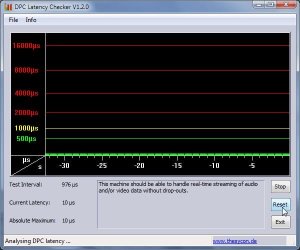
I load up DPC latency checker. Pretty much green bars all the way, average of about 300. It might peak at 1000 from time to time, but it doesn’t correlate to the audio skip or a process turning on (according to task manager.) So my latency is ok, and I’m not seeing my drop-out corresponding to a rise in latency.

I do a clean-boot and turn off everything non-Microsoft. Still have the problem. I continue trying a clean-boot turning off virtually everything that isn’t necessary. Still no fix.

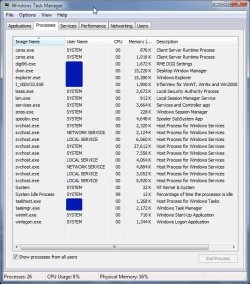
(All this time I’m tracking Task-Manager to see if I can see a process turn on that corresponds to the drop-out. I don’t see anything. I have task manager sorted by CPU usage, see no spikes, the numbers look like I’m running smooth. My CPU is idling between 93-96% when problems happen.)

In task manager, I start turning off everything one at a time until I’m down to barebones. The problem still persists. In task manager, I also don’t see any nVIDIA processes running. I turned off a process called SeaPort, and that seemed to fix the problem for a long time. But it came back. I even changed the filename of seaport.exe so that it wouldn’t magically come back on.

I’ve gone into Device Manager and disabled multiple items to no avail. I have turned off the nVIDIA sound drivers and two other sound drivers that were present. Everything except the USB codec that loads when I plug in my USB DAC. I have tried using the other two sound drivers instead of the USB codec, and they have the same issue.

I have the same issue whether I play music from Foobar or a CD directly from the CD player on the computer (I don't remember what program I used to play it.) I loaded up winamp to see if that had a problem – it does. I have set the buffer on Foobar to maximum, and tried various settings in between. I saw a thread where somebody was able to fix their [windows 7] problem by adjusting the sample rate on Foobar, but I’m not sue how that will fix audio from applications like youtube which has the same drop-outs. No, there is no affect on video, just audio.

I’ve tried to update various drivers, but windows says they are up to date. I haven’t tried to uninstall/reinstall drivers because that’s getting a little too technical for me and I don’t want to kill my computer. For instance I’ve seen threads where it’s stated that nVIDIA drivers may not be too good, but if I uninstall my video card driver it seems that I wouldn’t have any display to look at to reinstall it. Hope that sounds funny to someone. And as for sound card drivers, I don’t believe I can update my “plug and play” USB audio device. I’ve also seen threads about updating chipset drivers, that sounds a little too complicated for me as well. But if that’s what it takes, and it’s a silver bullet, I can certainly Google it and figure it out.

No, I haven’t tried windows media player yet. Not sure why, but it doesn’t make sense that everything else is having issues.

I tried disconnecting my network cable, nope. I don’t have any torrent software on my computer either. I did load Skype though, maybe if I unload that?

I have McAfee antivirus. I turned off the live scan portion and that didn’t do anything. I think I turned everything off on it too, and that didn’t do anything.

I don’t have any “crackling” or static, just a quarter second drop-out that will drive you insane. And it’s completely random.

I’ll end this by saying that I have been running USB audio through my old XP machine for four years without any issues. Sigh.

Thanks for reading this far. Hope this helps somebody, and I would appreciate any advice someone is willing to share.
 

My Computer My Computer

At a glance

Windows 7 professional 64bitQuad Core X5677 3.46ghz12gbnVIDIA Quadro 2000 1gb
Computer Manufacturer/Model Number
Dell Precision T5500
OS
Windows 7 professional 64bit
CPU
Quad Core X5677 3.46ghz
Memory
12gb
Graphics Card(s)
nVIDIA Quadro 2000 1gb
Hard Drives
1.5tb 3.0Gb/s 7200 RPM 32mb DataBurstCache
Raid 1
Even though it's a new machine... is there a more recent BIOS update for the motherboard?
I have no sound issues but I'm running in 32 bit mode.

I have a lot of experience setting up windows machines for audio, the Win 7 machine I'm using now does very well, able to stream multiple sources... Youtube, Winamp, CD at the same time without glitching or dropouts but Win7 has been problematic for many.

With all of that memory try setting a "static" swap file, make the minimum and maximum size equal, 2 or 4 gigabytes should be fine.

Shut OFF Indexing on all drives, shut down any real-time virus checking including Windows Defender located in "Services" until you find out what's causing the dropout.

Since my machine is used for audio I've gone to extremes...but man... does this thing run great.

People get sick of seeing these so here's the last pics I'll post on the matter.

DPC Latency.jpg Processes.jpg


I have two virus/malware checkers (Malware Bytes and Spyware Doctor/Antivirus) and I run them manually.

You might take a look at your services to see if there's any nVidia or other useless processes running.

Ap
 

My Computer My Computer

At a glance

Windows 7 Home PremiumIntel Core 2 Duo @ 3.00gHz4 GBATI Radeon HD 2600 XT
Computer Manufacturer/Model Number
Assembled in my workshop
OS
Windows 7 Home Premium
CPU
Intel Core 2 Duo @ 3.00gHz
Motherboard
Gigabyte GA-P35-S3G
Memory
4 GB
Graphics Card(s)
ATI Radeon HD 2600 XT
Sound Card
RME 24/96 Card, Realtek Internal Audio PreSonus FireStudio
Monitor(s) Displays
Acer 1917 (x2)
Screen Resolution
1280 x 1024 on both monitors
Hard Drives
Three 250GB Seagate SATA Barracuda 7200rpm
PSU
Rosewill 500-watt
Case
Rosewill mid-tower
Cooling
Noctua NH-U9B (CPU), PwrSupply fan + single large case Fan
Keyboard
Macally w/2/USB ports.
Mouse
Trackman Wheel
Other Info
Event 20/20 bas studio monitors, Yamaha sub.
Rackmount Korg/Roland/Yamaha synthesizers,
Cubase MIDI/audio recording. Sony Soundforge audio/mastering software. CD Architect Mastering. RME & Presonus audio interfaces.
Is there a fix for it? It mostly stutters when i get a virus update from Advast... someone suggested to update the driver itself but how would it be done?
 

My Computer My Computer

At a glance

Windows 7 Home Premium 32 bit
OS
Windows 7 Home Premium 32 bit
I had the same problem for the last 2 months. It drove me mad.

I went through everything and disabled my wireless driver as i dont use wireless. This done the ticket and everything is back as sweet as a nut.

This might help you.
 

My Computer My Computer

At a glance

Windows 7 professional 32 bitAMD Phenom 9950 2.6ghz quad core4 GB DDR2 PC6400ATI Radeon 5770 x2 in CrossfireX
OS
Windows 7 professional 32 bit
CPU
AMD Phenom 9950 2.6ghz quad core
Motherboard
Asrock Alive Xfire motherboard
Memory
4 GB DDR2 PC6400
Graphics Card(s)
ATI Radeon 5770 x2 in CrossfireX
Sound Card
On board
Monitor(s) Displays
Samsung syncmaster 22 inch
Hard Drives
Corsair Extreme series SSD 32gb
+
250GB Seagate Baracuda
PSU
750w high powered PSU with four 19 amp rails.
Case
Alienware Area 51
Cooling
Corsair Hydro series liquid cooling
Keyboard
Razer Lycosa
Mouse
Razer Imperator
Internet Speed
20mb Virgin media broadband - fibre optic - its rubbish
Other things I did to stabalize it all

removed the video-driver, restarted with VGA mode (for there is no more video-driver: ) and still the sound was bad. Feeling stupid, but almost feels like I have to install a fresh Windows all together : (

Devnullius

I had left my old computer's sound-problem for what it was.

Last week I updated to Windows 7 Enterprise x86 SP1. The sound problem remained. Then I did a repair-upgrade, which did not change much.

Totally fet-up with it, I went to a recycle-firm and took an old PCI Soundblaster card (costed me €0,50). This greatly reduced all my problems!

BUT the problem still wasn't completely gone. Once in a while I still had interruptions, but nothing like mentioned before. The new interruptions were all caused by CPU spikes when playing (browser) video (chrome).

So I went on by uninstalling Flash Player. Only thing I could find for this, was the official tool. It only seems to remove a DirectX pluging - which I don't use.

I also updated my video-card drivers to the latest found on the NVidia website. Many versions had come by, so this might solve CPU-overload problems. Doesn't look like it, but shouldn't hurt either.

Then I started Firefox, and the CPU was just a bit less stressed (stress == more than 90% on my 3,0GHz HyperThreading, 2GB). than my Chrome is. So sound for videos was even better than with Chrome. So I re-enabled (in Device Manager) my onboard sound card. It had a bit more disturbances than the old Soundblaster, but was way much better than previously.

Finally, I got the CPU constantly at less <90% CPU for playback of web-videos. Both soundcards now give a stable sound. With the Soundblaster more volume and warmth - 50 cents well spent : > MAIN trick to stay under the 90% stress-free CPU usage, is BY CLOSING task manager - which I always have opened. It consumes 5 to 10% CPU too! Also, running Process Lasso in the background does not help - it reduces Firefox priority to below-normal.

Main conclusion (for now, that is) is that my problems are caused by a too high of a CPU load.

Main questions I am left with are:
1. why did it take me so long to solve this? ; PP
and
2. Shouldn't be a HP DX2200 with 2GB RAM be fast enough to play web-videos??? What processor should I have as a minimum, in general, to fluently do web-videos? Any practical feedback would be greatly appreciated...

Peace!

Devvie

ALSO: of GREAT interest when troubleshooting this problem yourself, check: http://www.sevenforums.com/sound-audio/48379-dpc-latency-causing-audio-stuttering-crackling.html

More system info: Avast 5 installed, but shields disabled. Enabling does not cause more problems. Network connection: mostly wireless, USB. Power options: min/max processor state is set at fixed 100% ++ wireless adapter at Max Performance ++ system cooling was active, now put to passive (I only changed this after fixing my problems, but it could solve yours). Active means:: always on, passive = cooling when needed.

 
Last edited:

My Computer My Computer

At a glance

Windows 7 Enterprise
OS
Windows 7 Enterprise
Finally definitely provably and logically solved the sound stutter

And now I really solved it! I can even pinpoint it! No doubt, all sounds working smooth again, even with maxed out cpu.

All problems were caused by my USB Wifi stick. I already had disabled wireless lan in the past (as suggested by others), but this didn't fix it.

What fixed it, was downloading the latest drivers from realtek. I used my ISP's installation cd for the USB Wifi-stick (Online Internet BV, RTL8187b chipset on USB Thomson Link TG123g DSL36307020 wifi-adapter), with Microsoft Update. But that's not current enough.

I downloaded the latest driver here; Realtek .

After that, I could Youtube Fullscreen @ 720, in two browsers with fluent sound. Sure, CPU maxed out at 110%, and video image not-so-fluent anymore, BUT crystal clear sound. As it should! NO more distortions!

So all whom are getting really really really desperate... If you have Realtek Wifi chipset... Go check out their latest drivers, you might need them ; )

Peace!

Devvie

PS: most problematic audio device was the onboard High Definition Audio Device (hdaudio func 01 ven 10ec dev 0861 subsys 14627254 rev 1003). Which has, guess what, also a Realtek chipset! I'm downloading (sloooooowly) the newest drivers (dated Jan. 28-11) for my audio too, just in case, from here: Realtek

PS: As mentioned, some privacy tools can cause problems too! I solved my final connection problems not mentioned here, more in this link: http://www.techrepublic.com/forum/discussions/102-340460-3416973?tag=discussion-thread

Peace!

Devnullius
 
Last edited:

My Computer My Computer

At a glance

Windows 7 Enterprise
OS
Windows 7 Enterprise
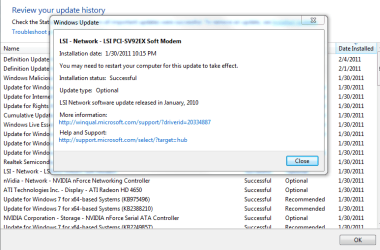
i attached a picture of the update that sound stuttered my cpu, videos and audio streams and files were stuttering, thanks to the DPC latency checker...

Windows 7 Home Prem 64-bit upgrade from Vista Home Prem 64bit
 

Attachments

  • Capture.PNG
    Capture.PNG
    23.4 KB · Views: 437

My Computer My Computer

At a glance

Windows 7 Home Premium 64bitAMD Phenom II X4 925 2.8GHz8GB DDR2ATI HD 4650
Computer Manufacturer/Model Number
HP Pavilion p6102f
OS
Windows 7 Home Premium 64bit
CPU
AMD Phenom II X4 925 2.8GHz
Memory
8GB DDR2
Graphics Card(s)
ATI HD 4650
Monitor(s) Displays
Dell st2410
Screen Resolution
1920x1080
Hard Drives
Seagate 750gb SATA
Seagate 1.5tb SATA
Keyboard
Saitek Eclipse II
Mouse
Logitech MX Revolution
Internet Speed
Fios 25 Mbps/15 Mbps
Win 7 Sound Stutter

Hi,

I suffered this for a long time with no fix and blamed win 7 and the sound software I was using ( amazing slow downer) the stutter was occasional with no apparent trigger -the fix was simple when I sorted what processes were running, I run AVG antivirus and Windows had also activated the Windows Firewall - I switched off the Windows Firewall and my problem disappeared. No other programs seemed to be affected and when I had the stutter the processor activity stopped completely.
 

My Computer My Computer

At a glance

windows 7 home 64 bit, Windows xp home 32 bit
OS
windows 7 home 64 bit, Windows xp home 32 bit
Im having the same issue again with a brand new PC.

Intel Core i7 3.4 Gh
4 RAM DDR3 1333mhz.
MOBO asus P8P67 Pro.
Windows 7 32 bits ultimate.

Im using the SRS audio sand box in order to improve the audio of my omega striker 7.1

No audio latency issues.
 

My Computer My Computer

At a glance

Microsoft Windows 7 Ultimate 64 bits 7601 Mul...Intel(R) Core(TM) i7-3770K CPU @ 3.50GHz8.00 GBNVIDIA GeForce GTX 670
Computer type
PC/Desktop
Computer Manufacturer/Model Number
Custom Build
OS
Microsoft Windows 7 Ultimate 64 bits 7601 Multiprocessor Free Service Pack 1
CPU
Intel(R) Core(TM) i7-3770K CPU @ 3.50GHz
Motherboard
ASUSTeK Computer INC. P8Z68-V PRO GEN3
Memory
8.00 GB
Graphics Card(s)
NVIDIA GeForce GTX 670
Sound Card
Omega Striker
Monitor(s) Displays
Viewsonic vx2250wm
Screen Resolution
1920 x 1080 x 32 bits (4294967296 colors) @ 60 Hz
Hard Drives
V9CPETXT
Seagate 1TB.
PSU
Corsair Gold Series AX850
Case
nvidia 690 advanced II
Cooling
Air
I have been playing with Latency issues for the last month. I have discovered an interesting phenomenon; While I have managed to keep DPC Latency Checker in the yellow, I have witnessed a sizable improvement in Latency if I start a video stream in my browser while playing audio Remains in Low Green with an odd yellow spike.

EMU-0204 ASIO output (usb)
Streaming Radio
Firefox (Streaming Youtube video)
WiFi
 

My Computer My Computer

At a glance

7 U 32Amd2GbHD3200
Computer Manufacturer/Model Number
Compaq
OS
7 U 32
CPU
Amd
Motherboard
780G
Memory
2Gb
Graphics Card(s)
HD3200
Sound Card
0204
Monitor(s) Displays
Mobo
I normally dont post on forums but seen as I had the exact same problem and seem to have fixed it I thought I would let you guys know what solved it for me!

To start with I was convinced I had got some malware or virus on my system so I ran every scan imaginable and even resorted to a full format and reinstallation of windows from scratch. All drivers updated and still no joy, but since I didnt have this issue when I first moved onto Windows 7 64bit I backtracked to try and remember what had changed since the initial install and it turned out to be a third stick of ram I had installed. Since this has been removed *touch wood* I haven't had any stuttering at all.
 

My Computer My Computer

At a glance

Windows 7 64bit
OS
Windows 7 64bit
I finally fixed it on my machine. Tracked it down to Mcafee, and then did a search for "Mcafee causing audio stutter" and found that a feature called NetGuard is causing it. Netguard grabs all your internet transmissions and checks the ip addresses against a database.

I tested by disabling it and opening a browser while playing audio (no stutter), and then reenabling it and repeating (stutter).

NetGuard is under the Firewall Settings => Email and Web Protection tab.
 

My Computer My Computer

At a glance

Windows 7Phenom II X3 720 Unlocked to Quad4 GB OCz Reaper HPC DDR3Radeon 4890
OS
Windows 7
CPU
Phenom II X3 720 Unlocked to Quad
Motherboard
Gigabyte GA-MA790FXT-UD5P
Memory
4 GB OCz Reaper HPC DDR3
Graphics Card(s)
Radeon 4890
Sound Card
Creative X-Fi Sooper Dooper
Monitor(s) Displays
Acer 24" 1920x1080
Hard Drives
2xSeagate 250 GB in Raid 0
PSU
Corsair TX850
Case
Antec 900
Cooling
Tuniq Tower 120
i signed up just to post this fix none of these worked

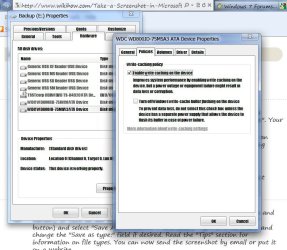
i have always had a problem with my win 7 stuttering on every cpu i have installed it on so i finally got tired of it an started trying to fix it and none of the applied to me i dont have and antivirus and defender, indexing and other optional services turned off no realtek or wireless lan and i triend the latency checker which was a waste it did show latency ad went into red but i was nothing to do with drivers i found the problem with windows 7 all by itself it has to do with windows 7 installing the option TURN OFF WRITE CACHE BUFFER FLUSHING selected by default all i hadto do was uncheck tht option in the drive properties on the hard drive that had the music but i went ahead and disabled both since thats supposed to be use only if you have them plugged into their own power supply after disable i installed mcafee and enabled indexing defender and all others and guess what no stuttering still NOW IF YOUR MULTI TASKING USING CPU INTINCIVE PROGAMS IT IS UNDERSTANDABLE TO RECIEVE STUTTER OR LAG I HAVENT EXPERIENCED AND WHILE PLAYING MASS EFFECT 3 OR DIABLE 3 WITH MEDIA PLAYER PLAYING IN THE BACKGROUND

Fix
1. Open Computers 2. Right click on your Hard drive (Anyone will work if you have more than one) 3.Click on Hardwre Tab 4. Double Click or Highlight and click properties for you hard drive 5. Click Policy Tab 6. Uncheck the second option "TURN OFF WRITE CACHE BUFFER FLUSHING" Do the same for multiple hard drives no need to restart or restart audio Fixes instantly

Below is a screen shot of the policy page should look for
 

Attachments

  • Capture.JPG
    Capture.JPG
    92.6 KB · Views: 160

My Computer My Computer

At a glance

windows 7 ultimate 64intel pentium 4 6312.5gbamd 5450
Computer Manufacturer/Model Number
emachines w3611
OS
windows 7 ultimate 64
CPU
intel pentium 4 631
Motherboard
d945gclg2
Memory
2.5gb
Graphics Card(s)
amd 5450
Sound Card
amd 5450
Monitor(s) Displays
Dual 32 inch samsung hdtv extended to 21 inch hp flat monito
Hard Drives
1 sata 80gb western digital
1 ide 80gb western digital
Cooling
standered
GTX 560 Ti appears to be causing lag.

Hey guys, I'm having what sounds like the very same audio/mouse stuttering problem that's been mentioned all through this thread. I've followed a bunch of leads throughout the thread and have pinpointed it down to my GTX 560 Ti. While running DPC Latency checker, it will spike to 400us during idle from time to time, but if I scroll web pages such as facebook, or steam it will sit at 16000us constantly. FullHD video playback is also not possible without lag.

Worth noting is that this problem has happened from time to time for the last few months, but it would always go away with a reboot. As of today though, it's here to stay it would seem.

Also, my motherboard is old (ASUS P5-B Deluxe Wifi/AP - circa 2006), but I believe I should have more than enough power (much newer antec 650w PSU).

Does anybody have any suggestions? If my 560 is disabled in device manager, I get no lag. No matter the driver version (I've tried 5) the problem is identical in windows.

Thanks for any help!
 

My Computer My Computer

At a glance

Windows 7 Ultimate x64Core2 Quad Q9550 @ 3.69GHz4GB 800mhz (Kingston?)MSI GTX 560Ti Hawk
OS
Windows 7 Ultimate x64
CPU
Core2 Quad Q9550 @ 3.69GHz
Motherboard
ASUS P5-B Deluxe Wifi/AP
Memory
4GB 800mhz (Kingston?)
Graphics Card(s)
MSI GTX 560Ti Hawk
Sound Card
Creative X-Fi XtremeMusic
Monitor(s) Displays
1x Dell 2407WFP, 1x Dell 2405
Screen Resolution
1920x1200
Hard Drives
1.5TB Seagate 7200rpm
1.5TB WD Green
PSU
Antec 650W
Case
Antec Sonata II
Cooling
A huge heatsink/fan (forget the brand/model)
Keyboard
Microsoft Ergonomic something something 5000
Mouse
Logitec G500
Internet Speed
Cable 100 Mbit
Other Info
PC = OLD
This has been driving me nuts for a week now. I have a Sony Vaio VPCF1 with 4GB Ram and windows 7 64bit

The audio stuttering has had me demented. I tried all sorts to solve it. I registered here to hopefully save someone else going through the same madness.

It ended up being the WIFI driver INTEL WLAN. Thank the Lord. Its fixed :D
 

My Computer My Computer

At a glance

Windows 7 64bit
OS
Windows 7 64bit
So same sob story here, audio stuttering under every circumstance possible blah blah blah... its terrible. Tracked down the stutter to the Ethernet Driver with DCP.

Question I have is, what if there is no updated driver for your system? Desktop wired to the wall and I can't very well work on it disconnected from the net. Tried disabling the write cache flushing like said above, nothing. Tried reinstalling the driver, nothing. What else is there?
 

My Computer My Computer

At a glance

Win 7 x64i7-2600 3.4GHz2x 1600MHz 4GB KingstonNVIDIA GTX 560 Ti
Computer type
PC/Desktop
Computer Manufacturer/Model Number
Custom
OS
Win 7 x64
CPU
i7-2600 3.4GHz
Motherboard
Intel DH67GD
Memory
2x 1600MHz 4GB Kingston
Graphics Card(s)
NVIDIA GTX 560 Ti
Hard Drives
160GB Intel SSD Primary
1TB WD Black
2TB WD Black
Antivirus
AVG
Browser
Chrome
Windows7 64bit audio stutter and popping

Fairly recently had this problem with the audio tried every thing to correct it(updating drivers,rolling back drivers etc)but nothing worked, but what i have discovered is disabling the internet fixes the problem.
Which means every time i want to play some music i have to disable the internet which is a right pain in the butt.Grateful if anyone knows a fix for this.
confused.gif

PS looks like i'm not alone.
 

My Computer My Computer

At a glance

Windows 7 home premium 64bit sp1Intel Core i58gbIntel HD Graphics Family HD 3000
Computer type
Laptop
Computer Manufacturer/Model Number
Samsung NP300E5A-A02DX
OS
Windows 7 home premium 64bit sp1
CPU
Intel Core i5
Motherboard
Manufacturer SAMSUNG ELECTRONICS CO., LTD
Memory
8gb
Graphics Card(s)
Intel HD Graphics Family HD 3000
Sound Card
Realtek High Definition Audio
Monitor(s) Displays
Generic PnP Monitor on Intel HD Graphics Family
Screen Resolution
1920x1080 pixels
Hard Drives
SAMSUNG HM641JI
Keyboard
Logitech K400 wireless
Mouse
Logitech M570 trackball wireless
Internet Speed
75MB DL 16MB UL (Cooking with Gas)
Antivirus
Avast IS and MBAM Pro
Browser
Firefox
I know its no help but I have similar problems with home built asus based PC, with tenda 802.11n W322P network card.
;)
 

My Computer My Computer

At a glance

windows 8 Pro x64Intel Pentium 4 Prescott 90nm3.00GB Single-Channel DDR @ 199MHz (3-3-3-8)512MB ATI Radeon HD 3450 (AMD Computer Inc)
Computer type
PC/Desktop
Computer Manufacturer/Model Number
custom build
OS
windows 8 Pro x64
CPU
Intel Pentium 4 Prescott 90nm
Motherboard
ASUSTeK Computer Inc. P4C800-E (CPU 1)
Memory
3.00GB Single-Channel DDR @ 199MHz (3-3-3-8)
Graphics Card(s)
512MB ATI Radeon HD 3450 (AMD Computer Inc)
Sound Card
SoundMAX Integrated Digital Audio
Monitor(s) Displays
IPS235 (1440x900@59Hz)
Screen Resolution
1440x900@59Hz
Hard Drives
75GB Maxtor 6V080E0 ATA Device (SATA)
466GB Hitachi HDP725050GLA360 ATA Device (SATA)
Fairly recently had this problem with the audio tried every thing to correct it(updating drivers,rolling back drivers etc)but nothing worked, but what i have discovered is disabling the internet fixes the problem.
Which means every time i want to play some music i have to disable the internet which is a right pain in the butt.Grateful if anyone knows a fix for this.
confused.gif

PS looks like i'm not alone.

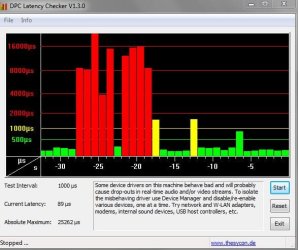
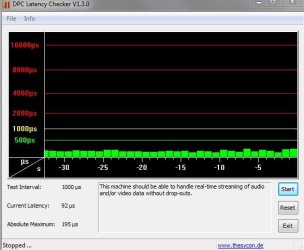
Just done a latency test.this is what it looks like.
Internet enabled.JPG

Internet disabled.JPG
 

My Computer My Computer

At a glance

Windows 7 home premium 64bit sp1Intel Core i58gbIntel HD Graphics Family HD 3000
Computer type
Laptop
Computer Manufacturer/Model Number
Samsung NP300E5A-A02DX
OS
Windows 7 home premium 64bit sp1
CPU
Intel Core i5
Motherboard
Manufacturer SAMSUNG ELECTRONICS CO., LTD
Memory
8gb
Graphics Card(s)
Intel HD Graphics Family HD 3000
Sound Card
Realtek High Definition Audio
Monitor(s) Displays
Generic PnP Monitor on Intel HD Graphics Family
Screen Resolution
1920x1080 pixels
Hard Drives
SAMSUNG HM641JI
Keyboard
Logitech K400 wireless
Mouse
Logitech M570 trackball wireless
Internet Speed
75MB DL 16MB UL (Cooking with Gas)
Antivirus
Avast IS and MBAM Pro
Browser
Firefox
Back
Top