Does Anything Work?

As an experiment some time a go (a year or so), a web master placed a (benign) link button on his website that stated "click this button to download and install a virus on your computer" or such

he found that in a very short time he had over 400 visitors who clicked on that button

How can any Tech prevent users like this from becoming infected - they cannot!!!

Ok I will admit that some of the scare monger tactics of the legitimate AV industry and major retail chains, to sell their products, does not help to combat this problem

It produces a state of paranoia about the malware situation rather that the informed caution that is actually needed. Users have a state of mind where they are terrified of being infected and so when their fears are proved by the drive by malware they panic and click the button, without thinking
 

My Computers

System One System Two

  • Computer type
    PC/Desktop
    Computer Manufacturer/Model Number
    ChillBlast - Custom to my design
    OS
    Windows 11 Pro x64 [Latest Release and Release Preview]
    CPU
    Ryzen 9 5950X, 3.8 - 5.2 MHz
    Motherboard
    Asus Prime X570-Pro
    Memory
    64GB [2 x 32GB] DDR4 3200MHz
    Graphics Card(s)
    4GB NVIDIA GEFORCE GTX 1650 Ti
    Sound Card
    On-board SPDIF to 5.1 System + HDMI [5.1 system]
    Monitor(s) Displays
    32" UHD 32 Bit HDR Monitor + 43" UHD 4K 32Bit HDR TV
    Screen Resolution
    2 x 3840 x 2160 @60Hz
    Hard Drives
    1TB M2 SSD OS, 500GB Fast Access SSD, 2 x 8TB Data + Various Externals from 1TB to 4TB, 10TB NAS
    PSU
    NZXT C750 80 PLUS Gold 750W Modular PSU
    Case
    Workstation Case [Matt Black]
    Cooling
    NZXT Kraken X63 280mm CPU Cooler +2x Quiet Case fans
    Keyboard
    Logitech Wireless MX Keys & K400 + others
    Mouse
    Logitech Wireless MX Master 3S
    Internet Speed
    920 MB Down 50 MB Up
    Antivirus
    BitDefender Total Security Pro
    Browser
    Chrome (always run latest Non-Beta)
    Other Info
    Also run ...
    Laptop - Quad 8GB - Windows 10 Pro x64
    Nexus 7 Android tablet x2
    Samsung 10.2" tablet
    Blackview TAB 8 4G Android Tablet c/w Keyboard
    Wacom Intuos Pro Medium Pen Pad
    Wacom Intuos Pro Small Pen Pad
    Wacom Expresskeys Remote
    Loopdeck+ Graphics Controller
    Shuttle Pro v2 Control
  • Computer type
    Laptop
    System Manufacturer/Model Number
    Dell XPS 17 10750H
    OS
    Windows 11 Pro x64 Latest RP
    CPU
    Intel I7 10750H 5.0GHz
    Motherboard
    Dell XPS
    Memory
    32GB [2x16GB] DDR4 2933 MHz
    Graphics Card(s)
    nVidia GTX1650Ti 4 GB GDDR6
    Sound Card
    Stock [Realtek] 4 Speaker
    Monitor(s) Displays
    17" IPS UHD+ Infinity Edge Touchscreen
    Screen Resolution
    3840 x 2400
    Hard Drives
    2TB M2 NVMe, 4TB External + various 500GB & 1TB External NVMe (also have access to spinner HDD from
    PSU
    Stock
    Case
    Stock XPS Aluminium & Carbon Fibre
    Cooling
    Stock - Active Fan Control
    Keyboard
    Backlit + Various Logitech
    Mouse
    Stock Track Pad + Logitech MX Trackball
    Internet Speed
    72 MB Down 18MB Up
    Browser
    Chrome
    Other Info
    Also run ...
    Laptop - Quad 8GB - Windows 10 Pro x64
    Nexus 7 Android tablet x2
    10.2" tablet
    Sony Z3 Android Smartphone
    Wacom Intuos Pro Medium Pen Pad
    Wacom Intuos Pro Small Pen Pad
    Wacom Expresskeys Remote
    Loopdeck+ Graphics Controller
    Shuttle Pro v2 Control Pad
    10TB NAS
I can't believe it.

I learned this kind of lesson in about 1998...the hard way...crippled PC's...

I suppose there's new users every minute of every day...who don't know jack
 

My Computer

OS
Windows 7 Home Premium 64bit
CPU
i7 930 2.8g
Motherboard
x58A-Ud3R rev2.0 FB
Memory
Corsair xms3 CMX6GX3M3C 1600 C7 2gx3
Graphics Card(s)
HIS ATI pcie HD5670
Sound Card
Presonus Firebox
Monitor(s) Displays
Flatron W2343T x2
Hard Drives
1x500g Seagate Sata2 7200
2x1TB Seagate Sata2 7200
PSU
Cooler Master 700W Silent Pro
Case
Antec
Cooling
Zalman CPU Cooler CNPS10x-Quiet
I can't believe it.

I learned this kind of lesson in about 1998...the hard way...crippled PC's...

I suppose there's new users every minute of every day...who don't know jack

A lot of the really bad infections I see are from people with kids in the house. They'll click on anything shiny and flashy. Just put up a link to cute kitty screen savers and you're in.
 

My Computer

Computer Manufacturer/Model Number
Gateway GT5662
OS
Windows 7 Ultimate 64-bit
CPU
Phenom 9500+ Quad Core
Motherboard
ECS 2GB FSB
Memory
3GB PC23200
Graphics Card(s)
Nvidia 8800GT Alpha Dog Edition
Sound Card
Onboard Realtek HDA
Monitor(s) Displays
Apple 22" Cinema Display
PSU
Antec 600W 22A
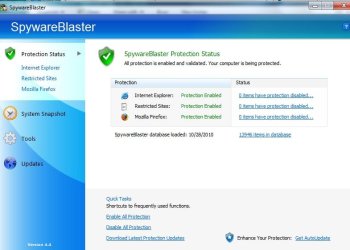
One very good anti-malware application to have is SpywareBlaster by javacool. This app runs in the background, it's free and it is 'pro' active. SpywareBlaster® | Prevent spyware and malware. Free download.
It needs to be updated manually (free version), or with a donation, it will update itself. Once updated, click the button that says "enable all protection"
 

Attachments

  • spywareblaster.jpg
    spywareblaster.jpg
    85.8 KB · Views: 5

My Computer

Computer type
PC/Desktop
Computer Manufacturer/Model Number
Bruce ... somewhere in his 40's
OS
Windows 7 Ultimate 32bit SP1
CPU
Intel(R) Core(TM)2 Quad CPU @ 2.40GHz, 2400 MHz
Motherboard
INTEL/D975XBX2
Memory
4 GB
Graphics Card(s)
ATI Radeon HD 2600 Pro
Monitor(s) Displays
Samsung SyncMaster 914v
Screen Resolution
1280 x 1024
Hard Drives
2/500GB each ... ST3500630AS ATA Device.
One is not connected
PSU
Rocketfish 700 W
Case
G.Skill Gigabyte Chassis
Keyboard
Standard PS/2 Keyboard
Mouse
Microsoft PS/2 Mouse
Internet Speed
DSL
Antivirus
Avira Internet Security
Browser
IE 11
Other Info
ATI HDMI Audio
Users have a state of mind where they are terrified of being infected and so when their fears are proved by the drive by malware they panic and click the button, without thinking

An excellent description!
 

My Computer

OS
Windows 7 & Windows Vista Ultimate
Before looking at what other software might help, I suggest educating them on all the dangers of the web using a more user friendly version of this article.

I suggest telling them that if they see a message claiming an infection, even if it appears to come from their installed security software, to save and close only what is important, restart the computer and update and run successive scans with their security software.

Of course, some are just not going to listen.
 

My Computer

OS
Arch Linux 64-bit
We do try to tell them. Many of them think that since they have anti-virus software they should be able to do whatever they want. I've tried setting up users with a limited account but they can't seem to deal with logging in as an admin to install stuff. Many of my customers call the computer a modem or a hard drive, they think the hard drive is memory, they think Windows is the computer, have no idea what Flash is, or java, or plugins, or codecs. It's really difficult when people think their computer is the same as their toaster. Push the button and it makes toast.
 

My Computer

Computer Manufacturer/Model Number
Gateway GT5662
OS
Windows 7 Ultimate 64-bit
CPU
Phenom 9500+ Quad Core
Motherboard
ECS 2GB FSB
Memory
3GB PC23200
Graphics Card(s)
Nvidia 8800GT Alpha Dog Edition
Sound Card
Onboard Realtek HDA
Monitor(s) Displays
Apple 22" Cinema Display
PSU
Antec 600W 22A
Maybe after you 'fix' a cutomer's computer, you need to attach an important instruction ... DO NOT plug this in. :p
 

My Computer

Computer type
PC/Desktop
Computer Manufacturer/Model Number
Bruce ... somewhere in his 40's
OS
Windows 7 Ultimate 32bit SP1
CPU
Intel(R) Core(TM)2 Quad CPU @ 2.40GHz, 2400 MHz
Motherboard
INTEL/D975XBX2
Memory
4 GB
Graphics Card(s)
ATI Radeon HD 2600 Pro
Monitor(s) Displays
Samsung SyncMaster 914v
Screen Resolution
1280 x 1024
Hard Drives
2/500GB each ... ST3500630AS ATA Device.
One is not connected
PSU
Rocketfish 700 W
Case
G.Skill Gigabyte Chassis
Keyboard
Standard PS/2 Keyboard
Mouse
Microsoft PS/2 Mouse
Internet Speed
DSL
Antivirus
Avira Internet Security
Browser
IE 11
Other Info
ATI HDMI Audio
Maybe after you 'fix' a cutomer's computer, you need to attach an important instruction ... DO NOT plug this in. :p

Right, the only safe computer is still in the box.

:)
 

My Computer

Computer Manufacturer/Model Number
Gateway GT5662
OS
Windows 7 Ultimate 64-bit
CPU
Phenom 9500+ Quad Core
Motherboard
ECS 2GB FSB
Memory
3GB PC23200
Graphics Card(s)
Nvidia 8800GT Alpha Dog Edition
Sound Card
Onboard Realtek HDA
Monitor(s) Displays
Apple 22" Cinema Display
PSU
Antec 600W 22A
As viruses and scareware evolve, it's going to be harder to keep it out of the sys.

The latest phony AV's not only tell you that there's "something" on the PC, but some of them actually scan ahead and throw up a screen that mimics your current AV. Just last week I saw this on my dentists PC.

And also on a family members PC, to which they (unfortunately) responded by clicking everything they were told to because they "panicked" and thought it was part of their AV "helping" them. I had to wipe the PC's HD & re-install everything. It was that bad.

And they do a good job of scaring the average user too, lots of flashing/blinking and bright red letters saying in essence "OMG, YOU"RE INFECTED....DO SOMETHING QUICKLY OR ALL IS LOST!!!!

As some have said, and I fully agree, education is the key. Not everyone is going to be able to learn about all the intricacies of malware/viruses, but some education can go a long way.

I was over at a friends and I saw a warning message pop up, to which he promptly clicked it off without reading it. I asked what that was & his response was "I don't know, it pops up once in a while." It turns out it was his AV warning him that a prog was trying to establish a connection. A program that turned out to be a virus. He had never bothered to actually read the message, thinking of it as nothing more then an annoyance.

I think as long as these tactics continue, we'll see our fair share of infected PC's. As to the question "Does anything work", not 100%, but vigilance, good AV software and some basic education can at least cut down on some of the infections. (Hopefully)
 

My Computer

Computer type
PC/Desktop
Computer Manufacturer/Model Number
Dell Hell oh Well
OS
Win 7 32 Home Premium, Win 7 64 Pro, Win 8.1, Win 10
CPU
Intel Core 2 Duo 2.93GHz
Memory
Not much with my ADHD
Graphics Card(s)
ATI Radeon HD 4350
Monitor(s) Displays
24" HDTV/Monitor
Screen Resolution
Blurry after a Scotch or 2
Hard Drives
1 HDD 250 GB, 1 HDD 1 TB, 3 - 1 TB Externals
Case
Don't get on my case...man :D
Cooling
I have an Air Conditioner & Diet Pepsi
Keyboard
Saitek Cyborg
Mouse
10 yr old MS optical mouse that still works
Internet Speed
Never fast enough
Antivirus
Various
Browser
Various
We discuss semantics...

Reality - The "nanny state" won't work.
No matter what prevention is used, what standard of computer safety education has been gleaned ...
individuals must take responsibility for their actions or lack thereof -
AND bear the consequences of these actions.
 

My Computer

Computer Manufacturer/Model Number
LAPTOP. HP Pavilion dv7-4010TX .
OS
Win 7 Ultimate 64-bit. SP1.
CPU
Intel i7 -720QM.[1.6GHz Turbo Boost 2.8GHz. 6MB Cache.]
Memory
8 DDR 3 RAM. 1066MHZ
Graphics Card(s)
ATI 1024 MB. DDR3. Radeon HD5650
Monitor(s) Displays
17.3" High Definition Brightview LCD. LED Backlit.
Screen Resolution
1600 x 900.
Hard Drives
640GB
Case
Laptop / notebook.
Mouse
Logitech Anywhere mouse. MX.
Internet Speed
ADSL [ but too slow ]
This is why 99% of people are besides themselves with mania for AV programs...they have some kind of manic blind belief and love for AV. To them an AV program = no virus ever. AV companies lllllloooooveee this kind of attitude.
 

My Computer

OS
Windows 7 Home Premium 64bit
CPU
i7 930 2.8g
Motherboard
x58A-Ud3R rev2.0 FB
Memory
Corsair xms3 CMX6GX3M3C 1600 C7 2gx3
Graphics Card(s)
HIS ATI pcie HD5670
Sound Card
Presonus Firebox
Monitor(s) Displays
Flatron W2343T x2
Hard Drives
1x500g Seagate Sata2 7200
2x1TB Seagate Sata2 7200
PSU
Cooler Master 700W Silent Pro
Case
Antec
Cooling
Zalman CPU Cooler CNPS10x-Quiet
As viruses and scareware evolve, it's going to be harder to keep it out of the sys.

The latest phony AV's not only tell you that there's "something" on the PC, but some of them actually scan ahead and throw up a screen that mimics your current AV. Just last week I saw this on my dentists PC.

And also on a family members PC, to which they (unfortunately) responded by clicking everything they were told to because they "panicked" and thought it was part of their AV "helping" them. I had to wipe the PC's HD & re-install everything. It was that bad.

And they do a good job of scaring the average user too, lots of flashing/blinking and bright red letters saying in essence "OMG, YOU"RE INFECTED....DO SOMETHING QUICKLY OR ALL IS LOST!!!!

As some have said, and I fully agree, education is the key. Not everyone is going to be able to learn about all the intricacies of malware/viruses, but some education can go a long way.

I was over at a friends and I saw a warning message pop up, to which he promptly clicked it off without reading it. I asked what that was & his response was "I don't know, it pops up once in a while." It turns out it was his AV warning him that a prog was trying to establish a connection. A program that turned out to be a virus. He had never bothered to actually read the message, thinking of it as nothing more then an annoyance.

I think as long as these tactics continue, we'll see our fair share of infected PC's. As to the question "Does anything work", not 100%, but vigilance, good AV software and some basic education can at least cut down on some of the infections. (Hopefully)

But what sites are these people visiting?

I have a core of about 10-15 sites in my favourites that I visit pretty much daily...they are good sites, legitimate sites. They aren't the kind of sites that sport neon flashing promises.

What about when a good site goes bad...can a good site be hacked itself and suddenly start spewing pop ups?

In my experience...that is rare to the point of non-existant. I've never seen one of my legit sites start freaking out and promising me to fix my 'viruses'.

So...where are people going to expose themselves to such false positive virus warnings?
 

My Computer

OS
Windows 7 Home Premium 64bit
CPU
i7 930 2.8g
Motherboard
x58A-Ud3R rev2.0 FB
Memory
Corsair xms3 CMX6GX3M3C 1600 C7 2gx3
Graphics Card(s)
HIS ATI pcie HD5670
Sound Card
Presonus Firebox
Monitor(s) Displays
Flatron W2343T x2
Hard Drives
1x500g Seagate Sata2 7200
2x1TB Seagate Sata2 7200
PSU
Cooler Master 700W Silent Pro
Case
Antec
Cooling
Zalman CPU Cooler CNPS10x-Quiet
  • Like
Reactions: JMH
I can't believe it.

I learned this kind of lesson in about 1998...the hard way...crippled PC's...

I suppose there's new users every minute of every day...who don't know jack
That's like the question of why working at a help desk, you get a ton of password reset calls every 3 months when the reset cycle comes up. It's always the same people with the same issue who never read or learn anything and then they complain why they have to deal with this.

The problem is that users just don't give a damn and since a lot of PCs are corporate IT and the actual end user doesn't have to pay that support for the most part, then they don't care. And what's more, a lot of these people are in very locked down network but yet they manage to get to these hacked sites.
 

My Computer

OS
Windows 7 Ultimate x64 SP1
CPU
Intel Core i3 530 2.93 Ghz Clarkdale
Motherboard
ASRock P55 PRO/USB3 LGA 1156
Memory
4 GB OCZ DDR3 1600 (PC12800) Low Voltage Desktop Memory
Graphics Card(s)
Nvidia GeForce GTX 550 Ti with 1 GB of RAM
Sound Card
Realtek HD ALC892
Monitor(s) Displays
20'' eMachines E202HDbmd Glare Panel Widescreen
Screen Resolution
1600 x 900
Hard Drives
Western Digital 1 TB Caviar Black Edition (7200 RPM) SATA
Hitachi Deskstar 500 GB (7200 RPM) SATA
Samsung SpinPoint 400 GB (7200 RPM) SATA
PSU
Rosewill Xtreme Series RX750-D-B ATX12V v2.2 & EPS12V (750W)
Case
Cooler Master Centurion 534 RC-534-KKN2-GP Mid-Tower
Cooling
Standard Case Fans and Stock CPU Heatsink
Keyboard
Microsoft Wireless Optical Desktop Elite
Mouse
Microsoft Wireless Optical Desktop Elite
Internet Speed
7.1 Mbps Verizon DSL
What about when a good site goes bad...can a good site be hacked itself and suddenly start spewing pop ups?

In my experience...that is rare to the point of non-existant. I've never seen one of my legit sites start freaking out and promising me to fix my 'viruses'.

So...where are people going to expose themselves to such false positive virus warnings?

Unfortunately, good sites have been hacked. The list of these includes Fox, The New York Times and several other well known "legitimate" sites. All have been infiltrated by malicious ad banners or a virus. Nowadays, going to a legitimate site does not guarantee safety.

And as JMH says, users do need to take responsibility, if you go looking for illegal downloads and other "shady" items, or peruse questionable sites, then "you takes your chances".

Also, as Darician stated, it doesn't help to stifle the spread of viruses when people think "it's just the company PC, not my own...who cares if it gets infected".

How many times do you still get a FWD E mail from someone that has 300 other E mail addys attached to it. If that E mail lands one one infected computer, all those addys are now potential targets.
 

My Computer

Computer type
PC/Desktop
Computer Manufacturer/Model Number
Dell Hell oh Well
OS
Win 7 32 Home Premium, Win 7 64 Pro, Win 8.1, Win 10
CPU
Intel Core 2 Duo 2.93GHz
Memory
Not much with my ADHD
Graphics Card(s)
ATI Radeon HD 4350
Monitor(s) Displays
24" HDTV/Monitor
Screen Resolution
Blurry after a Scotch or 2
Hard Drives
1 HDD 250 GB, 1 HDD 1 TB, 3 - 1 TB Externals
Case
Don't get on my case...man :D
Cooling
I have an Air Conditioner & Diet Pepsi
Keyboard
Saitek Cyborg
Mouse
10 yr old MS optical mouse that still works
Internet Speed
Never fast enough
Antivirus
Various
Browser
Various
Perhaps I am totally missing something here but ...


If Im browsing the web and some scareware like this pops up telling me Im in danger the first thing I do is obviously read what it says.

Second, If the app is NOT Norton, I know right away something is not right and it attempting to trick me into downloading something nasty.

Ill double check my taskbar as well, to see if Norton is reporting anything.


I guess my point is, it doesnt matter what AV you prefer.
If something is telling you theres a security risk and click here to download .. and it is NOT your prefered & installed AV.... somethings wrong.

It just seems to me this would be common sense.
 

My Computer

Computer Manufacturer/Model Number
Custom (Self Build)
OS
Windows 7 Home Premium 64bit
CPU
Intel Core i7 2700k
Motherboard
eVGA P67 SLI
Memory
8GB Mushkin Redline Ridgebacks @1866
Graphics Card(s)
EVGA GTX570 SC
Sound Card
XiFi Titanium HD
Monitor(s) Displays
LG W2453V
Screen Resolution
1920x1080
Hard Drives
Intel 320 80GB -- Intel X25-V 40GB --WD Black 1TB x2 -- WD Blue 640GB
PSU
Seasonic x750
Case
Corsair 600T SE White
Cooling
eVGA Superclocked CPU Cooler
Keyboard
Saitek Cyborg
Antivirus
Kaspersky
Browser
IE
Other Info
LG BD/DVD
  • Like
Reactions: JMH
I wouldn't be surprised if AV companies actually put out viruses on the net to help sure up the dependency people have on AV's.

Of course, they probably have no need to do that with all the proliferation of scams online anyway.

What virus can penetrate a smart users defenses? Let's say you know not to click strange promises embedded in neon flashing popups...you know not to install mysterious exe files, you know not to visit dodgy sites with gay abandon, you know....etc...you get the idea...

Are there any viruses that have been written that can bypass software and the best human shields?
 

My Computer

OS
Windows 7 Home Premium 64bit
CPU
i7 930 2.8g
Motherboard
x58A-Ud3R rev2.0 FB
Memory
Corsair xms3 CMX6GX3M3C 1600 C7 2gx3
Graphics Card(s)
HIS ATI pcie HD5670
Sound Card
Presonus Firebox
Monitor(s) Displays
Flatron W2343T x2
Hard Drives
1x500g Seagate Sata2 7200
2x1TB Seagate Sata2 7200
PSU
Cooler Master 700W Silent Pro
Case
Antec
Cooling
Zalman CPU Cooler CNPS10x-Quiet
This is a great discussion with a lot of excellent points being made!

But what sites are these people visiting?

I have a core of about 10-15 sites in my favourites that I visit pretty much daily...they are good sites, legitimate sites. They aren't the kind of sites that sport neon flashing promises.

What about when a good site goes bad...can a good site be hacked itself and suddenly start spewing pop ups?

In my experience...that is rare to the point of non-existant. I've never seen one of my legit sites start freaking out and promising me to fix my 'viruses'.

So...where are people going to expose themselves to such false positive virus warnings?

I have a friend who works in security at Microsoft. He was doing a search for information on a server, clicked on one of the search result sites and *poof* the site was infected. He immediately pulled the plug from the 'net, avoiding serious damage. The obvious point being that his computer was most definitely up to date and secure. He was conducting valid research. It can happen to anyone that way.

Although I have been very fortunate and none of my computers have ever been infected (knock on wood), often times when I am merely catching up on forum posts I am only using the mouse. More than once I have been intent on what I was reading and inadvertently clicked a link.

How many times do you still get a FWD E mail from someone that has 300 other E mail addys attached to it. If that E mail lands one one infected computer, all those addys are now potential targets.

I agree with the other things you wrote, Borg 386, but it amazes me that this still happens. I cringe when ever I get one of those.
 

My Computer

OS
Windows 7 & Windows Vista Ultimate
Perhaps I am totally missing something here but ...


If Im browsing the web and some scareware like this pops up telling me Im in danger the first thing I do is obviously read what it says.

Second, If the app is NOT Norton, I know right away something is not right and it attempting to trick me into downloading something nasty.

Ill double check my taskbar as well, to see if Norton is reporting anything.


I guess my point is, it doesnt matter what AV you prefer.
If something is telling you theres a security risk and click here to download .. and it is NOT your prefered & installed AV.... somethings wrong.

It just seems to me this would be common sense.
Common sense is just unfortunately not that common.
 

My Computer

OS
Windows 7 Ultimate x64 SP1
CPU
Intel Core i3 530 2.93 Ghz Clarkdale
Motherboard
ASRock P55 PRO/USB3 LGA 1156
Memory
4 GB OCZ DDR3 1600 (PC12800) Low Voltage Desktop Memory
Graphics Card(s)
Nvidia GeForce GTX 550 Ti with 1 GB of RAM
Sound Card
Realtek HD ALC892
Monitor(s) Displays
20'' eMachines E202HDbmd Glare Panel Widescreen
Screen Resolution
1600 x 900
Hard Drives
Western Digital 1 TB Caviar Black Edition (7200 RPM) SATA
Hitachi Deskstar 500 GB (7200 RPM) SATA
Samsung SpinPoint 400 GB (7200 RPM) SATA
PSU
Rosewill Xtreme Series RX750-D-B ATX12V v2.2 & EPS12V (750W)
Case
Cooler Master Centurion 534 RC-534-KKN2-GP Mid-Tower
Cooling
Standard Case Fans and Stock CPU Heatsink
Keyboard
Microsoft Wireless Optical Desktop Elite
Mouse
Microsoft Wireless Optical Desktop Elite
Internet Speed
7.1 Mbps Verizon DSL
  • Like
Reactions: JMH
I almost got caught from a legitimate search. I like the Pidgin IM client. I searched for it with Google and clicked the first link. When I clicked the download button I noticed the name was unusual. Then I looked at the URL and noticed this was not the Pidgin IM site. I'm sure if I would have installed that program I would have been infected. It's easy to get fooled if you don't take a close look at the information on your screen.

The site looked just like the real Pidgin site, but it was misspelled. I forgot exactly, but it was a subtle change like Pidgin.im.cz or something. They had the right logo and purple color.
 

My Computer

Computer Manufacturer/Model Number
Gateway GT5662
OS
Windows 7 Ultimate 64-bit
CPU
Phenom 9500+ Quad Core
Motherboard
ECS 2GB FSB
Memory
3GB PC23200
Graphics Card(s)
Nvidia 8800GT Alpha Dog Edition
Sound Card
Onboard Realtek HDA
Monitor(s) Displays
Apple 22" Cinema Display
PSU
Antec 600W 22A
Back
Top