Does creating an image mean that I have a backup?

lister

New member
Power User
Local time
2:40 AM
Messages
259
Hi I created an image using the windows 7 inbuilt system from the control panel. Does that mean that if anything goes really badly wrong then all i do is install from the image?

Thanks!
 

My Computer My Computer

At a glance

Windows 7 Panasonic CF F9 (used to have CF F8)
Computer Manufacturer/Model Number
Panasonic Toughbook CF F9
OS
Windows 7 Panasonic CF F9 (used to have CF F8)
I assume that you mean you created a system image. Yes, this means you have a 100% exact copy of your Windows system on whichever drive you backed up to (perhaps a USB drive). So, in the event of a disaster, you boot from the Windows 7 DVD, select a repair install and you can point to the system image on the USB drive. It will put everything back (OS, programs, customizations, data) to exactly what you had when you created that image.
 
Last edited by a moderator:

My Computer My Computer

At a glance

Windows 7 Ultimate x64Intel Q9550 2.83Ghz OC'd to 3.40Ghz8GB G.Skill PI DDR2-800, 4-4-4-12 timingsEVGA 1280MB Nvidia GeForce GTX570
Computer Manufacturer/Model Number
Self-Built in July 2009
OS
Windows 7 Ultimate x64
CPU
Intel Q9550 2.83Ghz OC'd to 3.40Ghz
Motherboard
Gigabyte GA-EP45-UD3R rev. 1.1, F12 BIOS
Memory
8GB G.Skill PI DDR2-800, 4-4-4-12 timings
Graphics Card(s)
EVGA 1280MB Nvidia GeForce GTX570
Sound Card
Realtek ALC899A 8 channel onboard audio
Monitor(s) Displays
23" Acer x233H
Screen Resolution
1920x1080
Hard Drives
Intel X25-M 80GB Gen 2 SSD
Western Digital 1TB Caviar Black, 32MB cache. WD1001FALS
PSU
Corsair 620HX modular
Case
Antec P182
Cooling
stock
Keyboard
ABS M1 Mechanical
Mouse
Logitech G9 Laser Mouse
Internet Speed
15/2 cable modem
Other Info
Windows and Linux enthusiast. Logitech G35 Headset.
Works a treat too. :D

If you have more than one drive, make sure you have the right boxes ticked. I could have formatted a separate drive with data on it! This is system restore on speed. No more reloading windows and then all progs. So instead of all evening, it took me 15 mins. All done and dusted. :D
 

My Computer My Computer

At a glance

Win 7 Home Premium x64Athlon 64 X2 4200Corsair 2GB PC3500 at 400MHz 2-3-2-5-1TGeForce 8800GTS 640MB
Computer Manufacturer/Model Number
Home built
OS
Win 7 Home Premium x64
CPU
Athlon 64 X2 4200
Motherboard
Asus A8N-SLI Deluxe
Memory
Corsair 2GB PC3500 at 400MHz 2-3-2-5-1T
Graphics Card(s)
GeForce 8800GTS 640MB
Sound Card
TerraTec Universe 7.1
Monitor(s) Displays
Proview 19in CRT and Samsung 17in TFT
Screen Resolution
1280x1024
Hard Drives
Seagate 320Gb SATA 300 - Windows and Programes
Western Digital 750GB SATA 300 - Data/Files only
Hitachi 500GB SATA300 - Backups
PSU
Enermax 650w
Case
Lian Li
Cooling
Forced air
There are other backup options, too, Macrium and Paragon are the two most often used by forum members. The best part is that they are free.
 

My Computer My Computer

At a glance

Windows 10, Home Clean InstallIntel Core2 processsor Q8200(2.33Ghz 1333FSB)...6 gbATI Radeon 256MB HD3650
Computer type
PC/Desktop
Computer Manufacturer/Model Number
Dell XPS 420
OS
Windows 10, Home Clean Install
CPU
Intel Core2 processsor Q8200(2.33Ghz 1333FSB) Quad Core Tech
Motherboard
Dell
Memory
6 gb
Graphics Card(s)
ATI Radeon 256MB HD3650
Sound Card
Intergrated 7.1 Channel Audio
Monitor(s) Displays
Dell SP2009W 20"
Hard Drives
640 GB Serial ATA Hard drive
Cooling
Fan
Keyboard
Dell USB Keyboard
Mouse
Dell Premium Optical USB
Internet Speed
DSL 2.85
It would be a good idea to Create a System Repair Disc from the Backup and Restore window of Control Panel, it's on the left side. That way if your hard drive dies, you can replace it and still restore your system. This is only true if the backup is on another drive, not a different partition on the same drive.
 

My Computer My Computer

At a glance

Windows 10 Pro X64Intel Quad Core i7-4770 @ 3.4Ghz16.0GB PC3-12800 DDR3 SDRAM 1600 MHzIntel Integrated HD Graphics
Computer type
PC/Desktop
Computer Manufacturer/Model Number
Lenovo IdeaCenter 450
OS
Windows 10 Pro X64
CPU
Intel Quad Core i7-4770 @ 3.4Ghz
Memory
16.0GB PC3-12800 DDR3 SDRAM 1600 MHz
Graphics Card(s)
Intel Integrated HD Graphics
Sound Card
Realtek HD Audio
Monitor(s) Displays
HP 22" LCD
Screen Resolution
1680 x 1050
Hard Drives
250GB Samsung EVO SATA-3 SSD
2TB Seagate ST2000DM001 SATA-2
1.5TB Seagate ST3150041AS SATA
Keyboard
Dell USB
Mouse
Lenovo USB
Internet Speed
Cable via Road Runner 3MB Upload, 30MB Download
Antivirus
Windows Defender, MBAM Pro, MBAE
Browser
Seamonkey
Other Info
UEFI/GPT
PLDS DVD-RW DH16AERSH
Remember that only the files which existed when image was taken will be there when you reimage.

This is why some like to make a backup of latest files as well, on a schedule or on demand.

And that leads some to separate the data from the OS/Programs partition using this: http://www.sevenforums.com/tutorials/18629-user-folders-change-default-location.html

This makes the image leaner with only OS and programs, while files remain separately in their partition "vault" and also backed up externally.
 
You need to make a system repair disk if you don't have the original Windows disk.

My method.
I only image drive c, which is exclusively windows and programs. I have relocated all file locations, Doc's, music, pic's, etc, to a separate physical hdd (e). I manualy backup data to a third hdd (f), which also has the image file (of drive c) on it. This drive is removed from the pc when not in use.

When I fitted a new (faster) hdd, I booted from my windows disk. Then selected repair. It found the image on my third hdd. I then took the tick out of the box, so as I did not format drive e with my data/files on it. It then partitioned my new, larger, drive to the size of my old hdd and, minutes later all was working. All my files were located correctly on drive e. Just as before.

I do it this way, because I personally don't like to use backup programs for files, as I don't want to be tied to a program in order to get them back.

I've always said. Use the method you prefer, so long as you do make backups.

 

My Computer My Computer

At a glance

Win 7 Home Premium x64Athlon 64 X2 4200Corsair 2GB PC3500 at 400MHz 2-3-2-5-1TGeForce 8800GTS 640MB
Computer Manufacturer/Model Number
Home built
OS
Win 7 Home Premium x64
CPU
Athlon 64 X2 4200
Motherboard
Asus A8N-SLI Deluxe
Memory
Corsair 2GB PC3500 at 400MHz 2-3-2-5-1T
Graphics Card(s)
GeForce 8800GTS 640MB
Sound Card
TerraTec Universe 7.1
Monitor(s) Displays
Proview 19in CRT and Samsung 17in TFT
Screen Resolution
1280x1024
Hard Drives
Seagate 320Gb SATA 300 - Windows and Programes
Western Digital 750GB SATA 300 - Data/Files only
Hitachi 500GB SATA300 - Backups
PSU
Enermax 650w
Case
Lian Li
Cooling
Forced air
Win 7 Backup and Restore works like a charm.

I use frequently.

Has never failed me.

Has saved me more than once.

To actually perform the restore operation, I prefer to use a System Repair Disc. You can also use your Win 7 DVD.

[FONT=&quot]CREATE A SYSTEM REPAIR DISC[/FONT]
START | type System Repair | Enter key | Create Disc button
[FONT=&quot]CREATE AND RESTORE A SYSTEM IMAGE[/FONT]
CREATE A SYSTEM IMAGE BACKUP
· START | type Backup your computer | Enter key
· In left-hand pane, select Create a System Image
· select where you want to save the backup | Next
· Select the drives you want to backup | Next
· Start Backup button
· Finish button after completion


RESTORE A SYSTEM IMAGE BACKUP
· Boot from the System Repair CD you created.
· Connect the external drive with the backup image
· NEXT button (change language if desired)
· Restore your computer using a system image
that you created earlier
radio button
· NEXT button
· Use the latest available system image radio button
· NEXT button
· Format and repartition discs checkbox
· NEXT button
· FINISH button
· YES button
 

My Computer My Computer

At a glance

MS Windows 7 Ultimate SP1 64-bitAMD A10-4600M6.00 GB Dual-Channel DDR3 @ 798MHz (11-11-12-28)AMD Radeon HD 7660G
Computer Manufacturer/Model Number
Toshiba Satellite S875D-S7239 laptop
OS
MS Windows 7 Ultimate SP1 64-bit
CPU
AMD A10-4600M
Motherboard
AMD Pumori (Socket FT1)
Memory
6.00 GB Dual-Channel DDR3 @ 798MHz (11-11-12-28)
Graphics Card(s)
AMD Radeon HD 7660G
Sound Card
High Definition Audio Device
Monitor(s) Displays
Generic PnP Monitor (1600x900@60Hz)
Screen Resolution
1600x900@60Hz
Hard Drives
SSD 119GB Corsair CSSD-V128GB2 ATA Device
Keyboard
Standard PS/2 Keyboard
Mouse
HP Wireless Optical Mobile Mouse Model FHA-3410
Internet Speed
What the local pub, local coffee shop offers.
Other Info
Optical Drive:MATSHITA BD-CMB UJ160B ATA Device


Also have an Asus ha1002xp netbook with Win 7 Ultimate installed.
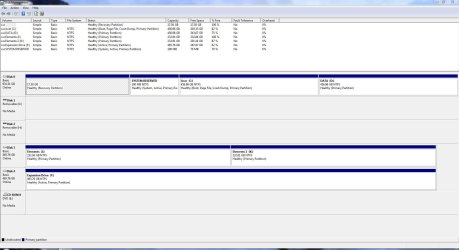
· Format and repartition discs checkbox
I haven't check this box in any of my image recoveries.
Correct me if I'm wrong: but I believe this formats the entire disk and you will lose information in any data partitions.
In my case (Disk 0) I would lose data on D: and maybe the recovery partition.
MS imaging will image System Reserved(active partition) and c:.
 

Attachments

  • disks.JPG
    disks.JPG
    143.5 KB · Views: 21

My Computer My Computer

At a glance

Windows 7x64 Home Premium SP1Intel i7 2600kG.Skill Ripjaws (DDR3-1600) 2x4GBNvidia GeForce GTS 450; Intel HD Graphics 300...
Computer type
PC/Desktop
Computer Manufacturer/Model Number
Own build
OS
Windows 7x64 Home Premium SP1
CPU
Intel i7 2600k
Motherboard
ASUS P8Z68 Deluxe
Memory
G.Skill Ripjaws (DDR3-1600) 2x4GB
Graphics Card(s)
Nvidia GeForce GTS 450; Intel HD Graphics 3000(GT2+)
Monitor(s) Displays
Dell Ultrasharp IPS panel U2311H, Samsung SyncMaster P2350
Screen Resolution
1920x1080
Hard Drives
Samsung 850 Pro SSD 256GB, Samsung SSD 840 120GB, Seagates 1TB Barracuda ST31000528AS x2
PSU
Seasonic M12II 520W
Case
Lian Li Lancool PC-K60
Cooling
Case: 1x120mm, 3x140mm CPU: Hyper 212+
Keyboard
Logitech MK520 (wireless)
Mouse
Logitech MK520
Internet Speed
6-7 Mbps
Antivirus
Norton Security Premium, Malwarebytes on 2 (MSE on 3rd PC)
Browser
FireFox
Other Info
Audio: Logitech Z523 2.1
From my previous post:

CREATE A SYSTEM IMAGE BACKUP
· START | type Backup your computer | Enter key
· In left-hand pane, select Create a System Image
· select where you want to save the backup | Next
· Select the drives you want to backup | Next
· Start Backup button
· Finish button after completion
 

My Computer My Computer

At a glance

MS Windows 7 Ultimate SP1 64-bitAMD A10-4600M6.00 GB Dual-Channel DDR3 @ 798MHz (11-11-12-28)AMD Radeon HD 7660G
Computer Manufacturer/Model Number
Toshiba Satellite S875D-S7239 laptop
OS
MS Windows 7 Ultimate SP1 64-bit
CPU
AMD A10-4600M
Motherboard
AMD Pumori (Socket FT1)
Memory
6.00 GB Dual-Channel DDR3 @ 798MHz (11-11-12-28)
Graphics Card(s)
AMD Radeon HD 7660G
Sound Card
High Definition Audio Device
Monitor(s) Displays
Generic PnP Monitor (1600x900@60Hz)
Screen Resolution
1600x900@60Hz
Hard Drives
SSD 119GB Corsair CSSD-V128GB2 ATA Device
Keyboard
Standard PS/2 Keyboard
Mouse
HP Wireless Optical Mobile Mouse Model FHA-3410
Internet Speed
What the local pub, local coffee shop offers.
Other Info
Optical Drive:MATSHITA BD-CMB UJ160B ATA Device


Also have an Asus ha1002xp netbook with Win 7 Ultimate installed.
From my previous post:

CREATE A SYSTEM IMAGE BACKUP
· START | type Backup your computer | Enter key
· In left-hand pane, select Create a System Image
· select where you want to save the backup | Next
·Select the drives you want to backup | Next
· Start Backup button
· Finish button after completion

My post is about your RESTORING DIRECTIONS.
If I'm trying to put the image on a NEW HDD then I would tick the box.
 

My Computer My Computer

At a glance

Windows 7x64 Home Premium SP1Intel i7 2600kG.Skill Ripjaws (DDR3-1600) 2x4GBNvidia GeForce GTS 450; Intel HD Graphics 300...
Computer type
PC/Desktop
Computer Manufacturer/Model Number
Own build
OS
Windows 7x64 Home Premium SP1
CPU
Intel i7 2600k
Motherboard
ASUS P8Z68 Deluxe
Memory
G.Skill Ripjaws (DDR3-1600) 2x4GB
Graphics Card(s)
Nvidia GeForce GTS 450; Intel HD Graphics 3000(GT2+)
Monitor(s) Displays
Dell Ultrasharp IPS panel U2311H, Samsung SyncMaster P2350
Screen Resolution
1920x1080
Hard Drives
Samsung 850 Pro SSD 256GB, Samsung SSD 840 120GB, Seagates 1TB Barracuda ST31000528AS x2
PSU
Seasonic M12II 520W
Case
Lian Li Lancool PC-K60
Cooling
Case: 1x120mm, 3x140mm CPU: Hyper 212+
Keyboard
Logitech MK520 (wireless)
Mouse
Logitech MK520
Internet Speed
6-7 Mbps
Antivirus
Norton Security Premium, Malwarebytes on 2 (MSE on 3rd PC)
Browser
FireFox
Other Info
Audio: Logitech Z523 2.1
It works perfectly. I've done many, many times. I've tested all of the ins and outs of Win 7 Backup and Restore and you can't go wrong.
 

My Computer My Computer

At a glance

MS Windows 7 Ultimate SP1 64-bitAMD A10-4600M6.00 GB Dual-Channel DDR3 @ 798MHz (11-11-12-28)AMD Radeon HD 7660G
Computer Manufacturer/Model Number
Toshiba Satellite S875D-S7239 laptop
OS
MS Windows 7 Ultimate SP1 64-bit
CPU
AMD A10-4600M
Motherboard
AMD Pumori (Socket FT1)
Memory
6.00 GB Dual-Channel DDR3 @ 798MHz (11-11-12-28)
Graphics Card(s)
AMD Radeon HD 7660G
Sound Card
High Definition Audio Device
Monitor(s) Displays
Generic PnP Monitor (1600x900@60Hz)
Screen Resolution
1600x900@60Hz
Hard Drives
SSD 119GB Corsair CSSD-V128GB2 ATA Device
Keyboard
Standard PS/2 Keyboard
Mouse
HP Wireless Optical Mobile Mouse Model FHA-3410
Internet Speed
What the local pub, local coffee shop offers.
Other Info
Optical Drive:MATSHITA BD-CMB UJ160B ATA Device


Also have an Asus ha1002xp netbook with Win 7 Ultimate installed.
Back
Top