
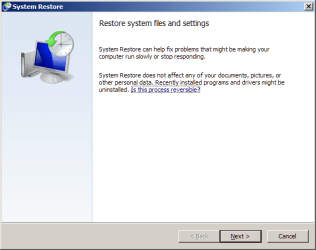
Having used System Restore dozens of times for many years I just noticed conflicting information in Win 7 on whether it affects your files. It says:
"System Restore does not affect any of your documents, pictures or other personal data."
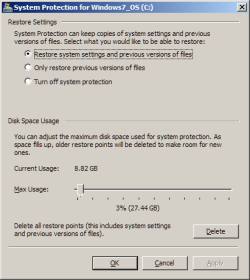
But you see the total opposite under System Protection > Configure where the choices are:
It really all depends on what they mean by "files". Isn't everything in the computer a file? - program files, settings, your own documents and photos and music.
"System Restore does not affect any of your documents, pictures or other personal data."
But you see the total opposite under System Protection > Configure where the choices are:
"- Restore system settings and previous versions of files
- Only restore previous version of files
- Turn off system protection"
I thought the whole point was that it restores the state of the OS and installed programs and does not affect your own files, that is, your photos and MS Office documents and so forth but now I'm confused. I don't understand why Configure doesn't have an option for "Restore system settings and DON'T restore previous of files".- Only restore previous version of files
- Turn off system protection"
It really all depends on what they mean by "files". Isn't everything in the computer a file? - program files, settings, your own documents and photos and music.
Attachments
My Computer
At a glance
7 Pro 64Intel Core i5-2540M 2.6 GHz6 GB RAM
- Computer type
- Laptop
- Computer Manufacturer/Model Number
- Lenovo Thinkpad T520
- OS
- 7 Pro 64
- CPU
- Intel Core i5-2540M 2.6 GHz
- Memory
- 6 GB RAM
- Hard Drives
- 1 Tb


