Hi all, again.  I'm running Win764 Ultimate, and attempting to use the built-in Explorer software to burn a DVD-ROM. When I drag the intended files over to the designated DVD-ROM Drive, it copies them to a "temp" location on Drive C:\. This is a Dual Layer DVD+R recorder and disc, so we're talking 8.5GB capacity (6.6 actually to burn).
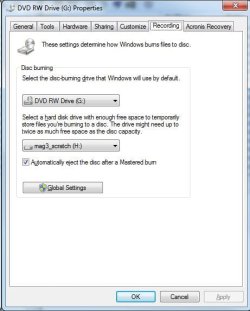
Being someone who, naturally, attempts to keep as much off of Drive C: as possible, I checked out the "properties" of the drive (by right clicking on the drive root entry on the left panel in Explorer). One of the tabs is "Recording" On that tab, I can "select a hard drive with enough Free space to store the files temporarily, that you wish to burn." (see attached).
It was set to C:\ by default. I changed it to a different drive letter (a "scratch" drive that acts as temporary disk space for me. It is much faster, actually (a SATA III drive in a the only SATA III socket on the MB). It's lightning fast, otherwise. I saved the setting. I noticed that Explorer created a temp directory on that drive for DVD burning. I then rebooted the machine.
However, when I attempt to drag/drop more files on to DVD-ROM drive, it still copies them temporarily to drive C:\, ignoring the setting I have in place. I checked, and sure enough, it's still shows as being set to my new H:\ scratch drive, but it doesn't behave that way.
Am I missing something here, or does Explorer seem to have a mind of its own? Is there any other setting I can change to make it do what I ask? Do I have to be a "local admin" to make it work (the Account I'm using is an "Enterprise Admin" account from AD on my PDC). Perhaps, a "security policy" setting that needs changing?
Anyway, all help greatly appreciated.
Thanks & Regards,
Arnold
I'm running Win764 Ultimate, and attempting to use the built-in Explorer software to burn a DVD-ROM. When I drag the intended files over to the designated DVD-ROM Drive, it copies them to a "temp" location on Drive C:\. This is a Dual Layer DVD+R recorder and disc, so we're talking 8.5GB capacity (6.6 actually to burn). Being someone who, naturally, attempts to keep as much off of Drive C: as possible, I checked out the "properties" of the drive (by right clicking on the drive root entry on the left panel in Explorer). One of the tabs is "Recording" On that tab, I can "select a hard drive with enough Free space to store the files temporarily, that you wish to burn." (see attached).
It was set to C:\ by default. I changed it to a different drive letter (a "scratch" drive that acts as temporary disk space for me. It is much faster, actually (a SATA III drive in a the only SATA III socket on the MB). It's lightning fast, otherwise. I saved the setting. I noticed that Explorer created a temp directory on that drive for DVD burning. I then rebooted the machine.
However, when I attempt to drag/drop more files on to DVD-ROM drive, it still copies them temporarily to drive C:\, ignoring the setting I have in place. I checked, and sure enough, it's still shows as being set to my new H:\ scratch drive, but it doesn't behave that way.
Am I missing something here, or does Explorer seem to have a mind of its own? Is there any other setting I can change to make it do what I ask? Do I have to be a "local admin" to make it work (the Account I'm using is an "Enterprise Admin" account from AD on my PDC). Perhaps, a "security policy" setting that needs changing?
Anyway, all help greatly appreciated.
Thanks & Regards,
Arnold
Attachments
My Computer
- OS
- Win 7 64bit ultimate