Solved Why does Windows fail to load on some occasions?

BJC1992

New member
Member
Local time
2:14 AM
Messages
94
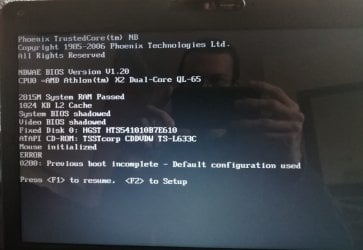
I'm writing this post on behalf of my Grandad who is experiencing problems with his laptop. The laptop can run perfectly for two weeks for example, and then all of a sudden it will start playing up. So today it was having one of its moments, so after pressing the 'on' button it just shows a blank screen with a flashing underscore at the top left of the screen, this will go on for about 15-20 minutes, before being presented with the image in the screenshot below.
After pressing F1 the laptop starts as normal and is absolutely fine, perhaps for another two weeks. The laptop has recently had a new HDD fitted so we know its unlikely to be a fault there as the laptop also had this issue before the HDD change.
The laptop in question is a Toshiba (Model: Satellite L450D-13p)
 

Attachments
  • IMG_20210317_143006_resized_20210317_055903906 (2).jpg
    IMG_20210317_143006_resized_20210317_055903906 (2).jpg
    68.7 KB · Views: 0

My Computer

Computer type
PC/Desktop
Computer Manufacturer/Model Number
Advent SE 1101
OS
Windows 7 32 Bit
CPU
AMD Sempron(tm) 140 Processor 2.70Ghz
Memory
4GB (3.12GB Usable)
Graphics Card(s)
Nvidia GeForce 210
Sound Card
Nvidia High Definition Audio
Monitor(s) Displays
Compaq 7500
Hard Drives
320GB
Keyboard
Standard PS/2 Keyboard
Mouse
Microsoft PS/2 Mouse
Antivirus
Avast Antivirus Free
Browser
Google Chrome
Other Info
ACPI x86 Based PC

My Computers

System One System Two

  • Computer type
    PC/Desktop
    OS
    7 X64
    CPU
    i5 8400
    Motherboard
    gigabyte b365m ds3h
    Memory
    2x8gb 3200mhz
    Hard Drives
    various
    PSU
    pure power 11 400w cm
    Case
    Coolermaster
    Cooling
    cryorig m9i
  • Computer type
    PC/Desktop
    OS
    7x64
    CPU
    g5400
    Motherboard
    ga b365m ds3h
    Memory
    8gb ddr4 2400
    PSU
    xfx pro 450w
So as this particular problem is a bit over my head could someone explain exactly what is happening with the laptop, can anyone tell from the screenshot what is going on? Also with the links mentioned above by SIW2 what do I need to do with that as it wants me to download the zip file, I try this but my PC says the file may be dangerous.
 

My Computer

Computer type
PC/Desktop
Computer Manufacturer/Model Number
Advent SE 1101
OS
Windows 7 32 Bit
CPU
AMD Sempron(tm) 140 Processor 2.70Ghz
Memory
4GB (3.12GB Usable)
Graphics Card(s)
Nvidia GeForce 210
Sound Card
Nvidia High Definition Audio
Monitor(s) Displays
Compaq 7500
Hard Drives
320GB
Keyboard
Standard PS/2 Keyboard
Mouse
Microsoft PS/2 Mouse
Antivirus
Avast Antivirus Free
Browser
Google Chrome
Other Info
ACPI x86 Based PC
The message indicates it didn't boot with configured settings, so it reverts to defaults.

Because it happens every couple of weeks, it might be a bios issue. There is a newer bios for that machine, which is linked in my post. It is from the dynabook site. It doesn't say what the changes are, but they are often for "improved stability".


If you dont know how to update bios, there are many youtube videos.
 

My Computers

System One System Two

  • Computer type
    PC/Desktop
    OS
    7 X64
    CPU
    i5 8400
    Motherboard
    gigabyte b365m ds3h
    Memory
    2x8gb 3200mhz
    Hard Drives
    various
    PSU
    pure power 11 400w cm
    Case
    Coolermaster
    Cooling
    cryorig m9i
  • Computer type
    PC/Desktop
    OS
    7x64
    CPU
    g5400
    Motherboard
    ga b365m ds3h
    Memory
    8gb ddr4 2400
    PSU
    xfx pro 450w
OK many thanks for that, I should be able to have a go at that when I next have access to the laptop, probably next week, then I'll update the thread and mark as solved if I am successful.
 

My Computer

Computer type
PC/Desktop
Computer Manufacturer/Model Number
Advent SE 1101
OS
Windows 7 32 Bit
CPU
AMD Sempron(tm) 140 Processor 2.70Ghz
Memory
4GB (3.12GB Usable)
Graphics Card(s)
Nvidia GeForce 210
Sound Card
Nvidia High Definition Audio
Monitor(s) Displays
Compaq 7500
Hard Drives
320GB
Keyboard
Standard PS/2 Keyboard
Mouse
Microsoft PS/2 Mouse
Antivirus
Avast Antivirus Free
Browser
Google Chrome
Other Info
ACPI x86 Based PC
BJC1992:

What is the exact serial number on that Toshiba Satellite L450D-13P laptop.
What country was it originally purchased in?

Be real careful about updating the BIOS from 1.20 to 1.30.
If the BIOS update fails, you may be left with a paperweight or a doorstop.
 

My Computer

Computer type
PC/Desktop
Computer Manufacturer/Model Number
Dell OptiPlex 9020
OS
Windows 7 Professional SP1 64-bit
CPU
Intel Core i7-4790 3.60 GHz
Memory
32 GB DDR3-1600 MHz
Graphics Card(s)
Integrated Intel HD Graphics 4600
Monitor(s) Displays
Viewsonic 32" LCD
Hard Drives
Kingston SATA 3 240 GB SSD
Internet Speed
Spectrum Internet 1000 Mbps
The serial number is 3A557514K, and was purchased in the UK.
I'll be careful when updating the BIOS, I'll research the above points first. And I do have another laptop that can be used if this one gets messed up so is definitely worth me trying.
 

My Computer

Computer type
PC/Desktop
Computer Manufacturer/Model Number
Advent SE 1101
OS
Windows 7 32 Bit
CPU
AMD Sempron(tm) 140 Processor 2.70Ghz
Memory
4GB (3.12GB Usable)
Graphics Card(s)
Nvidia GeForce 210
Sound Card
Nvidia High Definition Audio
Monitor(s) Displays
Compaq 7500
Hard Drives
320GB
Keyboard
Standard PS/2 Keyboard
Mouse
Microsoft PS/2 Mouse
Antivirus
Avast Antivirus Free
Browser
Google Chrome
Other Info
ACPI x86 Based PC
Your Toshiba Satellite L450D-13P laptop was purchased in the U.K. on 2010-04-08, so it's more than 10 years old.

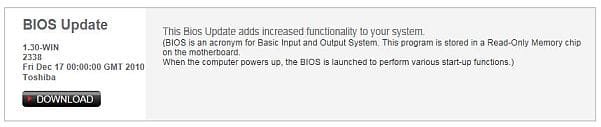
This is the details for its BIOS 1.30-WIN update.
 

Attachments

  • Capture.JPG
    Capture.JPG
    17.9 KB · Views: 19

My Computer

Computer type
PC/Desktop
Computer Manufacturer/Model Number
Dell OptiPlex 9020
OS
Windows 7 Professional SP1 64-bit
CPU
Intel Core i7-4790 3.60 GHz
Memory
32 GB DDR3-1600 MHz
Graphics Card(s)
Integrated Intel HD Graphics 4600
Monitor(s) Displays
Viewsonic 32" LCD
Hard Drives
Kingston SATA 3 240 GB SSD
Internet Speed
Spectrum Internet 1000 Mbps
OK great, many thanks for that, I'll have access to the laptop within the next week so will update this thread once I've sorted it out.
 

My Computer

Computer type
PC/Desktop
Computer Manufacturer/Model Number
Advent SE 1101
OS
Windows 7 32 Bit
CPU
AMD Sempron(tm) 140 Processor 2.70Ghz
Memory
4GB (3.12GB Usable)
Graphics Card(s)
Nvidia GeForce 210
Sound Card
Nvidia High Definition Audio
Monitor(s) Displays
Compaq 7500
Hard Drives
320GB
Keyboard
Standard PS/2 Keyboard
Mouse
Microsoft PS/2 Mouse
Antivirus
Avast Antivirus Free
Browser
Google Chrome
Other Info
ACPI x86 Based PC
I've had a look at the information above, but can't find online what I need, just a bunch of other stuff. the BIOS thats currently showing is "Toshiba V1.20, 17/11/2009", what the easiest way to update that?

Would appreciate any help/advice.
 
Last edited:

My Computer

Computer type
PC/Desktop
Computer Manufacturer/Model Number
Advent SE 1101
OS
Windows 7 32 Bit
CPU
AMD Sempron(tm) 140 Processor 2.70Ghz
Memory
4GB (3.12GB Usable)
Graphics Card(s)
Nvidia GeForce 210
Sound Card
Nvidia High Definition Audio
Monitor(s) Displays
Compaq 7500
Hard Drives
320GB
Keyboard
Standard PS/2 Keyboard
Mouse
Microsoft PS/2 Mouse
Antivirus
Avast Antivirus Free
Browser
Google Chrome
Other Info
ACPI x86 Based PC
It can be that your CMOS battery need to be replaced.
The CMOS battery holds the BIOS configuration and power the RTC (real time clock)
Did you noticed that after some hours powered off, when you boot the clock is wrong (near midnight on another year)?

To update the BIOS, Download the BIOS1.30- Win and extract the BIOS130.exe to a folder.

Disable the anti virus and close all active programs.
Run BIOS130.exe
 
Last edited:

My Computers

System One System Two

  • Computer type
    PC/Desktop
    Computer Manufacturer/Model Number
    custom build
    OS
    Windows 7 HP 64
    CPU
    i5 6600K - 800MHz to 4200MHz
    Motherboard
    GA-Z170-HD3P
    Memory
    4+4G GSkill DDR4 3000
    Graphics Card(s)
    IG - Intel 530
    Monitor(s) Displays
    Samsung 226BW
    Screen Resolution
    1680x1050
    Hard Drives
    (1) -1 SM951 – 128GB M.2 AHCI PCIe SSD drive for Windows 7 and Lubuntu
    (2) -1 WD SATA 3 - 1T for Data
    (3) -1 WD SATA 3 - 1T for backup
    PSU
    Thermaltake 450W TR2 gold
    Keyboard
    Old and good Chicony mechanical keyboard
    Mouse
    Logitech mX performance - 9 buttons (had to disable some)
    Internet Speed
    500Mb/s
    Browser
    Firefox 64
    Other Info
    TinyWall firewall
  • Computer type
    Laptop
    System Manufacturer/Model Number
    Asus Q550LF
    OS
    Windows 7 Pro
    CPU
    i7-4500U 800MHz to 3.0GHz
    Motherboard
    Asus Q550LF
    Memory
    (4+4)G DDR3 1600
    Graphics Card(s)
    IG intel 4400 + NVIDIA GeForce GT 745M
    Sound Card
    Realtek
    Monitor(s) Displays
    LG Display LP156WF4-SPH1
    Screen Resolution
    1920 x 1080
    Hard Drives
    BX500 120G SSD for Windows and programs +
    1T HDD for data
    Internet Speed
    500 Mb/s
    Browser
    Firefox
    Other Info
    TinyWall firewall
...and hopefully, maybe, possibly, you have a borrowed or owned UPS with AVR, you do not want any surge, brownout, or blackout during BIOS updating operation. That would be ultra-safe :)
 

My Computer

Computer type
PC/Desktop
Computer Manufacturer/Model Number
Antec desktop; Acer Aspire laptops
OS
Windows 7 Professional 64-bit
CPU
Desktop i5; Acers i5 & i7
Memory
desktop 16GB; 1 Acer 8GB & 1 Acer 16GB
Hard Drives
1TB split into 2 equal partitions [OS and data] usable by RJS
Internet Speed
AT&T DSL
Browser
FF, GChrome, msIE
Other Info
Windows 7 Firewall, Emsisoft AM/AV, MSE [scan-only], SpywareBlaster, Ruiware/BillP combine
It can be that your CMOS battery need to be replaced.
The CMOS battery holds the BIOS configuration and power the RTC (real time clock)
Did you noticed that after some hours powered off, when you boot the clock is wrong (near midnight on another year)?

To update the BIOS, Download the BIOS1.30- Win and extract the BIOS130.exe to a folder.

Disable the anti virus and close all active programs.
Run BIOS130.exe

I had the CMOS battery changed a few years ago, the clock is showing correct so that can't be the culprit. I'll proceed with the BIOS update and see if that helps.
 

My Computer

Computer type
PC/Desktop
Computer Manufacturer/Model Number
Advent SE 1101
OS
Windows 7 32 Bit
CPU
AMD Sempron(tm) 140 Processor 2.70Ghz
Memory
4GB (3.12GB Usable)
Graphics Card(s)
Nvidia GeForce 210
Sound Card
Nvidia High Definition Audio
Monitor(s) Displays
Compaq 7500
Hard Drives
320GB
Keyboard
Standard PS/2 Keyboard
Mouse
Microsoft PS/2 Mouse
Antivirus
Avast Antivirus Free
Browser
Google Chrome
Other Info
ACPI x86 Based PC
Normally when it stop during POST is the CMOS battery.
Do you have a CMOS battery sensor on BIOS?

Did you do a disk check?
Open a CMD window as administrator and type:
chkdsk c: /f
It will say your disk is in use and if you want to schedule to next start = yes
Restart
Pay attention on the results, specially bad blocks, bad clusters, bad sectors etc
 

My Computers

System One System Two

  • Computer type
    PC/Desktop
    Computer Manufacturer/Model Number
    custom build
    OS
    Windows 7 HP 64
    CPU
    i5 6600K - 800MHz to 4200MHz
    Motherboard
    GA-Z170-HD3P
    Memory
    4+4G GSkill DDR4 3000
    Graphics Card(s)
    IG - Intel 530
    Monitor(s) Displays
    Samsung 226BW
    Screen Resolution
    1680x1050
    Hard Drives
    (1) -1 SM951 – 128GB M.2 AHCI PCIe SSD drive for Windows 7 and Lubuntu
    (2) -1 WD SATA 3 - 1T for Data
    (3) -1 WD SATA 3 - 1T for backup
    PSU
    Thermaltake 450W TR2 gold
    Keyboard
    Old and good Chicony mechanical keyboard
    Mouse
    Logitech mX performance - 9 buttons (had to disable some)
    Internet Speed
    500Mb/s
    Browser
    Firefox 64
    Other Info
    TinyWall firewall
  • Computer type
    Laptop
    System Manufacturer/Model Number
    Asus Q550LF
    OS
    Windows 7 Pro
    CPU
    i7-4500U 800MHz to 3.0GHz
    Motherboard
    Asus Q550LF
    Memory
    (4+4)G DDR3 1600
    Graphics Card(s)
    IG intel 4400 + NVIDIA GeForce GT 745M
    Sound Card
    Realtek
    Monitor(s) Displays
    LG Display LP156WF4-SPH1
    Screen Resolution
    1920 x 1080
    Hard Drives
    BX500 120G SSD for Windows and programs +
    1T HDD for data
    Internet Speed
    500 Mb/s
    Browser
    Firefox
    Other Info
    TinyWall firewall
I haven't done a disk check but I will do so when I next have access to the laptop.
So from the last few posts it would seem that it's either the CMOS battery, or the BIOS update. It could be a few weeks before I have access to the laptop so I'll mark the thread as solved. If the above doesn't work I'll open the thread again.
 

My Computer

Computer type
PC/Desktop
Computer Manufacturer/Model Number
Advent SE 1101
OS
Windows 7 32 Bit
CPU
AMD Sempron(tm) 140 Processor 2.70Ghz
Memory
4GB (3.12GB Usable)
Graphics Card(s)
Nvidia GeForce 210
Sound Card
Nvidia High Definition Audio
Monitor(s) Displays
Compaq 7500
Hard Drives
320GB
Keyboard
Standard PS/2 Keyboard
Mouse
Microsoft PS/2 Mouse
Antivirus
Avast Antivirus Free
Browser
Google Chrome
Other Info
ACPI x86 Based PC
Back
Top