Does Windows7 have AHCI issues?

ranjan2001

New member
Power User
Local time
4:28 PM
Messages
143
Location
NewDelhi, India
Does Windows7 have AHCI/SATA install issues?

I remember Vista could not install if the HDD was configured as SATA as the drivers were not inbuilt & it use to hang & give BSOD.

Is this problem over in windows7 RC1 or does it still require to integrate SATA drivers & make custom installation DVD?
 

My Computer My Computer

At a glance

Windows 7 Ultimate x64 build 7600Intel C2D 6300 1.86MHz4x1Gb Transcend JetRAM DDR2 PC2-6400 800MHzXFX 7600GT
Computer Manufacturer/Model Number
Custom Built
OS
Windows 7 Ultimate x64 build 7600
CPU
Intel C2D 6300 1.86MHz
Motherboard
Asus P5B-dlx wifi
Memory
4x1Gb Transcend JetRAM DDR2 PC2-6400 800MHz
Graphics Card(s)
XFX 7600GT
Sound Card
Creative Audigy Value
Monitor(s) Displays
Lenovo 20"
Screen Resolution
1680x1050
Hard Drives
4 x 1.5TB Seagate barracuda
PSU
Zebronics Platinum 450Watts
Case
Zebronics Peace
Cooling
stock cooling
Keyboard
silicon keyboard
Mouse
Logitech 3 button mouse
Internet Speed
1mbps
I was able to install on both a machine with AHCI enabled and one still using SATA. Granted, the AHCI was on an x58 board which is fairly new so that might play a role but I doubt it.
 

My Computer My Computer

At a glance

Windows 7 Ultimate x64 RC1 (7100), Vista Ulti...Intel Core i7 920Corsair Dominator 6GB DDR3 1600 8-8-8-24 T1Dual EVGA GTX280 SLI
Computer Manufacturer/Model Number
Custom Built
OS
Windows 7 Ultimate x64 RC1 (7100), Vista Ultimate x64 SP1
CPU
Intel Core i7 920
Motherboard
EVGA X58 3x SLI
Memory
Corsair Dominator 6GB DDR3 1600 8-8-8-24 T1
Graphics Card(s)
Dual EVGA GTX280 SLI
Sound Card
On board Realtek HD Audio
Monitor(s) Displays
BenQ V2400W 24" LCD Panel
Screen Resolution
1920x1200
Hard Drives
WD Velociraptor 300GB 10k RPM Sata
WD Caviar Black 1TB 7200 RPM Sata
PSU
Corsair 750TX
Case
Antec P182 Gun Metal finish
Cooling
Noctua NH-U12P SE1366
Keyboard
Microsoft Natural Ergo 4000
Mouse
Logitech LX7 Cordless Optical Mouse
Internet Speed
10MB Cable

My Computer My Computer

At a glance

Windows 7 Ultimate x64 build 7600Intel C2D 6300 1.86MHz4x1Gb Transcend JetRAM DDR2 PC2-6400 800MHzXFX 7600GT
Computer Manufacturer/Model Number
Custom Built
OS
Windows 7 Ultimate x64 build 7600
CPU
Intel C2D 6300 1.86MHz
Motherboard
Asus P5B-dlx wifi
Memory
4x1Gb Transcend JetRAM DDR2 PC2-6400 800MHz
Graphics Card(s)
XFX 7600GT
Sound Card
Creative Audigy Value
Monitor(s) Displays
Lenovo 20"
Screen Resolution
1680x1050
Hard Drives
4 x 1.5TB Seagate barracuda
PSU
Zebronics Platinum 450Watts
Case
Zebronics Peace
Cooling
stock cooling
Keyboard
silicon keyboard
Mouse
Logitech 3 button mouse
Internet Speed
1mbps
Aah, I gotcha. The first time I performed an AHCI install was on my new build... with 7057.

:p
 

My Computer My Computer

At a glance

Windows 7 Ultimate x64 RC1 (7100), Vista Ulti...Intel Core i7 920Corsair Dominator 6GB DDR3 1600 8-8-8-24 T1Dual EVGA GTX280 SLI
Computer Manufacturer/Model Number
Custom Built
OS
Windows 7 Ultimate x64 RC1 (7100), Vista Ultimate x64 SP1
CPU
Intel Core i7 920
Motherboard
EVGA X58 3x SLI
Memory
Corsair Dominator 6GB DDR3 1600 8-8-8-24 T1
Graphics Card(s)
Dual EVGA GTX280 SLI
Sound Card
On board Realtek HD Audio
Monitor(s) Displays
BenQ V2400W 24" LCD Panel
Screen Resolution
1920x1200
Hard Drives
WD Velociraptor 300GB 10k RPM Sata
WD Caviar Black 1TB 7200 RPM Sata
PSU
Corsair 750TX
Case
Antec P182 Gun Metal finish
Cooling
Noctua NH-U12P SE1366
Keyboard
Microsoft Natural Ergo 4000
Mouse
Logitech LX7 Cordless Optical Mouse
Internet Speed
10MB Cable
I remember Vista could not install if the HDD was configured as SATA as the drivers were not inbuilt & it use to hang & give BSOD.

Is this problem over in windows7 RC1 or does it still require to integrate SATA drivers & make custom installation DVD?

You could install Vista in AHCI mode out of the box withtout third party drivers with Intel based Chipsets. Not sure if it was the case with mb using chipsets or an external sata controler like the ones from Promise.

I saw you use a P5B-DLX-Wifi too and I always used it and installed Vista in AHCI mode without a BSOD under Vista.

With Windows 7 it's another story. I had to reinstall in IDE mode yesterday after having used it in AHCI mode since the beta as yesterday my system became unbootable for no reason and unrepairable. The system became unbootable before and I could repair it but this time things were too messed up to do something, so I decided that it wasn't worth it anymore and reinstalled everything with the bios set to IDE instead of AHCI.
Avoid the drivers from Intel, even the beta, they don't seem to work well with the ICH8R chipset (maybe just for my computer?). The drivers that come with W7 worked better here.
 

My Computer My Computer

At a glance

Windows 7 x64
OS
Windows 7 x64
I have an Asus Maximus Formula (x38) and had absolutely no issues with installing 7 on an AHCI setup.
 

My Computer My Computer

At a glance

Windows 7 64-bitIntel C2D E8400 WolfdaleMushkin 2GB DDR2 800Asus 8800GT
OS
Windows 7 64-bit
CPU
Intel C2D E8400 Wolfdale
Motherboard
Asus Maximus Formula
Memory
Mushkin 2GB DDR2 800
Graphics Card(s)
Asus 8800GT
Hard Drives
2x Seagate Barracuda ES.2 ST3250310NS 250GB 7200 RPM 32MB Cache SATA-II
PSU
Cooler Master Real Power Pro RS-650-ACAA-A1
Case
Lian-li PC-1010B
Mouse
Logitech G7
I have an Asus Maximus Formula (x38) and had absolutely no issues with installing 7 on an AHCI setup.

Maybe it's just my setup or a problem with the ICH8R chipsets.

These are the issues I had since the Beta using AHCI mode with the AHCI drivers from Intel with a P5B-DLX-Wifi.
- Install would become unbootable for no reason (NTLDR missing). Like after a reboot or a shutdown when before everything worked perfectly fine.
- random freeze during normal activity or files transfer HDD to HDD, or same drive but different partition. Sometimes I even had to hard reboot the computer to get it to work again.
- SATA DVD-RW recognized as CD-Rom, or not recognized at all, and made the system hang.
(I know some SATA drive have a hard time dealing with the AHCI mode and installing the SATA ODD on the promise IDE/SATA controller set to IDE mode fixed that)

And these were the issues I encountered with the AHCI drivers that come with W7, but were much rare than with the AHCI drivers from Intel.
- Install would become unbootable for no reason (NTLDR missing). Like after a reboot or a shutdown.
- random freeze that lasted a few seconds during normal disk activity, or same drive but different partition. I never had to hard reboot as with the AHCI drivers from Intel.
 

My Computer My Computer

At a glance

Windows 7 x64
OS
Windows 7 x64
I remember Vista could not install if the HDD was configured as SATA as the drivers were not inbuilt & it use to hang & give BSOD.

Is this problem over in windows7 RC1 or does it still require to integrate SATA drivers & make custom installation DVD?


The probleme With Vista (even XP) was when you swith to AHCI after installation.
During installation: If Vista doesn't have the good driver you should give them to it with a CD/DVD/USBkey/D7 and it would be fine. If you don't have the driver, Vista will not see the Drive

Seven know more hardware, and as more drivers by default. So for most hardware you will not need any additionnal driver.
I use AHCI on a P45 chipset with Seven since Beta version, I never had any issue (HDD and DVD drive are all SATA)
 

My Computer My Computer

At a glance

Vista H.P. SP1 x32 Seven RC x64Q6600 @ 3.4Ghz4Go PC2-64008500GT @ 700/500
OS
Vista H.P. SP1 x32 Seven RC x64
CPU
Q6600 @ 3.4Ghz
Motherboard
GA-EP45-DS3L
Memory
4Go PC2-6400
Graphics Card(s)
8500GT @ 700/500
Sound Card
Audigy Platinium
Monitor(s) Displays
Mitsubishi Diamond Pro 920 + Mitsubishi Diamond Pro 720
Screen Resolution
1600x1200 twice
Hard Drives
Hitachi 160Go
Maxtor 160Go (system drive)
Maxtor 200Go in Antec MX-1 EC external box (eSATA-USB2.0)
PSU
Corsair VX550W
Case
Thermaltake Xaser III
Cooling
Watercooling (CPU, GPU, HDD, NB)
Keyboard
MS Wireless Multimedia 6000 V2.0
Mouse
IntellEye Explorer 3.0
Internet Speed
ADSL 18Mbit/s/1Mbit/s

Thanks a bunch scaramonga for posting this as it worked perfectly!
I forgot about setting it up in the bios before I installed the RC 7100
& I wasn't going to do it all over again with all the programs I have installed & customizations I've done to the system to enable AHCI.

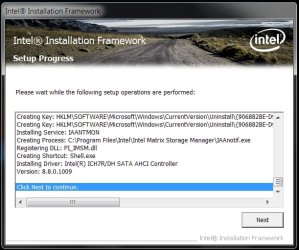
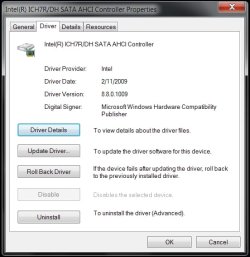
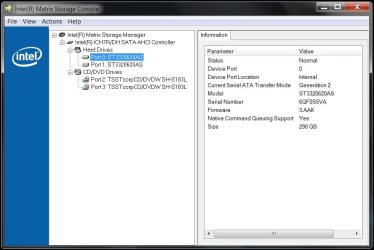
But after the registry modification I was able to install the latest Intel Matrix Storage drivers v8.8.0.1009 & I now have AHCI set in the bios with NCQ enabled! :p
 

Attachments

  • Intel Matrix Storage Manager v8.8.0.1009.jpg
    Intel Matrix Storage Manager v8.8.0.1009.jpg
    52.6 KB · Views: 159
  • Intel Matrix Storage Manager SATA-AHCI v8.8.0.1009.jpg
    Intel Matrix Storage Manager SATA-AHCI v8.8.0.1009.jpg
    37.8 KB · Views: 165
  • Intel Matrix Storage Console.jpg
    Intel Matrix Storage Console.jpg
    49 KB · Views: 322
Last edited:

My Computer My Computer

At a glance

Windows® 7 Ultimate x64 SP1Intel Core 2 Duo E8400 (E0) @ 4.0GHzG.SKILL-F2-8500CL5D-4GBPK (2x2Gbs) (5-5-5-15)...EVGA GTX 470 SC (845/1690/2000) 160Gbs
Computer Manufacturer/Model Number
ABS Tech Ultimate X9
OS
Windows® 7 Ultimate x64 SP1
CPU
Intel Core 2 Duo E8400 (E0) @ 4.0GHz
Motherboard
ASUS P5Q Pro Turbo / 1780 FSB
Memory
G.SKILL-F2-8500CL5D-4GBPK (2x2Gbs) (5-5-5-15) @ 1067Mhz
Graphics Card(s)
EVGA GTX 470 SC (845/1690/2000) 160Gbs
Sound Card
VIA HD Audio / Boston Acoustics
Monitor(s) Displays
Acer X222W HD 22" LCD 2500:1 / 5ms
Screen Resolution
1680x1050
Hard Drives
Seagate Barracuda SATAII 2 x 320GB
Seagate Barracuda SATAII 1Tb
Intel® Rapid Storage Technology v10.1.0.1008
AHCI-NCQ Enabled
PSU
Silent Pro GOLD 80 PLUS 800w /95% efficiency / SLI-Crossfire
Case
ABS Stealth Black-Custom
Cooling
CoolerMaster V6GT 6 Heatpipe 200w CPU Cooler
Keyboard
Logitech G15 Gaming Keyboard (Old Style Blue!)
Mouse
Logitech MX518 Gaming Mouse
Internet Speed
1Mbs-up/ 6Mbs-down
Thanks a bunch scaramonga for posting this as it worked perfectly!
I forgot about setting it up in the bios before I installed the RC 7100
& I wasn't going to do it all over again with all the programs I have installed & customizations I've done to the system to enable AHCI.

But after the registry modification I was able to install the latest Intel Matrix Storage drivers v8.8.0.1009 & I now have AHCI set in the bios with NCQ enabled! :p

Glad to help my friend, and great you got it working OK. :D:D
 

My Computer My Computer

At a glance

XP
OS
XP
Back
Top