Doing a Clean Install with a Upgrade Windows 7 Version

Looks like the x64 clean install from upgrade disc worked this time and accepted my product key during setup (when I had the x32 unactivated install on the HD first). Like I mentioned before I did delete the x32 partitions during the install and installed the x64 to the unallocated space. Therefore it seems that for the upgrade to do a clean install and accept your upgrade key you might have to have some form of windows install on a partition already (even if you just delete the partition 5 minutes later in the setup). I will confirm this by performing 2 more tests:

1.) Rebuild the RAID array (which removes any partitions prior to booting from install disc) and then try to install x32 version. I'm expecting this to not accept my product key

2.) Same as above but using x64 version. This is what failed for me the first time and prompted me to start this investigation

-Dan
 

My Computer My Computer

OS
windows7 RC
CPU
Intel Core 2 Duo E6300 (1.86Ghz)
Motherboard
Intel DG965WH
Memory
OCZ 4GB PC2-6400
Graphics Card(s)
ATI X1900XT
Sound Card
Creative Audigy2
Monitor(s) Displays
Samsung 213T 21" LCD
Screen Resolution
1600x1200
Hard Drives
2xMaxtor 300GB 7200rpm
Ok final post for the night. Both the 32-bit and 64-bit Windows 7 Home Premium Upgrade with a clean install DID NOT accept my upgrade product key when I rebuilt my RAID array first (aka removed all partition prior to booting off the windows7 DVDs). This tells us that to do a clean install you have to have some previous version of windows already installed on your PC somewhere (perhaps any drive or any partition). The fact that you can erase these partitions and install to the drive's bare unallocated space once in setup must mean that some flag is triggered during the initial loading of setup that detects the windows version somewhere. One key item to note: It seems like this works even with an unactivated copy of windows 7 installed on a partition.

Summary of what I tested tonight using my MS Store pre-ordered Windows 7 Home Premium Upgrade version downloaded today:

1.) Installing Win7 64-bit Upgrade as a Clean install on a completely blank hard drive prior to install -> Does not accept upgrade product key during setup and will not activate after installation completes

2.) Installing Win7 32-bit Upgrade as a Clean install, but having the 64-bit unactivated Win7 on the HD from #1 above prior to setup starting (Clean install meant I deleted all existing partitions during setup and installed to non-allocated space) -> WORKS AND DOES ACCEPT PRODUCT KEY DURING SETUP

3.) Installing Win7 64-bit Upgrade as a Clean install, but having the 32-bit unactivated Win7 on the HD from #2 above prior to setup starting (Clean install meant I deleted all existing partitions during setup and installed to non-allocated space) -> WORKS AND DOES ACCEPT PRODUCT KEY DURING SETUP

4.) Removing partitions from #3 above and Installing Win7 32-bit Upgrade as a Clean install on a completely blank hard drive prior to install -> Does not accept upgrade product key during setup and will not activate after installation completes

5.) Removed all partitions and verified #1 again -> DOES NOT WORK

Bottom Line:

A.) If you have a previous windows installation on a drive somewhere in your system and you want to do a clean install from your upgrade disc you should have no problem, as long as that partition is still intact during setup. You can even delete this partition during setup and create a blank hard drive to install to and do a completely clean 1 time installation. This will work with your Windows 7 Home Premium 32/64 Upgrade DVD and upgrade key.

B.) If you have a COMPLETELY BLANK HARD DRIVE prior to install (no previous partitions at all with windows on them), your Windows 7 Home Premium 32/64 Upgrade DVD and upgrade key WILL NOT BE ACCEPTED during setup, and also will not activate later once in windows after installation completes (ex: you leave the product key blank during setup so that setup can complete)

--> The workaround to situation B is to just run the Windows 7 clean installation a second time. The first time you just simply leave the product key empty so that setup can complete. Once in windows after the first install, don't bother trying to activate. Then just reinstall again booting from the upgrade DVD media again. I know this is completely lame and is essentially a 2x installation, but at least you can still do a true Clean Install (no need to try an in-place upgrade from win7 to win7 sillyness), and this time it will accept your upgrade key.

Hope that wasn't too confusing!! Feel free to ask questions if anything's not clear! :geek:

-Dan

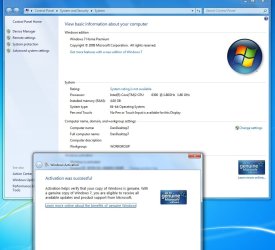
UPDATE: Just wanted to update that online activation went thru just fine a few min ago for me following scenario B above where I did the 2nd clean install with my upgrade key after the first install without the upgrade key, screenshot attached =)
 

Attachments

  • win7_activated.jpg
    win7_activated.jpg
    87 KB · Views: 1,410
Last edited:

My Computer My Computer

OS
windows7 RC
CPU
Intel Core 2 Duo E6300 (1.86Ghz)
Motherboard
Intel DG965WH
Memory
OCZ 4GB PC2-6400
Graphics Card(s)
ATI X1900XT
Sound Card
Creative Audigy2
Monitor(s) Displays
Samsung 213T 21" LCD
Screen Resolution
1600x1200
Hard Drives
2xMaxtor 300GB 7200rpm
Ok final post for the night. Both the 32-bit and 64-bit Windows 7 Home Premium Upgrade with a clean install DID NOT accept my upgrade product key when I rebuilt my RAID array first (aka removed all partition prior to booting off the windows7 DVDs). This tells us that to do a clean install you have to have some previous version of windows already installed on your PC somewhere (perhaps any drive or any partition). The fact that you can erase these partitions and install to the drive's bare unallocated space once in setup must mean that some flag is triggered during the initial loading of setup that detects the windows version somewhere. One key item to note: It seems like this works even with an unactivated copy of windows 7 installed on a partition.

Summary of what I tested tonight using my MS Store pre-ordered Windows 7 Home Premium Upgrade version downloaded today:

1.) Installing Win7 64-bit Upgrade as a Clean install on a completely blank hard drive prior to install -> Does not accept upgrade product key during setup and will not activate after installation completes

2.) Installing Win7 32-bit Upgrade as a Clean install, but having the 64-bit unactivated Win7 on the HD from #1 above prior to setup starting (Clean install meant I deleted all existing partitions during setup and installed to non-allocated space) -> WORKS AND DOES ACCEPT PRODUCT KEY DURING SETUP

3.) Installing Win7 64-bit Upgrade as a Clean install, but having the 32-bit unactivated Win7 on the HD from #2 above prior to setup starting (Clean install meant I deleted all existing partitions during setup and installed to non-allocated space) -> WORKS AND DOES ACCEPT PRODUCT KEY DURING SETUP

4.) Removing partitions from #3 above and Installing Win7 32-bit Upgrade as a Clean install on a completely blank hard drive prior to install -> Does not accept upgrade product key during setup and will not activate after installation completes

5.) Removed all partitions and verified #1 again -> DOES NOT WORK

Bottom Line:

A.) If you have a previous windows installation on a drive somewhere in your system and you want to do a clean install from your upgrade disc you should have no problem, as long as that partition is still intact during setup. You can even delete this partition during setup and have a completely blank hard drive and do a completely clean 1 time installation. This will work with your Windows 7 Home Premium 32/64 Upgrade DVD and upgrade key.

B.) If you have a COMPLETELY BLANK HARD DRIVE prior to install (no previous partitions at all with windows on them), your Windows 7 Home Premium 32/64 Upgrade DVD and upgrade key WILL NOT BE ACCEPTED during setup, and also will not activate later once in windows after installation completes (ex: you leave the product key blank during setup so that setup can complete)

--> The workaround to situation B is to just run the Windows 7 clean installation a second time. The first time you just simply leave the product key empty so that setup can complete. Once in windows after the first install, don't bother trying to activate. Then just reinstall again booting from the upgrade DVD media again. I know this is completely lame and is essentially a 2x installation, but at least you can still do a true Clean Install (no need to try an in-place upgrade from win7 to win7 sillyness), and this time it will accept your upgrade key.

Hope that wasn't too confusing!! Feel free to ask questions if anything's not clear! :geek:

-Dan
Thanks for the verifications! Looks like the double 7 install that alot of us discussed around the MSDN release of 7 has finally come to fruition.
 

My Computer My Computer

Computer Manufacturer/Model Number
Compal JFT02 (Custom Build Laptop)
OS
Windows 7 Home Premium x64 - Mac OS X 10.6.4 x64
CPU
Intel Core 2 Duo T9300 2.5 GHz
Motherboard
JFT02
Memory
4GB Kingston DDR2-800
Graphics Card(s)
NVIDIA Geforce 8600M GT (512MB Model)
Sound Card
Realtek HD Audio
Monitor(s) Displays
WUXGA Standard Laptop Display
Screen Resolution
1680*1050
Hard Drives
Toshiba 320GB 5400RPM Laptop HD
PSU
Standard Laptop Power Supply
Case
Standard Laptop Case
Cooling
Standard Laptop Cooling
Keyboard
Standard Laptop 105 Key-Keyboard
Mouse
Synaptics Touchpad
Internet Speed
Verizion Online DSL 3360/864 kbs (dl/up)
DJ, MS foreclosed the possibility of doing the Vista "upgrade over upgrade" trick months ago. Yet some are reporting that is the only way they can clean install with Upgrade without getting an error message. They seem to think it is the only way, period.

THere are now dozens of reports on all the forums of people with Upgrade media getting clean installs to formatted, even zeroed, drives.

I booted from the installer and deleted/created/formatted my HDD ran the install with key upfront and it auto-activated as soon as I connected to the internet and clicked the activation link in Computer properties.

Tomorrow I am going to zero another drive and try it that way.
EDIT UPDATE: My Amazon Upgrade disk didn't arrive til 10/25 and I just tried installing from boot to a zeroed drive. After installation the activation link on Computer>Properties would NOT accept the key. So I did an Upgrade (repair) install over that installation and it accepted the key afterward this time. It must require some kind of traces on the HDD of previous activation of qualifying OS.
 
Last edited:
Thanks for the verifications! Looks like the double 7 install that alot of us discussed around the MSDN release of 7 has finally come to fruition.

It's possible that It only works because the key being inputted with Upgrade medium is a full product key.

MS specifically announced 6 months ago that there would be no upgrade over upgrade as with Vista.

But increasing numbers are reporting this is the only way they can achieve a clean install from booting Upgrade disk without an error message.
 
Last edited:
Thanks for the verifications! Looks like the double 7 install that alot of us discussed around the MSDN release of 7 has finally come to fruition.

It only works because the key being inputted with Upgrade medium is a full product key.

MS specifically announced 6 months ago that there would be no upgrade over upgrade as with Vista.

No its not. Its the upgrade key because windows itself told me I can't use this key for a full installation, only for upgrades. Only when I run setup again and choosing upgrade (the second time) could I enter the key and windows 7 accept it. Then it activated fine.
 

My Computer My Computer

OS
Windows 7 Retail
It only works because the key being inputted with Upgrade medium is a full product key.
What is the source for this information ? :D
 

My Computer My Computer

Computer Manufacturer/Model Number
Gateway GT5056
OS
XP_Pro, W7_7201, W7RC.vhd, SciLinux5.3, Fedora12, Fedora9_2x, OpenSolaris_09-06
CPU
AMD 64x2
Motherboard
Yes
Memory
1 gig
Graphics Card(s)
Dunno
Sound Card
Realtek something
Monitor(s) Displays
Samsung SyncMaster 940MW w/TV
Screen Resolution
1280x1024
Hard Drives
250 GB WD, USB Seagate Freedesk 1.5 T
Internet Speed
Cable modem
Other Info
1 + 1 = 10b,
7 + 7 = 16o,
a + b = 15h.
Ok final post for the night. Both the 32-bit and 64-bit Windows 7 Home Premium Upgrade with a clean install DID NOT accept my upgrade product key when I rebuilt my RAID array first (aka removed all partition prior to booting off the windows7 DVDs). This tells us that to do a clean install you have to have some previous version of windows already installed on your PC somewhere (perhaps any drive or any partition). The fact that you can erase these partitions and install to the drive's bare unallocated space once in setup must mean that some flag is triggered during the initial loading of setup that detects the windows version somewhere. One key item to note: It seems like this works even with an unactivated copy of windows 7 installed on a partition.

Summary of what I tested tonight using my MS Store pre-ordered Windows 7 Home Premium Upgrade version downloaded today:

1.) Installing Win7 64-bit Upgrade as a Clean install on a completely blank hard drive prior to install -> Does not accept upgrade product key during setup and will not activate after installation completes

2.) Installing Win7 32-bit Upgrade as a Clean install, but having the 64-bit unactivated Win7 on the HD from #1 above prior to setup starting (Clean install meant I deleted all existing partitions during setup and installed to non-allocated space) -> WORKS AND DOES ACCEPT PRODUCT KEY DURING SETUP

3.) Installing Win7 64-bit Upgrade as a Clean install, but having the 32-bit unactivated Win7 on the HD from #2 above prior to setup starting (Clean install meant I deleted all existing partitions during setup and installed to non-allocated space) -> WORKS AND DOES ACCEPT PRODUCT KEY DURING SETUP

4.) Removing partitions from #3 above and Installing Win7 32-bit Upgrade as a Clean install on a completely blank hard drive prior to install -> Does not accept upgrade product key during setup and will not activate after installation completes

5.) Removed all partitions and verified #1 again -> DOES NOT WORK

Bottom Line:

A.) If you have a previous windows installation on a drive somewhere in your system and you want to do a clean install from your upgrade disc you should have no problem, as long as that partition is still intact during setup. You can even delete this partition during setup and have a completely blank hard drive and do a completely clean 1 time installation. This will work with your Windows 7 Home Premium 32/64 Upgrade DVD and upgrade key.

B.) If you have a COMPLETELY BLANK HARD DRIVE prior to install (no previous partitions at all with windows on them), your Windows 7 Home Premium 32/64 Upgrade DVD and upgrade key WILL NOT BE ACCEPTED during setup, and also will not activate later once in windows after installation completes (ex: you leave the product key blank during setup so that setup can complete)

--> The workaround to situation B is to just run the Windows 7 clean installation a second time. The first time you just simply leave the product key empty so that setup can complete. Once in windows after the first install, don't bother trying to activate. Then just reinstall again booting from the upgrade DVD media again. I know this is completely lame and is essentially a 2x installation, but at least you can still do a true Clean Install (no need to try an in-place upgrade from win7 to win7 sillyness), and this time it will accept your upgrade key.

Hope that wasn't too confusing!! Feel free to ask questions if anything's not clear! :geek:

-Dan

UPDATE: Just wanted to update that online activation went thru just fine a few min ago for me following scenario B above, screenshot attached =)

So if I understand your update at the bottom of the post, then the entire post is a moot point, and you CAN install to a completely clean hard drive, enter no key during installation, but enter the key later and it WILL activate? If this is true, I think you should edit the post to reflect that, as it is quite confusing with the addition of the update.
 

My Computer My Computer

Computer Manufacturer/Model Number
Custom
OS
Windows 7 Ultimate RTM (Technet)
CPU
3.00 gigahertz Intel Core2 Duo E8400
Motherboard
ASUSTeK Computer INC. P5K/EPU Rev 1.xx
Memory
4GB
Graphics Card(s)
ATI Radeon X1950 Pro
Sound Card
Built in HD Audio
Monitor(s) Displays
22" Gateway LCD
Screen Resolution
1920 x 1200
Hard Drives
ST3160023A [Hard drive] (160.04 GB) -- drive 0, rev 8.01, ST3500630AS [Hard drive] (500.11 GB) -- drive 2, rev 3.AAK
ST3500630AS [Hard drive] (500.11 GB) -- drive 1, rev 3.AAK
Keyboard
Logitech G11
Mouse
Microsoft Wireless Laser Mouse 5000
Internet Speed
13.44 Mbps
Hi MacGyvr,
Sorry for any confusion, I've updated my UPDATE in my post above. I just wanted to confirm that online activation was successful following scenario B where I did the 2nd install with the upgrade key after the 1st install without. Previously I had only verified that within setup the product key would be accepted. Until now I had not verified it would complete the online activation.

-Dan
 

My Computer My Computer

OS
windows7 RC
CPU
Intel Core 2 Duo E6300 (1.86Ghz)
Motherboard
Intel DG965WH
Memory
OCZ 4GB PC2-6400
Graphics Card(s)
ATI X1900XT
Sound Card
Creative Audigy2
Monitor(s) Displays
Samsung 213T 21" LCD
Screen Resolution
1600x1200
Hard Drives
2xMaxtor 300GB 7200rpm
Wow super confusing but thanks for the help. I've been working on my desktop all day trying to figure this all out. I was going from a 32bit vista to the 64bit 7, but i couldn't install it because i didn't have the disc. I had downloaded the software from online. So i had to figure out how to get it to iso and now my product key won't register. So now i've format my hard drive and i've got my fingers crossed for the trick to work.
 

My Computer My Computer

OS
Windows 7
UPDATE: Just wanted to update that online activation went thru just fine a few min ago for me following scenario B above, screenshot attached =)


I put my key in up front after booting from Upgrade installer, formatted the drive, installed and auto-activated. Others report the same. Is a format not clean enough to trigger your key-later requirement?

Am going to test it on a zeroed drive tomorrow.
EDIT UPDATE: My Amazon Upgrade disk didn't arrive til 10/25 and I just tried installing from boot to a zeroed drive. After installation the activation link on Computer>Properties would NOT accept the key. So I did an Upgrade (repair) install over that installation and it accepted the key afterward this time. It must require some kind of traces on the HDD of previous activation of qualifying OS.
 
Last edited:
this question has probably been answered time and time again, but I'll ask it anyway ;)

i'll be putting windows 7 pro 64 bit upgrade version (student from digital river) on a bootable usb key or dvd. My system currently has vista home premium 32 bit on it.

When I boot from the key/dvd and select custom install to wipe vista 32-bit off it and do a clean install - will this mean the requirements for an upgrade version will have been met and not throw a wobbly when i insert the key at the end of it?
 

My Computer My Computer

Computer Manufacturer/Model Number
OcUK
OS
Windows Vista Home Premium 32-bit
CPU
Intel Q6600 G0 o/c'd to 3.2GHz
Motherboard
Abit IP35 Pro
Memory
4GB PC8500
Graphics Card(s)
nVidia Geforce 8800 GTX
Sound Card
Realtek High Definition Audio (onboard)
Monitor(s) Displays
Samung Syncmaster 226BW & 2233RZ
Screen Resolution
1680x1050 & 1680x1050
Hard Drives
500GB internal & 1TB Hitachi Deskstar in external eSATA case
Case
Antec Nine Hundred
Cooling
Tuniq Tower 120
Keyboard
Logitech G15
Mouse
Logitech G5 Laser
Internet Speed
50Mbit/sec Cable
Other Info
LG GGC-H20L Blu-Ray/HD-DVD Combo drive, nVidia 3D Vision, Medusa 5.1 Home Edition Headset and a lot of other PCs
Hi,

I think there is confusion in the whole process because not all posts report using the same upgrade version. As far as I've read, there are:

a) downloaded from MS store
b) downloaded from digital river (student offer)
c) retail boxed pre-ordered at discount
d) retail boxed just purchased in store

it looks like the "upgrade installs as a full retail" works for c) and d), and "double upgrade install trick" works for a) and b)

Do you think this might explain the variability of success reported in this and other threads?
 

My Computer My Computer

OS
MAC OSX
Hi,

I think there is confusion in the whole process because not all posts report using the same upgrade version. As far as I've read, there are:

a) downloaded from MS store
b) downloaded from digital river (student offer)
c) retail boxed pre-ordered at discount
d) retail boxed just purchased in store

it looks like the "upgrade installs as a full retail" works for c) and d), and "double upgrade install trick" works for a) and b)

Do you think this might explain the variability of success reported in this and other threads?

Yes. I'm betting it has something to do with this.
 

My Computer My Computer

Computer type
PC/Desktop
Computer Manufacturer/Model Number
Dell: XPS 420 (2), XPS M1330 (several), XPS 14z, Mini 9, Mini 10v
OS
W8 Pro, W7 Ultimate, XP Pro x64, Vista x64, Ubuntu
CPU
Q6600, Q6700, T7500, T7500, N270, N270
Motherboard
Dell
Memory
8GB, 8GB, 4GB, 4GB, 2GB, 2GB
Graphics Card(s)
ATI, nVidia, nVidia, nVidia, Intel, Intel
Monitor(s) Displays
Dell 2408WFP
Hard Drives
A drawer full. OCZ Vertex's in RAID 0. Vertex 3's, Vertex 4, Samsung 830's, Samsung 840's, Intel 330. Don't use dino drives any more except for servers.
Keyboard
Logitech Wave
Internet Speed
29 Mbps DL / .95 Mbps UL
Other Info
New project(2013)...Another low power server. Zotac H67ITX, i3-2100T, Windows Server 2012 Essentials on Samsung SSD.
Previous project...Low power (38-40 watts using Kill-a-Watt) Windows Home Server. Zotac ION (Atom 330, GeForce9400), 4GB RAM, 2x2TB WD Green, IN WIM miniITX Case. Fits on a shelf in laundry closet, practically silent.
That sounds like it might explain things.

Wouldn't be surprised if this is because they first said you can 'upgrade' from Win2000.

This possibly could be a short lived perk for the early buyers.
Or maybe MS just decided to drop 40% off the price of their new OS, but I find this un-likely.
 

My Computer My Computer

Computer type
PC/Desktop
Computer Manufacturer/Model Number
76~2.0
OS
Windows 7 Ult x64 - SP1/ Windows 8 Pro x64
CPU
Intel Core i5-3570K 4.6GHz
Motherboard
Gigabyte GA-Z77X UD3H, f18
Memory
8GB (2X4GB) DDR3 1600 Corsair Vengeance CL8 1.5v
Graphics Card(s)
Sapphire HD 7770 Vapor-X OC 1GB DDR5
Sound Card
Onboard VIA VT2021
Monitor(s) Displays
22" LCD Dell
Screen Resolution
1680x1050
Hard Drives
Samsung 840Pro 128GB SSD,
Seagate Barracuda 500GB SATA2 7200rpm 32MB cache, Seagate Barracuda 1TB SATA2 7200rpm 32MB cache,
PSU
Corsair HX650W
Case
Cooler Master Storm Scout
Cooling
Corsair H80 2x12cm Noctua NF P12 , 2x14cm case fans
Keyboard
Logitech Wave
Mouse
CM Sentinel
Internet Speed
Dismal
Antivirus
Avast
Browser
Opera Next
Other Info
Haswell laptop: HP Envy 17t-j, i7-4700MQ, GeForce 740M 2GB DDR3, 17.3" Full HD 1920x1080, 16GB RAM, Samsung 840 Pro 128GB, 1TB Hitachi 7200 HDD,
Desktop: eSATA ports,
External eSATA Seagate 500GB SATA2 7200rpm,
External WD USB 500GB
I have the upgrade version and did a clean install last night. However, I did get an error when trying to put the product code in:

"The Software Licensing Service determined that this specified product key can only be used for upgrading, not for clean installations."

I called Microsoft and told them I used to have XP but deleted it months ago since I was so happy with Windows 7 RC. They had me go to the registry and make a quick change and then I went to the command prompt and they had me type something. I am kicking myself now because I didn't write it down. If I do a clean install again, I may need this. Worked like a charm though. I will have to call them back. I still have the case #.
 

My Computer My Computer

OS
Windows 7 Pro 64bit
this question has probably been answered time and time again, but I'll ask it anyway ;)

i'll be putting windows 7 pro 64 bit upgrade version (student from digital river) on a bootable usb key or dvd. My system currently has vista home premium 32 bit on it.

When I boot from the key/dvd and select custom install to wipe vista 32-bit off it and do a clean install - will this mean the requirements for an upgrade version will have been met and not throw a wobbly when i insert the key at the end of it?

From what people are posting (including copies of emails from Digital River), the Digital River student versions are full versions that can be installed without any qualifying base operating system. In at least one email, Digital River went on to explain they have called them upgrade versions not by Microsoft's definition but by the fact that Windows 7 is an "upgrade" from anything out there because it's newer (not that the activation keys are upgrade keys).
Tom
 

My Computer My Computer

Computer type
PC/Desktop
Computer Manufacturer/Model Number
Dell: XPS 420 (2), XPS M1330 (several), XPS 14z, Mini 9, Mini 10v
OS
W8 Pro, W7 Ultimate, XP Pro x64, Vista x64, Ubuntu
CPU
Q6600, Q6700, T7500, T7500, N270, N270
Motherboard
Dell
Memory
8GB, 8GB, 4GB, 4GB, 2GB, 2GB
Graphics Card(s)
ATI, nVidia, nVidia, nVidia, Intel, Intel
Monitor(s) Displays
Dell 2408WFP
Hard Drives
A drawer full. OCZ Vertex's in RAID 0. Vertex 3's, Vertex 4, Samsung 830's, Samsung 840's, Intel 330. Don't use dino drives any more except for servers.
Keyboard
Logitech Wave
Internet Speed
29 Mbps DL / .95 Mbps UL
Other Info
New project(2013)...Another low power server. Zotac H67ITX, i3-2100T, Windows Server 2012 Essentials on Samsung SSD.
Previous project...Low power (38-40 watts using Kill-a-Watt) Windows Home Server. Zotac ION (Atom 330, GeForce9400), 4GB RAM, 2x2TB WD Green, IN WIM miniITX Case. Fits on a shelf in laundry closet, practically silent.
I called Microsoft ... They had me go to the registry and make a quick change and then I went to the command prompt and they had me type something .... Worked like a charm

Same here. Got an invalid product code when I tried to enter it. Tech support had me continue with nothing entered which completed the install. I was then guided through a Registry change and then some command prompt stuff and all is well.

I'm using a pre-ordered retail box Win 7 Upgrade version that states right on it that XP users will have to perform a clean install - which in my experience has usually meant on a reformatted drive (or partition).

R
 

My Computer My Computer

Computer type
PC/Desktop
Computer Manufacturer/Model Number
Custom build
OS
Win 10 Pro
CPU
Intel Core i7-6900K
Motherboard
Asus X99-DELUXE II
Memory
32GB DDR4-2133
Graphics Card(s)
Gforce GTX 750 Ti
Monitor(s) Displays
2x Dell U2413
Screen Resolution
1920 x 1200
Hard Drives
Samsung 850 Pro 256 GB SSD
WD600GLFS
WD300GLFS
PSU
Corsair AX750
Case
Lian Li PC-B10
Cooling
Nochua N1
Keyboard
Das Keyboard Pro (Cherry MX blue w/O-Ring Mod)
Mouse
Logitech MX-610 Laser w/Teflon pads
This is the last time I will ask (for clarification purposes) because I don't want to annoy anyone that feels this has been asked/answered on here. But there is one thing I do not understand.

[This is w/ the retail upgrade 64 bit Windows 7 DVD preordered.]

Whether I (a) boot from DVD, custom install w/ format or (b) reformat hard drive then boot from DVD - do I get the SAME result? That result being a hard drive that is (1) sparkling clean, (2) reformatted and (3) with only Windows 7 on it.

Please let me know if I do get the same result and, if not, what is different.

THANK YOU ALL!!! :)


On a side note, I ordered this from Best Buy the DAY it came out. They are telling me I may not get it until the 29th. My delivery time was 22nd-29th. Absurd.
 

My Computer My Computer

Computer Manufacturer/Model Number
DELL m1530
OS
Windows 7 Home Premium 64-Bit
Memory
4 GB
Screen Resolution
1440x900
Hard Drives
250GB, 500GB (external)
I think djjaeger82 has really stated it best. If you're using the upgrade disc (and key), you CAN repartition and reformat the drive, but you must do it from within the Windows 7 installer, and the drive must have Windows of some form (XP, Vista, 7) on it beforehand. If the drive is brand new, or you have wiped it via PartitionMagic or some other means BEFORE running the Win7 installer, the upgrade media and key will not activate (unless you install Windows 7 over the top a second time).

I have yet to see confirmation that someone with the Digital River update disc and key (because supposedly you can get the full version if you call them) has gotten a successful activation with a drive that is wiped BEFORE running the installer.

-HM
 

My Computer My Computer

Computer Manufacturer/Model Number
Shuttle SD39P2 SFF XPC
OS
Windows 7 Professional 64-Bit
CPU
Intel Core 2 Duo E6600 320 MB
Motherboard
Intel 975X + ICH7R
Memory
4 GB Crucial Ballistix
Graphics Card(s)
NVIDIA GeForce 8800 GTS
Sound Card
Realtek ALC888
Monitor(s) Displays
Sumsung 22" LCD
Screen Resolution
1680x1050
Hard Drives
Maxtor 320 GB SATA II (7200 RPM, 16MB cache, AHCI mode)
PSU
400W
Case
Shuttle XPC
Cooling
I.C.E. Technology CPU heat-pipe
Keyboard
IBM Model M
Mouse
Razer DeathAdder
Internet Speed
DSL
Back
Top