kayzee
New member
- Local time
- 7:23 AM
- Messages
- 34
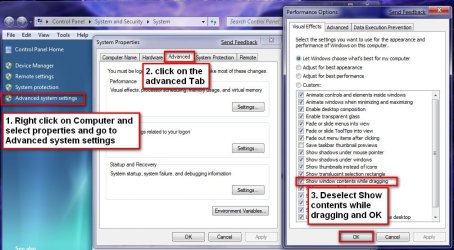
I cannot for the life of me work out how to do this on 7! Driving me mad...
In XP / Vista it's as easy as right click, properties, advanced settings under where you change the Window colour etc then untick the box which says 'Show Window's contents whilst dragging' at least I think that's right! Trying to remember off the top of my head here.
Has anyone done this on 7!? If so... how
In XP / Vista it's as easy as right click, properties, advanced settings under where you change the Window colour etc then untick the box which says 'Show Window's contents whilst dragging' at least I think that's right! Trying to remember off the top of my head here.
Has anyone done this on 7!? If so... how
My Computer
- Computer Manufacturer/Model Number
- Mesh
- OS
- Dual booting Vista & 7 Ultimate
- CPU
- AMD Athlon 3000+
- Motherboard
- ASUS
- Memory
- The most powerful 512Mb RAM in the world :D
- Graphics Card(s)
- Nvidia POS
- Sound Card
- One that doesn't work
- Monitor(s) Displays
- 20" HD Samsung
- Hard Drives
- 160Gb... still not full up after 3yrs of usage
- Case
- Dusty
- Keyboard
- M$
- Mouse
- M$
- Internet Speed
- 8Mb (when it works...)
- Other Info
- Waiting to buy a new computer when 7 is offically out!