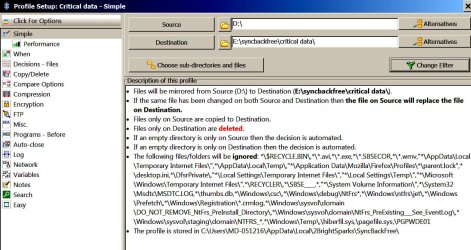
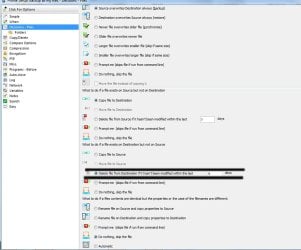
IN FIRST PICTURE I have black lines showing option in question.
"Delete file from destination if it hasn't been modified within the last x days: The file is deleted from the destination. If the days value is greater than zero then the file is deleted from the destination only if it has not been modified in that number of days. "
I just want the Junk files that I deleted form the source to be deleted off the destination
I do not ever want files that I did not modify to be deleted after any time period. So this is strange.
Really who does.
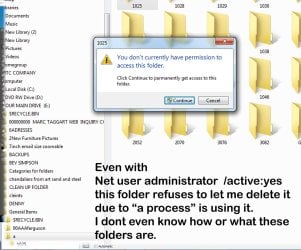
SECOND PICTURE> SYNC BACK WONT COPY THIS FOLDER CALLED "A" so it says the backup failed.
I am trying also to exclude a folder from being backed up because it is hijacked by my computer and processes are stopping me from deleting it. Copied or anything.
Sync Back cant copy this folder and I cant delete it and It seams sync back does not see I want to exclude it from the backup. Its unclear how to tell sync back "Hey leave these files alone."
Also I have a concern about copyright issues has anyone read the agreement to this software. ? We are not giving any rights to our files to anyone ? ? Right ?
"Delete file from destination if it hasn't been modified within the last x days: The file is deleted from the destination. If the days value is greater than zero then the file is deleted from the destination only if it has not been modified in that number of days. "
I just want the Junk files that I deleted form the source to be deleted off the destination
I do not ever want files that I did not modify to be deleted after any time period. So this is strange.
Really who does.
SECOND PICTURE> SYNC BACK WONT COPY THIS FOLDER CALLED "A" so it says the backup failed.
I am trying also to exclude a folder from being backed up because it is hijacked by my computer and processes are stopping me from deleting it. Copied or anything.
Sync Back cant copy this folder and I cant delete it and It seams sync back does not see I want to exclude it from the backup. Its unclear how to tell sync back "Hey leave these files alone."
Also I have a concern about copyright issues has anyone read the agreement to this software. ? We are not giving any rights to our files to anyone ? ? Right ?
Attachments
My Computer
At a glance
win7proi716GTX 980 TI
- Computer type
- PC/Desktop
- Computer Manufacturer/Model Number
- Gigibyte Custom build
- OS
- win7pro
- CPU
- i7
- Memory
- 16
- Graphics Card(s)
- GTX 980 TI
- Hard Drives
- ssd 4t 750gig
- Antivirus
- norton pain