DOS anyone?

TechnoMage2016

Retired PC Tech
Pro User
VIP
Local time
1:58 AM
Messages
717
Location
Central Florida
This is not really a Poll, but I am still curious just how many PC enthusiasts today still use DOS to help them get out of problems in Windows that Windows can't handle. ???

Back when DOS was more popular, I developed a library of DOS Utilities disks, Flash Drives, etc.
That was then and now it's 2019, but.... there are still times when the all mighty "Windows" just can't seem to hack it!

I suppose that I could spend hours, just searching the internet for utility programs to do what Windows either can't or WON'T do. But I really don't need to do that.

Like this morning.... I was doing some cleanup on my 1TB External (Backup) USB hard drive. I came upon an old Video file (movie, I think) that I really wanted to delete. Windows announced that it encountered an IO error in the file and refused to do Anything with the file. Arggg!
My External drive is formatted NTFS, (I should have known better) and I could not access it in DOS.

So I booted up my PC using my DOS Utilities Flash Drive, and I ran the little program "NTFS4DOS", which allowed me to access all my NTFS drives from a DOS prompt.
Then it was just a matter of navigating down to the errant file and delete it. Then I used the old "RD" command to remove the directory that the file had lived in. About 5 min's and the job was done.

That's actually the second time in the last month, that I've had to use DOS to fix some problem on my Windows 7 PC.

I know we've got some real Windows experts here on the forum, but I'm just wondering how many of Y'all still use DOS when it's appropriate. ???

Well, that's my 'Question of the day'. ;)

:cool:
 

My Computer

Computer type
PC/Desktop
Computer Manufacturer/Model Number
Various
OS
Win 7 Pro, SP1, x86, Win-11/Pro/64
CPU
AMD
Motherboard
Various
Memory
8GB Crucial
Graphics Card(s)
Various
Sound Card
OnBoard
Monitor(s) Displays
Acer 21.5"
Hard Drives
Crucial SSD, 500 GB
PSU
OEM
Case
SFF Slim Line Case
Cooling
OEM
Keyboard
eMachines
Mouse
Logitech Wireless
Internet Speed
varies
Antivirus
Windows Defender/Super Anti-Spyware
Browser
Firefox
diskgenius has a boot to dos function. Pretty unusual nowadays
 

My Computers

System One System Two

  • Computer type
    PC/Desktop
    OS
    7 X64
    CPU
    i5 8400
    Motherboard
    gigabyte b365m ds3h
    Memory
    2x8gb 3200mhz
    Hard Drives
    various
    PSU
    pure power 11 400w cm
    Case
    Coolermaster
    Cooling
    cryorig m9i
  • Computer type
    PC/Desktop
    OS
    7x64
    CPU
    g5400
    Motherboard
    ga b365m ds3h
    Memory
    8gb ddr4 2400
    PSU
    xfx pro 450w
Right!


When I shut down my Commodore 64 business and went full IBM Compatible, I had to learn the OS of the day, which was MS DOS 2.0. It worked great on my first hard drive, the Seagate 20 MB half height drive.


There were many DOS upgrades before I finally got and used Windows 95. I still like MS DOS 6.22 the best. I've had a few arguments about this, but I still think that "Deltree" was the most powerful command in the whole DOS language. It could WIPE a hard drive in one keystroke. :cry:
I seldom used it outside of a Batch File, because one little typing mistake could ruin my day. ;)


Thanks for your response,
TechnoMage :cool:
 

My Computer

Computer type
PC/Desktop
Computer Manufacturer/Model Number
Various
OS
Win 7 Pro, SP1, x86, Win-11/Pro/64
CPU
AMD
Motherboard
Various
Memory
8GB Crucial
Graphics Card(s)
Various
Sound Card
OnBoard
Monitor(s) Displays
Acer 21.5"
Hard Drives
Crucial SSD, 500 GB
PSU
OEM
Case
SFF Slim Line Case
Cooling
OEM
Keyboard
eMachines
Mouse
Logitech Wireless
Internet Speed
varies
Antivirus
Windows Defender/Super Anti-Spyware
Browser
Firefox
How much do you want for a set of those Cds and DVDs of your DOS stuff?
 

My Computer

Computer type
PC/Desktop
Computer Manufacturer/Model Number
Antec desktop; Acer Aspire laptops
OS
Windows 7 Professional 64-bit
CPU
Desktop i5; Acers i5 & i7
Memory
desktop 16GB; 1 Acer 8GB & 1 Acer 16GB
Hard Drives
1TB split into 2 equal partitions [OS and data] usable by RJS
Internet Speed
AT&T DSL
Browser
FF, GChrome, msIE
Other Info
Windows 7 Firewall, Emsisoft AM/AV, MSE [scan-only], SpywareBlaster, Ruiware/BillP combine

My Computers

System One System Two

  • Computer type
    PC/Desktop
    OS
    7 X64
    CPU
    i5 8400
    Motherboard
    gigabyte b365m ds3h
    Memory
    2x8gb 3200mhz
    Hard Drives
    various
    PSU
    pure power 11 400w cm
    Case
    Coolermaster
    Cooling
    cryorig m9i
  • Computer type
    PC/Desktop
    OS
    7x64
    CPU
    g5400
    Motherboard
    ga b365m ds3h
    Memory
    8gb ddr4 2400
    PSU
    xfx pro 450w
How much do you want for a set of those Cds and DVDs of your DOS stuff?


Roland,
Although I've shared things with other techs around the world, I'm not sure it would be legal to sell them.:zip:


Everything I've got is out there floating around in the clouds somewhere, and it's taken me years to get them all together in one place. For instance....just for grins and giggles, I did a web search one day for Ghost 11.5 (the last DOS version of the Ghost backup program) and there is was, as an ISO, free for the downloading. I know Symantec has abandoned it, but finding it like that was a big surprise. And yes, I still use it for all my drive/partition backups and disk cloning.

I just figured that every dedicated Computer Tech, Geek or Enthusiast would have his own collection of DOS tools, and I'm just curious how many actually do, and how many actually use them. ???

At 76, I'm definitely winding down, and hardly doing any Computer work at all anymore, except for myself and a few friends. I've cut down my own collection of PC's, Desktops and Laptops from 14 to just 8. And the phone doesn't ring like it used to. And when I need to use DOS to fix one of my PC's, I really have to dig through the old grey matter to just remember simple DOS commands.

It's been fun though. I wouldn't trade my life as a Computer Builder/Tech for anything.

As an afterthought....I was searching for "'XCOPY" just a few days ago, and I couldn't find it on any of my DOS disks, but Lo and Behold, I found it in The \Windows\System32\ directory.

Like, who would of thunk it?:confused:


:cool:
 

My Computer

Computer type
PC/Desktop
Computer Manufacturer/Model Number
Various
OS
Win 7 Pro, SP1, x86, Win-11/Pro/64
CPU
AMD
Motherboard
Various
Memory
8GB Crucial
Graphics Card(s)
Various
Sound Card
OnBoard
Monitor(s) Displays
Acer 21.5"
Hard Drives
Crucial SSD, 500 GB
PSU
OEM
Case
SFF Slim Line Case
Cooling
OEM
Keyboard
eMachines
Mouse
Logitech Wireless
Internet Speed
varies
Antivirus
Windows Defender/Super Anti-Spyware
Browser
Firefox
TechnoMage2016, if you ever decide to donate CDs and DVDs, put me on your list :) Shipping will be provided. What we can reaaly do -- trade lists of our old stuff and funny stories. Do you remember Netscape and Netsonic for Windows 3.1?
 

My Computer

Computer type
PC/Desktop
Computer Manufacturer/Model Number
Antec desktop; Acer Aspire laptops
OS
Windows 7 Professional 64-bit
CPU
Desktop i5; Acers i5 & i7
Memory
desktop 16GB; 1 Acer 8GB & 1 Acer 16GB
Hard Drives
1TB split into 2 equal partitions [OS and data] usable by RJS
Internet Speed
AT&T DSL
Browser
FF, GChrome, msIE
Other Info
Windows 7 Firewall, Emsisoft AM/AV, MSE [scan-only], SpywareBlaster, Ruiware/BillP combine
I go so far back with electronics........ well, I was still in grade school when I was building Crystal Set Radios and selling them to my friends for $5. I was in High School when my dad bought me my first Transistor Radio. Now, that was cool!


There was no actual "Internet" when I ran a 300 Baud Modem on my Commodore 64 computer, and worked several local Bulletin Boards. I didn't really like the OS on the C-64, so I de-compiled the Kernel ROM chip and re-wrote the OS and burned my own ROM chips, and sold them across the midwest at Hamfests and Computer shows. My customized OS really sped up the little C-64.


But, now that's all ancient history, sort of like MS-DOS. ;)


Netscape? OH, heck YES!!! I ran that beastie as long as I possibly could. I can't even remember how many versions I burned through. :geek:


Today, get lots of email, and I work about ten forums, including the Kia Soul forum, and I'm real happy just slogging along with Windows 7, Pro, x86, Firefox and Startpage.com.


Rolland, why don't you drop me a PM or email and we'll talk about CD's and related subjects.


TM :cool:
 

My Computer

Computer type
PC/Desktop
Computer Manufacturer/Model Number
Various
OS
Win 7 Pro, SP1, x86, Win-11/Pro/64
CPU
AMD
Motherboard
Various
Memory
8GB Crucial
Graphics Card(s)
Various
Sound Card
OnBoard
Monitor(s) Displays
Acer 21.5"
Hard Drives
Crucial SSD, 500 GB
PSU
OEM
Case
SFF Slim Line Case
Cooling
OEM
Keyboard
eMachines
Mouse
Logitech Wireless
Internet Speed
varies
Antivirus
Windows Defender/Super Anti-Spyware
Browser
Firefox

My Computers

System One System Two

  • Computer type
    PC/Desktop
    OS
    7 X64
    CPU
    i5 8400
    Motherboard
    gigabyte b365m ds3h
    Memory
    2x8gb 3200mhz
    Hard Drives
    various
    PSU
    pure power 11 400w cm
    Case
    Coolermaster
    Cooling
    cryorig m9i
  • Computer type
    PC/Desktop
    OS
    7x64
    CPU
    g5400
    Motherboard
    ga b365m ds3h
    Memory
    8gb ddr4 2400
    PSU
    xfx pro 450w
You can talk about it here. Could be interesting for people who don't know much about it.
diskgenius can make an img file
Create ".img" Image File - DiskGenius


That's really a pretty nice web site, but, when I downloaded the program for DOS 6.22 (I've lost my original disks) the program that ran was what looked like a batch file converted to an .exe file. Well that's OK, but when it ran it wanted to build the DOS disks on 3.5" Floppy Disks. I've not had a computer with a floppy disk drive in it, for a very long time. (although I still have several hundred 3.5" Floppy Disks)
Heck, I've got hundreds of 5.25" Floppy Disks, but no drive to read them. Anyone want to buy some 5.25" disks?


I just wonder if I could use my USB external Floppy Disk Drive. I've not used that in so long that I don't remember if it will come up in Explorer as drive "A:" or not. Eh?
It would really be fun, to once again have DOS 6.22 on disk.:party:


Happy Labor Day, Mates!


:cool:
 

My Computer

Computer type
PC/Desktop
Computer Manufacturer/Model Number
Various
OS
Win 7 Pro, SP1, x86, Win-11/Pro/64
CPU
AMD
Motherboard
Various
Memory
8GB Crucial
Graphics Card(s)
Various
Sound Card
OnBoard
Monitor(s) Displays
Acer 21.5"
Hard Drives
Crucial SSD, 500 GB
PSU
OEM
Case
SFF Slim Line Case
Cooling
OEM
Keyboard
eMachines
Mouse
Logitech Wireless
Internet Speed
varies
Antivirus
Windows Defender/Super Anti-Spyware
Browser
Firefox
Hi TechnoMage2016,

You can talk about it here. Could be interesting for people who don't know much about it.
I agree.:thumbsup:
 

My Computer

Computer type
Laptop
Computer Manufacturer/Model Number
Fujitsu LIFEBOOK
OS
Win 7 HP SP1 64-bit Vista HB SP2 32-bit Linux Mint 18.3
CPU
Intel(R) Pentium(R) CPU P6200 @ 2.13GHz
Motherboard
FUJITSU FJNBB06
Memory
4.00 GB
Graphics Card(s)
Intel(R) Graphics Media Accelerator HD
Sound Card
[1] Realtek High Definition Audio [2] Intel(R) Display Audio
Screen Resolution
1366 x 768 x 32 bits (4294967296 colors) @ 59 Hz
Hard Drives
TOSHIBA MK5076GSX
Antivirus
AVG FREE
You can probably use diskgenius to extract dos img files to usb stick
 

My Computers

System One System Two

  • Computer type
    PC/Desktop
    OS
    7 X64
    CPU
    i5 8400
    Motherboard
    gigabyte b365m ds3h
    Memory
    2x8gb 3200mhz
    Hard Drives
    various
    PSU
    pure power 11 400w cm
    Case
    Coolermaster
    Cooling
    cryorig m9i
  • Computer type
    PC/Desktop
    OS
    7x64
    CPU
    g5400
    Motherboard
    ga b365m ds3h
    Memory
    8gb ddr4 2400
    PSU
    xfx pro 450w
......curious just how many PC enthusiasts today still use DOS to help them get out of problems in Windows that Windows can't handle. ???
I still use DOS, but only as small batch files that I use to link between other routines such as :o home-grown GwBASIC and MouseRecorder scripts or to launch "proper" 3rd-party Windows programs. I'm still waiting for the Web to clearly explain to me how to write real Windows programs without tears, and until then I find that DOS, BASIC and MouseRecorder between them can usually get me where I want to be.
It's pretty simple stuff such as replacing the ad-man's tracking parameters from URLs with obfuscating data :devil: , creating playlists from a folder of Mp3s or from a web page such as SoundCloud, and controlling a 3rd-party command line utility called Youtube-dl.exe so it will download YouTube videos from URLs on the clipboard and text file lists without my having to type at the command line.

So for me its use isn't so much for getting out of problems that Windows can't handle, it's for doing a few things that Windows can't do, or Windows programs can't do, without too many mouse clicks and keypresses.
 

My Computer

Computer type
Laptop
Computer Manufacturer/Model Number
HP Probook
OS
Win 7 Pro 32-bit
I loved my C64. I learned to program in 6510 machine-language on that computer.


[...] MS DOS 2.0. It worked great on my first hard drive, the Seagate 20 MB half height drive.
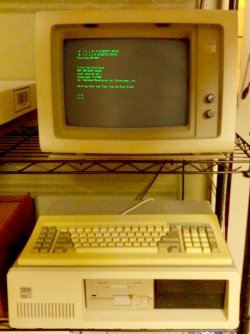
Ah yes, the venerable ST-225. I still have two of those. At one time I had about 6 or 8, but after it became clear the world had moved on to IDE drives I dumped all my MFM drives except for two -- one that after 35 years still runs on my original IBM PC (model 5150), and one as a spare in case that first one ever dies.


I downloaded the program for DOS 6.22 (I've lost my original disks) the program that ran was what looked like a batch file converted to an .exe file. Well that's OK, but when it ran it wanted to build the DOS disks on 3.5" Floppy Disks. I've not had a computer with a floppy disk drive in it, for a very long time. (although I still have several hundred 3.5" Floppy Disks)
Heck, I've got hundreds of 5.25" Floppy Disks, but no drive to read them. [...] I just wonder if I could use my USB external Floppy Disk Drive. I've not used that in so long that I don't remember if it will come up in Explorer as drive "A:" or not. Eh? It would really be fun, to once again have DOS 6.22 on disk.
My old IBM PC is fitted with 3.5" (1.44MB) and 5.25" (1.2MB) floppy drives, and I've powered it up on occasion when I needed to transfer stuff from 5.25" to 3.5" formats. Of course, the IBM PC doesn't have USB or network capabilities, but if I can get stuff into 3.5" format I can read it on more modern PCs.

I still have one testbed PC with a 3.5" internal floppy, but whenever I want to use it I always have to clean the heads because it just collects dust from so much disuse. An external USB floppy drive works better because it can be tucked away when not in use, and is portable amongst multiple PCs, as well. The BIOS in many modern computers will recognize the USB floppy during POST and hard-assign it as the A: drive, so you can even boot from it if necessary.

I still have copies of MS-DOS 6.22 if you need them. Unsure of the lifespan of floppy disks, I imaged the 4-disk set so it could subsequently be restored to fresh 3.5" floppies with the old rawrite.exe utility. (I similarly made images of my floppies for PC-DOS 2.1, 3.0, 3.1, and 3.3, and MS-DOS 3.2 and 5.0.)

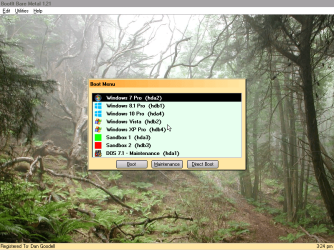
All my personal machines (3 desktops and two laptops) multiboot with a DOS partition, which I routinely boot into to run Terabyte Image-for-DOS. However, all my DOS partitions run DOS 7.1 (the unofficial release underlying Win98SE) because it supports FAT32 and larger partitions. DOS 6.22 was limited to FAT16 and partitions of no more than 2GB.
 

Attachments

  • bibm-bootmenu.png
    bibm-bootmenu.png
    267.5 KB · Views: 0
  • ibm5150.jpg
    ibm5150.jpg
    413.9 KB · Views: 0

My Computer

Computer type
PC/Desktop
Computer Manufacturer/Model Number
Dell Optiplex 7050
OS
Windows 7/8.1/10 multiboot
CPU
Intel Core i7-7700
Motherboard
Dell, Intel Q270 chipset
Memory
48GB (2x16GB Crucial DDR4-3200 + 2x8GB Hynix DDR4-2400)
Graphics Card(s)
Intel HD630 + AMD Radeon R7 450 PCIe
Monitor(s) Displays
Asus VC279 (27")
Screen Resolution
1920x1080
Hard Drives
Toshiba M.2 NVMe (256GB),
Samsung 960 Evo (500GB),
WD Red Plus 80EFBX (8TB)
When it comes to ancient 3rd-party utilities like those mentioned, I must have got tons of those. A lot of them are from Hiren's Boot Disk, which had Norton Ghost on it, though it was marked as "optional" and didn't have the required file to run it - what happened was that when I tried to launch it, it told me the name of the file I needed, I typed that into a search engine, downloaded it, put it into the right folder, and have been using it ever since. I guess not having it in the original boot disk was Hiren's way of staying legal. My original purchased copy of Ghost ran off a floppy and was great except that it couldn't see NTFS, though the manual said it could. So I was glad to find the slightly more up-to-date version did what the one I bought was supposed to do.

Other utilities on there I've found very useful are Odin (full disk backup program that I used till I found Ghost - much more reliable and complete that that Windows Backup & Restore abomination, but Ghost is better), Unstoppable Copier (whenever I copy a huge load of files using Windows drag & drop, it keeps stopping with stupid questions, when I just want the job to be completed when I get back to the computer in a few hours' time), File Recovery Tool (which has recovered files that Windows tells me can't be recovered), Disk Genius (partition manager), Battery Status, FileTypes Manager. Wouldn't want to be without them.
 

My Computer

Computer type
Laptop
Computer Manufacturer/Model Number
HP Probook
OS
Win 7 Pro 32-bit
Ghost 3.0, for instance, could indeed NOT see an NTFS drive. * Symantec finally upgraded the old DOS Ghost program to Ghost 11.5 and it WILL see and backup NTFS drives.

I've been using it for years, to back up everything from Win-98 to Win-10.


I did a web search for "Ghost 11.5" one day, just for kicks, and I found it and downloaded the ISO for Ghost on a boot disk. Neat! It boots up a PC right to the Ghost main screen.
I prefer my own Ghost boot disk, which boots up to a DOS menu, so I can run Ghost or do some other things.


* I used to run Windows XP on a FAT-32 formatted HD, in spite of the fact that many self proclaimed Experts said I couldn't do that. That allowed me to back up my HD with Ghost 3.0 (DOS Version).


Today, I still use Ghost 11.5, booted up from a CD or Flash Drive (or even an SD Memory Card) to back up my Windows 7 SSD, at least once a week. I also CLONE my SSD to a 1TB spinner.


With Ghost 11.5 still floating around out there in the Cloud, everyone who could use it, can find it.


Thanks for all the interesting responses.


:cool:
 

My Computer

Computer type
PC/Desktop
Computer Manufacturer/Model Number
Various
OS
Win 7 Pro, SP1, x86, Win-11/Pro/64
CPU
AMD
Motherboard
Various
Memory
8GB Crucial
Graphics Card(s)
Various
Sound Card
OnBoard
Monitor(s) Displays
Acer 21.5"
Hard Drives
Crucial SSD, 500 GB
PSU
OEM
Case
SFF Slim Line Case
Cooling
OEM
Keyboard
eMachines
Mouse
Logitech Wireless
Internet Speed
varies
Antivirus
Windows Defender/Super Anti-Spyware
Browser
Firefox
Wow - I'd love to have Ghost on its own on a boot drive. Must be quicker to use than my method where I have to launch the entire Hiren's disk and then choose Ghost from the menu. I did a search for the Ghost .iso file but my virus checkers didn't like the look of the downloads, which weren't actually the .iso itself but typically a tiny zip file within a zip file that (presumably) was supposed to download the actual goodies when run. I chickened out. I know my system partition is pretty much immune from viruses because of my use of full system backup & restore, but the data partition wouldn't be immune from ransomware etc.

Interesting that you've got it working with Windows 10. Does that mean your bootable Ghost image is UEFI compliant? I gather Win10 computers mostly have UEFI (in fact I think I read that Microsoft won't license Win10 to hardware manufacturers unless they include it). In any case I've noticed that my wife's Win10 computer won't boot with Hiren's, no doubt because Hiren's ain't UEFI-compliant. For her computer I've still to try a UEFI-compliant boot disk that (if I remember right) SIF2 kindly handed out a while ago which has AOMEI Backupper on it, and I know that works a treat on my own computers.
 

My Computer

Computer type
Laptop
Computer Manufacturer/Model Number
HP Probook
OS
Win 7 Pro 32-bit
If you can just get your hands on a copy of "Ghost 11.5" (.exe) then you can make a DOS boot disk and just put the Ghost file on it. I did something like that, to create what is now my Ghost boot disk.
I started with a DOS boot floppy disk, formatted under Windows ME. Then went to a Flash Drive, then to a CD. Now I have it on a CD, Flash Drive, and even an SD Memory Card.


I've recently found that I can take a small CD, create an ISO of it, and attach that ISO file to an email and send it wherever. ;) Of course, that depends on the compatibility of the email program being used.


:cool:
 

My Computer

Computer type
PC/Desktop
Computer Manufacturer/Model Number
Various
OS
Win 7 Pro, SP1, x86, Win-11/Pro/64
CPU
AMD
Motherboard
Various
Memory
8GB Crucial
Graphics Card(s)
Various
Sound Card
OnBoard
Monitor(s) Displays
Acer 21.5"
Hard Drives
Crucial SSD, 500 GB
PSU
OEM
Case
SFF Slim Line Case
Cooling
OEM
Keyboard
eMachines
Mouse
Logitech Wireless
Internet Speed
varies
Antivirus
Windows Defender/Super Anti-Spyware
Browser
Firefox
Way back in the 90's, I was doing a computer course at community college. The ancient pcs used to boot to DOS and you had to type 'win' to start Windows. Following my class was a women only group, and one week I decided to prank them.


I whizzed round all the machines and made the c:\ prompt show the message 'enter password - ask a man if necessary'. There was no password, typing 'win' still worked. However, nobody tried that - and a tech was called out. He quickly diagnosed the prank, but the humiliation of the women's group needing a male to fix things !


Next week : 'YOU !!! OFFICE !!! NOW !!!'


but ...
 

My Computer

Computer type
PC/Desktop
Computer Manufacturer/Model Number
self build
OS
Windows 7 Pro x64 sp1
CPU
i7 4770K
Motherboard
MSI B85M-E45
Memory
8GB Corsair Vengeance 1600MHz
Graphics Card(s)
onboard
Monitor(s) Displays
LG 27MP35
Screen Resolution
1920-1080
Hard Drives
Seagate 2TB
PSU
Cooler Master GX 750
Case
Antec 300
Cooling
Seidon 120V
Internet Speed
60/18
Antivirus
MSE
Browser
Firefox
Going 'way back ' to the early 90's, I taught a class in DOS for the County Community Continuing Education Dept. for three semesters. Old PC's with dual 5.25" floppy drives and NO HD's. It was a real Hoot! I enjoyed it and so did my students who were all adults, from 36 to 86. I had to give certain keys nic-names so the students could remember them. The Enter Key was the "DO IT!" key. ;) So, after typing in a command at the DOS Prompt, you must press the "DO IT" key. Eh?

I also taught one class in DOS to a group of County Employees. They loved it! We used a Computer Lab in a High School, in the afternoon when school was out for the day.

Well, I have a problem..... I cannot send an email using GMail, and attach an executable file like an ISO or ZIP file. I hit send and the email just goes off into a cloud somewhere, never to be seen again! Grrr!
Is there a forbidden file list at GMail?

But, I've found a great Work Around, to send a friend my DOS Utilities Disk in ISO form.....
I installed "Team Viewer 14" FREE, and I can send all those files, Peer to Peer, in just a few seconds.

A few years ago, I tried using Drop Box to share files, but the Guru's at Drop Box kept deleting them. So I put Drop Box on my Sh** List. It's worthless, if I can't send what I want. Eh?

So, if someone really wanted to work with me, I can share my DOS disks with them via Team Viewer.

I've got a thunder storm coming in here. Catch y'all later,
TechnoMage :cool:
 
Last edited:

My Computer

Computer type
PC/Desktop
Computer Manufacturer/Model Number
Various
OS
Win 7 Pro, SP1, x86, Win-11/Pro/64
CPU
AMD
Motherboard
Various
Memory
8GB Crucial
Graphics Card(s)
Various
Sound Card
OnBoard
Monitor(s) Displays
Acer 21.5"
Hard Drives
Crucial SSD, 500 GB
PSU
OEM
Case
SFF Slim Line Case
Cooling
OEM
Keyboard
eMachines
Mouse
Logitech Wireless
Internet Speed
varies
Antivirus
Windows Defender/Super Anti-Spyware
Browser
Firefox
Back
Top