DOS anyone?

Wow - I'd love to have Ghost on its own on a boot drive. Must be quicker to use than my method where I have to launch the entire Hiren's disk and then choose Ghost from the menu. I did a search for the Ghost .iso file but my virus checkers didn't like the look of the downloads, which weren't actually the .iso itself but typically a tiny zip file within a zip file that (presumably) was supposed to download the actual goodies when run. I chickened out. I know my system partition is pretty much immune from viruses because of my use of full system backup & restore, but the data partition wouldn't be immune from ransomware etc.
Interesting that you've got it working with Windows 10. Does that mean your bootable Ghost image is UEFI compliant? I gather Win10 computers mostly have UEFI (in fact I think I read that Microsoft won't license Win10 to hardware manufacturers unless they include it). In any case I've noticed that my wife's Win10 computer won't boot with Hiren's, no doubt because Hiren's ain't UEFI-compliant. For her computer I've still to try a UEFI-compliant boot disk that (if I remember right) SIF2 kindly handed out a while ago which has AOMEI Backupper on it, and I know that works a treat on my own computers.


I know I'm not the brightest bulb on the tree anymore, but I sort of remember saying something about downloading Ghost 11.5 from the web, and burning it to a CD. (the truth is out there!)

I do understand some folks reluctance to do that, but I did it again today. It worked fine. I scanned the download file as soon as I got it, and it was clean of any malware.
When it booted my PC, I noticed that the original disk it was set up on had been formatted under Windows 98. Wow! That's some history!
My own Ghost disk was formatted with Windows ME, and I thought was old. Ha! Ha!

The only glitch with getting Ghost on a CD, and running it from a CD, is that you can't set up 'Options' because you can't save that file to the CD. It was originally written to be set up on a Floppy Disk. A Flash Drive works good too, for the original setup. Then once all the options are set, it can be burned to a CD.
I know it sounds like a technicality, but it can make a big difference on whether the programs works correctly or not.
My own version of Ghost was set up on a Flash Drive, with all the necessary options set and recorded, before I ever burned it to a CD.
So, if I were to give a copy of that CD to someone, I know it would operate properly. :)


:cool:
 

My Computer

Computer type
PC/Desktop
Computer Manufacturer/Model Number
Various
OS
Win 7 Pro, SP1, x86, Win-11/Pro/64
CPU
AMD
Motherboard
Various
Memory
8GB Crucial
Graphics Card(s)
Various
Sound Card
OnBoard
Monitor(s) Displays
Acer 21.5"
Hard Drives
Crucial SSD, 500 GB
PSU
OEM
Case
SFF Slim Line Case
Cooling
OEM
Keyboard
eMachines
Mouse
Logitech Wireless
Internet Speed
varies
Antivirus
Windows Defender/Super Anti-Spyware
Browser
Firefox
Way back in the 90's, I was doing a computer course at community college. The ancient pcs used to boot to DOS and you had to type 'win' to start Windows. Following my class was a women only group, and one week I decided to prank them.
I whizzed round all the machines and made the c:\ prompt show the message 'enter password - ask a man if necessary'. There was no password, typing 'win' still worked. However, nobody tried that - and a tech was called out. He quickly diagnosed the prank, but the humiliation of the women's group needing a male to fix things !
Next week : 'YOU !!! OFFICE !!! NOW !!!'
but ...


Sir,

I see you're in the UK? Have you ever tried file transfers from there to (or from) the Colonies (USA)?
(Via the internet)

I've done file transfers using "Team Viewer" all over the US, with great success, but never out of the country. I can't help but wonder if it would work. ??? Any ideas?

:cool:
 

My Computer

Computer type
PC/Desktop
Computer Manufacturer/Model Number
Various
OS
Win 7 Pro, SP1, x86, Win-11/Pro/64
CPU
AMD
Motherboard
Various
Memory
8GB Crucial
Graphics Card(s)
Various
Sound Card
OnBoard
Monitor(s) Displays
Acer 21.5"
Hard Drives
Crucial SSD, 500 GB
PSU
OEM
Case
SFF Slim Line Case
Cooling
OEM
Keyboard
eMachines
Mouse
Logitech Wireless
Internet Speed
varies
Antivirus
Windows Defender/Super Anti-Spyware
Browser
Firefox
I reformatted an XP computer as FAT32 a few years ago and it does indeed work very well. I didn't know it's not supposed to. If I remember right I used Partition Magic to do the reformatting - at least whatever it was managed to do the job without wiping the drive. Sadly I wasn't able to repeat the trick on a second PC a year or so later, never found out why, but the other PC is living proof that it was possible.

Re the problem with Gmail refusing to carry .zips and .isos, whenever I've had that kind of problem I've just changed the file extension to something like .rtf and so far it's worked. It'd depend on how carefully the provider checked the contents of course. They may have wised up since I last used that technique, it's been a year or two and I can't remember the providers, but then again, it might still work.

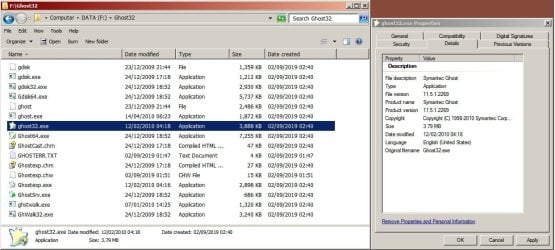
I tried looking again for Ghost but didn't find anything - possibly the DuckDuckGo search engine I use doesn't give the right hits. But all is not lost - I noticed that the Ghost file I downloaded from somewhere a few years ago, which works fine when dragged and dropped into the right folder of Hiren's boot disk, is a compressed .7z file, so I thought I'd try unpacking it to see if it contains the required executable. [See image below for what I got]. As you'll see, there's Ghostexp.exe (Ghost Explorer) and ghost32.exe, which is Ghost itself. What all the other files are, I've no idea, except I guess ghost64.exe must be the 64-bit version. Thing is, I tried putting just ghost32.exe into a folder on its own, and that seems to work when double-clicked from Windows 7 Pro 32-bit. I didn't actually try to save an image because I'm too short of drive space, but I took it to the brink and it all looked like it's supposed to.

So, is that the entire Ghost in that one file?

Incidentally, today I noticed that although Hiren has long since stopped updating his wonderful boot disk, his fans have apparently created an upgrade - supposed to be UEFI compliant and it has AOMEI Backupper which I've used before and liked.
Hiren's BootCD PE
 

Attachments

  • GhostFiles.jpg
    GhostFiles.jpg
    104.3 KB · Views: 1

My Computer

Computer type
Laptop
Computer Manufacturer/Model Number
HP Probook
OS
Win 7 Pro 32-bit
What can I say? I don't agree with your choice of Internet Search Engine. :( Why?

My browser is "Firefox" and my Search Engine is www.startpage.com . I use startpage because they are 100% SAFE, even though they do use the Google search engine.

I downloaded the Ghost 11.5 boot disk ISO. Then I burned the ISO to a CD using "ImgBurn" and booted up my PC with it. On the DOS boot screen, I noticed that the original disk was formatted with Win-98. If it were a car, it would be an Antique! :D

Well, it worked, but I was not able to set the options, like I would if it were on a floppy disk or Flash Drive.

I may burn that ISO to a Flash Drive, just so I could do some editing. The proper program file is "Ghost.exe".

Moving along that same track....last night I connected to a friends PC in Nevada, using Team Viewer and uploaded my DOS Utilities Disk (ISO) and later an ISO of my own Ghost Boot CD. He said everything is working GREAT. That's sure a lot cheaper than burning DVD's, putting them in a disk mailer and mailing them off to distant parts. But the use of Team Viewer is dependent on the person on the receiving end having the smarts to know how to download and install Team Viewer and then email me the ID# and Password. I offered to tune up one fellows PC using Team Viewer and his response was, "I can't do that." Duh!

Can you say, "Computer Illiterate!" ? or "You can't fix stupid"
:cool:
 
Last edited:

My Computer

Computer type
PC/Desktop
Computer Manufacturer/Model Number
Various
OS
Win 7 Pro, SP1, x86, Win-11/Pro/64
CPU
AMD
Motherboard
Various
Memory
8GB Crucial
Graphics Card(s)
Various
Sound Card
OnBoard
Monitor(s) Displays
Acer 21.5"
Hard Drives
Crucial SSD, 500 GB
PSU
OEM
Case
SFF Slim Line Case
Cooling
OEM
Keyboard
eMachines
Mouse
Logitech Wireless
Internet Speed
varies
Antivirus
Windows Defender/Super Anti-Spyware
Browser
Firefox
PR#0 is about all I remember from my Apple II days. heh.
 

My Computer

Computer type
PC/Desktop
Computer Manufacturer/Model Number
Custom Build
OS
Win 7 Home Prem x64 SP1
CPU
AMD FX6350 Vishera 3.9Ghz
Motherboard
ASUS M5A97 R2.0
Memory
16Gb Ballistix Sport 2x8Gb DDR3-1600
Graphics Card(s)
nVidia GEForce 1050Ti 4mg
Sound Card
on board Realtek HD w/Logitech 2.1 speakers
Monitor(s) Displays
AOC 2243w
Screen Resolution
1920x1080
Hard Drives
500g Samsung Evo 850 OS SSD,
250g Samsung Evo 850 SSD for data,
1Tb Toshiba SSD for b/u's.
PSU
Corsair CX750 modular
Case
MasterCooler Elite 330
Cooling
2x case, Coolermaster Viper CPU stack
Keyboard
ms wireless desktop 2000
Mouse
ms wireless desktop 2000
Internet Speed
Cable:Average about 250Mbps down, 25Mbps Up +/-
Antivirus
MSE, Cclnr, MwBytes, SA-S
Browser
IE11
Ah, that's much better. :-) Startpage.com did indeed give me some better hits and I was able to find what looks like the correct .iso file on Archive.org, and another one as a .rar file that a place called AvoidErrors.com pointed to. Everything looks clean as a whistle according to VirusTotal.com. The first download I'll probably process into a bootable flash drive with Rufus. The second download isn't a .iso, but there's a method given there for making a bootable drive with it, using a utility called FormatUSB, which I've also downloaded and virus checked. So that's got me at least 2 methods that are likely to get me to where I want to go. Now it's just a matter of getting my idle self to the shop and buying some flash drives, and I can try these things out. Thanks for the heads-up. :-)

I can see why some folks would be nervous about doing the Team Viewer thing. I'm sure it's pretty easy, but if they don't already have a complete system backup then installing anything new is a step into the unknown and potentially harmful. Me, I've got a OneDrive account that seems to allow me to share files without anybody having to install anything.

When I first bought Norton Ghost it changed my life. Being able to wipe away software problems at a stroke means I can try things out that would be way too risky without a full backup. The only time version 11.5 has ever let me down was when I used it to back up and restore my entire drive. It appeared to create the backup fine, but on restoring it stopped, saying there was insufficient contiguous drive space to load the C: partition, which made no sense. Recovering from the mess it left wasn't pleasant, and if I hadn't previously saved a Windows 7 complete backup I don't know how I'd have recovered. But Ghost has always been perfectly reliable for partitions.
 

My Computer

Computer type
Laptop
Computer Manufacturer/Model Number
HP Probook
OS
Win 7 Pro 32-bit
At 76, and after a DVT and a Stroke, my mind is still a little fuzzy, and remembering what I did a decade or more ago, isn't easy. And, DOS isn't something that I work with on a frequent basis.


i tried to format a Flash Drive and make it bootable, on my Win-7 PC, and Windows told me that it does not support that function (anymore). Now I remember! Windows ME was the last version of Windows that would do that. Win-7 only supports a Quick Format, on a Flash Drive. Arggg!


So today, I may try to find my old Win-ME install disk and load that OS onto a spare HD. Wish me luck! :sarc:


Cheers Mates!
:cool:
 

My Computer

Computer type
PC/Desktop
Computer Manufacturer/Model Number
Various
OS
Win 7 Pro, SP1, x86, Win-11/Pro/64
CPU
AMD
Motherboard
Various
Memory
8GB Crucial
Graphics Card(s)
Various
Sound Card
OnBoard
Monitor(s) Displays
Acer 21.5"
Hard Drives
Crucial SSD, 500 GB
PSU
OEM
Case
SFF Slim Line Case
Cooling
OEM
Keyboard
eMachines
Mouse
Logitech Wireless
Internet Speed
varies
Antivirus
Windows Defender/Super Anti-Spyware
Browser
Firefox
Good luck - I find taking meticulous notes is pretty helpful, it's often years before I have to do a thing again, and even with the notes it can take a while before the penny drops. I'm hoping to make a couple of bootable flash drives myself, from these new .iso files I've got my greedy paws on at last. I've only ever used Rufus for such work, but it's always done the job before, and I've got some notes, though they couldn't rightly be called extensive. It's hard to believe now that I once managed to add the Ghost file to Hiren's, re-create the .iso from the results and make a bootable flash drive from that.

Coincidentally, the author of Rufus had some vitreolic words to say about Microsoft's so-called Secure Boot, which he says should really be called Bootloader Signature Enforcement, and he also informs me that there's a bit of a trick to turning it off on some Acer computers (the option is greyed out unless the user has created a password for logging into the BIOS).
FAQ . pbatard/rufus Wiki . GitHub
The coincidence is, my wife's computer is one of those Acer abominations and we've never yet been able to get it to boot on anything external. According to my notes we tried the password trick last year but it still wouldn't work, probably because our only boot disks at the time weren't UEFI compliant, but my notes also suggest that Secure Boot still wouldn't turn off, in which case we're stuffed anyway, because I very much doubt that any of our bootable drives will turn out to be signed.

Hmm......is this signing business a thing that's done by the software that creates the bootable media (Windows, Rufus or whatever), or is it already in the .iso?

Another question: when you've got Windows ME to format a drive as bootable, what do you do next? I mean I don't suppose you can just copy an executable file onto the drive and expect it to run that when you boot up onto it, I suppose you have to do more than that - so how would you get there if all you had was an executable and a blank flash drive or CD?
 

My Computer

Computer type
Laptop
Computer Manufacturer/Model Number
HP Probook
OS
Win 7 Pro 32-bit
After 76 years, a stroke and whathaveyou, I'm not the brightest bulb on the tree anymore, if I ever were.
I may have been once, when I re-wrote the OS for the Commodore 64 computer, but that was a long time ago and I have no idea exactly how I did that now. I sure couldn't do that today. :(

But, back to my Flash Drive.... While I was still running Windows ME on my personal computer, I did use it to Format a small (64mb) flash drive. An option was to make the device bootable, which I did. Windows ME provided the necessary files to make the FD bootable. That's a function NO Longer Supported by Windows. :mad:

Then it was a pretty simple task to copy Ghost.exe, a DOS menu and some other necessary files to the FD.
It would boot up a PC (and still does today) and immediately present me with a full color DOS menu.
I had to load 'Ansi.sys' and a few other files to make that work.

And from that DOS Menu, I could select to run Ghost in several different manners, and also run other DOS programs like Scandisk, Format, NTFS4DOS, and a Password Removal tool. I could also run the Low Level Formatter.

Now, I wanted to copy that old Flash Drive before it dies of old age. No program that I tried would make an ISO of it, or just copy it like I'd copy a CD or DVD. Grrr! Every program I tried, said it could not read the FD.

So I turned back to DOS.
I have a program from HP that was designed to make a bootable Flash Drive. It did however ask me for the location of the three DOS files needed to make a disk bootable. Well, I did have those three files in a folder. So with the HP program and the three DOS files, I was once again able to make a DOS bootable Flash drive.

Then on my PC, I opened both the old Flash drive that I wanted to copy, and the new blank (bootable) FD at the same time on my Desktop. It was just Drag and Drop to copy the DOS files from the old FD to the new FD. The only difference between the two FD's is that the old one was only a few MB's, while the new one is 32 GB. So I can store a lot more DOS programs on the new FD than I could on the old one.

All this may sound relatively simple, but I can't tell you how many hours I've spent doing this. I was afraid that I'd have to go through Hypnotic Regression to just remember the "HOW" of it.:sarc:
No, I don't have notes. This post is as close as I've come to that.

Cheers Mates!
TechnoMage :cool:
 

My Computer

Computer type
PC/Desktop
Computer Manufacturer/Model Number
Various
OS
Win 7 Pro, SP1, x86, Win-11/Pro/64
CPU
AMD
Motherboard
Various
Memory
8GB Crucial
Graphics Card(s)
Various
Sound Card
OnBoard
Monitor(s) Displays
Acer 21.5"
Hard Drives
Crucial SSD, 500 GB
PSU
OEM
Case
SFF Slim Line Case
Cooling
OEM
Keyboard
eMachines
Mouse
Logitech Wireless
Internet Speed
varies
Antivirus
Windows Defender/Super Anti-Spyware
Browser
Firefox
USB external Floppy Disk Drive...I have one also, hope to recreate a dos 6.22 just for old times sake :)
 

My Computer

Computer type
PC/Desktop
Computer Manufacturer/Model Number
Antec desktop; Acer Aspire laptops
OS
Windows 7 Professional 64-bit
CPU
Desktop i5; Acers i5 & i7
Memory
desktop 16GB; 1 Acer 8GB & 1 Acer 16GB
Hard Drives
1TB split into 2 equal partitions [OS and data] usable by RJS
Internet Speed
AT&T DSL
Browser
FF, GChrome, msIE
Other Info
Windows 7 Firewall, Emsisoft AM/AV, MSE [scan-only], SpywareBlaster, Ruiware/BillP combine
3.5" (1.44MB) and 5.25" (1.2MB) floppy drives...if anyone ever finds a usb connect version for 3.5 and 5.25, email or pm or post -- I want to buy a working device.
 

My Computer

Computer type
PC/Desktop
Computer Manufacturer/Model Number
Antec desktop; Acer Aspire laptops
OS
Windows 7 Professional 64-bit
CPU
Desktop i5; Acers i5 & i7
Memory
desktop 16GB; 1 Acer 8GB & 1 Acer 16GB
Hard Drives
1TB split into 2 equal partitions [OS and data] usable by RJS
Internet Speed
AT&T DSL
Browser
FF, GChrome, msIE
Other Info
Windows 7 Firewall, Emsisoft AM/AV, MSE [scan-only], SpywareBlaster, Ruiware/BillP combine
There was one major problem with the old 'Floppy Disk Drives'. They would get worn, or just dirty, and go out of alignment, and then a drive would only read the disks that it wrote.

I was dealing with that on the C-1541 5.25" disk drives on the Commodore 64 system. I learned how to re-align the read head on the C-1541, and then translated that talent to the IBM 5.25" floppy disk drives, both full height and then 1/2 height. Once I figured out how to make and install a "Quiet Stop" for the C-1541, drive mis-alignment became a thing of the past, at least for me and my customers. Those were the days!

I made a friend at Verbatim, and got my hands on an Alignment disk & program from them. I re-aligned dozens of IBM floppy disk drives, back in the day.

What most people don't realize is that the CD drives, that we depend on so much today, and just take for granted, can fail because of the same things. In addition to just getting out of alignment, they also have the problem of the Laser Diode in the Read/Write head, drifting off frequency. I have a DVD drive here that was made in May of this year, that I bought in June, and it's already exhibiting that failure. Also, it's a very reputable brand, so it goes back to the old saying, "Stuff Happens". Eh?

I have two of the 3.5" external drives, that plug in to a USB port. But, neither of them is reliable. I think it's time to open them up and clean and oil them. Or, just buy a new one. Eh?


I still have just ONE PC left, that has a floppy disk port on the motherboard. I don't use it much though.


I've pretty well given up the old Floppy Disk, for the NON-Mechanical USB Flash Drive. And I love how the cost for Flash Drives has come down to realistic prices. A while back, I was in a Office Depot store, and I picked up several SanDisk Cruiser Blade, 32 GB FD's, for just $5 each.


:cool:
 

My Computer

Computer type
PC/Desktop
Computer Manufacturer/Model Number
Various
OS
Win 7 Pro, SP1, x86, Win-11/Pro/64
CPU
AMD
Motherboard
Various
Memory
8GB Crucial
Graphics Card(s)
Various
Sound Card
OnBoard
Monitor(s) Displays
Acer 21.5"
Hard Drives
Crucial SSD, 500 GB
PSU
OEM
Case
SFF Slim Line Case
Cooling
OEM
Keyboard
eMachines
Mouse
Logitech Wireless
Internet Speed
varies
Antivirus
Windows Defender/Super Anti-Spyware
Browser
Firefox
I done did it!

I done it, or I did it, or maybe I just Done Did It!


I formatted a SCMC (SD memory card, like work in my camera) using a little program from HP, called the "HP USB Format program". It formats the USB device, then adds the three DOS files required to make it boot up a PC to the DOS prompt. As it runs, it asks me where to find the three DOS files, which I keep in a separate folder on my HD.

So once I had my little SD card formatted, I copied all the files from my Ghost Boot CD to the SD card, and now I have a tiny little SD card that will boot up my PC, and present me with the Ghost menu, where I can run my Ghost backup program or several other DOS programs.

DOS is still alive and well, and still as useful as ever, if we can just remember how to use it. ;)

Cheers Mates!
:cool:
 
Last edited:

My Computer

Computer type
PC/Desktop
Computer Manufacturer/Model Number
Various
OS
Win 7 Pro, SP1, x86, Win-11/Pro/64
CPU
AMD
Motherboard
Various
Memory
8GB Crucial
Graphics Card(s)
Various
Sound Card
OnBoard
Monitor(s) Displays
Acer 21.5"
Hard Drives
Crucial SSD, 500 GB
PSU
OEM
Case
SFF Slim Line Case
Cooling
OEM
Keyboard
eMachines
Mouse
Logitech Wireless
Internet Speed
varies
Antivirus
Windows Defender/Super Anti-Spyware
Browser
Firefox
Back
Top