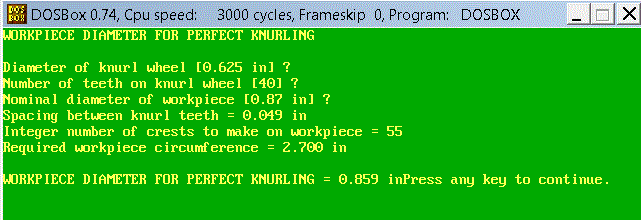
Ah, so you're running this in DOSBox ... I don't know enough how DOSBox processes commands under the hood, but I think DOSBox may be a limiting factor.
Your symptoms look a lot like what happens running batch files from a Windows Command Prompt window, where launching an exe from the batch file spawns another thread while the first thread continues processing the rest of the batch commands. The Windows command processor has a special batch command, "start /w", for that situation where you want the batch file to pause processing until the exe finishes and before picking up again with the next step. True DOS, of course, can only do one thing at a time, so it doesn't need "start". But when using a multi-tasking environment like Windows the "start" command may be necessary to pause the batch processing until the exe has finished.
I don't know where DOSBox falls between those two extremes (DOSBox is it's own "operating system" environment, neither DOS nor Windows), but it appears DOSBox does not support the "start" command. If it spawns a second thread but doesn't recognize a "start" command, you may be out of luck. That may just be a limitation of DOSBox.
What are those "?" in the knurling display? Are those user input prompts where the program pauses for you to input something, then displays the next line? And I guess you're calling the batch file from a shortcut that launches DOSBox, runs the knurling program, but finishes processing after the third input field and closes the DOSBox window before you have a chance to read the results?
It's too bad that when the program was compiled the programmer didn't simply end the program by displaying a couple gratuitous new-lines, but as is, probably the best you can do is suppress the "press any key" prompt in your batch file's pause command, ala "pause > nul". That should still pause the screen at the end of the knurling display and wait for you to press any key to close the window, but just without the text prompt.